Can you rearrange item order in startup

glennc

New member
Power User
VIP
Local time
5:16 AM
Messages
1,024
Hello,
I don't know the tech term for it, but basically is there a way to rearrange what programs start up and their order and give them delays. For instance I would like the AV/Malware to start before any actual communication from any other starting programs to the net, for instance.
Thanks for any help, you guy probably have a tutorial on it, but I don't know how to search for them yet.
glennc
 

My Computer My Computer

At a glance

Windows 7 UltimateAMD Phenom-II X4 9658192 MB DDR2-SDRAMATI Radeon HD 4200
Computer type
PC/Desktop
Computer Manufacturer/Model Number
Self-Built
OS
Windows 7 Ultimate
CPU
AMD Phenom-II X4 965
Motherboard
Gigabyte GA-MA785GM-US2H
Memory
8192 MB DDR2-SDRAM
Graphics Card(s)
ATI Radeon HD 4200
Sound Card
ATI Radeon HD 4200 High Definition Audo
Monitor(s) Displays
LG Electronics W1943
Screen Resolution
1360 X 768
Hard Drives
C: 500 GB Caviar Black SATA
E: 500 GB Caviar Black SATA
PSU
Ultra LSP 750
Case
Ultra XBlaster
Cooling
2 Fans, CPU Fan, PS Fan
Keyboard
Acer
Mouse
Logitech
Internet Speed
6 MB

My Computer My Computer

At a glance

Windows 10, Home Clean InstallIntel Core2 processsor Q8200(2.33Ghz 1333FSB)...6 gbATI Radeon 256MB HD3650
Computer type
PC/Desktop
Computer Manufacturer/Model Number
Dell XPS 420
OS
Windows 10, Home Clean Install
CPU
Intel Core2 processsor Q8200(2.33Ghz 1333FSB) Quad Core Tech
Motherboard
Dell
Memory
6 gb
Graphics Card(s)
ATI Radeon 256MB HD3650
Sound Card
Intergrated 7.1 Channel Audio
Monitor(s) Displays
Dell SP2009W 20"
Hard Drives
640 GB Serial ATA Hard drive
Cooling
Fan
Keyboard
Dell USB Keyboard
Mouse
Dell Premium Optical USB
Internet Speed
DSL 2.85
Howdy richc46,
Thanks for coming to the rescue, AGAIN. I had a feeling you had something on it.
Thank you again for your time and sharing.
Take care
glennc
 

My Computer My Computer

At a glance

Windows 7 UltimateAMD Phenom-II X4 9658192 MB DDR2-SDRAMATI Radeon HD 4200
Computer type
PC/Desktop
Computer Manufacturer/Model Number
Self-Built
OS
Windows 7 Ultimate
CPU
AMD Phenom-II X4 965
Motherboard
Gigabyte GA-MA785GM-US2H
Memory
8192 MB DDR2-SDRAM
Graphics Card(s)
ATI Radeon HD 4200
Sound Card
ATI Radeon HD 4200 High Definition Audo
Monitor(s) Displays
LG Electronics W1943
Screen Resolution
1360 X 768
Hard Drives
C: 500 GB Caviar Black SATA
E: 500 GB Caviar Black SATA
PSU
Ultra LSP 750
Case
Ultra XBlaster
Cooling
2 Fans, CPU Fan, PS Fan
Keyboard
Acer
Mouse
Logitech
Internet Speed
6 MB
This may help: Download Start-Q. You can also schedule delayed startups (e.g. with WinPatrol) and arrange the timing to your desire.
 

My Computer My Computer

At a glance

Vista, Windows7, Mint Mate, Zorin, Windows 8from 1.6GHz Duo to i7
Computer Manufacturer/Model Number
HP, Dell, Gateway, Toshiba - 4 laptops and 2 desktops
OS
Vista, Windows7, Mint Mate, Zorin, Windows 8
CPU
from 1.6GHz Duo to i7
Monitor(s) Displays
2x HP w2207
Hard Drives
5x HDD, 7x SSD, 12x Externals
Keyboard
with trackball - no mices
Mouse
Trackball mice
Internet Speed
DSL 6000
The startup tutorial says nothing about delaying program startups or timing.

I used to have such a program and used it for a while and decided it was of no particular benefit, although it did as advertised.

Here is one such, Google for more:

r2 Studios - Software
 

My Computer My Computer

At a glance

Windows 7 Home Premium SP1, 64-bitIntel Skylake i5-6600K, not overclocked8 GB HyperX DDR4-2666 (2 x 4 GB)none; graphics are integrated on CPU
Computer type
PC/Desktop
Computer Manufacturer/Model Number
Ignatz Special; 4 speed manual gearbox; factory air conditioning; one of one
OS
Windows 7 Home Premium SP1, 64-bit
CPU
Intel Skylake i5-6600K, not overclocked
Motherboard
AsRock Z170M Extreme 4, micro ATX
Memory
8 GB HyperX DDR4-2666 (2 x 4 GB)
Graphics Card(s)
none; graphics are integrated on CPU
Sound Card
onboard: Realtek ALC1150; external: USB Behringer UF0-202
Monitor(s) Displays
Dell S2340M 23 inch IPS
Screen Resolution
1600 x 900
Hard Drives
System: Crucial MX100 series SSD, 128 GB;
Data: Samsung Spinpoint 103SJ, 1 TB;
Backup: WD Caviar Green WD30EZRX-00D8PB0, 3 TB
PSU
Rosewill SilentNight 500 watt fanless, semi-modular
Case
Antec Solo II
Cooling
Noctua NH-U12S; Noctua F12 intake, Noctua S12A exhaust
Keyboard
Microsoft 200 6JH-00001 USB
Mouse
Dell or Microsoft optical wired; USB
Antivirus
Microsoft Security Essentials and Malwarebytes Premium
Browser
Pale Moon
Other Info
All fans PWM; speeds at idle: CPU circa 500 rpm; intake circa 600 rpm; exhaust circa 600 rpm; CPU temps 27 idle and 47 C load in a warm room (27 C/81 F) when running Intel Extreme Tuning Utility stress test.
Hey Gentlemen,
Thanks for joining in the discussion. I just looked, quickly and didn't see anything except deleting or adding startup programs. I had thought about rearranging their order, as it is now random, and delays to let the program fully start before the next on begins.
Of course, I have no experience in it's usefulness, but overtly it sounds like it might be a good idea.
Thanks for the links to the software. I trust you guy's opinions as you have answered and helped me before.
Maybe I should start a thread for if it is of value and to what percentage does it help. Thinking about it.
Thank you all, you knowledgeable son's of guns.
glennc
 

My Computer My Computer

At a glance

Windows 7 UltimateAMD Phenom-II X4 9658192 MB DDR2-SDRAMATI Radeon HD 4200
Computer type
PC/Desktop
Computer Manufacturer/Model Number
Self-Built
OS
Windows 7 Ultimate
CPU
AMD Phenom-II X4 965
Motherboard
Gigabyte GA-MA785GM-US2H
Memory
8192 MB DDR2-SDRAM
Graphics Card(s)
ATI Radeon HD 4200
Sound Card
ATI Radeon HD 4200 High Definition Audo
Monitor(s) Displays
LG Electronics W1943
Screen Resolution
1360 X 768
Hard Drives
C: 500 GB Caviar Black SATA
E: 500 GB Caviar Black SATA
PSU
Ultra LSP 750
Case
Ultra XBlaster
Cooling
2 Fans, CPU Fan, PS Fan
Keyboard
Acer
Mouse
Logitech
Internet Speed
6 MB
Howdy richc46,
Thanks for coming to the rescue, AGAIN. I had a feeling you had something on it.
Thank you again for your time and sharing.
Take care
glennc


I will be there for you as long as I have something to offer.
 

My Computer My Computer

At a glance

Windows 10, Home Clean InstallIntel Core2 processsor Q8200(2.33Ghz 1333FSB)...6 gbATI Radeon 256MB HD3650
Computer type
PC/Desktop
Computer Manufacturer/Model Number
Dell XPS 420
OS
Windows 10, Home Clean Install
CPU
Intel Core2 processsor Q8200(2.33Ghz 1333FSB) Quad Core Tech
Motherboard
Dell
Memory
6 gb
Graphics Card(s)
ATI Radeon 256MB HD3650
Sound Card
Intergrated 7.1 Channel Audio
Monitor(s) Displays
Dell SP2009W 20"
Hard Drives
640 GB Serial ATA Hard drive
Cooling
Fan
Keyboard
Dell USB Keyboard
Mouse
Dell Premium Optical USB
Internet Speed
DSL 2.85
Thanks a bunch Sir!
glennc
 

My Computer My Computer

At a glance

Windows 7 UltimateAMD Phenom-II X4 9658192 MB DDR2-SDRAMATI Radeon HD 4200
Computer type
PC/Desktop
Computer Manufacturer/Model Number
Self-Built
OS
Windows 7 Ultimate
CPU
AMD Phenom-II X4 965
Motherboard
Gigabyte GA-MA785GM-US2H
Memory
8192 MB DDR2-SDRAM
Graphics Card(s)
ATI Radeon HD 4200
Sound Card
ATI Radeon HD 4200 High Definition Audo
Monitor(s) Displays
LG Electronics W1943
Screen Resolution
1360 X 768
Hard Drives
C: 500 GB Caviar Black SATA
E: 500 GB Caviar Black SATA
PSU
Ultra LSP 750
Case
Ultra XBlaster
Cooling
2 Fans, CPU Fan, PS Fan
Keyboard
Acer
Mouse
Logitech
Internet Speed
6 MB
Another similar program is Startup Cop. The benefit of using such soft becomes obvious when using, for example, disk service packages like Acronis etc. that load service managers at startup requiring network access to ID local hard drives. When Antivirus & Firewall is selected to start first, the whole startup process is greatly accelerated, and there is no delay to start network services and disk service managers. If they don't start, one can't defrag or backup the drives. There are some other benefits, many center around starting AV services first at boot compare to other programs. Despite most AV have their own startup priorities, its not always endup in fast Windows boot, unless manually corrected.
 

My Computer My Computer

At a glance

Win 7
OS
Win 7
Hello zamar21,
I certainly will take a look at it. My startup is slower now then before. Microsoft had a program I heard about for XP call BootVis, that supposedly tested and then prioritized the startup. Haven't heard about a W7 version. Thanks for the link.
glennc
 

My Computer My Computer

At a glance

Windows 7 UltimateAMD Phenom-II X4 9658192 MB DDR2-SDRAMATI Radeon HD 4200
Computer type
PC/Desktop
Computer Manufacturer/Model Number
Self-Built
OS
Windows 7 Ultimate
CPU
AMD Phenom-II X4 965
Motherboard
Gigabyte GA-MA785GM-US2H
Memory
8192 MB DDR2-SDRAM
Graphics Card(s)
ATI Radeon HD 4200
Sound Card
ATI Radeon HD 4200 High Definition Audo
Monitor(s) Displays
LG Electronics W1943
Screen Resolution
1360 X 768
Hard Drives
C: 500 GB Caviar Black SATA
E: 500 GB Caviar Black SATA
PSU
Ultra LSP 750
Case
Ultra XBlaster
Cooling
2 Fans, CPU Fan, PS Fan
Keyboard
Acer
Mouse
Logitech
Internet Speed
6 MB
I recommend NOT messing around with the startup order. Some programs for reasons good or bad have positioned themselves at certain points in the startup chain. Best to leave well enough alone.

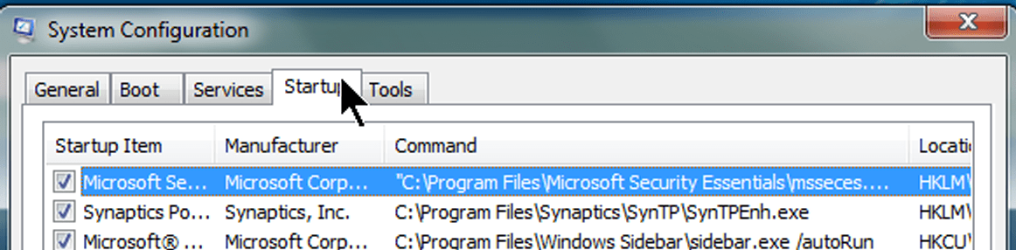
The one thing I recommend is to simply uncheck just about everything checked in the MSCONFIG startup tab. Let's see what I have:

startupprograms.png
 

My Computer My Computer

At a glance

MS Windows 7 Ultimate SP1 64-bitAMD A10-4600M6.00 GB Dual-Channel DDR3 @ 798MHz (11-11-12-28)AMD Radeon HD 7660G
Computer Manufacturer/Model Number
Toshiba Satellite S875D-S7239 laptop
OS
MS Windows 7 Ultimate SP1 64-bit
CPU
AMD A10-4600M
Motherboard
AMD Pumori (Socket FT1)
Memory
6.00 GB Dual-Channel DDR3 @ 798MHz (11-11-12-28)
Graphics Card(s)
AMD Radeon HD 7660G
Sound Card
High Definition Audio Device
Monitor(s) Displays
Generic PnP Monitor (1600x900@60Hz)
Screen Resolution
1600x900@60Hz
Hard Drives
SSD 119GB Corsair CSSD-V128GB2 ATA Device
Keyboard
Standard PS/2 Keyboard
Mouse
HP Wireless Optical Mobile Mouse Model FHA-3410
Internet Speed
What the local pub, local coffee shop offers.
Other Info
Optical Drive:MATSHITA BD-CMB UJ160B ATA Device


Also have an Asus ha1002xp netbook with Win 7 Ultimate installed.
To be fair, Win7 startup feels a lot smarter compare to XP. The impression is, its gradually optimized to avoid pitfalls. For example, error messages like "App Managed Machine Service didn't start", or "Some startup programs were blocked by -your firewall- ", resulted from delayed AV start are rare in Win7 (except delayed and slow sidebar start), but typical and persistent in XP. I'll check BootVis too. Yet some other more or less feature rich programs to control startup sequence in Win7 are Chameleon Startup Manager Pro, AnVir Task Manager (this thing is as good as it gets in many tasks, but limited in this one) and Absolute Startup Manager. There are a few less advanced for the task like Start-Q and such. Of course, Autoruns is the ever shining gold standard for manual programs & services On & Off, but useless to control startup sequence, don't know why Mark didn't went that far, may be due to common for his programs approach to uncover Windows rather than enrich.
 
Last edited:

My Computer My Computer

At a glance

Win 7
OS
Win 7
I recommend NOT messing around with the startup order. Some programs for reasons good or bad have positioned themselves at certain points in the startup chain. Best to leave well enough alone.

The one thing I recommend is to simply uncheck just about everything checked in the MSCONFIG startup tab. Let's see what I have:

View attachment 109462

Hey there karlsnooks,
I usually use that feature in CCleaner. Thanks for the System Config option. More professional :D. I noted though that System Configuration did not show any of the Norton AV 2011 processes starting. From reading about Norton it sets itself up to start first before anything else does IIRC. Why do you think Sys Config doesn't show it??????? Thanks for your help and any future assistance.
glennc
 

My Computer My Computer

At a glance

Windows 7 UltimateAMD Phenom-II X4 9658192 MB DDR2-SDRAMATI Radeon HD 4200
Computer type
PC/Desktop
Computer Manufacturer/Model Number
Self-Built
OS
Windows 7 Ultimate
CPU
AMD Phenom-II X4 965
Motherboard
Gigabyte GA-MA785GM-US2H
Memory
8192 MB DDR2-SDRAM
Graphics Card(s)
ATI Radeon HD 4200
Sound Card
ATI Radeon HD 4200 High Definition Audo
Monitor(s) Displays
LG Electronics W1943
Screen Resolution
1360 X 768
Hard Drives
C: 500 GB Caviar Black SATA
E: 500 GB Caviar Black SATA
PSU
Ultra LSP 750
Case
Ultra XBlaster
Cooling
2 Fans, CPU Fan, PS Fan
Keyboard
Acer
Mouse
Logitech
Internet Speed
6 MB
To be fair, Win7 startup feels a lot smarter compare to XP. The impression is, its gradually optimized to avoid pitfalls. For example, error messages like "Acronis Managed Machine Service didn't start", or "Some startup programs were blocked by -your firewall- ", resulted from delayed AV start are rare in Win7 (except delayed and slow sidebar start), but typical and persistent in XP. I'll check BootVis too. Yet some other more or less feature rich programs to control startup sequence in Win7 are Chameleon Startup Manager Pro, AnVir Task Manager (this thing is as good as it gets in many tasks, but limited in this one) and Absolute Startup Manager. There are a few less advanced for the task like Start-Q and such. Of course, Autoruns is the ever shining gold standard for manual programs & services On & Off, but useless to control startup sequence, don't know why Mark didn't went that far, may be due to common for his programs approach to uncover Windows rather than enrich.

Hey zamar21,
Thanks for the reply. I have used Autoruns, but as you mentioned it doesn't work on this issue. I am becoming leery of fooling about with the startup, W7 still does not like me and I sent flowers, but no luck. Take care.
glennc
 

My Computer My Computer

At a glance

Windows 7 UltimateAMD Phenom-II X4 9658192 MB DDR2-SDRAMATI Radeon HD 4200
Computer type
PC/Desktop
Computer Manufacturer/Model Number
Self-Built
OS
Windows 7 Ultimate
CPU
AMD Phenom-II X4 965
Motherboard
Gigabyte GA-MA785GM-US2H
Memory
8192 MB DDR2-SDRAM
Graphics Card(s)
ATI Radeon HD 4200
Sound Card
ATI Radeon HD 4200 High Definition Audo
Monitor(s) Displays
LG Electronics W1943
Screen Resolution
1360 X 768
Hard Drives
C: 500 GB Caviar Black SATA
E: 500 GB Caviar Black SATA
PSU
Ultra LSP 750
Case
Ultra XBlaster
Cooling
2 Fans, CPU Fan, PS Fan
Keyboard
Acer
Mouse
Logitech
Internet Speed
6 MB
There is no boovis for Windows 7 (nor Vista). Microsoft has their Windows Performance Analysis Tools

Windows Performance Analysis Developer Center

And this is said to be an alternative

WinBootInfo

I used Startup Delayer on XP, but have felt no need with Windows 7. Although no doubt also owing to this much more powerful PC. A Guy
 

My Computer My Computer

At a glance

Windows 10 Home x64INTEL Core i5-750 Quad-Core 3.37GHzHyperX Fury Black Series 8GB (2 x 4GB) 1866MhzEVGA GeForce GTX 750 Superclocked 1GB 128-Bit...
Computer type
PC/Desktop
OS
Windows 10 Home x64
CPU
INTEL Core i5-750 Quad-Core 3.37GHz
Motherboard
ASUS P7P55D
Memory
HyperX Fury Black Series 8GB (2 x 4GB) 1866Mhz
Graphics Card(s)
EVGA GeForce GTX 750 Superclocked 1GB 128-Bit GDDR5
Monitor(s) Displays
LG 32MA68HY 32" IPS
Screen Resolution
1920 x 1080
Hard Drives
Samsung 840 Evo 120GB, SEAGATE 500GB Barracuda® 7200.12, SATA 3 Gb/s, 7200 RPM, 16MB cache
PSU
ANTEC TruePower New TP-550, 80 PLUS, 550W
Case
ANTEC Three Hundred Illusion
Cooling
COOLER MASTER Hyper 212 Plus, 4 x 120mm 1 x 140mm Noctua's
Internet Speed
85 + Mbps
Antivirus
Avast
Browser
Vivaldi
There is no boovis for Windows 7 (nor Vista). Microsoft has their Windows Performance Analysis Tools

Windows Performance Analysis Developer Center

And this is said to be an alternative

WinBootInfo

I used Startup Delayer on XP, but have felt no need with Windows 7. Although no doubt also owing to this much more powerful PC. A Guy

Thanks A Guy,
I will look into it. Still wary.......
glennc
 

My Computer My Computer

At a glance

Windows 7 UltimateAMD Phenom-II X4 9658192 MB DDR2-SDRAMATI Radeon HD 4200
Computer type
PC/Desktop
Computer Manufacturer/Model Number
Self-Built
OS
Windows 7 Ultimate
CPU
AMD Phenom-II X4 965
Motherboard
Gigabyte GA-MA785GM-US2H
Memory
8192 MB DDR2-SDRAM
Graphics Card(s)
ATI Radeon HD 4200
Sound Card
ATI Radeon HD 4200 High Definition Audo
Monitor(s) Displays
LG Electronics W1943
Screen Resolution
1360 X 768
Hard Drives
C: 500 GB Caviar Black SATA
E: 500 GB Caviar Black SATA
PSU
Ultra LSP 750
Case
Ultra XBlaster
Cooling
2 Fans, CPU Fan, PS Fan
Keyboard
Acer
Mouse
Logitech
Internet Speed
6 MB
glen,
I've also used Autoruns to stop programs from running at startup time for those which are listed in msconfig but still present.

AutoRuns for Windows
 

My Computer My Computer

At a glance

MS Windows 7 Ultimate SP1 64-bitAMD A10-4600M6.00 GB Dual-Channel DDR3 @ 798MHz (11-11-12-28)AMD Radeon HD 7660G
Computer Manufacturer/Model Number
Toshiba Satellite S875D-S7239 laptop
OS
MS Windows 7 Ultimate SP1 64-bit
CPU
AMD A10-4600M
Motherboard
AMD Pumori (Socket FT1)
Memory
6.00 GB Dual-Channel DDR3 @ 798MHz (11-11-12-28)
Graphics Card(s)
AMD Radeon HD 7660G
Sound Card
High Definition Audio Device
Monitor(s) Displays
Generic PnP Monitor (1600x900@60Hz)
Screen Resolution
1600x900@60Hz
Hard Drives
SSD 119GB Corsair CSSD-V128GB2 ATA Device
Keyboard
Standard PS/2 Keyboard
Mouse
HP Wireless Optical Mobile Mouse Model FHA-3410
Internet Speed
What the local pub, local coffee shop offers.
Other Info
Optical Drive:MATSHITA BD-CMB UJ160B ATA Device


Also have an Asus ha1002xp netbook with Win 7 Ultimate installed.
Another similar program is Startup Cop. The benefit of using such soft becomes obvious when using, for example, disk service packages like Acronis etc. that load service managers at startup requiring network access to ID local hard drives. When Antivirus & Firewall is selected to start first, the whole startup process is greatly accelerated, and there is no delay to start network services and disk service managers. If they don't start, one can't defrag or backup the drives. There are some other benefits, many center around starting AV services first at boot compare to other programs. Despite most AV have their own startup priorities, its not always endup in fast Windows boot, unless manually corrected.

Not trying to HJ or bash Startup Cop, but reading what was said about Startup Cop from "PC MAG" simply isn't true.

It states:
PC Mag said:
With the advent of Microsoft's User Account Control (UAC) in Vista and Windows 7 it is no longer possible to start a program at boot-up that requires administrative privileges. If you do try to start a program that requires admin privileges you'll get a message that "Windows has blocked some startup programs."

If you go to this tutorial, it will show you how to start any program that normally requires UAC approval to run without user input. The program/task/bat can be run on startup or from clicking on a shortcut once on the desktop.

So shame on PC Mag saying this very untrue roadblock in Se7en, b/c there is a way around it, here it is:

http://www.sevenforums.com/tutorials/11949-elevated-program-shortcut-without-uac-prompt-create.html

You can also have common programs to start automatically minimized that otherwise would require UAC approval. To have the program run at startup, you can place the elevated shortcut into the startup folder, as was is said in post one of the tut, have the program load minimized without any user input.
 

My Computer My Computer

At a glance

OS3.5celerymemory never forgetsOB
Computer Manufacturer/Model Number
POS
OS
OS3.5
CPU
celery
Motherboard
Good Question ...Unknown
Memory
memory never forgets
Graphics Card(s)
OB
Sound Card
OB
Monitor(s) Displays
HUGE
Screen Resolution
168000000x105000000
Hard Drives
full
PSU
OEM 65watt
Case
N/A
Cooling
OB
Keyboard
OB
Mouse
mouse
Internet Speed
1 Trillion MBps
Other Info
Still An Awesome Forum!
I'll check WinBootInfo too. Its noted in the above linked blog comment, "Microsoft BootVis forces ProcessIdleTasks to run before it profiles your system, which is why people think BootVis optimizes your system’s boot speed (BootVis itself does not optimize your system at all)." Interesting, if WinBootInfo author can implement similar tactics to optimize system startup? There is also a note, stating CPU load and I/O cycles number should be added to each startup item listed in WinBootInfo to make it a useful boot analysis tool.

This thread is becoming quite informative, many programs where mentioned above, and the topic is important for everyone, since all face Win7 boot and Switch Off delays. Of course boot time and delays significance vary depending on each PC setup and purpose.
 

My Computer My Computer

At a glance

Win 7
OS
Win 7
Back
Top