
Cannot access 1TB External Hard drive (USB) Crashing windows explorer

Marking another partition on the same HD Active will mark the other Inactive automatically since only one can be Active per HD.

See if you can see data via Disk Mgmt Explore on the partition. If not running Disk Check may scramble some of the data even if it can repair the HD. If this can't be risked try data recovery first using a program like Recuva - Features

I appreciate the help from everyone, but i can't do anything with the drive until this scan is done, And for some reason it has been stuck on 132776 Files processed all day (Now 4PM, it was on that amount around 7am)

Not sure if i should be patient and see if it gets past this point.
Here
 

My Computer My Computer

At a glance

Windows 7 Ultimate 32-bit SP1 (Build 7601)Intel Core 2 Duo @ 2.10GHz4096Mb Installed - 3064 UsableMobile Intel(R) 965 Express Chipset Family
Computer Manufacturer/Model Number
HP Compaq 6710b
OS
Windows 7 Ultimate 32-bit SP1 (Build 7601)
CPU
Intel Core 2 Duo @ 2.10GHz
Motherboard
Hewlett-Packard 30C0 KBC Version 71.2E
Memory
4096Mb Installed - 3064 Usable
Graphics Card(s)
Mobile Intel(R) 965 Express Chipset Family
Sound Card
SoundMAX Integrated Digital HD Audio
Monitor(s) Displays
Generic PnP Monitor (15.4"vis, January 2006)
Screen Resolution
1280x800
Hard Drives
Hitachi HTS542580K9A300 [Hard drive] (80.03 GB)
Internet Speed
25 Mbit Download - 2.8 Mbit upload
Sorry for bumping such an old thread, but i'm still having the issue, i have recovered some data i need off the drive using Recuva as suggested, And have since formatted the entire drive.
I've placed a few files on the drive and tried to record a few things to it (Namely some footage from Project64 Using fraps for anyone who knows that) and the recording was fine, but when playing back the footage off the drive VLC Media player crashed when trying to skip through it.
Ontop of the above problem the drive has also been crashing explorer.exe a few times, and returning the error "Cyclic Redundancy Check" upon online search, basically just being told to "chkdsk" in cmd, which is the same as error checking through right-click>properties if i'm not mistaken, so i didn't bother trying that.
The other problem being a lack of power, which i wouldn't understand it being a dual power-source and everything connected properly.

So i'm wondering if there's anything else i can try, considering i'm strapped for cash to replace this, and i'm pretty sure it's out of warranty/guarantee.
Thanks for all the previous help.
 

My Computer My Computer

At a glance

Windows 7 Ultimate 32-bit SP1 (Build 7601)Intel Core 2 Duo @ 2.10GHz4096Mb Installed - 3064 UsableMobile Intel(R) 965 Express Chipset Family
Computer Manufacturer/Model Number
HP Compaq 6710b
OS
Windows 7 Ultimate 32-bit SP1 (Build 7601)
CPU
Intel Core 2 Duo @ 2.10GHz
Motherboard
Hewlett-Packard 30C0 KBC Version 71.2E
Memory
4096Mb Installed - 3064 Usable
Graphics Card(s)
Mobile Intel(R) 965 Express Chipset Family
Sound Card
SoundMAX Integrated Digital HD Audio
Monitor(s) Displays
Generic PnP Monitor (15.4"vis, January 2006)
Screen Resolution
1280x800
Hard Drives
Hitachi HTS542580K9A300 [Hard drive] (80.03 GB)
Internet Speed
25 Mbit Download - 2.8 Mbit upload
Test the HD with the maker's HD Diagnostic extended CD scan, followed by a full Disk Check. This will tell you its condition for sure.

If there are no diagnostics for your brand use Partition Wizard CD Partition surface test
followed by Partition Wizard Check File System

I'm going to be honest, i have no idea what to do on the HD diagnostic test, is it completely necessary?
Also i don't have any blank CD's lying around.

As for the others disc check won't work, it always pauses half-way through the process. (Not exactly half but never finishes, even after a 20-30 hr period) and still continues to do so after the format.
 

My Computer My Computer

At a glance

Windows 7 Ultimate 32-bit SP1 (Build 7601)Intel Core 2 Duo @ 2.10GHz4096Mb Installed - 3064 UsableMobile Intel(R) 965 Express Chipset Family
Computer Manufacturer/Model Number
HP Compaq 6710b
OS
Windows 7 Ultimate 32-bit SP1 (Build 7601)
CPU
Intel Core 2 Duo @ 2.10GHz
Motherboard
Hewlett-Packard 30C0 KBC Version 71.2E
Memory
4096Mb Installed - 3064 Usable
Graphics Card(s)
Mobile Intel(R) 965 Express Chipset Family
Sound Card
SoundMAX Integrated Digital HD Audio
Monitor(s) Displays
Generic PnP Monitor (15.4"vis, January 2006)
Screen Resolution
1280x800
Hard Drives
Hitachi HTS542580K9A300 [Hard drive] (80.03 GB)
Internet Speed
25 Mbit Download - 2.8 Mbit upload
You can install the Home version of Partition Wizard to run the tests.

I provided you with video tutorials so how could you reply that you have no idea what to do? You were shown a movie of exactly what to do.
 
I ran the test and it returned this result: HD Diagnostic test
And i tried the disc scan once again it returned the same problem, getting stuck and the harddrive itself stopping making any kind of noise, Usually meaning it's idle, normally makes a loud drive noise like any other HD.

Edit: An apologies on the previous reply, wasn't all that difficult to understand, the step-by-step.
 
Last edited:

My Computer My Computer

At a glance

Windows 7 Ultimate 32-bit SP1 (Build 7601)Intel Core 2 Duo @ 2.10GHz4096Mb Installed - 3064 UsableMobile Intel(R) 965 Express Chipset Family
Computer Manufacturer/Model Number
HP Compaq 6710b
OS
Windows 7 Ultimate 32-bit SP1 (Build 7601)
CPU
Intel Core 2 Duo @ 2.10GHz
Motherboard
Hewlett-Packard 30C0 KBC Version 71.2E
Memory
4096Mb Installed - 3064 Usable
Graphics Card(s)
Mobile Intel(R) 965 Express Chipset Family
Sound Card
SoundMAX Integrated Digital HD Audio
Monitor(s) Displays
Generic PnP Monitor (15.4"vis, January 2006)
Screen Resolution
1280x800
Hard Drives
Hitachi HTS542580K9A300 [Hard drive] (80.03 GB)
Internet Speed
25 Mbit Download - 2.8 Mbit upload
The previous test is indicating that your hard drive is failing.
First thing to do is backup any data that you don't want to loose.
Since you have already ran DiskCheck and re-formatted the drive and it's still giving errors, chances of salvaging the drive are slim.

Which HD test did you run?
Some HDD testing programs won't try to 'fix' problems, you should run the manufacturers program as it will try to fix the errors if it can.

HGST (formerly Hitachi Global Storage Technologies) joined the Western Digital Corporation family of companies in March 2012

HGST Drive Fitness Test
D/L and run the HGST Drive Fitness Test
 

My Computer My Computer

At a glance

Windows 7 Ult x64 - SP1/ Windows 8 Pro x64Intel Core i5-3570K 4.6GHz8GB (2X4GB) DDR3 1600 Corsair Vengeance CL8 1.5vSapphire HD 7770 Vapor-X OC 1GB DDR5
Computer type
PC/Desktop
Computer Manufacturer/Model Number
76~2.0
OS
Windows 7 Ult x64 - SP1/ Windows 8 Pro x64
CPU
Intel Core i5-3570K 4.6GHz
Motherboard
Gigabyte GA-Z77X UD3H, f18
Memory
8GB (2X4GB) DDR3 1600 Corsair Vengeance CL8 1.5v
Graphics Card(s)
Sapphire HD 7770 Vapor-X OC 1GB DDR5
Sound Card
Onboard VIA VT2021
Monitor(s) Displays
22" LCD Dell
Screen Resolution
1680x1050
Hard Drives
Samsung 840Pro 128GB SSD,
Seagate Barracuda 500GB SATA2 7200rpm 32MB cache, Seagate Barracuda 1TB SATA2 7200rpm 32MB cache,
PSU
Corsair HX650W
Case
Cooler Master Storm Scout
Cooling
Corsair H80 2x12cm Noctua NF P12 , 2x14cm case fans
Keyboard
Logitech Wave
Mouse
CM Sentinel
Internet Speed
Dismal
Antivirus
Avast
Browser
Opera Next
Other Info
Haswell laptop: HP Envy 17t-j, i7-4700MQ, GeForce 740M 2GB DDR3, 17.3" Full HD 1920x1080, 16GB RAM, Samsung 840 Pro 128GB, 1TB Hitachi 7200 HDD,
Desktop: eSATA ports,
External eSATA Seagate 500GB SATA2 7200rpm,
External WD USB 500GB
Have you tried using another USB cable and power supply? If so, take the drive out of the case and have someone test the drive by itself. There are USB to SATA/IDE test cables but they sometimes cost more than a new case. Cases, power supplies and cables go bad too and a case is cheaper than a drive. I bought a USB3 case for around $25.

If you have a friend close by that can open his PC and has a SATA cable (or whatever the drive may be), you could test the drive by itself. At least you'd know if it was tanked or not.
 

My Computer My Computer

At a glance

Windows 7 Pro-x64i7-2600 3.4GHz - 3.8GHz Turbo8Gb - 2x4GB, Muskin 991770 PC3-1333Integrated Intel HD 2000
Computer type
PC/Desktop
Computer Manufacturer/Model Number
Built 2/11/2011
OS
Windows 7 Pro-x64
CPU
i7-2600 3.4GHz - 3.8GHz Turbo
Motherboard
Intel DH67BL-B3
Memory
8Gb - 2x4GB, Muskin 991770 PC3-1333
Graphics Card(s)
Integrated Intel HD 2000
Sound Card
Integrated Intel 10.1 HD, RealTek ALC892
Monitor(s) Displays
Asus LCD VH222H, Haier HL24XSL2a
Screen Resolution
1920x1080, 1920x1080
Hard Drives
Crucial SSD C300-128Gb,
Western Digital WD5002AALX - 500Gb,
Western Digital WD7501AALS - 750Gb
PSU
Seasonic 650W 80+ Gold Modular
Case
Rosewill Defender
Cooling
Stock CPU, Four 120mm case fans, PCH fan added
Keyboard
Logitech EX100 Y-RBH94 Wireless
Mouse
Logitech EX100 M-RCE95 Wireless
Internet Speed
3.0/1.5 Mbs
Antivirus
Microsoft Security Essentials
Browser
Microsoft Internet Explorer 11
Other Info
Antec Veris Premier-Multimedia IR Station,
Cyber Accoustics-3602 Speakers,
AFT XM-5U Card Reader,
Hauppauge TV-HVR-2250,
Sony LX300 USB Turntable
HGST Drive Fitness Test
D/L and run the HGST Drive Fitness Test

This says that it's a bootable program?
I don't have anything to write it to other than a 16GB USB i have spare.
Unless i'm just being a dim-witt and not looking properly.

Also to note, it's an external drive connected via USB, doesn't have my OS on it or anything, just storage.
If so, take the drive out of the case and have someone test the drive by itself. There are USB to SATA/IDE test cables but they sometimes cost more than a new case.
I can't see anyway i would open the case without damaging it, besides i'd rather not do so, I think the drive inside it is a "Hitachi HDS721010CLA332" (According to the Properties>Hardware).
 

My Computer My Computer

At a glance

Windows 7 Ultimate 32-bit SP1 (Build 7601)Intel Core 2 Duo @ 2.10GHz4096Mb Installed - 3064 UsableMobile Intel(R) 965 Express Chipset Family
Computer Manufacturer/Model Number
HP Compaq 6710b
OS
Windows 7 Ultimate 32-bit SP1 (Build 7601)
CPU
Intel Core 2 Duo @ 2.10GHz
Motherboard
Hewlett-Packard 30C0 KBC Version 71.2E
Memory
4096Mb Installed - 3064 Usable
Graphics Card(s)
Mobile Intel(R) 965 Express Chipset Family
Sound Card
SoundMAX Integrated Digital HD Audio
Monitor(s) Displays
Generic PnP Monitor (15.4"vis, January 2006)
Screen Resolution
1280x800
Hard Drives
Hitachi HTS542580K9A300 [Hard drive] (80.03 GB)
Internet Speed
25 Mbit Download - 2.8 Mbit upload
Hi Pimmalage,

I went through this thread completely and have to say this though it is unpleasant.

A cyclic redundancy check error is a serious error indicating that the HDD is failing.

While check disk, can correct filesystem errors, it will only stall and stutter on a failing disk creating physical disk errors. It cannot deal with such errors. That you have repeatedly tried check disk with no avail further confirms that your disk has failed.

You had already formatted the disk and even then it failed.

A diagnostic test will only confirm that your disk has failed. It cannot repair this disk.

IMO, all available evidence suggests you are only wasting your time trying to resurrect the drive, an impossible task.

Give up and get a new drive. No other solution.
 

My Computer My Computer

At a glance

Windows 7 Home Premium 32 bit
OS
Windows 7 Home Premium 32 bit
HGST Drive Fitness Test
D/L and run the HGST Drive Fitness Test
This says that it's a bootable program?
I don't have anything to write it to other than a 16GB USB i have spare...........

No prob. Try to create a bootable pendrive with that ISO. You can download Rufus v 1.3.2 (442KB) and use it to create the bootable pendrive. http://rufus.akeo.ie/

All data in the pendrive will be lost when you create the bootable drive. So back up all data to another media - say your internal drive.

Plug in your pendrive, run Rufus, select Quick format if not selected already, select ISO Image in the drop down box, show it the location of the ISO, click on it and click Start.

Hitachidrivetest.jpg

Boot from the USB in onetime start menu to run the test.

OK, another question I always wanted to ask but forgot. :)

How did you determine that the external hard drive inside the case is a Hitachi? You said you checked in some Properties. Properties of what? Can you please upload a screenshot of that? Thanks.
 
Last edited:

My Computer My Computer

At a glance

Windows 7 Home Premium 32 bit
OS
Windows 7 Home Premium 32 bit
OK, another question I always wanted to ask but forgot. :)

How did you determine that the external hard drive inside the case is a Hitachi? You said you checked in some Properties. Properties of what? Can you please upload a screenshot of that? Thanks.

Well for one it has Hitachi Beveled into the side of the External harddrive :p
But i just did; My computer>Right-click>Properties>Hardware tab.

And as for the method of making a bootable USB i'll have a look into it, maybe just going to call it bricked at the moment, not sure if i could claim warranty atall, i shall chase that down myself.
 

My Computer My Computer

At a glance

Windows 7 Ultimate 32-bit SP1 (Build 7601)Intel Core 2 Duo @ 2.10GHz4096Mb Installed - 3064 UsableMobile Intel(R) 965 Express Chipset Family
Computer Manufacturer/Model Number
HP Compaq 6710b
OS
Windows 7 Ultimate 32-bit SP1 (Build 7601)
CPU
Intel Core 2 Duo @ 2.10GHz
Motherboard
Hewlett-Packard 30C0 KBC Version 71.2E
Memory
4096Mb Installed - 3064 Usable
Graphics Card(s)
Mobile Intel(R) 965 Express Chipset Family
Sound Card
SoundMAX Integrated Digital HD Audio
Monitor(s) Displays
Generic PnP Monitor (15.4"vis, January 2006)
Screen Resolution
1280x800
Hard Drives
Hitachi HTS542580K9A300 [Hard drive] (80.03 GB)
Internet Speed
25 Mbit Download - 2.8 Mbit upload
CRC errors can be caused by a bad cable or routing the cable near other electrically powered devices. If you tried another cable and can't test the drive by itself then it would seem your only option left is to assume the drive is bad. Go from there.
 

My Computer My Computer

At a glance

Windows 7 Pro-x64i7-2600 3.4GHz - 3.8GHz Turbo8Gb - 2x4GB, Muskin 991770 PC3-1333Integrated Intel HD 2000
Computer type
PC/Desktop
Computer Manufacturer/Model Number
Built 2/11/2011
OS
Windows 7 Pro-x64
CPU
i7-2600 3.4GHz - 3.8GHz Turbo
Motherboard
Intel DH67BL-B3
Memory
8Gb - 2x4GB, Muskin 991770 PC3-1333
Graphics Card(s)
Integrated Intel HD 2000
Sound Card
Integrated Intel 10.1 HD, RealTek ALC892
Monitor(s) Displays
Asus LCD VH222H, Haier HL24XSL2a
Screen Resolution
1920x1080, 1920x1080
Hard Drives
Crucial SSD C300-128Gb,
Western Digital WD5002AALX - 500Gb,
Western Digital WD7501AALS - 750Gb
PSU
Seasonic 650W 80+ Gold Modular
Case
Rosewill Defender
Cooling
Stock CPU, Four 120mm case fans, PCH fan added
Keyboard
Logitech EX100 Y-RBH94 Wireless
Mouse
Logitech EX100 M-RCE95 Wireless
Internet Speed
3.0/1.5 Mbs
Antivirus
Microsoft Security Essentials
Browser
Microsoft Internet Explorer 11
Other Info
Antec Veris Premier-Multimedia IR Station,
Cyber Accoustics-3602 Speakers,
AFT XM-5U Card Reader,
Hauppauge TV-HVR-2250,
Sony LX300 USB Turntable
CRC errors can be caused by a bad cable or routing the cable near other electrically powered devices. If you tried another cable and can't test the drive by itself then it would seem your only option left is to assume the drive is bad. Go from there.

A valid point which most often we overlook. OP may please take note.

OK, another question I always wanted to ask but forgot. :)

How did you determine that the external hard drive inside the case is a Hitachi? You said you checked in some Properties. Properties of what? Can you please upload a screenshot of that? Thanks.

Well for one it has Hitachi Beveled into the side of the External harddrive :p
But i just did; My computer>Right-click>Properties>Hardware tab.

And as for the method of making a bootable USB i'll have a look into it, maybe just going to call it bricked at the moment, not sure if i could claim warranty atall, i shall chase that down myself.

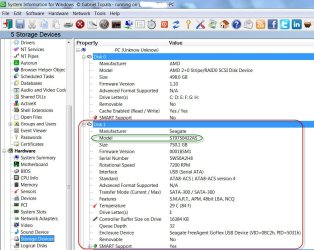
OK, I got it. In the case of your Hitachi external drive, both Device Manager and the Properties of the HDD in Computer explorer, show the Part/Model number of the actual drive inside the enclosure.

In the case of my Seagate external drive it only shows as Seagate FreeAgent GoFlex USB device. To get the model number and other details of the actual drive used in the enclosure, I had to run SIW for Windows. There may be other programs too that can read the details. Even Speccy does not give the details.

09-02-2013 12-24-06.jpg

May be of interest to those who want to know the actual drive details in the enclosure.
 

My Computer My Computer

At a glance

Windows 7 Home Premium 32 bit
OS
Windows 7 Home Premium 32 bit
Back
Top