
Darkstar1756
New member
- Local time
- 10:45 AM
- Messages
- 1
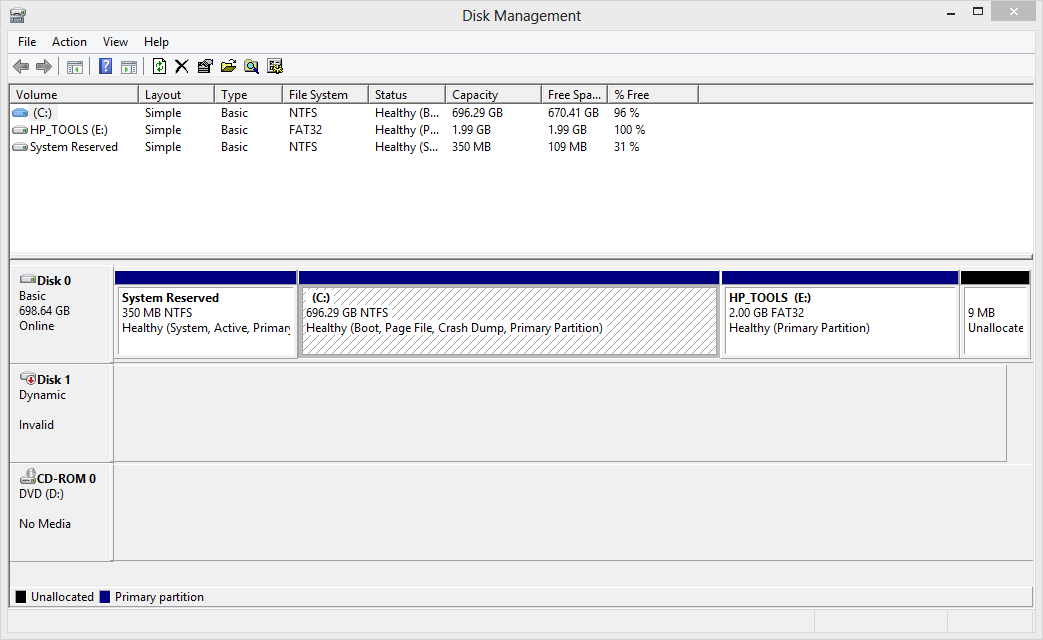
Somehow (It might have been me), system files used for windows were unaccessible or corrupted so I would get a BSOD on boot and a screen telling me that my laptop couldn't boot. I had no backups of any sort because I didn't have any external drives that were large enough (>400GB). So I had to order a new larger and faster HDD (I have been meaning to for a while just never had this kind of motivation to). I got it today and have installed it and successfully reinstalled windows and some other programs and am typing this because I put my old HDD that was in my laptop, put it in a external USB enclosure and when I plug it in (both to this laptop and another desktop that I have running Windows 7 x64 it doesn't let me access the drive. It doesn't even appear in windows explorer even though the computers detect that it was plugged in and the hard drive is whirring and clicking. On my laptop in Disk management it recognizes that it is a Dynamic Disk but says invalid and doesn't give any info on it. Is there any way to fix it or just access the files so that I can get all of my data off without deleting the files first. I have recently found a 500GB external HDD that I can transfer the files to if I can access them.
Edit: I have solved it, I managed to find a program that works perfectly and have already copied all possibly needed files before I wipe the old hdd (Program is called Find and mount).
Edit: I have solved it, I managed to find a program that works perfectly and have already copied all possibly needed files before I wipe the old hdd (Program is called Find and mount).
Last edited:
My Computer
- Computer type
- Laptop
- Computer Manufacturer/Model Number
- HP
- OS
- Windows 8 Pro x64
- CPU
- AMD Phenom II p650
- Memory
- 8GB Crucial DDR3
- Graphics Card(s)
- ATI Radeon HD 4250
- Hard Drives
- 750GB 7200rpm Western Digital HDD
- Antivirus
- Windows Defender


