
I was mounting and unmounting a WIM image no problem, I updated it to include USB3 and NVMe support, then installed that from USB onto a new system. Everything ran smooth.
Now in my new system using all the exact same files (including DISM) on the same OS, it will not mount the image (error 5: access denied).
It stalls at 99%...
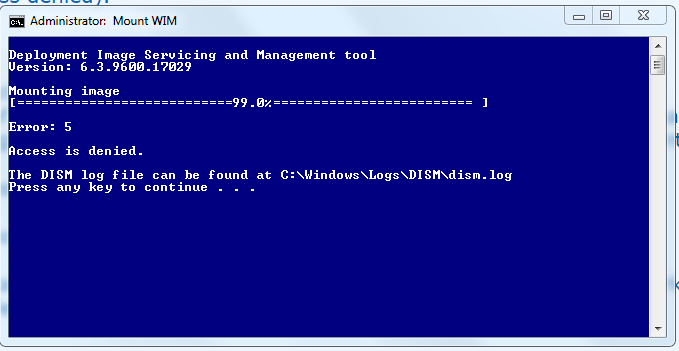
The error in the log file is 0x80070005
What I have tried:
- Making sure the install.wim is not read only (it's not).
- Taking ownership of the mount folder, and my DISM files, and the Windows source that contains the WIM.
- Making sure the registry key is clear (HKLM\SOFTWARE\Microsoft\WIMMount\Mounted Images)
- Checking I'm not using McAfee (I'm not).
- Making sure I'm logged in as an administrator (I am).
- Rebooting
- Taking deep breaths... getting angry lol...
Now what?! I have no idea why it's not mounting the image.
This is the same install.wim from the ISO I just installed Windows from, that I was working on perfectly fine, using all the same files I am using now. The computer user name is the same too.
All the answers I can find say disable McAfee (I'm not using it at all) and make sure install.wim is not read only (it's not).
I ran this then rebooted but it's not fixed it...
Something else is at play.
I am mounting on a NVMe drive, maybe that's it, I will post back if mounting to my standard SATA HDD doesn't work... if you never see me in this thread again - it worked lol.
Nope - it just says the exact same thing again, after taking 5 times longer to mount.
OK I will put my Windows source files and the mount folder both on my SATA HDD, after running the above commands again to clear it all up. I'll come back whining again if that doesn't work...
EDIT: That's not worked.
I cannot mount the WIM on a NVMe drive or a standard SATA HDD. The same error always happens "access denied".
EDIT: The 7updater package can mount and unmount fine, but I can't. After using 7updater, I can mount and unmount successfully once, then any further attempts fail with "Access denied".
I just wish that 7updater package had 2 batch files (like it has one to optimize the WIM and one to create an ISO) where one batch file can mount the WIM and another can do unmount /commit. I can't use the 7update to mount unless I run the main batch file and put in a dummy DRIVER.7z file (then I will forget I did that and end up updating with no drivers next time knowing me).
Why can the 7updater batch file mount and unmount fine but I can't, it's such a PITA.
I supposed I can try to use its DISM or something, with my own mount/unmount batch files. They were working the other day, now on a new PC, they aren't (notwithstanding 7updater, that always works).
EDIT: I copied all the files from "\7UPv50\amd64\dism" to the DISM folder I have been using and still get access denied. I'm going to cry in a minute.
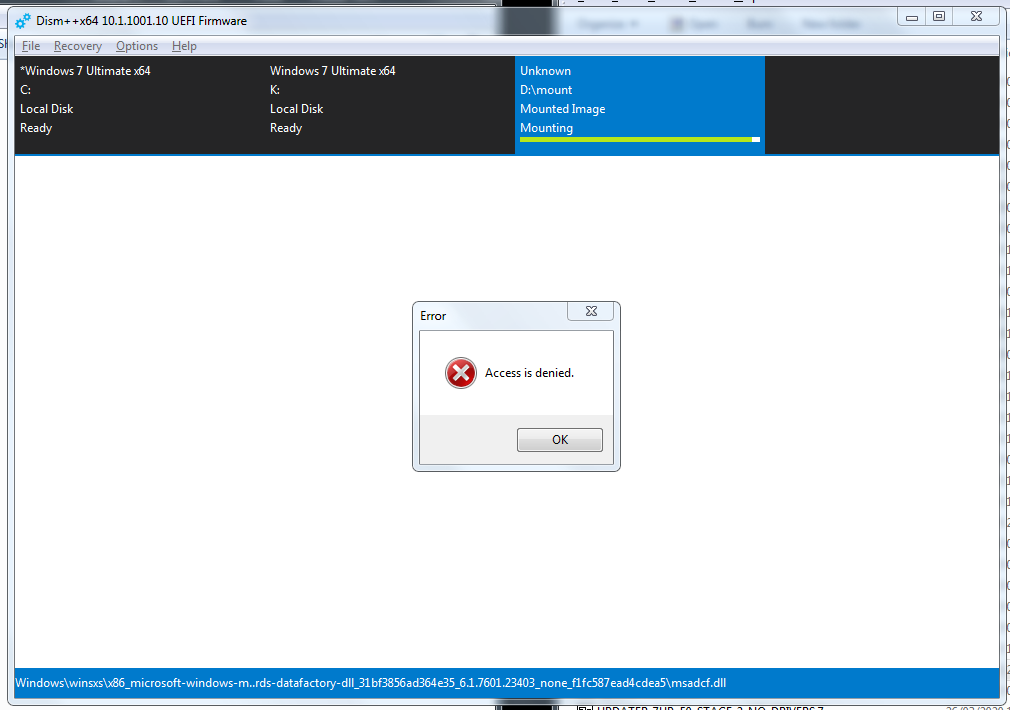
DISM++ says the same thing, it just tells me it with a dialog window... "Access is denied".
REALLY
Now in my new system using all the exact same files (including DISM) on the same OS, it will not mount the image (error 5: access denied).
It stalls at 99%...
The error in the log file is 0x80070005
What I have tried:
- Making sure the install.wim is not read only (it's not).
- Taking ownership of the mount folder, and my DISM files, and the Windows source that contains the WIM.
- Making sure the registry key is clear (HKLM\SOFTWARE\Microsoft\WIMMount\Mounted Images)
- Checking I'm not using McAfee (I'm not).
- Making sure I'm logged in as an administrator (I am).
- Rebooting
- Taking deep breaths... getting angry lol...
Now what?! I have no idea why it's not mounting the image.
This is the same install.wim from the ISO I just installed Windows from, that I was working on perfectly fine, using all the same files I am using now. The computer user name is the same too.
All the answers I can find say disable McAfee (I'm not using it at all) and make sure install.wim is not read only (it's not).
I ran this then rebooted but it's not fixed it...
Code:
dism.exe /Cleanup-Wim
DISM\dism.exe /Unmount-wim /MountDir:D:\mount /Discard
Echo Y | REG DELETE "HKLM\SOFTWARE\Microsoft\WIMMount\Mounted Images"
rd /s /q D:\mount
Something else is at play.
I am mounting on a NVMe drive, maybe that's it, I will post back if mounting to my standard SATA HDD doesn't work... if you never see me in this thread again - it worked lol.
Nope - it just says the exact same thing again, after taking 5 times longer to mount.
OK I will put my Windows source files and the mount folder both on my SATA HDD, after running the above commands again to clear it all up. I'll come back whining again if that doesn't work...
EDIT: That's not worked.
I cannot mount the WIM on a NVMe drive or a standard SATA HDD. The same error always happens "access denied".
EDIT: The 7updater package can mount and unmount fine, but I can't. After using 7updater, I can mount and unmount successfully once, then any further attempts fail with "Access denied".
I just wish that 7updater package had 2 batch files (like it has one to optimize the WIM and one to create an ISO) where one batch file can mount the WIM and another can do unmount /commit. I can't use the 7update to mount unless I run the main batch file and put in a dummy DRIVER.7z file (then I will forget I did that and end up updating with no drivers next time knowing me).
Why can the 7updater batch file mount and unmount fine but I can't, it's such a PITA.
I supposed I can try to use its DISM or something, with my own mount/unmount batch files. They were working the other day, now on a new PC, they aren't (notwithstanding 7updater, that always works).
EDIT: I copied all the files from "\7UPv50\amd64\dism" to the DISM folder I have been using and still get access denied. I'm going to cry in a minute.
DISM++ says the same thing, it just tells me it with a dialog window... "Access is denied".
REALLY
Last edited:
My Computer
At a glance
Windows 10 x64
- Computer type
- PC/Desktop
- OS
- Windows 10 x64