
Solved Cannot access ONE W7 share from XP

TheAncient

New member
Local time
7:44 AM
Messages
19
Location
Canada
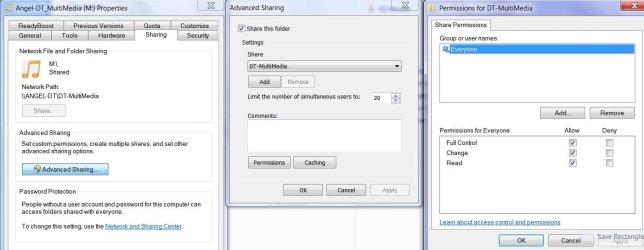
I am obviously missing something: I have a number of shares on my Windows 7 machine. 3 of 4 shares are accessible from my XP machines, one of them is not accessible. I remember in the XP world this happened occasionally and the solution in that case was, to disable and then re-enable sharing. I tried this in this case but it did not resolve the problem. I compared the settings between the folders and can't see any difference. I shut off ZoneAlarm on both machines but the error remained. Any idea what I am missing? (Screen shot attached)
 

Attachments
  • ScreenShot.jpg
    ScreenShot.jpg
    77.8 KB · Views: 57

My Computer

Computer Manufacturer/Model Number
Look-Ahead Inc.
OS
Windows 7 Ultimate x64
CPU
AMD Phenom II X4 965 @ 3.4GHz
Motherboard
ASUSTeK Computer INC. M5A88-M (AM3R2)
Memory
8GB
Graphics Card(s)
onboard graphics: ATI Radeon HD 4250 (ASUStek Computer Inc)
Sound Card
onboard sound: Realtek High Definition Audio
Monitor(s) Displays
Acer AL2216W
Screen Resolution
1680x1050@59Hz
Hard Drives
119GB KINGSTON SNV425S2128GB ATA Device (SSD)
1863GB AMD 1X2 Mirror/RAID1 SCSI Disk Device (RAID)
1397GB AMD 1X2 Mirror/RAID1 SCSI Disk Device (RAID)
I haven't had any answers to this question yet. Does anyone have any ideas? Even far fetched ones .....
Thanks!
 

My Computer

Computer Manufacturer/Model Number
Look-Ahead Inc.
OS
Windows 7 Ultimate x64
CPU
AMD Phenom II X4 965 @ 3.4GHz
Motherboard
ASUSTeK Computer INC. M5A88-M (AM3R2)
Memory
8GB
Graphics Card(s)
onboard graphics: ATI Radeon HD 4250 (ASUStek Computer Inc)
Sound Card
onboard sound: Realtek High Definition Audio
Monitor(s) Displays
Acer AL2216W
Screen Resolution
1680x1050@59Hz
Hard Drives
119GB KINGSTON SNV425S2128GB ATA Device (SSD)
1863GB AMD 1X2 Mirror/RAID1 SCSI Disk Device (RAID)
1397GB AMD 1X2 Mirror/RAID1 SCSI Disk Device (RAID)
I see you have Everyone has full control. That is NOT a good idea.
In fact, IIRC, Win 7 by default stops connections to certain folder even if Everyone has full control.
You can try adding your user name to that share, give that full control and then when trying to access it you will need to type in a password and or a user name and password.

You do have a password set on the account that made this share, right?
 

My Computer

Computer Manufacturer/Model Number
Built be Me
OS
Windows 7 Pro x64
CPU
i5 760
Motherboard
Asus P7P55D-E Pro
Memory
16GB
Graphics Card(s)
Nvidia GTS450
Sound Card
On board
Monitor(s) Displays
Dell 2007WFP Dell 1800FP
Screen Resolution
1680x1050 1280x1024
Hard Drives
Seagate 250GB & 750GB
WD 1TB
PSU
Antec 750
Case
In Win
Cooling
Cooler Master Hyper 212+
Keyboard
IBM
Mouse
MS
Yup: I'm secure

The fact that "Everyone" had been given access was a desperation measure - as was the removal of the passwords and my <very short-lived> experiment with shutting down all firewalls. I was trying to eliminate anything that could possibly prevent communication. Unfortunately, even with all those security measures removed, I was unable to access this share from my other [XP] machines. <security measures have long since been restored plus, during that time, the router was physically unplugged from the net> The big puzzler still is the fact that 3 shares works perfectly fine but one does not.
 

My Computer

Computer Manufacturer/Model Number
Look-Ahead Inc.
OS
Windows 7 Ultimate x64
CPU
AMD Phenom II X4 965 @ 3.4GHz
Motherboard
ASUSTeK Computer INC. M5A88-M (AM3R2)
Memory
8GB
Graphics Card(s)
onboard graphics: ATI Radeon HD 4250 (ASUStek Computer Inc)
Sound Card
onboard sound: Realtek High Definition Audio
Monitor(s) Displays
Acer AL2216W
Screen Resolution
1680x1050@59Hz
Hard Drives
119GB KINGSTON SNV425S2128GB ATA Device (SSD)
1863GB AMD 1X2 Mirror/RAID1 SCSI Disk Device (RAID)
1397GB AMD 1X2 Mirror/RAID1 SCSI Disk Device (RAID)
Hi there
Networking is always a grey area as far as MS is concerned.

Try these issues.

1) on the XP machine can you PING any other machine on the network.

2) Can the "missing" W7 machine ping the XP machine.

3) Have you enabled file sharing on the XP machine. AND enabled Network discovery on the W7 machine.

4) Is the XP machine in a different Workgroup to the rest -- shouldn't matter but changing the computer name / workgroup sometimes "magically" fixes the connections. Don't ask me why -- I'm NOT a networking guru -- all I know that this sometimes fixes the problem.

6) if you CAN ping the "Non acessible" W7 machine from XP try and connect a network drive manually like \\wwwww.xxxx.yyyy.zzzz\d assuming the share name on the W7 is called d and w,x,y,z is its LOCAL IP address.

Note you NEED to have an account on ALL the machines you want to connect to.

Does the W7 machine connect to the XP machine.? if it doesn't try also to connect an XP drive manually as well as above \\aaaa.bbbb.cccc.dddd\d for example. Again a,b,c,d is the local LAN address of the XP machine.


Sometimes as well the DHCP server (in your router) gets stuff messed up and the IP address is not acessible or is being used by a network device such as a NAS Disk, Network printer or multi-media streamer.

I had this problem when using SQUEEZEBOX as an audio streamer -- I now reserve specific addresses for the "Non Computing" network stuff and restrict the IP range for LAN computers to one's that the other components can't use.

Finally for this type of sharing ALL accounts on the W7 machine need to have a password.

Cheers
jimbo
 

My Computer

Computer type
PC/Desktop
Computer Manufacturer/Model Number
Custom built, several laptops HP/ASUS
OS
Linux CENTOS 7 / various Windows OS'es and servers
CPU
Intel i7 Intel i5
Memory
8GB, 16GB
Graphics Card(s)
On Motherboard
Sound Card
Realtek HD audio
Monitor(s) Displays
Apple Cinema display, Samsung LCD
Screen Resolution
1920 X 1080
Hard Drives
4 X 1TB SATA
Mouse
Toshiba wireless laser
Internet Speed
> 20MB up
Miracle, witchcraft or Microsoft?

Thanks to everyone for your help. For some reason that particular share is now accessible and my problem has solved itself with no intervention by myself.

Jimbo45: Not that it's needed anymore but I'll try to answer your questions anyway:
1. Each and every XP machine on the network was able to not only ping but "see" every other machine on network (i.e. IP addresses were resolved properly)
2. The W7 machine was able to "see", and ping both XP machines
3. File sharing and network discovery service were enabled on the W7 machine. In my original question I stated that I had disabled and then re-enabled file sharing on the W7 share - in the XP world that would occasionally fix similar issues. I don't see how having network discovery enabled on the W7 machine (it was enabled) would have anything to do with the XP machines not being able to access one of the four W7 shares. (If the W7 had had problems accessing the XP machines, this would probably be more relevant but W7 had no problems accessing the XP machines)
4. All machines were in the same workgroup (If they had not been in the same workgroup, the other 3 W7 shares would not have been accessible)
6. (what happened to 5?) The Win 7 machine was always accessible - I was able to access 3 of the 4 shares just fine. It was just the fourth share which could be "seen" (and mapped) but which told me I did not have authorization to access it.
6b. I do have an account on all machines. To make things easier, the account name is the same on all machines.
6c. The W7 machine had not problems accessing the XP machines
6d. You may have a point with the DHCP server getting messed up: The one thing I changed recently is, that I removed a NAS device. If it was a DHCP problem though, I should also not have been able to access the other 3 shares.
6e. I have no experience with squeezebox but I had to do something similar with my print server and the printers hanging off that print server. Just to be on the safe side, I might assign a static IP to the NAS as well when I hook it up again.
6f. I just removed the passwords from all machines again and everything is still working fine. So I do not believe that you have to have a password on all accounts. (Shootist: No worries - I put the passwords back on immediately after my test)

In summary: I have no clue why that share was not accessible and I also have no clue what could have possible fixed the issue. I suppose sometimes you just have to ascribe it to the mysteries of Microsoft and soldier on without ever figuring out the answer.
 

My Computer

Computer Manufacturer/Model Number
Look-Ahead Inc.
OS
Windows 7 Ultimate x64
CPU
AMD Phenom II X4 965 @ 3.4GHz
Motherboard
ASUSTeK Computer INC. M5A88-M (AM3R2)
Memory
8GB
Graphics Card(s)
onboard graphics: ATI Radeon HD 4250 (ASUStek Computer Inc)
Sound Card
onboard sound: Realtek High Definition Audio
Monitor(s) Displays
Acer AL2216W
Screen Resolution
1680x1050@59Hz
Hard Drives
119GB KINGSTON SNV425S2128GB ATA Device (SSD)
1863GB AMD 1X2 Mirror/RAID1 SCSI Disk Device (RAID)
1397GB AMD 1X2 Mirror/RAID1 SCSI Disk Device (RAID)
Back
Top