Solved Cannot access other PC on the next desk

foxint

New member
Member
VIP
Local time
6:35 PM
Messages
102
Hi Guys

I am sorry it this is the same question and it has been asked and answered, but I have read and read and pulled my hair out and cannot work it out.

I have 3 PC’s all on Win 7 Pro. I have set up a Homegroup. From Main-PC (F-PC) I can see the network map: D-PC; F-PC; T-PC.

I changed T-PC c-drive to share. I have turned off ALL security and allowed the sharing from anyone – yes not good, but what can you do. Windows sucks.

I am trying to access ALL the data on ALL PC’s let do it on one and then I can replicate this.

The usual error message: T-PC correctly Configure but not responding; Windows cannot access T-PC; error 0x80070035 – could not fix this.

The problem I see with a lot of the answers is they miss a few steps and assume you are a PC genius. I am no PC genius and spent most of this week to achieve zero. There are a lot of things I cannot delete, but will have to live with this.

Can someone offers a step-by-step guide, with exact steps – please do not assume I know anything?
 

My Computer My Computer

OS
Wind 7 Pro 64-bit
Is there passwords st up on all user account on all PCs? If not do that first. Then turn off the Homegroup stuff, it stinks IMHO, and switch to Workgroup name and in advanced network sharing turn on Password protected sharing and in the Homegroup section tick Use user accounts and passwords to connect to other computers. Then you will need to logon to one of the user accounts, Admin account preferably, to access all shared resources on the other PCs.
 

My Computer My Computer

OS
7 x64
Dear Edwar

Thank you…

Is there passwords st up on all user account on all PCs? If not do that first. [FONT=&quot]No passwords[/FONT]

Then turn off the Homegroup stuff, it stinks IMHO, and switch to Workgroup name and in advanced network sharing turn on Password protected sharing – [FONT=&quot]yes did this. I changed to workgroup on F-PC and on T-PC, but not D-PC (thinking if F & T worked D would work[/FONT][FONT=&quot])[/FONT]

and in the Homegroup section tick Use user accounts and passwords to connect to other computers. – [FONT=&quot]this is the part I go confused with, so I stopped dead and could not go any further.[/FONT]
 

My Computer My Computer

OS
Wind 7 Pro 64-bit
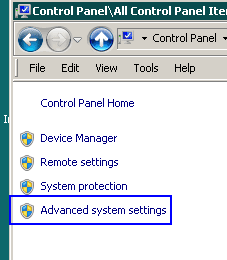
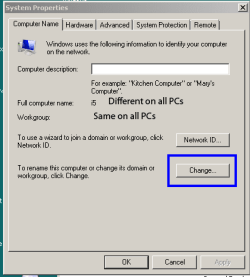
Sorry what do you mean you stopped dead and couldn't go further. You first have to turn off the homegroup system, Un-Join every PC from the homegroup. You do that in the homegroup area. Then in Advanced system settings make sure all have the same workgroup name and a different computer name.

Advanced System Settings.PNG

Advanced system.PNG
 

My Computer My Computer

OS
7 x64
Sorry what do you mean you stopped dead and couldn't go further. [FONT=&quot]Yes I could not go any further[/FONT]

You first have to turn off the homegroup system, [FONT=&quot]I think I did this. I found a command that said “leave the Homegroup”. So I clicked on this.[/FONT]

Un-Join every PC from the homegroup. You do that in the homegroup area. [FONT=&quot]Could not find this[/FONT]

Then in Advanced system settings make sure all have the same workgroup name and a different computer name. [FONT=&quot]Could not find this[/FONT]

[FONT=&quot]So I am still back at the beginning, but I think I have started in Workgroup[/FONT]
 

My Computer My Computer

OS
Wind 7 Pro 64-bit
[FONT=&quot]In the meantime I have mapped some drives and it is all looking a little strange. By the way I cannot delete these, so I suppose I am stuck with some things that I think I do not need

[/FONT]
[FONT=&quot]I have now lost T-PC when I view the PC’s on Windows Explorer[/FONT]
 

My Computer My Computer

OS
Wind 7 Pro 64-bit
[FONT=&quot]Plus I have lost D-PC. It is all going horribly wrong. My friend was right Windows is the work of the devil. I will retire hurt and try and fix it tomorrow. [/FONT]
[FONT=&quot] [/FONT]
[FONT=&quot]The problem is we live in the country and the last time I sent the PC away, the local PC man did not know what to do with a SSD. So it took me a week to re-install everything. So if you could help it would be most appreciated. I can give you my email if it helps[/FONT]
 

My Computer My Computer

OS
Wind 7 Pro 64-bit
Back
Top