Cannot access System Apps(CMD, Mspaint, Calc, etc) after chkdsk.

s0vvyblu3s

New member
Local time
11:01 PM
Messages
3
Not sure whether this is the right place to post this question.

Anyway. The issue is that I am not able to access any windows default tools like cmd, mspaint, calc, etc after windows ran check disk on startup.

One weird thing is that I am able to use these tools if I run them through third party "Run" tool like "Run-Command Portable (32-bit)".

Please let me know what I should be checking. Few other folders had permissions issue. I resolved them. But this I cannot.


--
Thanks and Regards,
Sakthi Ganesh K.
 

My Computer

Computer type
PC/Desktop
Computer Manufacturer/Model Number
Custom Build
OS
Windows 7 Ultimate 64bit
CPU
AMD Phenom X4 Black Edition
Motherboard
Asus M3A78-EM
Memory
DDR2 - 6GB
Graphics Card(s)
ATI Radeon 6670 HD.
Hard Drives
Seagate 320 GB,
Seagate 1TB.
Antivirus
Bit Defender Internet Security 2015
Browser
Opera, Chrome, Mozilla Firefox, Internet Explorer
All of those are inside Windows\System32, do you have access to that location when browsing? Can you open them double clicking?

Try run in cmd as admin (until we come up with something):
Code:
sfc /scannow
 

My Computer

Computer type
PC/Desktop
Computer Manufacturer/Model Number
Custom Build
OS
Windows 7 Ultimate x64 SP1
CPU
AMD Phenom 2 1090T
Motherboard
Gigabyte GA-890FXA-UD5
Memory
2x8GB Kingston HyperX Fury Black 1600Mhz Unganged
Graphics Card(s)
MSI GTX 970 Gaming 4G
Sound Card
Realtek On-Board HD 7.1 Audio / Logitech G35
Monitor(s) Displays
3xAcer GD245HQ
Screen Resolution
1920x1080
Hard Drives
Samsung 850 Pro 512GB SSD - OS /
WD Caviar Black SATA 3 - 1 TBx2 - Dynamic RAID 0 /
WD Caviar Green SATA 2 - 640GBx2 - Dynamic RAID 0 /
WD Caviar Green SATA 2 - 640GB - Internal Backup /
Seagate Barracude SATA 3 - 3TB - External Backup/ Sync
PSU
HighPower 1000W
Case
Cooler Master HAF 932
Cooling
Noctua NH-D14
Keyboard
Logitech G19
Mouse
Logitech G500
Internet Speed
100/4 Mbit Cable (100GB quota)
Antivirus
ZoneAlarm Extreme Security / MBAM Pro / MBAE Free / SAS Free
Browser
IE 11 - Firefox - Chrome
Other Info
Logitech F710/ G27/ G940/ Z5500 // TrackIR 5 // Nvidia 3D Surround Vision
Open a Elevated Command Prompt.
Enter echo %path% > %userprofile%\path.txt
Enter notepad %userprofile%\path.txt

The path variable should have at least

C:\WINDOWS\system32;C:\WINDOWS;C:\WINDOWS\System32\Wbem;


in it.

Copy and paste the data from the notepad window in a post here please.
 

My Computer

Computer type
PC/Desktop
Computer Manufacturer/Model Number
Lenovo IdeaCenter 450
OS
Windows 10 Pro X64
CPU
Intel Quad Core i7-4770 @ 3.4Ghz
Memory
16.0GB PC3-12800 DDR3 SDRAM 1600 MHz
Graphics Card(s)
Intel Integrated HD Graphics
Sound Card
Realtek HD Audio
Monitor(s) Displays
HP 22" LCD
Screen Resolution
1680 x 1050
Hard Drives
250GB Samsung EVO SATA-3 SSD
2TB Seagate ST2000DM001 SATA-2
1.5TB Seagate ST3150041AS SATA
Keyboard
Dell USB
Mouse
Lenovo USB
Internet Speed
Cable via Road Runner 3MB Upload, 30MB Download
Antivirus
Windows Defender, MBAM Pro, MBAE
Browser
Seamonkey
Other Info
UEFI/GPT
PLDS DVD-RW DH16AERSH
Here it is
Code:
C:\ProgramData\Oracle\Java\javapath;C:\Windows\system32;C:\Windows;C:\Windows\System32\Wbem;C:\Windows\System32\WindowsPowerShell\v1.0\;C:\Program Files (x86)\AMD\ATI.ACE\Core-Static;C:\adb

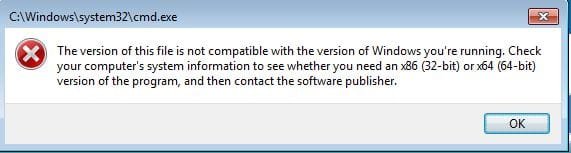
Oh... and attached is the screenshot I get when I open the command prompt...

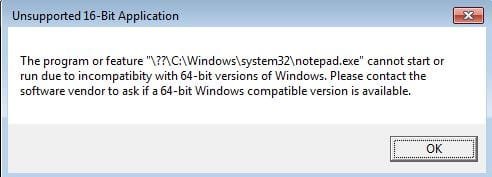
I even got error while trying to execute the second statement you provided... I have attached that as well...

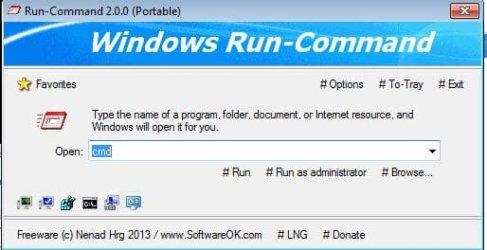
I managed to open up command prompt using a third party run command tool as I mentioned earlier... screenshot of that too is attachedm...
 

Attachments

  • 7Forums_Code_Error.JPG
    7Forums_Code_Error.JPG
    23.9 KB · Views: 9
  • 7Forums_Code_Error_In_CMD.JPG
    7Forums_Code_Error_In_CMD.JPG
    45.8 KB · Views: 9
  • CMD_Error.JPG
    CMD_Error.JPG
    26.2 KB · Views: 9
  • Run_Tool_Screenshot.JPG
    Run_Tool_Screenshot.JPG
    38.6 KB · Views: 9

My Computer

Computer type
PC/Desktop
Computer Manufacturer/Model Number
Custom Build
OS
Windows 7 Ultimate 64bit
CPU
AMD Phenom X4 Black Edition
Motherboard
Asus M3A78-EM
Memory
DDR2 - 6GB
Graphics Card(s)
ATI Radeon 6670 HD.
Hard Drives
Seagate 320 GB,
Seagate 1TB.
Antivirus
Bit Defender Internet Security 2015
Browser
Opera, Chrome, Mozilla Firefox, Internet Explorer
All of those are inside Windows\System32, do you have access to that location when browsing? Can you open them double clicking?

Try run in cmd as admin (until we come up with something):
Code:
sfc /scannow


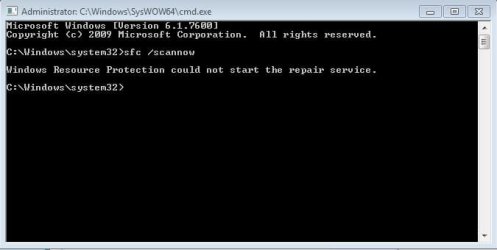
This is the error that I got while running the scan command...
 

Attachments

  • SFC_Scannow_Error.JPG
    SFC_Scannow_Error.JPG
    33.4 KB · Views: 9

My Computer

Computer type
PC/Desktop
Computer Manufacturer/Model Number
Custom Build
OS
Windows 7 Ultimate 64bit
CPU
AMD Phenom X4 Black Edition
Motherboard
Asus M3A78-EM
Memory
DDR2 - 6GB
Graphics Card(s)
ATI Radeon 6670 HD.
Hard Drives
Seagate 320 GB,
Seagate 1TB.
Antivirus
Bit Defender Internet Security 2015
Browser
Opera, Chrome, Mozilla Firefox, Internet Explorer
Try running the command in Safe Mode.

Also scan with Malwarebytes Anti-Malware free (enable rootkit scanning too, settings - detections).

It seems the 64bit versions got corrupted, we need sfc results to confirm. SysWoW64 (32bit) versions are running.

Edit: Did you try browsing to System32 folder and manually starting these apps? (mouse double click)

Try running the cmd as admin with your 3rd party app (Run Command 2).

Also see SFC /SCANNOW Command - Run in Windows 8 for sfc error. (The DISM command as used in the tutorial doesn't work in win7)
 

My Computer

Computer type
PC/Desktop
Computer Manufacturer/Model Number
Custom Build
OS
Windows 7 Ultimate x64 SP1
CPU
AMD Phenom 2 1090T
Motherboard
Gigabyte GA-890FXA-UD5
Memory
2x8GB Kingston HyperX Fury Black 1600Mhz Unganged
Graphics Card(s)
MSI GTX 970 Gaming 4G
Sound Card
Realtek On-Board HD 7.1 Audio / Logitech G35
Monitor(s) Displays
3xAcer GD245HQ
Screen Resolution
1920x1080
Hard Drives
Samsung 850 Pro 512GB SSD - OS /
WD Caviar Black SATA 3 - 1 TBx2 - Dynamic RAID 0 /
WD Caviar Green SATA 2 - 640GBx2 - Dynamic RAID 0 /
WD Caviar Green SATA 2 - 640GB - Internal Backup /
Seagate Barracude SATA 3 - 3TB - External Backup/ Sync
PSU
HighPower 1000W
Case
Cooler Master HAF 932
Cooling
Noctua NH-D14
Keyboard
Logitech G19
Mouse
Logitech G500
Internet Speed
100/4 Mbit Cable (100GB quota)
Antivirus
ZoneAlarm Extreme Security / MBAM Pro / MBAE Free / SAS Free
Browser
IE 11 - Firefox - Chrome
Other Info
Logitech F710/ G27/ G940/ Z5500 // TrackIR 5 // Nvidia 3D Surround Vision
Back
Top