I am trying to add a service to my primary broadband modem's Network adapter.
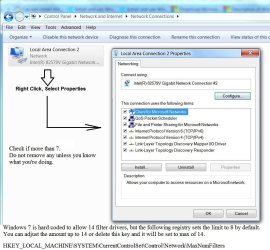
Right click connection then select properties.
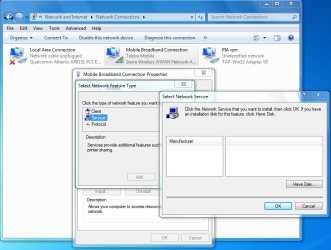
When I select Install then select Service then press ADD the resulting dialogue box is empty.
The same thing happens if I select Client or Protocol. There a no entries to choose from. Weird!
I tried going to Control Panel Programs and Features to check if I could turn Windows Features on or off but there is nothing there to do with Networking. From memory in XP there was but that seems to have changed in Windows 7.
If anyone has a clue why this box is empty I would really appreciate it.
Google search for "add service to network adapter" returns millions of results, all of which are not vaguely relevant to my problem. There are results for actually adding the said service but they all presume the resulting dialogue box is not empty.
Thanks for any replies.
My Computer
Computer type
PC/Desktop
Computer Manufacturer/Model Number
custom build
OS
Windows 7 Home Premium 32bit
CPU
Intel core i3 2100
Motherboard
Gigabyte H61M-USB3-B3
Memory
4 GB
Graphics Card(s)
ONBOARD INTEL HD graphics
Hard Drives
1 X Samsung 850 Pro SSD 256GB
1 X Western Digital 500 GB
1 X Western Digital 1TB
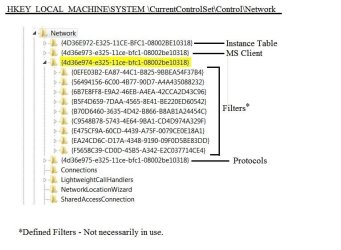
How many services (filters) are listed now? Windows has default maximum of eight with a hard limit of 14. If all of them are required, you would need to mod the Registry.
Attachments
Network Filters-2.JPG
212.2 KB
· Views: 1
My Computer
Computer type
PC/Desktop
Computer Manufacturer/Model Number
Built 2/11/2011
OS
Windows 7 Pro-x64
CPU
i7-2600 3.4GHz - 3.8GHz Turbo
Motherboard
Intel DH67BL-B3
Memory
8Gb - 2x4GB, Muskin 991770 PC3-1333
Graphics Card(s)
Integrated Intel HD 2000
Sound Card
Integrated Intel 10.1 HD, RealTek ALC892
Monitor(s) Displays
Asus LCD VH222H, Haier HL24XSL2a
Screen Resolution
1920x1080, 1920x1080
Hard Drives
Crucial SSD C300-128Gb,
Western Digital WD5002AALX - 500Gb,
Western Digital WD7501AALS - 750Gb
PSU
Seasonic 650W 80+ Gold Modular
Case
Rosewill Defender
Cooling
Stock CPU, Four 120mm case fans, PCH fan added
Keyboard
Logitech EX100 Y-RBH94 Wireless
Mouse
Logitech EX100 M-RCE95 Wireless
Internet Speed
3.0/1.5 Mbs
Antivirus
Microsoft Security Essentials
Browser
Microsoft Internet Explorer 11
Other Info
Antec Veris Premier-Multimedia IR Station,
Cyber Accoustics-3602 Speakers,
AFT XM-5U Card Reader,
Hauppauge TV-HVR-2250,
Sony LX300 USB Turntable
Thanks for the tip. I changed the registry as you suggested but that didn't make any difference.
This has me totally stumped. I have done a lot of google searches but nothing is helping at all.
Thanks for your reply.
My Computer
Computer type
PC/Desktop
Computer Manufacturer/Model Number
custom build
OS
Windows 7 Home Premium 32bit
CPU
Intel core i3 2100
Motherboard
Gigabyte H61M-USB3-B3
Memory
4 GB
Graphics Card(s)
ONBOARD INTEL HD graphics
Hard Drives
1 X Samsung 850 Pro SSD 256GB
1 X Western Digital 500 GB
1 X Western Digital 1TB
Ok, just to verify. What did you enter as the value for MaxNumFilters? If you just clicked on "Modify" and entered 14, you set the limit at 20 and I think Windows will ignore it and assume 8. The data is hex. If you want 14, ender "e" or change to decimal and enter 14.
What service are you trying to add and to what adapter?
My Computer
Computer type
PC/Desktop
Computer Manufacturer/Model Number
Built 2/11/2011
OS
Windows 7 Pro-x64
CPU
i7-2600 3.4GHz - 3.8GHz Turbo
Motherboard
Intel DH67BL-B3
Memory
8Gb - 2x4GB, Muskin 991770 PC3-1333
Graphics Card(s)
Integrated Intel HD 2000
Sound Card
Integrated Intel 10.1 HD, RealTek ALC892
Monitor(s) Displays
Asus LCD VH222H, Haier HL24XSL2a
Screen Resolution
1920x1080, 1920x1080
Hard Drives
Crucial SSD C300-128Gb,
Western Digital WD5002AALX - 500Gb,
Western Digital WD7501AALS - 750Gb
PSU
Seasonic 650W 80+ Gold Modular
Case
Rosewill Defender
Cooling
Stock CPU, Four 120mm case fans, PCH fan added
Keyboard
Logitech EX100 Y-RBH94 Wireless
Mouse
Logitech EX100 M-RCE95 Wireless
Internet Speed
3.0/1.5 Mbs
Antivirus
Microsoft Security Essentials
Browser
Microsoft Internet Explorer 11
Other Info
Antec Veris Premier-Multimedia IR Station,
Cyber Accoustics-3602 Speakers,
AFT XM-5U Card Reader,
Hauppauge TV-HVR-2250,
Sony LX300 USB Turntable
I just double checked. It is set at Decimal 14 or hex e
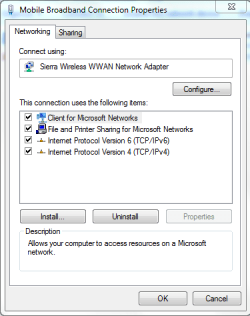
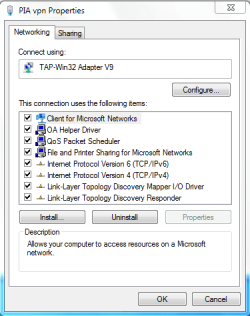
I am trying to add OA Helper driver to my mobile broadband adapter. This is my usb 4G Modem.
OA Helper driver is for Online Armor Firewall.
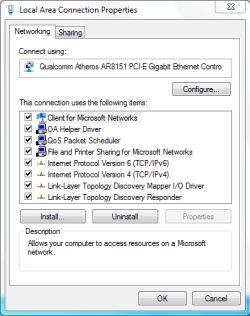
As you can see from the screenshots it is there in the ethernet adapter and also in the VPN connection.
I re-installed Online Armor Firewall with the latest version on the website and it made no difference.
I am just confused as to why it is in the other two adapters but not my mobile broadband one.
Also QoS packet scheduler cannot be added as when i press add there is nothing there to add.
This is the same no matter which adapter I try to install/add anything to. It is just blank. Very Frustrating.
Thanks again for your continued help.
My Computer
Computer type
PC/Desktop
Computer Manufacturer/Model Number
custom build
OS
Windows 7 Home Premium 32bit
CPU
Intel core i3 2100
Motherboard
Gigabyte H61M-USB3-B3
Memory
4 GB
Graphics Card(s)
ONBOARD INTEL HD graphics
Hard Drives
1 X Samsung 850 Pro SSD 256GB
1 X Western Digital 500 GB
1 X Western Digital 1TB
Hmmmmm. I'm going to have to dig deeper. The empty services window normally means the installer can't be found. I thought it might be an instance problem but it doesn't seem that way now. I checked mine and it's empty too. The only one I show entries on is adding Protocols.
Would you happen to have IE11 installed? Are you using Windows Firewall?
I'll try to get back as soon as I can.
My Computer
Computer type
PC/Desktop
Computer Manufacturer/Model Number
Built 2/11/2011
OS
Windows 7 Pro-x64
CPU
i7-2600 3.4GHz - 3.8GHz Turbo
Motherboard
Intel DH67BL-B3
Memory
8Gb - 2x4GB, Muskin 991770 PC3-1333
Graphics Card(s)
Integrated Intel HD 2000
Sound Card
Integrated Intel 10.1 HD, RealTek ALC892
Monitor(s) Displays
Asus LCD VH222H, Haier HL24XSL2a
Screen Resolution
1920x1080, 1920x1080
Hard Drives
Crucial SSD C300-128Gb,
Western Digital WD5002AALX - 500Gb,
Western Digital WD7501AALS - 750Gb
PSU
Seasonic 650W 80+ Gold Modular
Case
Rosewill Defender
Cooling
Stock CPU, Four 120mm case fans, PCH fan added
Keyboard
Logitech EX100 Y-RBH94 Wireless
Mouse
Logitech EX100 M-RCE95 Wireless
Internet Speed
3.0/1.5 Mbs
Antivirus
Microsoft Security Essentials
Browser
Microsoft Internet Explorer 11
Other Info
Antec Veris Premier-Multimedia IR Station,
Cyber Accoustics-3602 Speakers,
AFT XM-5U Card Reader,
Hauppauge TV-HVR-2250,
Sony LX300 USB Turntable
Hi Wiz, No I only have IE 8 which I never ever use. I use Firefox. I am glad you said yours is empty as well. I checked my mum's computer and that was same. Empty. My firewall is Online Armor and I find it really good, HIPS etc. I am so puzzled by this. I know from memory in XP you could add networking components via Add Remove Programs but that has changed in Windows 7. There must be a reason the dialogue box is empty surely. Again thanks for your continued assistance.
My Computer
Computer type
PC/Desktop
Computer Manufacturer/Model Number
custom build
OS
Windows 7 Home Premium 32bit
CPU
Intel core i3 2100
Motherboard
Gigabyte H61M-USB3-B3
Memory
4 GB
Graphics Card(s)
ONBOARD INTEL HD graphics
Hard Drives
1 X Samsung 850 Pro SSD 256GB
1 X Western Digital 500 GB
1 X Western Digital 1TB
IE11 has been causing other unrelated problems for a few so that question was just to remove it from the mix. I did find the same MS-documented problem adding services but it relates to a user designated as the network operator. (Go figure.)
Windows uses .inf files to install those services. When the window is empty, related documentation indicates the files can't be found or are corrupt. I ran SFC /scannow last night and just briefly scanned the CBS.log and saw a few network items. I didn't look in detail 'cause my eyes were pretty tired. I'll look it over this afternoon. There was no change to adding services but I also had a console message that some items could not be corrected. I was going to try booting in safe mode (without networking) and run SFC again. In the mean time you might try that too.
My Computer
Computer type
PC/Desktop
Computer Manufacturer/Model Number
Built 2/11/2011
OS
Windows 7 Pro-x64
CPU
i7-2600 3.4GHz - 3.8GHz Turbo
Motherboard
Intel DH67BL-B3
Memory
8Gb - 2x4GB, Muskin 991770 PC3-1333
Graphics Card(s)
Integrated Intel HD 2000
Sound Card
Integrated Intel 10.1 HD, RealTek ALC892
Monitor(s) Displays
Asus LCD VH222H, Haier HL24XSL2a
Screen Resolution
1920x1080, 1920x1080
Hard Drives
Crucial SSD C300-128Gb,
Western Digital WD5002AALX - 500Gb,
Western Digital WD7501AALS - 750Gb
PSU
Seasonic 650W 80+ Gold Modular
Case
Rosewill Defender
Cooling
Stock CPU, Four 120mm case fans, PCH fan added
Keyboard
Logitech EX100 Y-RBH94 Wireless
Mouse
Logitech EX100 M-RCE95 Wireless
Internet Speed
3.0/1.5 Mbs
Antivirus
Microsoft Security Essentials
Browser
Microsoft Internet Explorer 11
Other Info
Antec Veris Premier-Multimedia IR Station,
Cyber Accoustics-3602 Speakers,
AFT XM-5U Card Reader,
Hauppauge TV-HVR-2250,
Sony LX300 USB Turntable
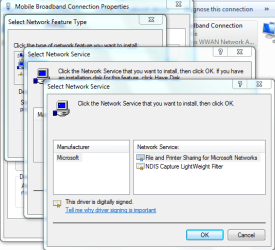
I may have found something but I need you to check to see if the service you want to add shows up in the list when you use the default Net Service installer.
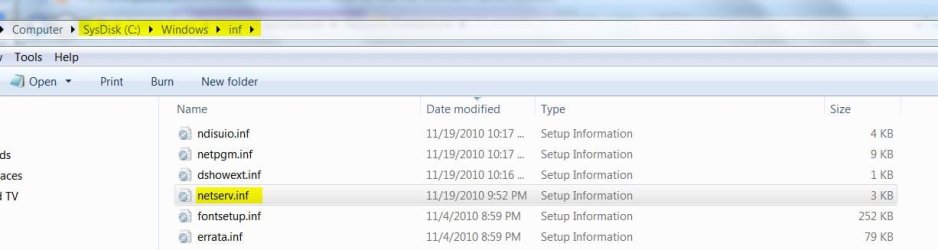
1. Get to the Add Service window then select Have Disk.
2. Browse to C:\Windows\INF and click on netserv.inf then Open. The window will close.
3. Click on OK on the Install from disk window and it should close.
4. A list of available services should now appear.
Is your service listed?
Attachments
Network Services - Add.JPG
75.6 KB
· Views: 1
Network Services INF.JPG
55.8 KB
· Views: 1
My Computer
Computer type
PC/Desktop
Computer Manufacturer/Model Number
Built 2/11/2011
OS
Windows 7 Pro-x64
CPU
i7-2600 3.4GHz - 3.8GHz Turbo
Motherboard
Intel DH67BL-B3
Memory
8Gb - 2x4GB, Muskin 991770 PC3-1333
Graphics Card(s)
Integrated Intel HD 2000
Sound Card
Integrated Intel 10.1 HD, RealTek ALC892
Monitor(s) Displays
Asus LCD VH222H, Haier HL24XSL2a
Screen Resolution
1920x1080, 1920x1080
Hard Drives
Crucial SSD C300-128Gb,
Western Digital WD5002AALX - 500Gb,
Western Digital WD7501AALS - 750Gb
PSU
Seasonic 650W 80+ Gold Modular
Case
Rosewill Defender
Cooling
Stock CPU, Four 120mm case fans, PCH fan added
Keyboard
Logitech EX100 Y-RBH94 Wireless
Mouse
Logitech EX100 M-RCE95 Wireless
Internet Speed
3.0/1.5 Mbs
Antivirus
Microsoft Security Essentials
Browser
Microsoft Internet Explorer 11
Other Info
Antec Veris Premier-Multimedia IR Station,
Cyber Accoustics-3602 Speakers,
AFT XM-5U Card Reader,
Hauppauge TV-HVR-2250,
Sony LX300 USB Turntable
I'm a little stumped to say the least and I guess our network gurus are out shopping. I agree, the services should just pop up. They don't because some pointer is missing. That was why the test on netserv.
The image below shows the Registry group for the service filters. If you would, could you see if your oem73.inf is included in that group? All you have to do is expand each key and the details will show. Don't change anything, just view them. Also, was oem73.inf installed in the Windows\inf folder?
Attachments
Network Filters-Reg.JPG
133.4 KB
· Views: 1
My Computer
Computer type
PC/Desktop
Computer Manufacturer/Model Number
Built 2/11/2011
OS
Windows 7 Pro-x64
CPU
i7-2600 3.4GHz - 3.8GHz Turbo
Motherboard
Intel DH67BL-B3
Memory
8Gb - 2x4GB, Muskin 991770 PC3-1333
Graphics Card(s)
Integrated Intel HD 2000
Sound Card
Integrated Intel 10.1 HD, RealTek ALC892
Monitor(s) Displays
Asus LCD VH222H, Haier HL24XSL2a
Screen Resolution
1920x1080, 1920x1080
Hard Drives
Crucial SSD C300-128Gb,
Western Digital WD5002AALX - 500Gb,
Western Digital WD7501AALS - 750Gb
PSU
Seasonic 650W 80+ Gold Modular
Case
Rosewill Defender
Cooling
Stock CPU, Four 120mm case fans, PCH fan added
Keyboard
Logitech EX100 Y-RBH94 Wireless
Mouse
Logitech EX100 M-RCE95 Wireless
Internet Speed
3.0/1.5 Mbs
Antivirus
Microsoft Security Essentials
Browser
Microsoft Internet Explorer 11
Other Info
Antec Veris Premier-Multimedia IR Station,
Cyber Accoustics-3602 Speakers,
AFT XM-5U Card Reader,
Hauppauge TV-HVR-2250,
Sony LX300 USB Turntable



 The only one I show entries on is adding Protocols.


 I agree, the services should just pop up. They don't because some pointer is missing. That was why the test on netserv.