I'm at a loss for ideas at the moment other than running a Proc-Trace on the add routine and see what dlls are called then see if they're referred to in the registry. What I'm afraid of is that since we both have blank screens, I can't tell what's missing if it's not in the registry. It's clear that the drivers were installed or they wouldn't be in Windows\inf and the Registry. What's not clear is why they don't show up.
Sorry I can't be more help at the moment. I'll put in another help call and see if someone chimes in.
My Computer
Computer type
PC/Desktop
Computer Manufacturer/Model Number
Built 2/11/2011
OS
Windows 7 Pro-x64
CPU
i7-2600 3.4GHz - 3.8GHz Turbo
Motherboard
Intel DH67BL-B3
Memory
8Gb - 2x4GB, Muskin 991770 PC3-1333
Graphics Card(s)
Integrated Intel HD 2000
Sound Card
Integrated Intel 10.1 HD, RealTek ALC892
Monitor(s) Displays
Asus LCD VH222H, Haier HL24XSL2a
Screen Resolution
1920x1080, 1920x1080
Hard Drives
Crucial SSD C300-128Gb,
Western Digital WD5002AALX - 500Gb,
Western Digital WD7501AALS - 750Gb
PSU
Seasonic 650W 80+ Gold Modular
Case
Rosewill Defender
Cooling
Stock CPU, Four 120mm case fans, PCH fan added
Keyboard
Logitech EX100 Y-RBH94 Wireless
Mouse
Logitech EX100 M-RCE95 Wireless
Internet Speed
3.0/1.5 Mbs
Antivirus
Microsoft Security Essentials
Browser
Microsoft Internet Explorer 11
Other Info
Antec Veris Premier-Multimedia IR Station,
Cyber Accoustics-3602 Speakers,
AFT XM-5U Card Reader,
Hauppauge TV-HVR-2250,
Sony LX300 USB Turntable
To get the most hits from google i searched for add client to microsoft networks.
They all say the same procedure, however I have found a few replies that state the dialogue box is empty so we are not alone with this problem.
I am wondering if this is just a Windows 7 problem. It seems strange.
If one were to uninstall client for microsoft networks for any reason at all I presume you would not be able to reinstall it.
You cannot re-install what is not there.
I did try selecting oem72.inf and that didn't work.
I even tried right clicking oem72.inf and selecting install but the error box says "The inf file you selected does not support this method of installation.
Thanks again for all your help.
My Computer
Computer type
PC/Desktop
Computer Manufacturer/Model Number
custom build
OS
Windows 7 Home Premium 32bit
CPU
Intel core i3 2100
Motherboard
Gigabyte H61M-USB3-B3
Memory
4 GB
Graphics Card(s)
ONBOARD INTEL HD graphics
Hard Drives
1 X Samsung 850 Pro SSD 256GB
1 X Western Digital 500 GB
1 X Western Digital 1TB
I put in a request for others to check their add services so we'll see what happens.
Yeah, I spent several hours going through MS Tech articles and nothing helped. That was after several Google tries.
One shot you might try (since you have more adapters) is to uninstall the adaptor drivers and disable the adaptor. Re-boot then reinstall them. My thought on this is the adaptor was installed while MaxNumFilters was set to 8 and perhaps there's a end point that's dangling somewhere. Just a shot though.
My Computer
Computer type
PC/Desktop
Computer Manufacturer/Model Number
Built 2/11/2011
OS
Windows 7 Pro-x64
CPU
i7-2600 3.4GHz - 3.8GHz Turbo
Motherboard
Intel DH67BL-B3
Memory
8Gb - 2x4GB, Muskin 991770 PC3-1333
Graphics Card(s)
Integrated Intel HD 2000
Sound Card
Integrated Intel 10.1 HD, RealTek ALC892
Monitor(s) Displays
Asus LCD VH222H, Haier HL24XSL2a
Screen Resolution
1920x1080, 1920x1080
Hard Drives
Crucial SSD C300-128Gb,
Western Digital WD5002AALX - 500Gb,
Western Digital WD7501AALS - 750Gb
PSU
Seasonic 650W 80+ Gold Modular
Case
Rosewill Defender
Cooling
Stock CPU, Four 120mm case fans, PCH fan added
Keyboard
Logitech EX100 Y-RBH94 Wireless
Mouse
Logitech EX100 M-RCE95 Wireless
Internet Speed
3.0/1.5 Mbs
Antivirus
Microsoft Security Essentials
Browser
Microsoft Internet Explorer 11
Other Info
Antec Veris Premier-Multimedia IR Station,
Cyber Accoustics-3602 Speakers,
AFT XM-5U Card Reader,
Hauppauge TV-HVR-2250,
Sony LX300 USB Turntable
I already tried that after increasing network filters to 14.
Uninstalled my broadband connection manager and then made sure all drivers were uninstalled.
Then did a re-install of Software and drivers and unfortunately it is still the same.
My Computer
Computer type
PC/Desktop
Computer Manufacturer/Model Number
custom build
OS
Windows 7 Home Premium 32bit
CPU
Intel core i3 2100
Motherboard
Gigabyte H61M-USB3-B3
Memory
4 GB
Graphics Card(s)
ONBOARD INTEL HD graphics
Hard Drives
1 X Samsung 850 Pro SSD 256GB
1 X Western Digital 500 GB
1 X Western Digital 1TB
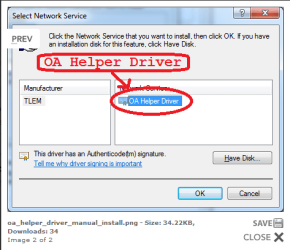
I managed to find an image on the web of what I am trying to achieve.
This is the said OA Helper driver that is shown as installed for ethernet and VPN adapters.
I know it is there but nothing will show up when you try to add a service for my mobile broadband adapter.
This image is not from my computer. It is from an article on the web.
Attachments
TLEM Driver.PNG
14.5 KB
· Views: 16
My Computer
Computer type
PC/Desktop
Computer Manufacturer/Model Number
custom build
OS
Windows 7 Home Premium 32bit
CPU
Intel core i3 2100
Motherboard
Gigabyte H61M-USB3-B3
Memory
4 GB
Graphics Card(s)
ONBOARD INTEL HD graphics
Hard Drives
1 X Samsung 850 Pro SSD 256GB
1 X Western Digital 500 GB
1 X Western Digital 1TB
Yes that was the response I was given, however the OA Helper driver should show up when I try to add a service from the Ethernet adapter or the VPN adapter but nothing shows up.
My main concern is why nothing shows up when you try to add a client or service to an adapter.
From everything I have read these dialogue boxes should not be empty so I am still confused.
My Computer
Computer type
PC/Desktop
Computer Manufacturer/Model Number
custom build
OS
Windows 7 Home Premium 32bit
CPU
Intel core i3 2100
Motherboard
Gigabyte H61M-USB3-B3
Memory
4 GB
Graphics Card(s)
ONBOARD INTEL HD graphics
Hard Drives
1 X Samsung 850 Pro SSD 256GB
1 X Western Digital 500 GB
1 X Western Digital 1TB