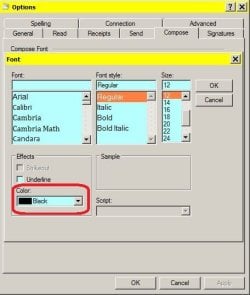
Hello...I have been trying to change my font color in WLM since changing computers 3yrs. ago and have not able to do it yet. I've done much searching and reading to find out what I'm doing wrong. No joy yet. I am familiar with changing colors with Outlook Express and have found the formula for WLM should be the same. Here is what I'm trying to do.
1. Change the default color for all of the words of the message I compose to anything but black (default now).
From the WLM window I click the unnamed icon at the top left of the page ..then options...mail...compose. I then click on a different color than black from the dropdown menu..click OK, then Apply and OK again. I begin to compose my message and the color is still black with a colored serpentine line below the words. Then I swear again but this won't help either.
2. Change the color of single words within the body of my message and leave the rest of the message black.
I use the dropdown color menu above the message to change the color of single words. This will not work either. Everything stays black.
It's strange to me that I am able to change the font style and size with no problem. This problem is not a "deal breaker" for me; It's just irritating that I can't do it.
Thanks in advance for any tips you may have for me.
1. Change the default color for all of the words of the message I compose to anything but black (default now).
From the WLM window I click the unnamed icon at the top left of the page ..then options...mail...compose. I then click on a different color than black from the dropdown menu..click OK, then Apply and OK again. I begin to compose my message and the color is still black with a colored serpentine line below the words. Then I swear again but this won't help either.
2. Change the color of single words within the body of my message and leave the rest of the message black.
I use the dropdown color menu above the message to change the color of single words. This will not work either. Everything stays black.
It's strange to me that I am able to change the font style and size with no problem. This problem is not a "deal breaker" for me; It's just irritating that I can't do it.
Thanks in advance for any tips you may have for me.
My Computer
At a glance
Windows 7 Home Premium 64 bitIntel (R) core (TM) Quad CPU Q93008.00 GBATI Radeon HD 4350
- Computer type
- PC/Desktop
- Computer Manufacturer/Model Number
- HP Pavilion Model HPE-137-C
- OS
- Windows 7 Home Premium 64 bit
- CPU
- Intel (R) core (TM) Quad CPU Q9300
- Motherboard
- Pegatron Corp. Eureka 3 1.02
- Memory
- 8.00 GB
- Graphics Card(s)
- ATI Radeon HD 4350
- Hard Drives
- 1000.10 GB.
HP BD B DH8E21. ATA Device [CD-ROM drive]
- Antivirus
- AVG Free
- Browser
- IE- 11