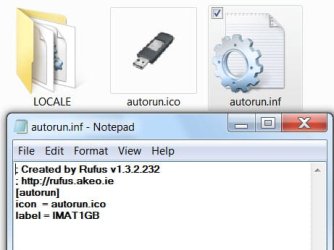
Have a Western Digital external HD (WD 2500BEV External USB Device).
It is about 3 years old but was only used once.
Recently resurrected the device to carry about 900+ TXT files (AutoCad VBA code snippets)
When using the device between 3 PCs -- if device was hot plugged, the PC froze, not even Ctrl+Alt+Delete would raise "Task Manager".
Radical shut-down with "Startup" btn on PC.
The only way to access the device was from a cold start with the device plugged in.
Copied data + device ICO + INF files to a safe folder
Reformated the external-device as NTFS
Copied all data files back onto the device including the ICO + INF files (original Western Digital ICO + INF files)
Device now runs like a new one except ...
The icon now fails all I get is the default windows icon, instead of the WD icon.
With a lot of drives active I would like a distinctive icon
(Have also rewritten the INF file as a precaution with and without "Link")
Why is the icon not "sticking" ??
I would appreciate any help
Thank you
3 PCs are: Win7 x86, Win7 x64, WinXP x86
It is about 3 years old but was only used once.
Recently resurrected the device to carry about 900+ TXT files (AutoCad VBA code snippets)
When using the device between 3 PCs -- if device was hot plugged, the PC froze, not even Ctrl+Alt+Delete would raise "Task Manager".
Radical shut-down with "Startup" btn on PC.
The only way to access the device was from a cold start with the device plugged in.
Copied data + device ICO + INF files to a safe folder
Reformated the external-device as NTFS
Copied all data files back onto the device including the ICO + INF files (original Western Digital ICO + INF files)
Device now runs like a new one except ...
The icon now fails all I get is the default windows icon, instead of the WD icon.
With a lot of drives active I would like a distinctive icon
(Have also rewritten the INF file as a precaution with and without "Link")
Why is the icon not "sticking" ??
I would appreciate any help
Thank you
3 PCs are: Win7 x86, Win7 x64, WinXP x86
Last edited:
My Computer
- Computer type
- PC/Desktop
- Computer Manufacturer/Model Number
- Toshiba, Lenovo (laptops) + 4 rigs
- OS
- XP Pro (x86) | 7 HP (x86) & (x64) | 7 Pro (x64)