Cannot create file "c:\User\...\Appdata\Roaming...". Access is denied.

KumaraB

New member
Cannot create file "c:\User\...\Appdata\Roaming...". Access is denied.

I'm not sure what's the cause for this, but I believe it has to do with a recent SweetIM malware attack. I tried to fix it. And also did a system restore. Malware is gone, but this thing came up.

The error message comes up upon closing an app (NoteTab Light). It's trying to save some info, but can't. My browser, Opera, now also is unable to recall from the cache when it previously can. Apparently, something has changed that prevents writing to files within that folder. Maybe not just the Roaming folder, but the whole Appdata as well. I can't be sure.

In anyway, I found that I can manually add and edit files in the folder, but apps can't do that anymore. What could be the cause?
 

My Computer

OS
Windows 7 Home Premium 64bit.
"Access is denied" could mean you're not administrator, or you haven't set the privileges of the action to allow yourself to do so..
 

My Computer

Computer Manufacturer/Model Number
Dell - Vostro 430
OS
Windows 7 Professional x64 SP1
CPU
Intel Core i7 860 @2.80GHz
Motherboard
Dell 054KM3
Memory
6144MB DDR3-SDRAM (3 x 2048 DDR3)
Graphics Card(s)
nVidia GeForce 310
Sound Card
Realtek High Definition Audio ALC662
Monitor(s) Displays
Dell Computer DELL E2311H
Screen Resolution
1920 x 1080
Hard Drives
Seagate Barracuda ST3750528AS (750 GB)
PSU
J515T 350W
Case
14.58inH x 6.69inW x 17.43inD
Cooling
Fan from the Box heehee
Keyboard
Rapoo Wireless Keyboard
Mouse
Rapoo Wireless Mouse
Internet Speed
1 byte every 2.6 hours
Other Info
Dreaming of building a new PC :D

Cant wait :)
I am logged in as administrator. Everything was working fine till then. In any case, how can I solve this issue?
 

My Computer

OS
Windows 7 Home Premium 64bit.
I'm not too sure how, Appdata is, as it name says, for application data, so I assume you can't save anything in it (it was already hidden automatically by windows).
 

My Computer

Computer Manufacturer/Model Number
Dell - Vostro 430
OS
Windows 7 Professional x64 SP1
CPU
Intel Core i7 860 @2.80GHz
Motherboard
Dell 054KM3
Memory
6144MB DDR3-SDRAM (3 x 2048 DDR3)
Graphics Card(s)
nVidia GeForce 310
Sound Card
Realtek High Definition Audio ALC662
Monitor(s) Displays
Dell Computer DELL E2311H
Screen Resolution
1920 x 1080
Hard Drives
Seagate Barracuda ST3750528AS (750 GB)
PSU
J515T 350W
Case
14.58inH x 6.69inW x 17.43inD
Cooling
Fan from the Box heehee
Keyboard
Rapoo Wireless Keyboard
Mouse
Rapoo Wireless Mouse
Internet Speed
1 byte every 2.6 hours
Other Info
Dreaming of building a new PC :D

Cant wait :)

My Computer

Computer type
PC/Desktop
Computer Manufacturer/Model Number
self build
OS
win 7 ultimate32bit, Win8.1pro wmc 32bit
CPU
amd phenom x4 9600
Motherboard
asus m2n32-sli deluxe
Memory
corsair twinxs 2x2gb
Graphics Card(s)
2x nvidia 1gb 8500gt
Sound Card
onboard
Monitor(s) Displays
23" PB Viseo 233d
Screen Resolution
1920x1080
Hard Drives
maxtor sata 500gb
maxtor sata 320gb
fujitsu sata200gb
PSU
oryxx tornado 750w
Case
thermaltake xaser lll
Cooling
artic freezer64 pro + 7 case fans
Done that. Problem remains. Anything else I can do? I suspect some sort of registry change is the cause.
 

My Computer

OS
Windows 7 Home Premium 64bit.
I've found out more about the issue. Apps actually can write new files into Appdata. What it can't do is modify existing files. What then could be the cause?
 

My Computer

OS
Windows 7 Home Premium 64bit.
I found out more. Strangely, by deleting the file that apps can't overwrite, the problem seem to disappear. Let me test this further.
 

My Computer

OS
Windows 7 Home Premium 64bit.
goto %userprofile% in windows explorer
right click appdata and check its security. click advanced

system, administrator, yourself... all have "full control"? Is it "inhereted" from folder c:\users\yourname?
 

My Computer

Computer type
Laptop
Computer Manufacturer/Model Number
ACER ASPIRE 5742G
OS
Microsoft Windows 7 Home Premium 64-bits 7601 Multiprocessor Free Service Pack 1
CPU
Intel(R) Core(TM) i3 CPU M 370 @ 2.40GHz
Motherboard
Acer Aspire 5742G
Memory
4,00 GB
Graphics Card(s)
ATI Mobility Radeon HD 5400 Series
Sound Card
(1) AMD High Definition Audio Device (2) Realtek High Defi
Screen Resolution
1366 x 768 x 32 bits (4294967296 colors) @ 60 Hz
Hard Drives
WDC WD5000BEVT-22ZAT0
goto %userprofile% in windows explorer
right click appdata and check its security. click advanced

system, administrator, yourself... all have "full control"? Is it "inhereted" from folder c:\users\yourname?

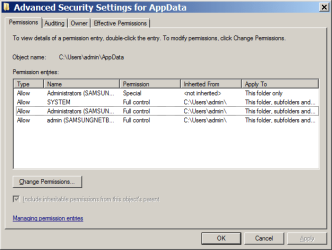
Yes and yes. On top of that, there's also another Allow type for Administrators (special, not inherited), which appeared after the "take ownership" attempt to solve the problem (but didn't).
 

My Computer

OS
Windows 7 Home Premium 64bit.
rigth click appdata->security->advanced->change permissions. Post screenshot.
 

My Computer

Computer type
Laptop
Computer Manufacturer/Model Number
ACER ASPIRE 5742G
OS
Microsoft Windows 7 Home Premium 64-bits 7601 Multiprocessor Free Service Pack 1
CPU
Intel(R) Core(TM) i3 CPU M 370 @ 2.40GHz
Motherboard
Acer Aspire 5742G
Memory
4,00 GB
Graphics Card(s)
ATI Mobility Radeon HD 5400 Series
Sound Card
(1) AMD High Definition Audio Device (2) Realtek High Defi
Screen Resolution
1366 x 768 x 32 bits (4294967296 colors) @ 60 Hz
Hard Drives
WDC WD5000BEVT-22ZAT0
There are folders, well not really folders they are links, in the Roaming folder that you can not access. Why and what are you trying to save in there and what is the exact path to the folder you are trying to save in.
 

My Computer

OS
7 x64
rigth click appdata->security->advanced->change permissions. Post screenshot.

Please see attached.

The problem seems to have been solved though. Still don't understand why, but deleting the data files that apps can't overwrite--e.g. C:\Users\admin\AppData\Roaming\NoteTab Light\NoteTab.fpr--enables the app to recreate the file, subsequently it has no more trouble overwriting them. The same applies for Opera's dcache files, and LibreOffice's extension files.

For weird reason, these files seem to have frozen in time. They are all dated 6 Sept, soon after which I did a system restore. So, I suspect that it has to do with the restore, though I can't be sure.

Please note that apps don't have any problem with some other data files.

Anyway, glad that I could somehow fix it.
 

Attachments

  • Clipboard01.png
    Clipboard01.png
    22.3 KB · Views: 20

My Computer

OS
Windows 7 Home Premium 64bit.
rigth click appdata->security->advanced->change permissions. Post screenshot.

Please see attached.

The problem seems to have been solved though. Still don't understand why, but deleting the data files that apps can't overwrite--e.g. C:\Users\admin\AppData\Roaming\NoteTab Light\NoteTab.fpr--enables the app to recreate the file, subsequently it has no more trouble overwriting them. The same applies for Opera's dcache files, and LibreOffice's extension files.

For weird reason, these files seem to have frozen in time. They are all dated 6 Sept, soon after which I did a system restore. So, I suspect that it has to do with the restore, though I can't be sure.

Please note that apps don't have any problem with some other data files.

Anyway, glad that I could somehow fix it.
Click "change permissions" in that screen. Put checkmark on both questions at bottom. Now user "admin" (yourself) has full control of all files in that folder and subfolders.
 

My Computer

Computer type
Laptop
Computer Manufacturer/Model Number
ACER ASPIRE 5742G
OS
Microsoft Windows 7 Home Premium 64-bits 7601 Multiprocessor Free Service Pack 1
CPU
Intel(R) Core(TM) i3 CPU M 370 @ 2.40GHz
Motherboard
Acer Aspire 5742G
Memory
4,00 GB
Graphics Card(s)
ATI Mobility Radeon HD 5400 Series
Sound Card
(1) AMD High Definition Audio Device (2) Realtek High Defi
Screen Resolution
1366 x 768 x 32 bits (4294967296 colors) @ 60 Hz
Hard Drives
WDC WD5000BEVT-22ZAT0
Done. I wouldn't know if it solves the problem though, as the problem no longer occurs. I'll see how things go.
 

My Computer

OS
Windows 7 Home Premium 64bit.
Done. I wouldn't know if it solves the problem though, as the problem no longer occurs. I'll see how things go.
The default security on appdata was fine. On subfolders as well, I think.
But something changed permissions on files in the folder.

In appdata permissions I see "administrators" - special. What special permissions? screenshot please
 

My Computer

Computer type
Laptop
Computer Manufacturer/Model Number
ACER ASPIRE 5742G
OS
Microsoft Windows 7 Home Premium 64-bits 7601 Multiprocessor Free Service Pack 1
CPU
Intel(R) Core(TM) i3 CPU M 370 @ 2.40GHz
Motherboard
Acer Aspire 5742G
Memory
4,00 GB
Graphics Card(s)
ATI Mobility Radeon HD 5400 Series
Sound Card
(1) AMD High Definition Audio Device (2) Realtek High Defi
Screen Resolution
1366 x 768 x 32 bits (4294967296 colors) @ 60 Hz
Hard Drives
WDC WD5000BEVT-22ZAT0
In appdata permissions I see "administrators" - special. What special permissions? screenshot please

Oh that's just due to the Take Ownership thing suggested earlier by pebbly. Shall I remove it?
yes remove it. and same 2 checkmarks on bottom as told you a few hours ago. Administrators have full control anyway
 

My Computer

Computer type
Laptop
Computer Manufacturer/Model Number
ACER ASPIRE 5742G
OS
Microsoft Windows 7 Home Premium 64-bits 7601 Multiprocessor Free Service Pack 1
CPU
Intel(R) Core(TM) i3 CPU M 370 @ 2.40GHz
Motherboard
Acer Aspire 5742G
Memory
4,00 GB
Graphics Card(s)
ATI Mobility Radeon HD 5400 Series
Sound Card
(1) AMD High Definition Audio Device (2) Realtek High Defi
Screen Resolution
1366 x 768 x 32 bits (4294967296 colors) @ 60 Hz
Hard Drives
WDC WD5000BEVT-22ZAT0

My Computer

OS
Windows 7 Home Premium 64bit.
Back
Top