Solved Cannot create partition

ninetailz

Hardcore Otaku
Local time
5:15 PM
Messages
37
Location
New York
Ok, i was trying to dual boot win7 with eOS and in order to do that i have to create partition and install the other os into the other partition.

I have tried this on partition creating program like EaseUS, paragon partition manager and built in win7 partition creator (Disk management) but i cannot create a partition, no matter how many times i try on win7 disk management program the creating process hangs. It also happened on easeus and paragon. Easeus had boot time partitioning which hanged and created a BSOD and restarted but didn't create a partition. Paragon also just hanged and didn't work.

Before these incident happened i already dual booted with 2 OS and this third time it showed 0MB available shirking space so i defragmented (boot time/normal defrag with smart defrag) and disabled many things like (system restore, paging, kernel dump) and it worked and showed the available space as it should be.

Please help, i have been trying to create partition for 2 days now :(

Thanks in advance

UPDATE: Recently my chkdsk stopped and showed BSOD

PS: I don't know if this is the right section
 
Last edited:

My Computer

Computer type
Laptop
Computer Manufacturer/Model Number
Dell
OS
Microsoft Windows 7 Ultimate 64-bit Multiprocessor Service Pack 1
CPU
Intel(R) Core(TM)2 Duo CPU P8600 @ 2.40GHz
Motherboard
Dell Inc. 0U692R
Memory
4.00 GB
Graphics Card(s)
(1) Mobile Intel(R) 4 Series Express Chipset Family
Sound Card
(1) Intel(R) / IDT High Definition Audio HDMI
Screen Resolution
1440 x 900 x 32 bits (4294967296 colors) @ 40 Hz
Hard Drives
TOSHIBA MQ01ABD050 ATA Device
Mouse
E-Blue Cobra Junior
Internet Speed
15 MBs
Antivirus
Microsoft Security Essentials
Browser
Chrome
Nietailz mate sounds like you have real problems whe it will not run chkdsk - have you tried that in safe mode?
If you can and it comes up with problems - run it again with the /f and maybe the/r switches
http://www.sevenforums.com/tutorials/433-disk-check.html

If that still does not come up with anything then go with these


http://www.superantispyware.com/

http://www.malwarebytes.org/products/malwarebytes_free/

http://www.bleepingcomputer.com/download/adwcleaner/

download from bleeping computer – delete any rubbishthese find.
All this is to eliminate a few things.

We may need to go on with other scans for hardware etc
 

My Computer

Computer type
PC/Desktop
Computer Manufacturer/Model Number
Own build (new) Desk1 / Asus ROG Win 7 / Desk2 1st build
OS
Desk1 7 Home Prem / Desk2 10 Pro / Main lap Asus ROG 10 Pro 2 laptop Toshiba 7 Pro Asus P2520 7 & 10
CPU
Desk1 i5 3750K / Laptop i7 GTX 860M / Desk2 i5 2500
Motherboard
Desk1 Asus P877-V / Desk2 Gigabyte H67 UD3H / Laptop ?
Memory
Desk1 8GB (1866) / Desk2 16GB (1333) / Laptop 8Gb DDR3
Graphics Card(s)
Desk 1& 2NVidia GTX 650 & Laptops on board Intel
Sound Card
Desk 1 & 2 -XONAR DG Realtek High Def audio Laptop
Monitor(s) Displays
Desk 1 Benq HD 2450 / Desk2 Philips 24" / Laptop 17.5"
Screen Resolution
1920x1080 D1 & D2 & Laptop 1
Hard Drives
Desk1 Samsung 120GB 830 SSD
Asus ROG 256GB 850 Pro SSD
Desk2 Samsung 840 256 SSD
Toshiba 120GB EVO
PSU
Desk 1 Corsair HX 1050/ Laptop ? / Desk 2 Corsair HX 650
Case
Desk 1 Cooler HAF XM ? Toshiba laptop / Desk2 Coolermaster
Cooling
Fans on all Desk1 -2 Desk2 - all Coolermasters 5 Laptop ?
Keyboard
Desk 1 MS Sidewinder X6 Desk 2 MS Sidewinder X 4
Mouse
Desk 1&2 - Gigabyte MS 900 gamer - laptop - Logitec wireless
Internet Speed
ADSL2+
Other Info
One other Desktop (tester) and spare Toshba laptop both with SSD's
Running Kaspersky 2016 ISS on all machines config'd identically
Logitec audio stereo systems on each machine (x3)
Canon MG5250MFC
Router/modem TP-Link running WPA2SK

My Computer

Computer type
PC/Desktop
Computer Manufacturer/Model Number
Skylake Special #666
OS
Windows 10 Pro x64
CPU
Intel Core i7 6700K
Motherboard
Asus Sabertooth Z170 Mark 1
Memory
GSkill TridentZ RGB 16GB 3600 16-16-16-36
Graphics Card(s)
EVGA GTX 980 Ti SC x2
Sound Card
Realtek High Definition
Monitor(s) Displays
AOC G2460PG
Screen Resolution
1920 x 1080 144Hz
Hard Drives
Samsung 860 Pro 256GB, Seagate Barracuda 4TB x2
PSU
EVGA 1000 P2, EVGA White Custom Braided Cables
Case
Corsair Vengeance C70 Gunmetal Black
Cooling
Corsair H100i v2, Corsair ML120 x2, Thermal Grizzly Kryonaut
Keyboard
Logitech G910 Orion Spectrum
Mouse
Logitech G700s
Internet Speed
Verizon Fios Quantum Gateway 75/75
Antivirus
Windows Defender, Malwarebytes Free 3.8.3
Browser
Chrome
Other Info
Corsair SP120 x4, LG Blu-ray Drive, Durabrand HT-395 100 Watt Dolby Digital Amp, Corsair H2100 Wireless 7.1 Headset
The reason will almost always be immediately obvious when we see the Disk Mgmt screenshot. You shouldn't need to use more than Disk Mgmt tools to shrink and create a partition, but something is awry with your configuration.
 
My thoughts entirely Greg with chkdsk not running and why I asked him to use safe mode in the hope of picking something up.
I have a feeling there might be some malware in there too to be honest or even a drive problem which would have been one of the things I suggested next.
 

My Computer

Computer type
PC/Desktop
Computer Manufacturer/Model Number
Own build (new) Desk1 / Asus ROG Win 7 / Desk2 1st build
OS
Desk1 7 Home Prem / Desk2 10 Pro / Main lap Asus ROG 10 Pro 2 laptop Toshiba 7 Pro Asus P2520 7 & 10
CPU
Desk1 i5 3750K / Laptop i7 GTX 860M / Desk2 i5 2500
Motherboard
Desk1 Asus P877-V / Desk2 Gigabyte H67 UD3H / Laptop ?
Memory
Desk1 8GB (1866) / Desk2 16GB (1333) / Laptop 8Gb DDR3
Graphics Card(s)
Desk 1& 2NVidia GTX 650 & Laptops on board Intel
Sound Card
Desk 1 & 2 -XONAR DG Realtek High Def audio Laptop
Monitor(s) Displays
Desk 1 Benq HD 2450 / Desk2 Philips 24" / Laptop 17.5"
Screen Resolution
1920x1080 D1 & D2 & Laptop 1
Hard Drives
Desk1 Samsung 120GB 830 SSD
Asus ROG 256GB 850 Pro SSD
Desk2 Samsung 840 256 SSD
Toshiba 120GB EVO
PSU
Desk 1 Corsair HX 1050/ Laptop ? / Desk 2 Corsair HX 650
Case
Desk 1 Cooler HAF XM ? Toshiba laptop / Desk2 Coolermaster
Cooling
Fans on all Desk1 -2 Desk2 - all Coolermasters 5 Laptop ?
Keyboard
Desk 1 MS Sidewinder X6 Desk 2 MS Sidewinder X 4
Mouse
Desk 1&2 - Gigabyte MS 900 gamer - laptop - Logitec wireless
Internet Speed
ADSL2+
Other Info
One other Desktop (tester) and spare Toshba laptop both with SSD's
Running Kaspersky 2016 ISS on all machines config'd identically
Logitec audio stereo systems on each machine (x3)
Canon MG5250MFC
Router/modem TP-Link running WPA2SK
Aren't BSODs normally hardware related?

Maybe the HDD is failing. :(
 

My Computer

Computer type
PC/Desktop
Computer Manufacturer/Model Number
n/a
OS
W7 Ultimate SP1, LM19.2 MATE, W10 Home 1703, W10 Pro 1703 VM, #All 64 bit
CPU
AMD Phenom II x6 1100T, 3.3 GHz
Motherboard
ASUS M4A88T-M/USB3 (AM3)
Memory
12GB DDR3 1333 G-Skill (4GB x 2), G-Skill (2GB x 2)
Graphics Card(s)
NVIDIA GeForce GTX 660
Sound Card
Realtek?
Monitor(s) Displays
Samsung S23B350
Screen Resolution
1920x1080
Hard Drives
WD Green 2TB (SATA), WD Green 3TB (SATA), WD Blue 4TB (SATA), WD Blue 6TB (SATA)
PSU
Cooler Master
Case
Antec GX300 Tower
Cooling
3x Antec TRICOOL 120mm Fans
Mouse
Wired Optical
Internet Speed
DSL
Antivirus
Avast
Browser
Pale Moon (64 bit)
Other Info
2018-12-27 Upgraded HDDs
2015-12-10 Upgraded case, graphics card, storage
2015-08-15 Upgraded motherboard & RAM
2015-07-15 Upgraded LM17.1 to LM17.2
Okay i was able to run chkdsk in third try, it took like 2 hours (Didn't had to go to safe mode)
i checked the two boxes (autofix sys error and repair bad sectors)

@ICit2lol: i ran all of those tools and found nothing (just tracking cookies)
@AddRAM: As you requested
sWzPSZg.png
 

My Computer

Computer type
Laptop
Computer Manufacturer/Model Number
Dell
OS
Microsoft Windows 7 Ultimate 64-bit Multiprocessor Service Pack 1
CPU
Intel(R) Core(TM)2 Duo CPU P8600 @ 2.40GHz
Motherboard
Dell Inc. 0U692R
Memory
4.00 GB
Graphics Card(s)
(1) Mobile Intel(R) 4 Series Express Chipset Family
Sound Card
(1) Intel(R) / IDT High Definition Audio HDMI
Screen Resolution
1440 x 900 x 32 bits (4294967296 colors) @ 40 Hz
Hard Drives
TOSHIBA MQ01ABD050 ATA Device
Mouse
E-Blue Cobra Junior
Internet Speed
15 MBs
Antivirus
Microsoft Security Essentials
Browser
Chrome
Here my latest Chkdsk, i am not sure how to check errors
Code:
TimeCreated : 7/23/2014 4:13:45 AM
Message     : 
              
              Checking file system on C:
              The type of the file system is NTFS.
              
              A disk check has been scheduled.
              Windows will now check the disk.                         
              
              CHKDSK is verifying files (stage 1 of 5)...
                178688 file records processed.                                 
                      
              File verification completed.
                651 large file records processed.                              
                   
                0 bad file records processed.                                  
                 
                0 EA records processed.                                        
                 
                44 reparse records processed.                                  
                  
              CHKDSK is verifying indexes (stage 2 of 5)...
                238514 index entries processed.                                
                      
              Index verification completed.
                0 unindexed files scanned.                                     
                 
                0 unindexed files recovered.                                   
                 
              CHKDSK is verifying security descriptors (stage 3 of 5)...
                178688 file SDs/SIDs processed.                                
                      
              Cleaning up 17 unused index entries from index $SII of file 0x9.
              Cleaning up 17 unused index entries from index $SDH of file 0x9.
              Cleaning up 17 unused security descriptors.
              Security descriptor verification completed.
                29914 data files processed.                                    
                     
              CHKDSK is verifying Usn Journal...
                34667016 USN bytes processed.                                  
                        
              Usn Journal verification completed.
              CHKDSK is verifying file data (stage 4 of 5)...
                178672 files processed.                                        
                      
              File data verification completed.
              CHKDSK is verifying free space (stage 5 of 5)...
                56291518 free clusters processed.                              
                        
              Free space verification is complete.
              Windows has checked the file system and found no problems.
              
               488281087 KB total disk space.
               262739252 KB in 136036 files.
                   81192 KB in 29915 indexes.
                       0 KB in bad sectors.
                  294571 KB in use by the system.
                   65536 KB occupied by the log file.
               225166072 KB available on disk.
              
                    4096 bytes in each allocation unit.
               122070271 total allocation units on disk.
                56291518 allocation units available on disk.
              
              Internal Info:
              00 ba 02 00 4b 88 02 00 62 8f 04 00 00 00 00 00  ....K...b.......
              a2 02 00 00 2c 00 00 00 00 00 00 00 00 00 00 00  ....,...........
              00 00 00 00 00 00 00 00 00 00 00 00 00 00 00 00  ................
              
              Windows has finished checking your disk.
              Please wait while your computer restarts.

i will try to create partition again if it doesn't work i will go with the maker's HD diagnosis tool
 

My Computer

Computer type
Laptop
Computer Manufacturer/Model Number
Dell
OS
Microsoft Windows 7 Ultimate 64-bit Multiprocessor Service Pack 1
CPU
Intel(R) Core(TM)2 Duo CPU P8600 @ 2.40GHz
Motherboard
Dell Inc. 0U692R
Memory
4.00 GB
Graphics Card(s)
(1) Mobile Intel(R) 4 Series Express Chipset Family
Sound Card
(1) Intel(R) / IDT High Definition Audio HDMI
Screen Resolution
1440 x 900 x 32 bits (4294967296 colors) @ 40 Hz
Hard Drives
TOSHIBA MQ01ABD050 ATA Device
Mouse
E-Blue Cobra Junior
Internet Speed
15 MBs
Antivirus
Microsoft Security Essentials
Browser
Chrome
Hi there

Do the following

1) download something like GPARTED or even a LIve Linux CD / USB
2) create bootable copy of it
3) boot it up. If using a LINUX system start GPARTED otherwise the GPARTED program will, start from the stand alone copy.
4) Re-size C partition to what sizes you want - your choice - but I'd keep only the OS and pgms on the OS partition -- even a large windows install shouldn't be larger than around 60 GB. With GPARTED just slide the C partition until the space is sufficient to what you want
5) Now in the unpartitioned space create a new partition and format it NTFS. It should ideally be a PRIMARY partition. Creating a partition will be on the menu.
6) Now you should be able to install the second OS. Exit GPARTED / Linux system.

If your "C" partition is already a LOGICAL partition we'll need to do some other things first so post back if that's the case.

I'd always AVOID wherever possible using the Windows built in "Shrink / re-size" partition options -- it's highly inflexible and often doesn't work at all.

Cheers
jimbo
 

My Computer

Computer type
PC/Desktop
Computer Manufacturer/Model Number
Custom built, several laptops HP/ASUS
OS
Linux CENTOS 7 / various Windows OS'es and servers
CPU
Intel i7 Intel i5
Memory
8GB, 16GB
Graphics Card(s)
On Motherboard
Sound Card
Realtek HD audio
Monitor(s) Displays
Apple Cinema display, Samsung LCD
Screen Resolution
1920 X 1080
Hard Drives
4 X 1TB SATA
Mouse
Toshiba wireless laser
Internet Speed
> 20MB up

My Computer

Computer type
PC/Desktop
Computer Manufacturer/Model Number
n/a
OS
W7 Ultimate SP1, LM19.2 MATE, W10 Home 1703, W10 Pro 1703 VM, #All 64 bit
CPU
AMD Phenom II x6 1100T, 3.3 GHz
Motherboard
ASUS M4A88T-M/USB3 (AM3)
Memory
12GB DDR3 1333 G-Skill (4GB x 2), G-Skill (2GB x 2)
Graphics Card(s)
NVIDIA GeForce GTX 660
Sound Card
Realtek?
Monitor(s) Displays
Samsung S23B350
Screen Resolution
1920x1080
Hard Drives
WD Green 2TB (SATA), WD Green 3TB (SATA), WD Blue 4TB (SATA), WD Blue 6TB (SATA)
PSU
Cooler Master
Case
Antec GX300 Tower
Cooling
3x Antec TRICOOL 120mm Fans
Mouse
Wired Optical
Internet Speed
DSL
Antivirus
Avast
Browser
Pale Moon (64 bit)
Other Info
2018-12-27 Upgraded HDDs
2015-12-10 Upgraded case, graphics card, storage
2015-08-15 Upgraded motherboard & RAM
2015-07-15 Upgraded LM17.1 to LM17.2
First try Partition or Volume - Shrink

followed by Partition or Volume - Create New.

If this fails or doesn't give enough space use Partition Wizard to Resize Partition - Video Help. Use the bootable CD which is safest, burning iSO to CD using Windows Image Burner.

My shrink space is showing 0, i tried defragging but doesn't do anything (also disabled system restore, paging, kernal dump)

i tried the bootable minitool partiton but it doesn't want to shrink space (whenever try to enter value it enters the whole partition size)

Hi there

Do the following

1) download something like GPARTED or even a LIve Linux CD / USB
2) create bootable copy of it
3) boot it up. If using a LINUX system start GPARTED otherwise the GPARTED program will, start from the stand alone copy.
4) Re-size C partition to what sizes you want - your choice - but I'd keep only the OS and pgms on the OS partition -- even a large windows install shouldn't be larger than around 60 GB. With GPARTED just slide the C partition until the space is sufficient to what you want
5) Now in the unpartitioned space create a new partition and format it NTFS. It should ideally be a PRIMARY partition. Creating a partition will be on the menu.
6) Now you should be able to install the second OS. Exit GPARTED / Linux system.

If your "C" partition is already a LOGICAL partition we'll need to do some other things first so post back if that's the case.

I'd always AVOID wherever possible using the Windows built in "Shrink / re-size" partition options -- it's highly inflexible and often doesn't work at all.

Cheers
jimbo

I heard gparted messes up your patition table?
 

My Computer

Computer type
Laptop
Computer Manufacturer/Model Number
Dell
OS
Microsoft Windows 7 Ultimate 64-bit Multiprocessor Service Pack 1
CPU
Intel(R) Core(TM)2 Duo CPU P8600 @ 2.40GHz
Motherboard
Dell Inc. 0U692R
Memory
4.00 GB
Graphics Card(s)
(1) Mobile Intel(R) 4 Series Express Chipset Family
Sound Card
(1) Intel(R) / IDT High Definition Audio HDMI
Screen Resolution
1440 x 900 x 32 bits (4294967296 colors) @ 40 Hz
Hard Drives
TOSHIBA MQ01ABD050 ATA Device
Mouse
E-Blue Cobra Junior
Internet Speed
15 MBs
Antivirus
Microsoft Security Essentials
Browser
Chrome
Are you using the PW boot disk? This is critical since it may be System files which are in the way and they cannot be running.

If PW boot disk cannot Resize by as much as you want, which I've never seen in five years here, then I would immediately do a Partition surface test with Partition Wizard.

If it shows bad sectors then use the maker's HD Diagnostic extended CD scan to determine for sure the condition of the HD, as I've already suggested once.
 
Are you using the PW boot disk? This is critical since it may be System files which are in the way and they cannot be running.

If PW boot disk cannot Resize by as much as you want, which I've never seen in five years here, then I would immediately do a Partition surface test with Partition Wizard.

If it shows bad sectors then use the maker's HD Diagnostic extended CD scan to determine for sure the condition of the HD, as I've already suggested once.

First i tried to shrink with disk management which shows 0 avaiable shrink space. Then i tried with partition wizard to resize but as i said before it doesn't let me enter custom value, just selects the whole partition.

And i cannot find my HD makers diagnosis tool, its not in their support site.

I will do a suface test now, and update this post if i find any bad sectors
 

My Computer

Computer type
Laptop
Computer Manufacturer/Model Number
Dell
OS
Microsoft Windows 7 Ultimate 64-bit Multiprocessor Service Pack 1
CPU
Intel(R) Core(TM)2 Duo CPU P8600 @ 2.40GHz
Motherboard
Dell Inc. 0U692R
Memory
4.00 GB
Graphics Card(s)
(1) Mobile Intel(R) 4 Series Express Chipset Family
Sound Card
(1) Intel(R) / IDT High Definition Audio HDMI
Screen Resolution
1440 x 900 x 32 bits (4294967296 colors) @ 40 Hz
Hard Drives
TOSHIBA MQ01ABD050 ATA Device
Mouse
E-Blue Cobra Junior
Internet Speed
15 MBs
Antivirus
Microsoft Security Essentials
Browser
Chrome
I asked if you are using the Partition Wizard boot CD. Yes or No? The Windows version will not work any better than Disk Mgmt since System Files are running.

What is your hard drive brand?
 
I asked if you are using the Partition Wizard boot CD. Yes or No? The Windows version will not work any better than Disk Mgmt since System Files are running.

What is your hard drive brand?

Yep, i am using a boot cd
its Toshiba
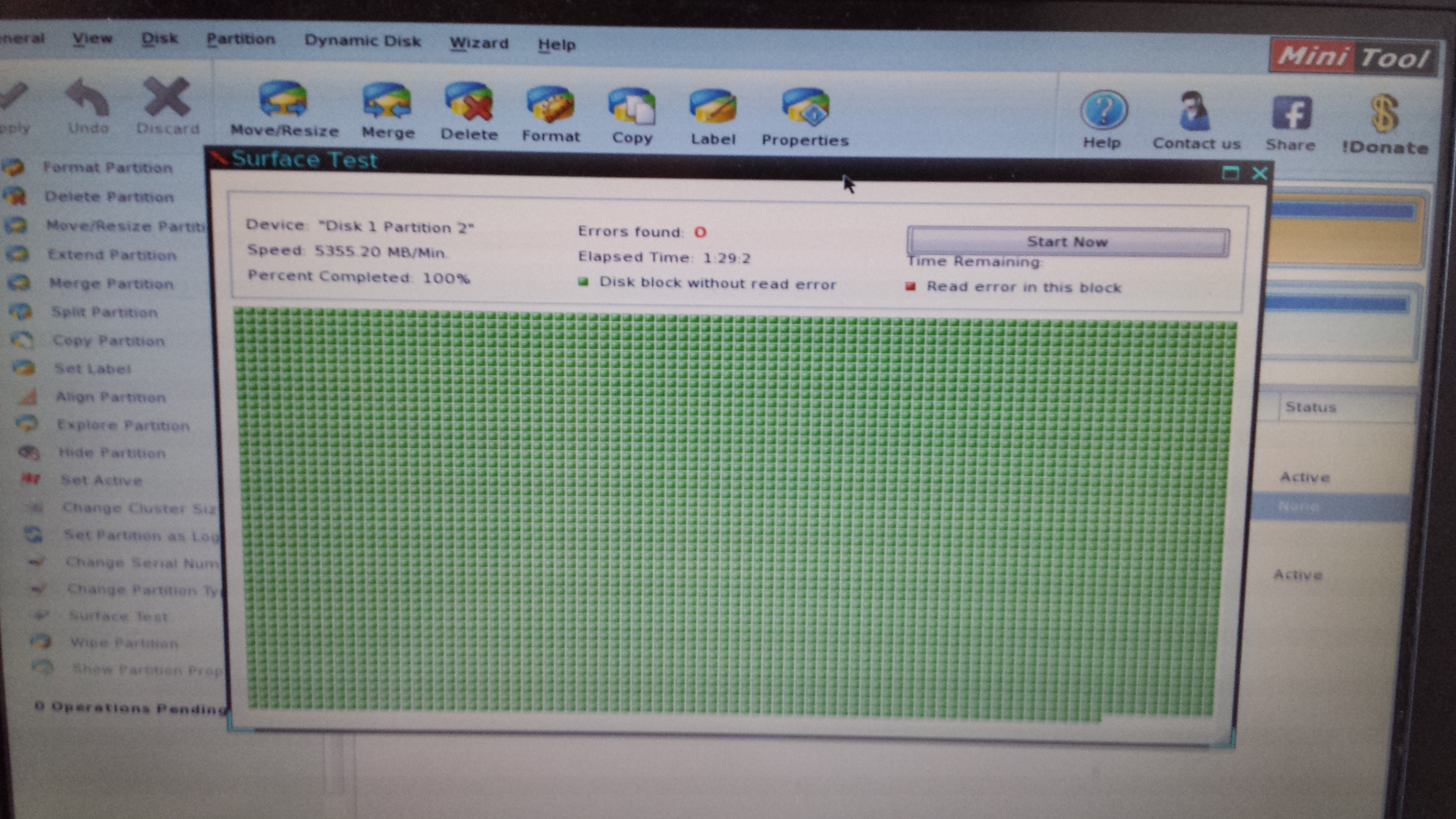
Surface test result:
XLnvGtu.jpg
 
Last edited:

My Computer

Computer type
Laptop
Computer Manufacturer/Model Number
Dell
OS
Microsoft Windows 7 Ultimate 64-bit Multiprocessor Service Pack 1
CPU
Intel(R) Core(TM)2 Duo CPU P8600 @ 2.40GHz
Motherboard
Dell Inc. 0U692R
Memory
4.00 GB
Graphics Card(s)
(1) Mobile Intel(R) 4 Series Express Chipset Family
Sound Card
(1) Intel(R) / IDT High Definition Audio HDMI
Screen Resolution
1440 x 900 x 32 bits (4294967296 colors) @ 40 Hz
Hard Drives
TOSHIBA MQ01ABD050 ATA Device
Mouse
E-Blue Cobra Junior
Internet Speed
15 MBs
Antivirus
Microsoft Security Essentials
Browser
Chrome
You have 214 GBs free on your C partition, there is no reason you can`t resize it using the Partition Wizard Boot CD.
 

My Computer

Computer type
PC/Desktop
Computer Manufacturer/Model Number
Skylake Special #666
OS
Windows 10 Pro x64
CPU
Intel Core i7 6700K
Motherboard
Asus Sabertooth Z170 Mark 1
Memory
GSkill TridentZ RGB 16GB 3600 16-16-16-36
Graphics Card(s)
EVGA GTX 980 Ti SC x2
Sound Card
Realtek High Definition
Monitor(s) Displays
AOC G2460PG
Screen Resolution
1920 x 1080 144Hz
Hard Drives
Samsung 860 Pro 256GB, Seagate Barracuda 4TB x2
PSU
EVGA 1000 P2, EVGA White Custom Braided Cables
Case
Corsair Vengeance C70 Gunmetal Black
Cooling
Corsair H100i v2, Corsair ML120 x2, Thermal Grizzly Kryonaut
Keyboard
Logitech G910 Orion Spectrum
Mouse
Logitech G700s
Internet Speed
Verizon Fios Quantum Gateway 75/75
Antivirus
Windows Defender, Malwarebytes Free 3.8.3
Browser
Chrome
Other Info
Corsair SP120 x4, LG Blu-ray Drive, Durabrand HT-395 100 Watt Dolby Digital Amp, Corsair H2100 Wireless 7.1 Headset
You have 214 GBs free on your C partition, there is no reason you can`t resize it using the Partition Wizard Boot CD.

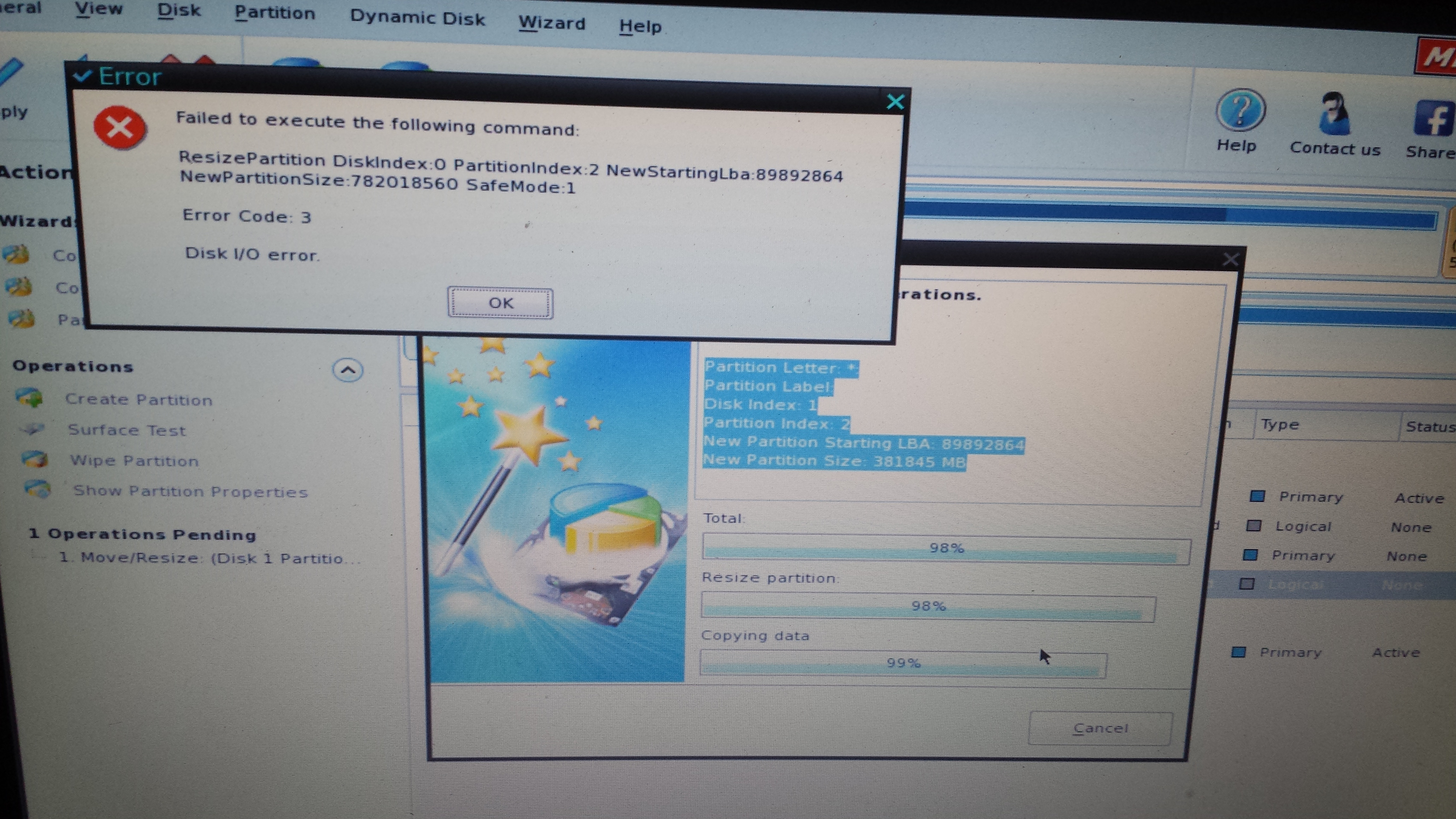
this error was the problem
xlhyDOX.jpg

i was confused with the options of partition wizard but after i understood and tried to create the partition the error popped up. Can anyone tell me what should i do about it.
 
Last edited:

My Computer

Computer type
Laptop
Computer Manufacturer/Model Number
Dell
OS
Microsoft Windows 7 Ultimate 64-bit Multiprocessor Service Pack 1
CPU
Intel(R) Core(TM)2 Duo CPU P8600 @ 2.40GHz
Motherboard
Dell Inc. 0U692R
Memory
4.00 GB
Graphics Card(s)
(1) Mobile Intel(R) 4 Series Express Chipset Family
Sound Card
(1) Intel(R) / IDT High Definition Audio HDMI
Screen Resolution
1440 x 900 x 32 bits (4294967296 colors) @ 40 Hz
Hard Drives
TOSHIBA MQ01ABD050 ATA Device
Mouse
E-Blue Cobra Junior
Internet Speed
15 MBs
Antivirus
Microsoft Security Essentials
Browser
Chrome
Hi there
I've never had ANY problems with GPARTED - download either the stand alone version or download any decent Linux live CD and start it from the command line ==>GPARTED -- It's a graphical program - any Windows user shouldn't have any trouble in using it.

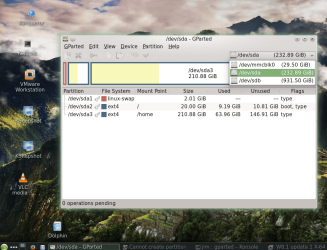
Screenshot (Although this is on a Linux Host the GUI and menu is identical when used on Windows). Handles NTFS / FAT32 etc partitions also - no problems -- just adjust partition by re-sizing the partition space to get the size you want -- works perfectly.

Cheers
jimbo
 

Attachments

  • snapshot5.png
    snapshot5.png
    642.7 KB · Views: 3

My Computer

Computer type
PC/Desktop
Computer Manufacturer/Model Number
Custom built, several laptops HP/ASUS
OS
Linux CENTOS 7 / various Windows OS'es and servers
CPU
Intel i7 Intel i5
Memory
8GB, 16GB
Graphics Card(s)
On Motherboard
Sound Card
Realtek HD audio
Monitor(s) Displays
Apple Cinema display, Samsung LCD
Screen Resolution
1920 X 1080
Hard Drives
4 X 1TB SATA
Mouse
Toshiba wireless laser
Internet Speed
> 20MB up
Back
Top