Cannot delete 0 Byte File

Natash

New member
Local time
11:36 PM
Messages
1
I have a 0 byte file that is in my pictures and I cannot delete/copy/cut it. It's been on my computer for a few years and I've tried to do a lot to get rid of it. The original picture is long gone. When I attempt to open the file, there is no program on my system that can open it. Help please?
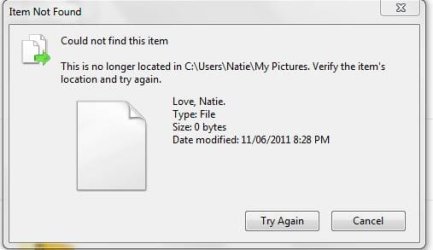
Forum help.JPG
 

My Computer

Computer type
Laptop
Computer Manufacturer/Model Number
HP
OS
Windows 7 Ultimate x64
Memory
285 GB
Antivirus
Avast
Browser
Chrome, IE
Welcome to the Seven Forums.

Since you have tried lots of things - anything that we suggest will most likely be something that you have already tried.

The first thing that I would try is to make sure that the filing system is healthy via CHKDSK. See these two links:
http://www.sevenforums.com/tutorials/433-disk-check.html
http://www.sevenforums.com/tutorials/96938-check-disk-chkdsk-read-event-viewer-log.html

Then try this check:
http://www.sevenforums.com/tutorials/1538-sfc-scannow-command-system-file-checker.html

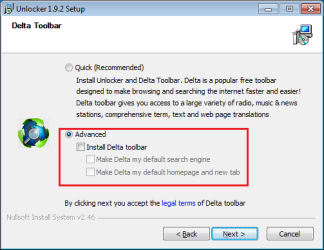
You can also try Unlocker. Make sure to uncheck any junk that it wants to install.

unlocker-junk.png

Once Unlocker is installed, right-click on the file that you want to delete and select Unlocker from the context menu.
 

My Computer

Computer type
Laptop
Computer Manufacturer/Model Number
Employer provided Dell Latitude
OS
W7 Pro SP1 64bit
CPU
i7
Memory
8GB
Graphics Card(s)
Intel HD Graphics
Hard Drives
crappy SSD
Antivirus
Employer mandated Symantec Endpoint Protection
Browser
Pale Moon 64bit, IE11 64bit & Chrome 64bit
http://www.sevenforums.com/general-discussion/89677-cannot-delete-0-byte-file-desktop-2.html


Bunch of solutions for this issue on that page.
the main one that worked for me was
navigating to the directory in an elevated command prompt
EXAMPLE
CD C:\users\(username)\downloads
then typing dir /x to find the 'short' file name of the corrupted file Example: Fairyt~2 was mine
then typing del (shortname)
EXAMPLE

The trick is to delete the file using its short name. To discover the short name,
open a command line window, and type DIR /X. This will show you two names for the
zero byte file--the normal one and a "short name" that consists of the first 6
letters of the file name, a tilde (~), and a number. Now use DEL with the short
name.
 

My Computer

Computer type
PC/Desktop
Computer Manufacturer/Model Number
Self Assembled
OS
Windows 7 ultimate 64 bit
CPU
AMD FX 8120
Motherboard
Asrock 990fx extreme 4
Memory
32 GB ddr3 corsair 1600mhz ram
Graphics Card(s)
Nvidia geforce 660ti
Monitor(s) Displays
24" Wide acer gd245hq + ipex 19"
Screen Resolution
2560*1440 + 1280*1024
Hard Drives
Kingston 120gb ssd 450mb read/write
4X2TB hdds Seagate/Western Digital
PSU
m850w cooler master
Case
600t Corsair
Cooling
h80i water cooler
Mouse
g9x logitech mouse
Antivirus
Zonealarm Extreme Security Suite
Browser
Google Chrome
:thumbsup: Thank you so much!!! I was ready to pull my hair out over two files I couldn't get rid of and your solution worked perfectly!!


http://www.sevenforums.com/general-discussion/89677-cannot-delete-0-byte-file-desktop-2.html


Bunch of solutions for this issue on that page.
the main one that worked for me was
navigating to the directory in an elevated command prompt
EXAMPLE
CD C:\users\(username)\downloads
then typing dir /x to find the 'short' file name of the corrupted file Example: Fairyt~2 was mine
then typing del (shortname)
EXAMPLE

The trick is to delete the file using its short name. To discover the short name,
open a command line window, and type DIR /X. This will show you two names for the
zero byte file--the normal one and a "short name" that consists of the first 6
letters of the file name, a tilde (~), and a number. Now use DEL with the short
name.
 

My Computer

Computer type
PC/Desktop
Computer Manufacturer/Model Number
Dell Studio XPS 9100
OS
Windows 7 Home Premium 64 bit
Antivirus
MSE
Back
Top