Cannot delete .eml files

CarlS

New member
Member
Local time
1:06 AM
Messages
27
Location
MN
Hi. I searched high and low, this forum and the web, and I can't find this one.
Background - this is a new machine - about 1 month old. Windows 7. 3 Gig, etc.
Email client is Windows Live Mail. I like it and Windows 7 a lot.

The current problem is that I cannot delete saved .eml files.
A delete, with the key or the right click, or whatever - does NOTHING.
No response.

I have discovered that if I open properties on the file, and select "details" and select remove properties and personal information, and then select the "remove the following properties button", and then hit OK, and OK, then I can delete it!

This is somewhat painful.
The good thing is that I can do it for a whole range of files, so it is not a killer.
I tend to save emails that deal with controversial issues, so I can resend them to someone, if need be.

The other insight is that this was not the case initially. Initially, all of these same, saved emails were having their dates updated every time I opened Windows Live Mail. Then SyncToy would recopy them, endlessly. That problem was mysteriously fixed, and then this one showed up - about 4 weeks ago.

And . . . does anyone actually read these things?

Thanks.
 

My Computer

Computer type
PC/Desktop
Computer Manufacturer/Model Number
Compaq CQ510F
OS
Windows 7 Home Premium SP1 64 bit
CPU
AMD II X2 215
Memory
3 G
Starting from the bottom of your post: Yes, some insomniacs like me (it's 3am here!).

I do not have an answer to your original question. Instead, let me ask you one: If reason to save your emails as eml-files is to be able to resend / forward these messages, you are doing extra job for nothing. Why don't you just leave the messages in your Inbox or other mail folders, create as many archive folders you want and need and keep your mails sorted and archived inside Windows Live Mail? Then choose forward when you want to send a message to somebody else?

Kari
 

My Computer

Computer type
Laptop
Computer Manufacturer/Model Number
HP ENVY 17-1150eg
OS
Windows 10 Pro x64 EN-GB
CPU
1.6 GHz Intel Core i7-720QM Processor
Memory
6 GB
Graphics Card(s)
ATI Mobility Radeon HD 5850 Graphics
Sound Card
Beats sound system with integrated subwoofer
Monitor(s) Displays
17" laptop display, 22" LED and 32" Full HD TV through HDMI
Screen Resolution
1600*900 (1), 1920*1080 (2&3)
Hard Drives
Internal: 2 x 500 GB SATA Hard Disk Drive 7200 rpm
External: 2TB for backups, 3TB USB3 network drive for media
Cooling
As Envy runs a bit warm, I have it on a Cooler Master pad
Keyboard
Logitech diNovo Media Desktop Laser (bluetooth)
Mouse
Logitech Performance Mouse MX
Internet Speed
50/10 Mbps VDSL
Antivirus
Windows Defender 4.3.9431.0
Browser
Maxthon 3.5.2., IE11
Hi CarlS,

You could try changing the attributes of all your *.eml files and then seeing if you are able to delete them.
(Remember to close your mail client first :-) )

If they are in the same folder run this from CMD:
ATTRIB -r -s -H /S /D C:\YourFolderPath\YourFolder\*.eml
 

My Computer

Computer Manufacturer/Model Number
Custom Hack job
OS
Windows 7 Ultimate 64 bit
CPU
Intel(R) Core(TM)2 Quad CPU Q8200 @ 2.33GHz
Motherboard
GigaByte EP45-UD3
Memory
8 GB Kingston
Graphics Card(s)
Nvidia GeForce 9600GT
Sound Card
Soundblaster Audigy
Monitor(s) Displays
AOC x2 22"
Hard Drives
2 x Samsung 500GB (RAID)
2 x Samsung 2TB
1 x WD Green 2TB
1 x Seagate 1TB
1 x Samsung 500GB
PSU
Thermaltake QFan 750W
Case
CM Scout Gaming
Cooling
Coolermaster V10
Keyboard
Microsoft Wireless Keyboard 1000
Mouse
Microsoft Wireless Optical 2000
Internet Speed
320
Other Info
Winfast PVR2000CP
LG DVD-RAM DVD/RW/DL Super Multi
Linksys WMP300Nx2 Wireless Adapter
hit Shift+Delete
 

My Computer

Computer Manufacturer/Model Number
Windows
OS
Windows 7
Motherboard
Intel
Graphics Card(s)
intel 915gm
I do not have an answer to your original question. Instead, let me ask you one: If reason to save your emails as eml-files is to be able to resend / forward these messages, you are doing extra job for nothing. Why don't you just leave the messages in your Inbox or other mail folders, create as many archive folders you want and need and keep your mails sorted and archived inside Windows Live Mail? Then choose forward when you want to send a message to somebody else?

Kari

Well, I do a bunch of "official" stuff for our homeowners association. I have, for example, 200 requests for changes to landscaping, etc. I store the original request, make a note of it in my log, and then send it on to board members. As each one approves or discusses it, I save the emails in the same folder on my hard drive. I also back them up about once a day to my laptop.

The reason I keep them all that way is in the event of litigation. We had one Owner who built some stuff into our Common Area - with no approvals, no request. I need to be able to prove that we discussed and approved things.

It's also easier to keep them on the hard drive. If I build folders in Windows Live Mail, they have 2 problems. If they are pop accounts, they only appear on the machine where I made them. If they are hotmail or msn accounts - they are all downloaded every time I sign on from anywhere. And it would be a LOT of folders. This way I can zip the old ones and keep them forever in case we have litigation.

NET - a LONG explanation. I would like to do this!

OH, shift delete doesn't do it. I have to alter something in the properties. And I am persuaded that Windows Live Mail is the reason.

Thanks for the potential workaround - and for paying attention! Nice OS this 7. I see there's a forum for 8 already! Gads.
 

My Computer

Computer type
PC/Desktop
Computer Manufacturer/Model Number
Compaq CQ510F
OS
Windows 7 Home Premium SP1 64 bit
CPU
AMD II X2 215
Memory
3 G

My Computer

Computer type
PC/Desktop
Computer Manufacturer/Model Number
Compaq CQ510F
OS
Windows 7 Home Premium SP1 64 bit
CPU
AMD II X2 215
Memory
3 G
Hi CarlS,

You could try changing the attributes of all your *.eml files and then seeing if you are able to delete them.
(Remember to close your mail client first :-) )

If they are in the same folder run this from CMD:
ATTRIB -r -s -H /S /D C:\YourFolderPath\YourFolder\*.eml

Yep - if I remove attributes I can delete them.
I'll try the command string - tell me what it does exactly?
thanks.
 

My Computer

Computer type
PC/Desktop
Computer Manufacturer/Model Number
Compaq CQ510F
OS
Windows 7 Home Premium SP1 64 bit
CPU
AMD II X2 215
Memory
3 G
Carl, I tried to reproduce your issue. I saved some Live Mail emails, both IMAP and POP. I tried all variations: deleting when message was still in Inbox, deleting when message was already deleted in Live Mail, saving to different locations. I have absolutely no problems, I right click and choose Delete and they are gone. Works like any other file.

So, I think it might not be because of Live Mail you have this issue. I have no other solutions to you, only to first try a simple system file scan and repair (open command prompt as an administrator, type sfc /scannow and hit Enter) or system restore to an earlier point.

Weird issue!

Kari
 

My Computer

Computer type
Laptop
Computer Manufacturer/Model Number
HP ENVY 17-1150eg
OS
Windows 10 Pro x64 EN-GB
CPU
1.6 GHz Intel Core i7-720QM Processor
Memory
6 GB
Graphics Card(s)
ATI Mobility Radeon HD 5850 Graphics
Sound Card
Beats sound system with integrated subwoofer
Monitor(s) Displays
17" laptop display, 22" LED and 32" Full HD TV through HDMI
Screen Resolution
1600*900 (1), 1920*1080 (2&3)
Hard Drives
Internal: 2 x 500 GB SATA Hard Disk Drive 7200 rpm
External: 2TB for backups, 3TB USB3 network drive for media
Cooling
As Envy runs a bit warm, I have it on a Cooler Master pad
Keyboard
Logitech diNovo Media Desktop Laser (bluetooth)
Mouse
Logitech Performance Mouse MX
Internet Speed
50/10 Mbps VDSL
Antivirus
Windows Defender 4.3.9431.0
Browser
Maxthon 3.5.2., IE11
Hi CarlS,

You could try changing the attributes of all your *.eml files and then seeing if you are able to delete them.
(Remember to close your mail client first :-) )

If they are in the same folder run this from CMD:
ATTRIB -r -s -H /S /D C:\YourFolderPath\YourFolder\*.eml

Yep - if I remove attributes I can delete them.
I'll try the command string - tell me what it does exactly?
thanks.

The attrib command changes the attributes of a file. the minus sign that you see before r,s, & h removes an attribute (a plus sign would add it). r = Read Only, s = system, h = hidden.

So the command removes these attributes from the file, hopefully allowing you to delete it :). The prerequisite is having ownership of the file to change the attributes.

The 'S' switch is for matching files in the same folder. The 'D' switch is for the folders themselves. If you type 'attrib /?' from the command prompt it will give you a more thorough explanation.

Good luck!
 

My Computer

Computer Manufacturer/Model Number
Custom Hack job
OS
Windows 7 Ultimate 64 bit
CPU
Intel(R) Core(TM)2 Quad CPU Q8200 @ 2.33GHz
Motherboard
GigaByte EP45-UD3
Memory
8 GB Kingston
Graphics Card(s)
Nvidia GeForce 9600GT
Sound Card
Soundblaster Audigy
Monitor(s) Displays
AOC x2 22"
Hard Drives
2 x Samsung 500GB (RAID)
2 x Samsung 2TB
1 x WD Green 2TB
1 x Seagate 1TB
1 x Samsung 500GB
PSU
Thermaltake QFan 750W
Case
CM Scout Gaming
Cooling
Coolermaster V10
Keyboard
Microsoft Wireless Keyboard 1000
Mouse
Microsoft Wireless Optical 2000
Internet Speed
320
Other Info
Winfast PVR2000CP
LG DVD-RAM DVD/RW/DL Super Multi
Linksys WMP300Nx2 Wireless Adapter
Carl, I tried to reproduce your issue. I saved some Live Mail emails, both IMAP and POP. I tried all variations: deleting when message was still in Inbox, deleting when message was already deleted in Live Mail, saving to different locations. I have absolutely no problems, I right click and choose Delete and they are gone. Works like any other file.

So, I think it might not be because of Live Mail you have this issue. I have no other solutions to you, only to first try a simple system file scan and repair (open command prompt as an administrator, type sfc /scannow and hit Enter) or system restore to an earlier point.

Weird issue!

Kari

FYI - I also couldn't reproduce the issue. It has me curious though! :D
 

My Computer

Computer Manufacturer/Model Number
Custom Hack job
OS
Windows 7 Ultimate 64 bit
CPU
Intel(R) Core(TM)2 Quad CPU Q8200 @ 2.33GHz
Motherboard
GigaByte EP45-UD3
Memory
8 GB Kingston
Graphics Card(s)
Nvidia GeForce 9600GT
Sound Card
Soundblaster Audigy
Monitor(s) Displays
AOC x2 22"
Hard Drives
2 x Samsung 500GB (RAID)
2 x Samsung 2TB
1 x WD Green 2TB
1 x Seagate 1TB
1 x Samsung 500GB
PSU
Thermaltake QFan 750W
Case
CM Scout Gaming
Cooling
Coolermaster V10
Keyboard
Microsoft Wireless Keyboard 1000
Mouse
Microsoft Wireless Optical 2000
Internet Speed
320
Other Info
Winfast PVR2000CP
LG DVD-RAM DVD/RW/DL Super Multi
Linksys WMP300Nx2 Wireless Adapter
OK, a few more odiities.
If I copy / paste the file - I can delete the new one!
Until I close that folder. When I go back, it will noy delete.
If I copy the file to another folder by dragging it - I cannot delete the new one.
If I copy the duplicate back, it will replace the old one.
I cannot MOVE an .eml file - the option isn't even presented.
And I cannot RENAME it, no such option presented.
There is something in the attributes that will not even offer up a delete.

More wierd - if I save a copy of a test email, as long as Windows Live Mail is open - I can delete it! Oddly, it remains deletable when I close Live Mail.
It BECOMES undeletable when I close Windows Explorer and reopen it!
Holy Smokes, Batman - what is going on!
I also found that if I copy - it won't let me move - out of My Documents to Downloads, it will let me delete that one.
If I copy or move that one back to My Documents - it is no longer deletable.
It's something in Windows Explorer - my documents.

I probably have some option set somewhere.

I don't have the problem with any other type of file!

Thanks - as I said, not a killer problem - kind of fascinating.

Carl :cry:
 

My Computer

Computer type
PC/Desktop
Computer Manufacturer/Model Number
Compaq CQ510F
OS
Windows 7 Home Premium SP1 64 bit
CPU
AMD II X2 215
Memory
3 G
I seem to have misposted my last one.
I'll try again. I think it timed out.
I discovered that these files are only non deletable if they are in my "LIbraries" - anywhere in my libraries.
If I copy them elsewhere on the hard drive, to C, or downloads - they are immediately deletable.
If I copy / paste one to the same directory or folder, it is deletable UNTIL I close Windows Explorer and then return.

I am NOT making this up!
 

My Computer

Computer type
PC/Desktop
Computer Manufacturer/Model Number
Compaq CQ510F
OS
Windows 7 Home Premium SP1 64 bit
CPU
AMD II X2 215
Memory
3 G

My Computer

Computer type
Laptop
Computer Manufacturer/Model Number
HP ENVY 17-1150eg
OS
Windows 10 Pro x64 EN-GB
CPU
1.6 GHz Intel Core i7-720QM Processor
Memory
6 GB
Graphics Card(s)
ATI Mobility Radeon HD 5850 Graphics
Sound Card
Beats sound system with integrated subwoofer
Monitor(s) Displays
17" laptop display, 22" LED and 32" Full HD TV through HDMI
Screen Resolution
1600*900 (1), 1920*1080 (2&3)
Hard Drives
Internal: 2 x 500 GB SATA Hard Disk Drive 7200 rpm
External: 2TB for backups, 3TB USB3 network drive for media
Cooling
As Envy runs a bit warm, I have it on a Cooler Master pad
Keyboard
Logitech diNovo Media Desktop Laser (bluetooth)
Mouse
Logitech Performance Mouse MX
Internet Speed
50/10 Mbps VDSL
Antivirus
Windows Defender 4.3.9431.0
Browser
Maxthon 3.5.2., IE11
...
I am NOT making this up!

:roflmao:

One of the weirdest issues I've heard!

I'll second that!

CarlS - I'm curious about a few things (and broadening our search)

Security Tab
* What's in the security tab when your mail client is open?
* When you go back after you close the mail client, has it changed?
* Are there any special permissions?

ATTRIB
* Did you try the attrib command? (I'm just curiosu if it was able to change them when they were read only).

OTHER FILES
* Are any other files except for your mail files affected?

Indexing
* Do you have more than 3 Terabytes of data that is indexed?

MAIL SETTINGS
* I'm not aware of any mail settings that make your mail read-only when the app isn't running; but I'll look into it for you.
 

My Computer

Computer Manufacturer/Model Number
Custom Hack job
OS
Windows 7 Ultimate 64 bit
CPU
Intel(R) Core(TM)2 Quad CPU Q8200 @ 2.33GHz
Motherboard
GigaByte EP45-UD3
Memory
8 GB Kingston
Graphics Card(s)
Nvidia GeForce 9600GT
Sound Card
Soundblaster Audigy
Monitor(s) Displays
AOC x2 22"
Hard Drives
2 x Samsung 500GB (RAID)
2 x Samsung 2TB
1 x WD Green 2TB
1 x Seagate 1TB
1 x Samsung 500GB
PSU
Thermaltake QFan 750W
Case
CM Scout Gaming
Cooling
Coolermaster V10
Keyboard
Microsoft Wireless Keyboard 1000
Mouse
Microsoft Wireless Optical 2000
Internet Speed
320
Other Info
Winfast PVR2000CP
LG DVD-RAM DVD/RW/DL Super Multi
Linksys WMP300Nx2 Wireless Adapter
Last try.

Tim, and Kari, you are indefatigable. Thanks.
After reading this one, if you have no insights - I just might leave it alone.
I just have to remove properties in order to delete a standalone email in My Documents.
Could be worse!

sfc /scannow - says I must be administrator running a console session.
Frankly, I don't know how to do that.
I ran system maintenance from the control panel as an administrator - found nothing.

FILE TYPES
NO other file type seems to be affected.
doc txt pdf xsl htm rtf dat jpg gif wmv any quicken file, you name it.

INDEXING SIZE
I do not have 3 terabytes of data indexed. The C drive is only 450 Gig.
I have not touched indexing, so I assume it is turned on.

ATTRIB STRING
I tried running this string:
ATTRIB -r -s -H /S /D C:\Users\CarlDesk\My Documents\_aHoldEmails\*.eml
Response is "Parameter format not correct".
The run command has c:\Users\CarlDesk> as the default location prompt.

MORE EXPERIMENTS
I save an email to this folder: My Documents\HoldEmails WITH Windows Explorer open there.
I can delete it, no problem.
I close Windows Explorer
I can no longer delete it!
I delete its attributes through the properties thing.
I can delete it.
If I delete properties, and leave it there - and then close / open Explorer - it becomes not deletable again.
I can delete the folder, with it in it - not a problem!
I even emptied the trash to be sure.
I can also MOVE the folder! Which moves the email.
I cannot MOVE it by itself, only copy.
If I save it there with Windows Explorer closed, it is NOT deletable when I open it to look.
I MOVED the folder from My Documents to Public Documents - it is not deletable.
The folder is deletable, as before.
I COPY the folder to My Pictures - the file is NOT deletable. The Folder is.
I MOVE the folder to the C drive - any place - it is normal, deletable.

This one is Wierdest.
I open an email. Click on SAVE to file. Find the folder I want: Hold Emails.
THEN - do not save it, but go to Windows Explorer and open it to look at that folder.
THEN save it there - it DOES NOT appear in the Windows Explorer!
If I click away and then back, it appears! And it is NOT deletable.

If I first OPEN Windows Explorer on that folder, then save an eml to it, I can see it immediately, and delete it. If I have 2 instances of Windows Explorer open, and just close one, the new email remains deletable in the other.

Close Windows Explorer, close live email.
Open Windows Explorer to the folder.
Open live email.
Open an email - save it to that folder.
ONLY the new one is deletable.

The sequencing does not seem to matter. Only the new one is ever deletable.
I thought I had a sequence where the old ones were rendered deletable, but I can't repeat it.

I am persuaded that it has something to do with Windows Live Mail.
When I first brought everything up on Windows 7, I ran Synctoy to establish the backup to my laptop.
No problem the first run.
On subsequent runs, it always wanted to overwrite EVERY .eml file.
I think I had to have opened Live Mail at least once in the interim for this to occur.
It was as if it reset ALL of the dates modified on all of the .eml files - I don't see how that is possible.
If I backed up, and did not open Live Mail - they were not overwritten the next time.

Somehow - that got fixed, and this problem immediately appeared. About a month ago.
It now makes no difference whether or not Live Mail is running.
Closing or opening the Windows Explorer seems to trigger the change in the file.

Amazing.
Thanks again. There must be more urgent problems out there!!! :D
 

My Computer

Computer type
PC/Desktop
Computer Manufacturer/Model Number
Compaq CQ510F
OS
Windows 7 Home Premium SP1 64 bit
CPU
AMD II X2 215
Memory
3 G
I tried everything you described above. Works fine for me, can not understand the reason for your issue. Try system file scan (sfc /scannow) one more time in elevated command prompt (right click Command Prompt, choose Run as administrator) and typing the command. Sorry about forgetting to mention about elevation.

Other than that, I have absolutely no clue.

Kari
 

My Computer

Computer type
Laptop
Computer Manufacturer/Model Number
HP ENVY 17-1150eg
OS
Windows 10 Pro x64 EN-GB
CPU
1.6 GHz Intel Core i7-720QM Processor
Memory
6 GB
Graphics Card(s)
ATI Mobility Radeon HD 5850 Graphics
Sound Card
Beats sound system with integrated subwoofer
Monitor(s) Displays
17" laptop display, 22" LED and 32" Full HD TV through HDMI
Screen Resolution
1600*900 (1), 1920*1080 (2&3)
Hard Drives
Internal: 2 x 500 GB SATA Hard Disk Drive 7200 rpm
External: 2TB for backups, 3TB USB3 network drive for media
Cooling
As Envy runs a bit warm, I have it on a Cooler Master pad
Keyboard
Logitech diNovo Media Desktop Laser (bluetooth)
Mouse
Logitech Performance Mouse MX
Internet Speed
50/10 Mbps VDSL
Antivirus
Windows Defender 4.3.9431.0
Browser
Maxthon 3.5.2., IE11
Hi Carl,

Also run the attrib command in an elevated prompt
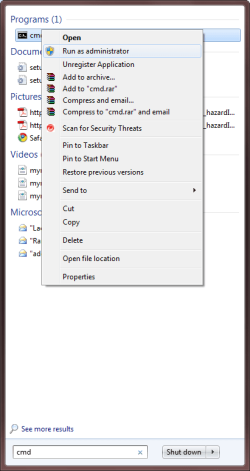
To get to the elevated prompt.
1. Click on the START Globe
2. Type CMD in the search programs and files box
3. Right click on CMD when it appears and choose 'Run as Administrator'
4. If it worked correctly, the Command Prompt will open with Administrator in it's Title area.

I have rewritten the ATTRIB string for your scenario; just paste this in to he elevatged CMD window and press enter.
ATTRIB -r -s -H /S /D "%userprofile%\Documents\_aHoldEmails\*.eml"

After you try this, you may as well leave the CMD window open and run 'sfc /scannow'

Good Luck!
 

Attachments

  • cmd as admin.png
    cmd as admin.png
    13.9 KB · Views: 21

My Computer

Computer Manufacturer/Model Number
Custom Hack job
OS
Windows 7 Ultimate 64 bit
CPU
Intel(R) Core(TM)2 Quad CPU Q8200 @ 2.33GHz
Motherboard
GigaByte EP45-UD3
Memory
8 GB Kingston
Graphics Card(s)
Nvidia GeForce 9600GT
Sound Card
Soundblaster Audigy
Monitor(s) Displays
AOC x2 22"
Hard Drives
2 x Samsung 500GB (RAID)
2 x Samsung 2TB
1 x WD Green 2TB
1 x Seagate 1TB
1 x Samsung 500GB
PSU
Thermaltake QFan 750W
Case
CM Scout Gaming
Cooling
Coolermaster V10
Keyboard
Microsoft Wireless Keyboard 1000
Mouse
Microsoft Wireless Optical 2000
Internet Speed
320
Other Info
Winfast PVR2000CP
LG DVD-RAM DVD/RW/DL Super Multi
Linksys WMP300Nx2 Wireless Adapter
I have discovered that if I open properties on the file, and select "details" and select remove properties and personal information, and then select the "remove the following properties button", and then hit OK, and OK, then I can delete it!

I have the exact same problem as Carl, but DO NOT have Windows Live Mail installed.

I use Carl's solution above if I need to delete an .eml file.

Weird issue this is.
 

My Computer

OS
Windows 7 Ultimate
Indeed. Trust oneself one does not.

I am NOT making this up.
I did the scan - nothing found.
I am learning a lot of things, but no solution.
The world will not end - but it is a very curious problem.

Thanks.
Say, Crabtree - I see we are both "junior" members.
Nobody has referred to me that way in 50 or more years!!
Carl
 

My Computer

Computer type
PC/Desktop
Computer Manufacturer/Model Number
Compaq CQ510F
OS
Windows 7 Home Premium SP1 64 bit
CPU
AMD II X2 215
Memory
3 G
Yep, this is weird indeed.

I have one more idea, one that I touched on before but now have an idea to check.
Open indexing and ensure that the *.eml file location is not being indexed.
Open your virus software, ensure that the *.eml location is not being scanned.
Reboot.
See if the problem continues, if this fixes it, try to work out which program causes it. Man this is annoying me... lol.
 

My Computer

Computer Manufacturer/Model Number
Custom Hack job
OS
Windows 7 Ultimate 64 bit
CPU
Intel(R) Core(TM)2 Quad CPU Q8200 @ 2.33GHz
Motherboard
GigaByte EP45-UD3
Memory
8 GB Kingston
Graphics Card(s)
Nvidia GeForce 9600GT
Sound Card
Soundblaster Audigy
Monitor(s) Displays
AOC x2 22"
Hard Drives
2 x Samsung 500GB (RAID)
2 x Samsung 2TB
1 x WD Green 2TB
1 x Seagate 1TB
1 x Samsung 500GB
PSU
Thermaltake QFan 750W
Case
CM Scout Gaming
Cooling
Coolermaster V10
Keyboard
Microsoft Wireless Keyboard 1000
Mouse
Microsoft Wireless Optical 2000
Internet Speed
320
Other Info
Winfast PVR2000CP
LG DVD-RAM DVD/RW/DL Super Multi
Linksys WMP300Nx2 Wireless Adapter
Back
Top