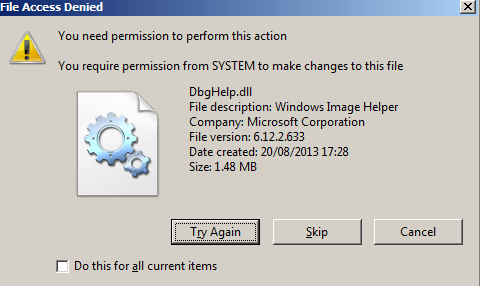
Cannot Delete Microsoft Security Client folder in C:\Program Files

Robbie1979

New member
Local time
5:44 PM
Messages
7
Hey there guys, I'm new here. Wish it had been under better circumstances but hey ho.

I have searched the forums high and low before asking this so please try not to berate me too much!

I naively installed MSE then promptly uninstalled it and got something that offers better protection.

After uninstalling I noticed that the the C:\Program Files\Microsoft Security Client folder was still present and had all the files still in there, including msseces.exe. Though the program seems to be gone and isn't shown under Control Panel, I'd like to delete this folder. I assume this is just Microsoft's inefficiency but I see no reason why this folder should hang around.

When I try to delete it I get the old 'You require permissions from Administrators to make changes to this folder'. Yes, my account is an admin account and I've also tried deleting it by enabling the administrator account in the command prompt, logging in with that account and it still doesn't work. I've also followed the procedure outlined in this video: https://www.youtube.com/watch?v=XPs-1IgztbU and nothing seems to work.

I'm at my wit's end and need the help of you good people. Alternatively, maybe there's a good reason why this folder is still present, in which case maybe someone can apprise me. Oh, I've also tried this method ( Uninstalling Microsoft Security Essentials - Microsoft Community )with the .bat file and it won't delete the files, says permission denied.

Thanks for any help guys!
 

My Computer

Computer type
PC/Desktop
OS
Windows 7 64-bit
In the few cases in my installs with MSE which still get infected, I have them upgrade Malwarebytes free scanner to Trial version and then to paid Real Time Protection. None of these have ever gotten infected again and they enjoy perfect performance which is rarely the case with any bloated AV. Just something to keep in mind.

As to the remnants of MSE, it normally uninstalls completely so I'd be tempted to reinstall it for the purpose of seeing if it will uninstall correctly. If not then you may have system corruption.

If all else fails go ahead and Take Ownership of the files needing deletion using Take Ownership Shortcut

I'd also run CCleaner - PC Optimization and Cleaning - Free Download Disk and Registry cleaners to make sure anything else left that's safe to remove is deleted.
 
Thanks for the response.

I think there's some confusion around the term infected here. My system hasn't been infected by malware or anything similar (other than MSE itself!).

I'd be surprised if it's system corruption as Windows was just installed fresh today on a brand new SSD.

I'll try the take ownership shortcut and let you know but I haven't read good things about trying to delete obsolete folders from the Program Files directory in Windows 7.

I tried CCleaner and it didn't do anything nor identify any old registry entries pertinent to MSE - although that may have been because I did it after running the .bat which removes them.
 

My Computer

Computer type
PC/Desktop
OS
Windows 7 64-bit
As suspected, it doesn't work.

To89pbX.png
 

My Computer

Computer type
PC/Desktop
OS
Windows 7 64-bit
Did you install the Take Ownership shortcut and reboot the PC, rightclick the files which will not delete, Take Ownership, Tick the box shown then try Deleting?

Sometimes you'll need to go into the File folder, take ownership and delete the sub-files before it will complete.

A possibly better solution I'd try first is posted by Derek just below.
 
Last edited:

My Computer

Computer type
PC/Desktop
Computer Manufacturer/Model Number
Self Built
OS
Win 10 Pro x64
CPU
Intel I5-2500K @3.3GHz
Motherboard
Asrock P67 Extreme4
Memory
16GB G.Skill Ripjaws X (4x4GB)
Graphics Card(s)
EVGA GeForce 750 Ti SC 2GB
Sound Card
ASUS Xonar DG 5.1 Channels 24-bit 96KHz PCI Interface Sound
Monitor(s) Displays
auria eq2367
Screen Resolution
1920 x 1080
Hard Drives
250GB Samsung 850 EVO SSD
1TB WD Blue
1TB Hitachi
PSU
SeaSonic X 650W 80 Plus Gold
Case
Corsair Obsidian 750D
Cooling
Corsair H60, Three 140mm case fans
Keyboard
Logitech Wireless Keyboard K520
Mouse
Logitech Wireless Mouse M310
Internet Speed
Wave Broadband ~ 100 dn 5 up
Antivirus
Windows Defender, Malwarebytes Premium
Browser
Edge, IE11, Chrome
Other Info
Laptop specs: HP g7-1365dx /
CPU: AMD A6-3420M APU with Radeon(tm) HD Graphics /
RAM: Crucial 8Gb (2x4Gb) /
SSD: Crucial M4-CT128M4SSD2 ATA Device/ FW 000F /
GFX: AMD Radeon HD 6520G /
OS: Windows 10 Pro x64
maybe you could try "delete on reboot", it's a freeware tool.
Normally I uninstall with IO bit uninstaller, which searches any left overs en remove or even shred them.
There is the file protectionsystem of windows, it may prevent deleting or changing system folders.
 

My Computer

Computer type
PC/Desktop
OS
Microsoft Windows 7 Ultimate 64-bits 7601 Multiprocessor Free Service Pack 1
CPU
Intel(R) Core(TM)2 Duo CPU E8400 @ 3.00GHz
Motherboard
ASRock G41MH/USB3.
Memory
8,00 GB
Graphics Card(s)
(1) Intel(R) G41 Express Chipset (2) Intel(R) G41 Express
Sound Card
(1) VIA High Definition Audio (2) Intel(R) High Definition
Monitor(s) Displays
S24B350 Samsung
Screen Resolution
1920 x 1080 x 32 bits (4294967296 colors) @ 60 Hz
Hard Drives
(1) ST31000528AS ATA Device (2) Generic- Compact Flash USB Device (3) Generic- MS/MS-Pro USB Device (4) Generic- SD/MMC USB Device (5) Generic- SM/xD-Picture USB Device
Antivirus
ZoneAlarm Free Antivirus + Firewall version: 12.0.104.000 Vs
Did you install the Take Ownership shortcut and reboot the PC, rightclick the files which will not delete, Take Ownership, Tick the box shown then try Deleting?

Sometimes you'll need to go into the File folder, take ownership and delete the sub-files before it will complete.

A possibly better solution I'd try first is posted by Derek just below.

I rebooted. No box pops up, a command prompt flashes for about a tenth of a second. I installed the take ownership with pause option.

Additionally, you can try the removal tool.

Have a look at this,

http://www.sevenforums.com/tutorials/345542-microsoft-security-essentials-uninstall-completely.html

Make sure you read the Information and Warning boxes at the top.

Thanks, have tried this and it did nothing.

maybe you could try "delete on reboot", it's a freeware tool.
Normally I uninstall with IO bit uninstaller, which searches any left overs en remove or even shred them.
There is the file protectionsystem of windows, it may prevent deleting or changing system folders.

Thanks but I should not need a tool to delete a folder on my own system. I have an admin account and what I want to achieve is about as simple as it gets. Windows 7 really is appalling. Does anyone have any idea what actually needs to be done to delete a folder from the program files directory on this ridiculous operating system because even logging in with the hidden admin account fails. So clearly there is something wrong here. People talk about viruses taking over their PCs, well now I know how they feel.
 

My Computer

Computer type
PC/Desktop
OS
Windows 7 64-bit
Sounds to me like something from that program is being held in memory, might need to put MSCONFIG in the Run box [press the Windows key + R at the same time] and uncheck everything related to that program then save and reboot and try again.

When all else fails I use a 'brute force' method to remove stubborn files. I boot to a Linux LiveDVD [Linux Mint 17.1], navigate to the Folder and delete it. The downside is there may be error messages when booting to Windows or in a rare instance no boot at all but that depends upon what files are removed.
 

My Computer

Computer type
PC/Desktop
Computer Manufacturer/Model Number
Customs, Dell, Gateway, HP, Toshiba, Acer, ASUS
OS
Windows 7 Ultimate 64-bit, Windows 8.1 64-bit, Mac OS X 10.10, Linux Mint 17, Windows 10 Pro TP
Keyboard
Microsoft
Mouse
Microsoft
From post #8
I rebooted. No box pops up, a command prompt flashes for about a tenth of a second. I installed the take ownership with pause option.

When the command prompt flashes for a split second normally means the you are not in the admin account.

All the suggestion above need to be run from the administrator account.

MSE is a anti virus program and will not let just anybody remove it.
Like any anti virus program, it is protecting itself in case a infection is trying to shut it down or remove it.
 

My Computer

Computer type
PC/Desktop
Computer Manufacturer/Model Number
Home made Desktop
OS
Windows 10 Pro. 64/ version 1709 Windows 7 Pro/64
CPU
Intel i7-6800K @ 4.3
Motherboard
ASUS X-99 Deluxe II
Memory
Corsair Platinum 16 gig @2400
Graphics Card(s)
EVGA GTX 1070 OC
Monitor(s) Displays
Asus 27" LED LCD/VE278Q
Screen Resolution
1920-1080 or 1280-720 HDMI
Hard Drives
INTEL SSD 730-240 Gb Sata 3.0/
PSU
EVGA Platium 1200W
Case
Phanteks Luxe Tempered Glass 8 fans/ one radiator
Cooling
XSPC/ Water Cooled CPU
Keyboard
Das 4 Professional
Mouse
Logitech M705/MX Anywhere 2-S
Internet Speed
100 mbits
Antivirus
Microsoft Security Essentials/ Malwarebytes Premium 3.0/ SAS
Browser
I.E. 11 default/Firefox/ ISP Time Warner Cable/Spectrum
Other Info
LG BluRay Burner/
Sound system-KLipsch-THX/
Icy Dock ssd Hot Swap bays.
Nothing is being held in memory. I've checked MSCONFIG, Process Explorer and Comodo Killswitch.

I am the admin account. As mentioned before, I have also tried in the hidden admin account. Neither work. What exactly is the point of that other admin account if it does nothing.

Fyi, I decided to run the Fix It tool again and this time it says MsMpSvc could not be stopped. Which is odd because I uninstalled (or at least thought I had!) MSE. Again, the same thing happens when I run the tool in the admin account. From reading about that service, there is no way to stop it. Hence that Fix It tool can never work. Not for me anyway.
 

My Computer

Computer type
PC/Desktop
OS
Windows 7 64-bit
Thanks, I'll try the boot method. How would I delete it though? Your link shows copy and pasting but does not specify how to delete files.

I won't be reinstalling it given that it is essentially a virus.

Also, as mentioned before, I'd appreciate if someone could tell me how exactly a user can have admin privileges on this godforsaken operating system.
 

My Computer

Computer type
PC/Desktop
OS
Windows 7 64-bit
Back
Top