Cannot detect soundcard: Samsung laptop

bingowings

New member
Local time
11:17 PM
Messages
8
All my sound settings have suddenly vanished after I uninstalled a firewall.

Now I cannot load downloaded Realtek driver. I have no sound at all on my Samsung NP350U2Y-A04VN notebook. How do I get sound back? It's an incredibly frustrating problem.
 

My Computer My Computer

Computer type
Laptop
Computer Manufacturer/Model Number
Samsung
OS
Windows 7 Professional Service Pack 1 (build 7600)
CPU
2.20 gigahertz Intel Core i3-2330M
Memory
2.20 gigahertz Intel Core i3-2330M
Graphics Card(s)
Intel(R) HD Graphics 3000 [Display adapter]
Hard Drives
SAMSUNG HN-M500MBB [Hard drive] (500.11 GB)
Antivirus
AVG, Avast
Browser
Chrome, Firefox, Chromium
Hello and welcome bingowings first up mate some system specs please very hard to work without them http://www.sevenforums.com/tutorials/180324-system-info-see-your-system-specs.html

I see you are running two AV's - not a good idea mate they will conflict at best and cause more problems that they will prevent. My advice is get rid of the AVG it is in my mind rubbish to start with. Use the removal tool to do that http://www.avg.com/au-en/utilities I always check in the registry to make sure it is completely gone if you don't know how to do that ask.

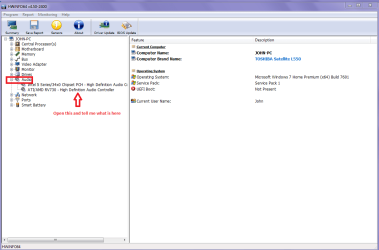
Now I have Googled the machine for support and each site I get is Vietnamese or some obscure language so could you run PART B: of this and see what the Realtek device actually is? (see my pic of mine)

Using HW Info

PART A:

You can test the volts onthe PSU with HW Info HWiNFO,HWiNFO32/64 - Download <download the right bit version and close the right hand window select Sensorsand scroll down to the power section where you will see what the volts aredoing see my pic. In my pic the section (Nuvoton)with VBATT is a dead give away you are in the section for the rail voltages.There are other section titles and one that pops up often is ITE

Now the voltage on thedifferent rails have to be within 5% =+/- of what is required or the machinewill not work properly if at all.

See this for the railvoltage info

http://www.tomshardware.com/reviews/power-supply-specifications-atx-reference,3061.html (Section 2.)

The original right handwindow shows the machine running and is handy for that but for looking at thecomponents in some detail close it and use the main left hand side panel

FOR OTHER COMPONENTS

PART B:

Open each small squarewith + in it on the section the components are in and then click on theindividual component/s (it willhighlight in blue) - in the right hand side will appear all sorts of detailsincluding brands speeds and other essential info that particular device. Seepic for example.
 

Attachments

  • HW INFI AUDIO.PNG
    HW INFI AUDIO.PNG
    28.2 KB · Views: 0

My Computer My Computer

Computer type
PC/Desktop
Computer Manufacturer/Model Number
Own build (new) Desk1 / Asus ROG Win 7 / Desk2 1st build
OS
Desk1 7 Home Prem / Desk2 10 Pro / Main lap Asus ROG 10 Pro 2 laptop Toshiba 7 Pro Asus P2520 7 & 10
CPU
Desk1 i5 3750K / Laptop i7 GTX 860M / Desk2 i5 2500
Motherboard
Desk1 Asus P877-V / Desk2 Gigabyte H67 UD3H / Laptop ?
Memory
Desk1 8GB (1866) / Desk2 16GB (1333) / Laptop 8Gb DDR3
Graphics Card(s)
Desk 1& 2NVidia GTX 650 & Laptops on board Intel
Sound Card
Desk 1 & 2 -XONAR DG Realtek High Def audio Laptop
Monitor(s) Displays
Desk 1 Benq HD 2450 / Desk2 Philips 24" / Laptop 17.5"
Screen Resolution
1920x1080 D1 & D2 & Laptop 1
Hard Drives
Desk1 Samsung 120GB 830 SSD
Asus ROG 256GB 850 Pro SSD
Desk2 Samsung 840 256 SSD
Toshiba 120GB EVO
PSU
Desk 1 Corsair HX 1050/ Laptop ? / Desk 2 Corsair HX 650
Case
Desk 1 Cooler HAF XM ? Toshiba laptop / Desk2 Coolermaster
Cooling
Fans on all Desk1 -2 Desk2 - all Coolermasters 5 Laptop ?
Keyboard
Desk 1 MS Sidewinder X6 Desk 2 MS Sidewinder X 4
Mouse
Desk 1&2 - Gigabyte MS 900 gamer - laptop - Logitec wireless
Internet Speed
ADSL2+
Other Info
One other Desktop (tester) and spare Toshba laptop both with SSD's
Running Kaspersky 2016 ISS on all machines config'd identically
Logitec audio stereo systems on each machine (x3)
Canon MG5250MFC
Router/modem TP-Link running WPA2SK
First steps..

Thank you very much for your thorough reply, stranger. Specs below..

Am in the process of removing AVG.. I also have Kaspersky [free version] now, which should also go? Sorry, how do I execute Part B?

Kind regards

BW


OS: Microsoft Windows 7 Ultimate 32-bit 7600 Multiprocessor Free

Graphics card: Intel(R) HD Graphics 3000

Soundcard: Intel(R) Display Audio

HDD: SAMSUNG HN-M500MBB ATA Device

Usable memory 1.91 GB

Total memory 2.00 GB

CPU: Intel(R) Core(TM) i3-2330M CPU @ 2.20GHz

Bios: AMIBIOS Version 07PZ.M022.20121025.WZW

Motherboard: SAMSUNG ELECTRONICS CO., LTD. 350U2Y/350U2Z/300U1Z
 

My Computer My Computer

Computer type
Laptop
Computer Manufacturer/Model Number
Samsung
OS
Windows 7 Professional Service Pack 1 (build 7600)
CPU
2.20 gigahertz Intel Core i3-2330M
Memory
2.20 gigahertz Intel Core i3-2330M
Graphics Card(s)
Intel(R) HD Graphics 3000 [Display adapter]
Hard Drives
SAMSUNG HN-M500MBB [Hard drive] (500.11 GB)
Antivirus
AVG, Avast
Browser
Chrome, Firefox, Chromium
I notice you don't have SP-1 (7600)
Windows 7 needs SP-1 which is (7601)

Please only one anti virus program at one time on one computer.
For the time being I recommend removing all anti virus programs using their online uninstallers and then install MSE.

Microsoft Security Essentials - Microsoft Windows

Then update Windows 7 including SP-1.
 

My Computer My Computer

Computer type
PC/Desktop
Computer Manufacturer/Model Number
Home made Desktop
OS
Windows 10 Pro. 64/ version 1709 Windows 7 Pro/64
CPU
Intel i7-6800K @ 4.3
Motherboard
ASUS X-99 Deluxe II
Memory
Corsair Platinum 16 gig @2400
Graphics Card(s)
EVGA GTX 1070 OC
Monitor(s) Displays
Asus 27" LED LCD/VE278Q
Screen Resolution
1920-1080 or 1280-720 HDMI
Hard Drives
INTEL SSD 730-240 Gb Sata 3.0/
PSU
EVGA Platium 1200W
Case
Phanteks Luxe Tempered Glass 8 fans/ one radiator
Cooling
XSPC/ Water Cooled CPU
Keyboard
Das 4 Professional
Mouse
Logitech M705/MX Anywhere 2-S
Internet Speed
100 mbits
Antivirus
Microsoft Security Essentials/ Malwarebytes Premium 3.0/ SAS
Browser
I.E. 11 default/Firefox/ ISP Time Warner Cable/Spectrum
Other Info
LG BluRay Burner/
Sound system-KLipsch-THX/
Icy Dock ssd Hot Swap bays.
Thank you LB - like your name and pic. Thanks heaps for your advice which I'm acting on. I also have five anti-malware programs. Should I delete those too?

Kind rgds

BW
 

My Computer My Computer

Computer type
Laptop
Computer Manufacturer/Model Number
Samsung
OS
Windows 7 Professional Service Pack 1 (build 7600)
CPU
2.20 gigahertz Intel Core i3-2330M
Memory
2.20 gigahertz Intel Core i3-2330M
Graphics Card(s)
Intel(R) HD Graphics 3000 [Display adapter]
Hard Drives
SAMSUNG HN-M500MBB [Hard drive] (500.11 GB)
Antivirus
AVG, Avast
Browser
Chrome, Firefox, Chromium
Drivers: I have --

Realtek PCIe GBE Family Controller Realtek 7.92.115.2015

and Intel(R) Display Audio Intel(R) Corporation 6.16.0.3154 2014-09-09
 

My Computer My Computer

Computer type
Laptop
Computer Manufacturer/Model Number
Samsung
OS
Windows 7 Professional Service Pack 1 (build 7600)
CPU
2.20 gigahertz Intel Core i3-2330M
Memory
2.20 gigahertz Intel Core i3-2330M
Graphics Card(s)
Intel(R) HD Graphics 3000 [Display adapter]
Hard Drives
SAMSUNG HN-M500MBB [Hard drive] (500.11 GB)
Antivirus
AVG, Avast
Browser
Chrome, Firefox, Chromium
Ok mate the 7600 build I didn't noticed that have you fixed it because without Service Pack 1 -SP1 it is going to run ragged anyway?

To run PART 2: you shut down the small windows it opens with and then just open out the left hand panel listings and on the right the detailed info on the components will appear - sometimes in so much detail it isn't funny. See my pic and try opening the small +'s

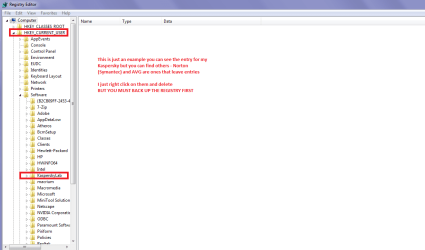
The AV Layback bear has put you right on that as I also mentioned in my first post. Now as I think I said even the AV removal tools do not always remove every scrap of their presence and they can be found in the registry HKEY's LOCAL_MACHINE and CURRENT_USER Symantec (Norton) and AVG are culprits of this and in my pic I show you how to find thembut you MUST do this before you do anything in the registry -
http://www.sevenforums.com/tutorials/4230-registry-backup-restore.html
 

Attachments

  • REG 1.PNG
    REG 1.PNG
    23.2 KB · Views: 0

My Computer My Computer

Computer type
PC/Desktop
Computer Manufacturer/Model Number
Own build (new) Desk1 / Asus ROG Win 7 / Desk2 1st build
OS
Desk1 7 Home Prem / Desk2 10 Pro / Main lap Asus ROG 10 Pro 2 laptop Toshiba 7 Pro Asus P2520 7 & 10
CPU
Desk1 i5 3750K / Laptop i7 GTX 860M / Desk2 i5 2500
Motherboard
Desk1 Asus P877-V / Desk2 Gigabyte H67 UD3H / Laptop ?
Memory
Desk1 8GB (1866) / Desk2 16GB (1333) / Laptop 8Gb DDR3
Graphics Card(s)
Desk 1& 2NVidia GTX 650 & Laptops on board Intel
Sound Card
Desk 1 & 2 -XONAR DG Realtek High Def audio Laptop
Monitor(s) Displays
Desk 1 Benq HD 2450 / Desk2 Philips 24" / Laptop 17.5"
Screen Resolution
1920x1080 D1 & D2 & Laptop 1
Hard Drives
Desk1 Samsung 120GB 830 SSD
Asus ROG 256GB 850 Pro SSD
Desk2 Samsung 840 256 SSD
Toshiba 120GB EVO
PSU
Desk 1 Corsair HX 1050/ Laptop ? / Desk 2 Corsair HX 650
Case
Desk 1 Cooler HAF XM ? Toshiba laptop / Desk2 Coolermaster
Cooling
Fans on all Desk1 -2 Desk2 - all Coolermasters 5 Laptop ?
Keyboard
Desk 1 MS Sidewinder X6 Desk 2 MS Sidewinder X 4
Mouse
Desk 1&2 - Gigabyte MS 900 gamer - laptop - Logitec wireless
Internet Speed
ADSL2+
Other Info
One other Desktop (tester) and spare Toshba laptop both with SSD's
Running Kaspersky 2016 ISS on all machines config'd identically
Logitec audio stereo systems on each machine (x3)
Canon MG5250MFC
Router/modem TP-Link running WPA2SK
pluses

Aha. From opening the pluses, in the audio section I get the below. Struggling to download the service pack on a slow connection. About to eradicate avg traces. Thanks again for your time and insight.

Sincerely, BW


Audio Adapter: Intel Cougar Point PCH - High Definition Audio Controller [B2]
Audio Controller Hardware ID: PCI\VEN_8086&DEV_1C20&SUBSYS_C604144D&REV_04

High Definition Audio Codec: Unknown 0
Audio Codec Hardware ID: HDAUDIO\FUNC_04&VEN_0000&DEV_0000&SUBSYS_00000000
 

My Computer My Computer

Computer type
Laptop
Computer Manufacturer/Model Number
Samsung
OS
Windows 7 Professional Service Pack 1 (build 7600)
CPU
2.20 gigahertz Intel Core i3-2330M
Memory
2.20 gigahertz Intel Core i3-2330M
Graphics Card(s)
Intel(R) HD Graphics 3000 [Display adapter]
Hard Drives
SAMSUNG HN-M500MBB [Hard drive] (500.11 GB)
Antivirus
AVG, Avast
Browser
Chrome, Firefox, Chromium
Please list all the anti malware programs you have install.
 

My Computer My Computer

Computer type
PC/Desktop
Computer Manufacturer/Model Number
Home made Desktop
OS
Windows 10 Pro. 64/ version 1709 Windows 7 Pro/64
CPU
Intel i7-6800K @ 4.3
Motherboard
ASUS X-99 Deluxe II
Memory
Corsair Platinum 16 gig @2400
Graphics Card(s)
EVGA GTX 1070 OC
Monitor(s) Displays
Asus 27" LED LCD/VE278Q
Screen Resolution
1920-1080 or 1280-720 HDMI
Hard Drives
INTEL SSD 730-240 Gb Sata 3.0/
PSU
EVGA Platium 1200W
Case
Phanteks Luxe Tempered Glass 8 fans/ one radiator
Cooling
XSPC/ Water Cooled CPU
Keyboard
Das 4 Professional
Mouse
Logitech M705/MX Anywhere 2-S
Internet Speed
100 mbits
Antivirus
Microsoft Security Essentials/ Malwarebytes Premium 3.0/ SAS
Browser
I.E. 11 default/Firefox/ ISP Time Warner Cable/Spectrum
Other Info
LG BluRay Burner/
Sound system-KLipsch-THX/
Icy Dock ssd Hot Swap bays.
Spybot, Ccleaner, Wisecare, ioBit, Superantispyware: just deleted all.

Still have malwarebytes.

Bests, BW.
 

My Computer My Computer

Computer type
Laptop
Computer Manufacturer/Model Number
Samsung
OS
Windows 7 Professional Service Pack 1 (build 7600)
CPU
2.20 gigahertz Intel Core i3-2330M
Memory
2.20 gigahertz Intel Core i3-2330M
Graphics Card(s)
Intel(R) HD Graphics 3000 [Display adapter]
Hard Drives
SAMSUNG HN-M500MBB [Hard drive] (500.11 GB)
Antivirus
AVG, Avast
Browser
Chrome, Firefox, Chromium
Hopefully Wisecare and ioBit have not caused damage. They normally do.
Removing them is a great idea but the damage they have caused is left behind.

I know nothing about Spybot.
Malwarebytes is a great anti malware program.

Ccleaner and Super Anti Spyware are programs I use. If used correctly they are great also.

At the present time until your problem is fixed just keeping Malwarebytes is a good idea.

You need to have SP-1 installed. It could take a long time downloading.

I also recommend until your problem is solved MSE is the anti virus to use. You can always change to another one later if you so choose.
 

My Computer My Computer

Computer type
PC/Desktop
Computer Manufacturer/Model Number
Home made Desktop
OS
Windows 10 Pro. 64/ version 1709 Windows 7 Pro/64
CPU
Intel i7-6800K @ 4.3
Motherboard
ASUS X-99 Deluxe II
Memory
Corsair Platinum 16 gig @2400
Graphics Card(s)
EVGA GTX 1070 OC
Monitor(s) Displays
Asus 27" LED LCD/VE278Q
Screen Resolution
1920-1080 or 1280-720 HDMI
Hard Drives
INTEL SSD 730-240 Gb Sata 3.0/
PSU
EVGA Platium 1200W
Case
Phanteks Luxe Tempered Glass 8 fans/ one radiator
Cooling
XSPC/ Water Cooled CPU
Keyboard
Das 4 Professional
Mouse
Logitech M705/MX Anywhere 2-S
Internet Speed
100 mbits
Antivirus
Microsoft Security Essentials/ Malwarebytes Premium 3.0/ SAS
Browser
I.E. 11 default/Firefox/ ISP Time Warner Cable/Spectrum
Other Info
LG BluRay Burner/
Sound system-KLipsch-THX/
Icy Dock ssd Hot Swap bays.
SP-1 just won't install. In fact my attempts triggered a meltdown. So I think I will just stick with things as they are now. I can get by without sound. Will just stick with MSE and try reinstalling Ccleaner and Super Anti Spyware and see if that helps. Thanks. Best, BW.
 

My Computer My Computer

Computer type
Laptop
Computer Manufacturer/Model Number
Samsung
OS
Windows 7 Professional Service Pack 1 (build 7600)
CPU
2.20 gigahertz Intel Core i3-2330M
Memory
2.20 gigahertz Intel Core i3-2330M
Graphics Card(s)
Intel(R) HD Graphics 3000 [Display adapter]
Hard Drives
SAMSUNG HN-M500MBB [Hard drive] (500.11 GB)
Antivirus
AVG, Avast
Browser
Chrome, Firefox, Chromium

My Computer My Computer

Computer type
PC/Desktop
Computer Manufacturer/Model Number
Home made Desktop
OS
Windows 10 Pro. 64/ version 1709 Windows 7 Pro/64
CPU
Intel i7-6800K @ 4.3
Motherboard
ASUS X-99 Deluxe II
Memory
Corsair Platinum 16 gig @2400
Graphics Card(s)
EVGA GTX 1070 OC
Monitor(s) Displays
Asus 27" LED LCD/VE278Q
Screen Resolution
1920-1080 or 1280-720 HDMI
Hard Drives
INTEL SSD 730-240 Gb Sata 3.0/
PSU
EVGA Platium 1200W
Case
Phanteks Luxe Tempered Glass 8 fans/ one radiator
Cooling
XSPC/ Water Cooled CPU
Keyboard
Das 4 Professional
Mouse
Logitech M705/MX Anywhere 2-S
Internet Speed
100 mbits
Antivirus
Microsoft Security Essentials/ Malwarebytes Premium 3.0/ SAS
Browser
I.E. 11 default/Firefox/ ISP Time Warner Cable/Spectrum
Other Info
LG BluRay Burner/
Sound system-KLipsch-THX/
Icy Dock ssd Hot Swap bays.
Brink

Thanks LB, will have a look at the Brink link.

BW
 

My Computer My Computer

Computer type
Laptop
Computer Manufacturer/Model Number
Samsung
OS
Windows 7 Professional Service Pack 1 (build 7600)
CPU
2.20 gigahertz Intel Core i3-2330M
Memory
2.20 gigahertz Intel Core i3-2330M
Graphics Card(s)
Intel(R) HD Graphics 3000 [Display adapter]
Hard Drives
SAMSUNG HN-M500MBB [Hard drive] (500.11 GB)
Antivirus
AVG, Avast
Browser
Chrome, Firefox, Chromium
Back
Top