Cannot downgrade to install Windows 7 onto Sony VAIO SVE151J11M

Teckniqs

New member
Local time
6:20 PM
Messages
17
Hi there all,

My friend brought over his Sony Vaio SVE151J11M today as it would not load boot up (Windows 8), I have here a genuine copy of Windows 7 which I purchased a couple of years ago and the disc has been kept in immaculate condition but it will not install onto this laptop.


When I press power the VAIO screen comes up, it then it says "please wait" and then a spinning circle of dots appear but then goes on to a black (back lit) screen, I can hear the disc spinning as it should do but it then stops and does nothing.

I had changed the boot priority to Optical drive boot but it just won't work, is there something stopping me from being able to put Windows 7 onto this Windows 8 laptop or am I doing something wrong?

Also, I installed Windows 7 onto another hard drive using another laptop which works fine but when I removed it and placed it into the SVE151J11M it just comes up with "Operating System Not Found".

This is getting very frustrating and I really want to do this for him.

Many kind thanks all
 

My Computer My Computer

At a glance

Windows 7 Ultimate x32
OS
Windows 7 Ultimate x32
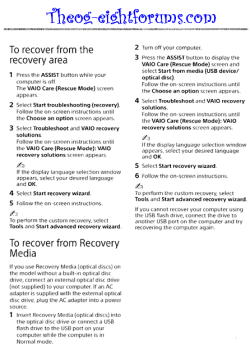
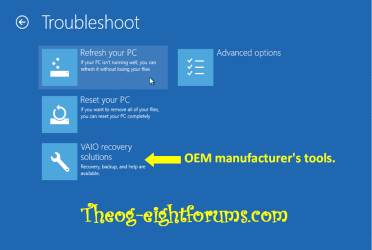
For Windows 8 Recovery.

SONY Recovery Manual 001 theog.PNG
 

My Computer My Computer

At a glance

ME/XP/Vista/Win7
OS
ME/XP/Vista/Win7
Just trying it now... Thanks for your help.
 

My Computer My Computer

At a glance

Windows 7 Ultimate x32
OS
Windows 7 Ultimate x32
Do you want to install Win7 or WIndows 8?

If you want to install Windows 7, boot into BIOS setup by tapping the key given on first boot screen.

Disable Secure Boot which may be on Security, Advanced or Boot tab in BIOS.

Once you disable Secure boot, take note of the settings avaialble for Legacy BIOS or Compatibility Mode. You may need to change these later if the install will not proceed.

Save Changes to BIOS and exit.

Now reboot and tap the key for Boot Menu, look for UEFI or EFI DVD drive, select it to boot the Win7 disk. Follow these steps Clean Install Windows 7 using the Drive Options in Steps 7/8 to delete all partitions, create new for install, then install Win 7.

If this fails boot back into BIOS and try a Legacy Mode or CSM with UEFI boot first, or ou can turn off UEFI altogether to Bypass UEFI to Install WIn7.

If the goal on the other hand is to reinstall Windows 8 and Recovery fails, you can also use a Windows 8 retail installer to Clean Install - Windows 8 which will activate with the license which is coded in the BIOS.
 
You absolute legends. I will try this tomorrow when I wake up (UK time) and I'll get back to you to let you know how I got on.

Many kind thanks for your expertise.
 

My Computer My Computer

At a glance

Windows 7 Ultimate x32
OS
Windows 7 Ultimate x32
Hi all just to update as promised, we decided to try going straight for the Windows 8 partition recovery and after leaving it running throughout the night it is now working absolutely fine this morning.

Although we both prefer W7, the laptop is supposed to have W8 on it as standard so it's back to how it should be again.

I would like to give my utmost thanks to all that have helped me with this, every time I've had a problem it has been resolved using this forum and I give my full appreciation to everybody kind enough to help people like us resolve these problems.

Hopefully I shouldn't have any more problems for a while but I can rest assure if I do, I know where to come!

Best regards.
 

My Computer My Computer

At a glance

Windows 7 Ultimate x32
OS
Windows 7 Ultimate x32
There is no reason to be stuck with the Win8 phone app on a new PC.

What I do when testing Win7 on Win8 machines is to shrink C, then reboot into BIOS setup to disable Secure Boot, attempt Win7 install to space you created by booting to UEFI installer choice (DVD or USB). UEFI (Unified Extensible Firmware Interface) - Install Windows 7 with - Windows 7 Forums.

If install fails adjust the Legacy BIOS or CSM settings in BIOS setup until install works. We can help you. A camera snap of the expanded choices would be nice.

Remember that you must take special steps to use UEFI Bootable USB Flash Drive - Create in Windows - Option One is easiest and does it all for you.

I've not found a Win8 machine yet that cannot run Win7 fine, nor have any drivers ever not been found. For one or two missing drivers, google their device name as shown in the Win8 Dev Mgr, use Hardware Identification, Driver Max for it's excellent scan and one free download per day, or ask back in our Drivers forum which can find any driver.
 
Back
Top