Solved Cannot get mapped drive letter back IN win 7 Pro 32 bit

p23185

New member
Member
Local time
4:14 AM
Messages
46
I used to map a NAS drive on my Win 7 Pro 32 bit machine. Now the mapping is no longer available. I go to the "Map Network" and the letter is GONE. I can still access the NAS HDD via "network" in the Windows explorer. but I have links constrcuted around that drive letter. HOW DO I DELETE AND START OVER WHEN THE DRIVE LETTER IS MISSING ALTOGETHER?
 

My Computer My Computer

At a glance

Windows 7 Ultimate x64i7-26008GbBFGgts250
Computer Manufacturer/Model Number
me/na
OS
Windows 7 Ultimate x64
CPU
i7-2600
Motherboard
Asus P8P67eluxe_i7-2600
Memory
8Gb
Graphics Card(s)
BFGgts250
Sound Card
mobo
Monitor(s) Displays
Acer P236H
Hard Drives
500Gb system Hitachi
1000Gb video Seagate 6.0 Gp/s SATA
1000Gb special project Seagate 3.0Gb/s SATA
PSU
thermaltake_600w
Case
Antec_900
Cooling
fans
Hello,

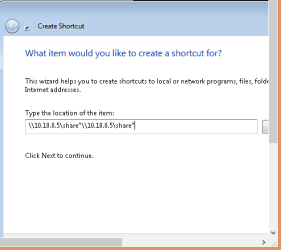
I'd normally disconnect the mapped drive from 'Computer' right click the mapped network drive and choose 'Disconnect'. You may also create a Shortcut on your desktop instead of mapping a network drive, an alternative.
 

Attachments

  • Create a Shortcut.PNG
    Create a Shortcut.PNG
    4.4 KB · Views: 4

My Computer My Computer

At a glance

Win7 & Win8 64bitIntel i5
Computer Manufacturer/Model Number
Lenovo Desktop/Samsung Laptop
OS
Win7 & Win8 64bit
CPU
Intel i5
Internet Speed
Charter-20 Mbps
Antivirus
Avast
Browser
FF, IE9 and Chrome
But the drive letter assigned to that NAS HD is missing - so I cannot delete it and remap it. That letter just does not show up. Never happened before and I cannot assign it another letter as all my links will be inop.
 

My Computer My Computer

At a glance

Windows 7 Ultimate x64i7-26008GbBFGgts250
Computer Manufacturer/Model Number
me/na
OS
Windows 7 Ultimate x64
CPU
i7-2600
Motherboard
Asus P8P67eluxe_i7-2600
Memory
8Gb
Graphics Card(s)
BFGgts250
Sound Card
mobo
Monitor(s) Displays
Acer P236H
Hard Drives
500Gb system Hitachi
1000Gb video Seagate 6.0 Gp/s SATA
1000Gb special project Seagate 3.0Gb/s SATA
PSU
thermaltake_600w
Case
Antec_900
Cooling
fans
Is the letter being used by another device? This shouldn't happen if the drive was mapped however can happen if it got disconnected/removed from Windows Explorer.

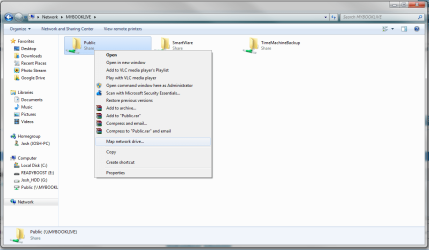
map.png

You should be able to map the share to the letter you want by navigating to the share and then right clicking it.

Before doing so, ensure that the drive letter you wish to use is not listed in 'My Computer'

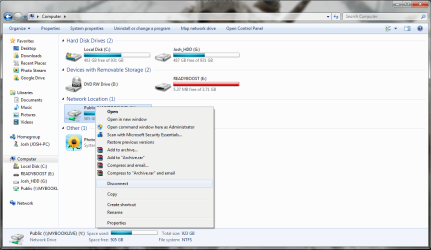
If an old mapped drive is using the drive letter you wish to use then right click it and then click on 'Disconnect'

disconnect.png

If you can, provide any screenshots necessary as it can help us in providing the most relevant help :)

Josh! :)
 

My Computer My Computer

At a glance

Windows 7 Professional x64 SP1 ; Windows Serv...Intel Core i5 2400 @ 3.10GHz8.0GB DDR3 @ 665MHz (2GBx4)AMD Radeon HD 6870
Computer type
PC/Desktop
Computer Manufacturer/Model Number
Custom Built
OS
Windows 7 Professional x64 SP1 ; Windows Server 2012 R2 Standard
CPU
Intel Core i5 2400 @ 3.10GHz
Motherboard
Foxconn H67MP-S/-V/H67MP
Memory
8.0GB DDR3 @ 665MHz (2GBx4)
Graphics Card(s)
AMD Radeon HD 6870
Sound Card
Realtek High Definition Audio
Monitor(s) Displays
AOC 2243W & SMB1930NW
Screen Resolution
1440x900 & 1920x1080
Hard Drives
977GB Seagate ST31000524AS ATA Drive (SATA)
250GB WD iSCSI attached Drive
PSU
750W Gaming PSU
Case
Novatech Night
Cooling
Fan
Keyboard
Dell Standard PS/2 Keyboard
Mouse
R.A.T 07 Gaming Mouse
Internet Speed
Download: 10 Mbps Ping: 30ms Upload: 0.81 Mbps
Browser
Google Chrome
Other Info
Optiarc DVD RW AD-5260S ATA Device
Even though yesterday I had rebooted the laptop twice before posting this question, TODAY the letter "H" is available again. I mapped it and all is well now. I HAVE NO IDEA WHAT HAPPENED, but for now we are fine.
 

My Computer My Computer

At a glance

Windows 7 Ultimate x64i7-26008GbBFGgts250
Computer Manufacturer/Model Number
me/na
OS
Windows 7 Ultimate x64
CPU
i7-2600
Motherboard
Asus P8P67eluxe_i7-2600
Memory
8Gb
Graphics Card(s)
BFGgts250
Sound Card
mobo
Monitor(s) Displays
Acer P236H
Hard Drives
500Gb system Hitachi
1000Gb video Seagate 6.0 Gp/s SATA
1000Gb special project Seagate 3.0Gb/s SATA
PSU
thermaltake_600w
Case
Antec_900
Cooling
fans
I am glad your issue is solved :) In future if you ever need to map network drives I find it helpful to use letters at the end of the alphabet like 'Y' or 'Z' as these are rarely taken by other devices. That being said randomly disappearing letters for no reason is not something I see often...

Josh :)
 

My Computer My Computer

At a glance

Windows 7 Professional x64 SP1 ; Windows Serv...Intel Core i5 2400 @ 3.10GHz8.0GB DDR3 @ 665MHz (2GBx4)AMD Radeon HD 6870
Computer type
PC/Desktop
Computer Manufacturer/Model Number
Custom Built
OS
Windows 7 Professional x64 SP1 ; Windows Server 2012 R2 Standard
CPU
Intel Core i5 2400 @ 3.10GHz
Motherboard
Foxconn H67MP-S/-V/H67MP
Memory
8.0GB DDR3 @ 665MHz (2GBx4)
Graphics Card(s)
AMD Radeon HD 6870
Sound Card
Realtek High Definition Audio
Monitor(s) Displays
AOC 2243W & SMB1930NW
Screen Resolution
1440x900 & 1920x1080
Hard Drives
977GB Seagate ST31000524AS ATA Drive (SATA)
250GB WD iSCSI attached Drive
PSU
750W Gaming PSU
Case
Novatech Night
Cooling
Fan
Keyboard
Dell Standard PS/2 Keyboard
Mouse
R.A.T 07 Gaming Mouse
Internet Speed
Download: 10 Mbps Ping: 30ms Upload: 0.81 Mbps
Browser
Google Chrome
Other Info
Optiarc DVD RW AD-5260S ATA Device
Back
Top