Solved Cannot increase graphics in GTA IV

converse5

Banned
Local time
5:01 AM
Messages
26
First of all let me tell you the Specs of my PC
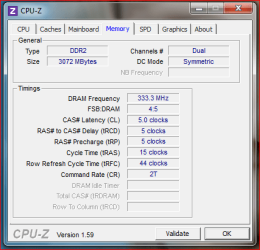
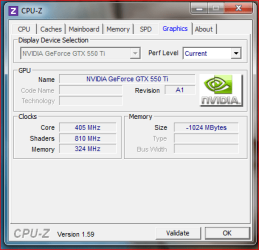
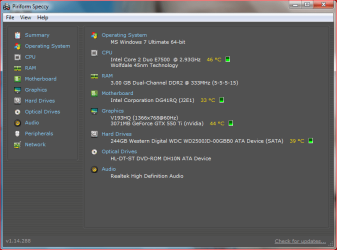
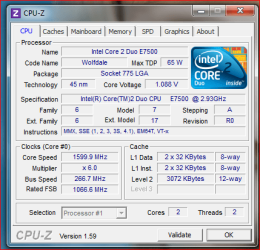
I have uploaded the specs taken by CPU Z and Speccy

Now in last shot u can see that i have highlighted two things, my virtual mem is what i see in GTA IV settings and i cant seem to increase graphics quality,
In BIOS setting i have set Maximum DVMT in video option but still it seems i am stuck with 256MB only
I have 64 bit Win 7 and when i run the Can you run test i also get a NO!
I have seen at many forums that using -norestrictions shortcut could help but it cannot seem to be the solution for me,
Can someone please explain me and help me solve this?
Another thing that I can run many games with ultra high graphics, i have even played Battlefield 3, Crysis 2, Assassin creed Revelation, Saints Row 4 and NFS Run with high graphics only GTA IV gives me the problem and Can you run test always give me no with every game coz of the 256 MB RAM
 

Attachments
  • 1.PNG
    1.PNG
    22 KB · Views: 63
  • 2.PNG
    2.PNG
    15.7 KB · Views: 29
  • 3.PNG
    3.PNG
    16.3 KB · Views: 38
  • 4.PNG
    4.PNG
    26.7 KB · Views: 82
  • 5.PNG
    5.PNG
    32 KB · Views: 200

My Computer

Computer Manufacturer/Model Number
Custom
OS
Windows 7 Ultimate 64 bit
CPU
E7500
Motherboard
Intel DG41RG
Memory
3GB
Graphics Card(s)
Nvidia GeForce GTX 550 Ti
Sound Card
Onboard
Monitor(s) Displays
Acer v193HQ
Screen Resolution
1366x768
Hard Drives
250GB SATA
PSU
CoolerMaster 450W Bronze
Keyboard
A4Tech
Mouse
A4Tech
Internet Speed
1Mbps Dl and 512Kbps Ul
make a command line with notepad and type -availablevidmem 2.0
then save it as commandline.txt This will rise the limit of available memory that gta iv sees.
 

My Computer

Computer type
PC/Desktop
Computer Manufacturer/Model Number
custom build
OS
Windows 10 64bit
CPU
AMD Phenom II X4 925 (Deneb)(2.8GHz) OC 3.4GHz
Motherboard
M5A78L-MLX Plus
Memory
Corsair Vengeance DDR3 4GBX2 (8192MB)
Graphics Card(s)
XFX HD 6870 1GB (OC)- 940MHz core, mem 1150MHz
Monitor(s) Displays
Vizio 26' 1920x1080 / Acer 1336x768
Screen Resolution
1920x1080 60Hz /1336x768
Hard Drives
Kingston Digital 60GB SSDNow V300/500gb HDD Western Digital 7200rpm (/WD 160GB HDD 7200rpm
PSU
CORSAIR CX600 600w
Case
AZZA Orion 202 EVO
Cooling
cooler master hyper TX3 cpu cooler
Keyboard
Razer DeathStalker
Mouse
Logitech Optical Gaming Mouse G400
Antivirus
Defualt on win 10
Browser
Firefox
Other Info
cpu is overclocked in bios
where to save the file? in the installed directory?
 

My Computer

Computer Manufacturer/Model Number
Custom
OS
Windows 7 Ultimate 64 bit
CPU
E7500
Motherboard
Intel DG41RG
Memory
3GB
Graphics Card(s)
Nvidia GeForce GTX 550 Ti
Sound Card
Onboard
Monitor(s) Displays
Acer v193HQ
Screen Resolution
1366x768
Hard Drives
250GB SATA
PSU
CoolerMaster 450W Bronze
Keyboard
A4Tech
Mouse
A4Tech
Internet Speed
1Mbps Dl and 512Kbps Ul

My Computer

Computer type
PC/Desktop
Computer Manufacturer/Model Number
custom build
OS
Windows 10 64bit
CPU
AMD Phenom II X4 925 (Deneb)(2.8GHz) OC 3.4GHz
Motherboard
M5A78L-MLX Plus
Memory
Corsair Vengeance DDR3 4GBX2 (8192MB)
Graphics Card(s)
XFX HD 6870 1GB (OC)- 940MHz core, mem 1150MHz
Monitor(s) Displays
Vizio 26' 1920x1080 / Acer 1336x768
Screen Resolution
1920x1080 60Hz /1336x768
Hard Drives
Kingston Digital 60GB SSDNow V300/500gb HDD Western Digital 7200rpm (/WD 160GB HDD 7200rpm
PSU
CORSAIR CX600 600w
Case
AZZA Orion 202 EVO
Cooling
cooler master hyper TX3 cpu cooler
Keyboard
Razer DeathStalker
Mouse
Logitech Optical Gaming Mouse G400
Antivirus
Defualt on win 10
Browser
Firefox
Other Info
cpu is overclocked in bios
Did that and it works!
Thanks alot and Rep added :)
 

My Computer

Computer Manufacturer/Model Number
Custom
OS
Windows 7 Ultimate 64 bit
CPU
E7500
Motherboard
Intel DG41RG
Memory
3GB
Graphics Card(s)
Nvidia GeForce GTX 550 Ti
Sound Card
Onboard
Monitor(s) Displays
Acer v193HQ
Screen Resolution
1366x768
Hard Drives
250GB SATA
PSU
CoolerMaster 450W Bronze
Keyboard
A4Tech
Mouse
A4Tech
Internet Speed
1Mbps Dl and 512Kbps Ul
Your most welcome and thank you for +rep,glad I could help.Had this problem myself in the past.
 

My Computer

Computer type
PC/Desktop
Computer Manufacturer/Model Number
custom build
OS
Windows 10 64bit
CPU
AMD Phenom II X4 925 (Deneb)(2.8GHz) OC 3.4GHz
Motherboard
M5A78L-MLX Plus
Memory
Corsair Vengeance DDR3 4GBX2 (8192MB)
Graphics Card(s)
XFX HD 6870 1GB (OC)- 940MHz core, mem 1150MHz
Monitor(s) Displays
Vizio 26' 1920x1080 / Acer 1336x768
Screen Resolution
1920x1080 60Hz /1336x768
Hard Drives
Kingston Digital 60GB SSDNow V300/500gb HDD Western Digital 7200rpm (/WD 160GB HDD 7200rpm
PSU
CORSAIR CX600 600w
Case
AZZA Orion 202 EVO
Cooling
cooler master hyper TX3 cpu cooler
Keyboard
Razer DeathStalker
Mouse
Logitech Optical Gaming Mouse G400
Antivirus
Defualt on win 10
Browser
Firefox
Other Info
cpu is overclocked in bios
Hi,

I'm having the same problem - I followed the above instructions but it increased the MB from 59 to 112? I have an i7 core processor with 1GB dedicated GFX, my laptop is the Dell XPS 14z.
 

My Computer

OS
Windows 7 Home Premium 64bit
Found a way

The command line "-availiblevidmem 2.0" uses the "2.0" is just doubling the default, so just replace it with a number until you get a high enough memory.
 

My Computer

Computer type
Laptop
Computer Manufacturer/Model Number
Sony VAIO VPCEH1AFX
OS
Window 7 Home Premium 32bit
CPU
Intel(R) Pentium(R) CPU B940 @ 2.00GHz (2 CPUs), ~2.0GHz
Memory
4096Mb
Graphics Card(s)
Intel(R) HD Family Graphics
Hard Drives
500Gb
Antivirus
Malwarebytes
Browser
Chrome
Back
Top