Cannot install: 2018-02 Security Monthly Quality Rollup for Windows 7

Collin2011

New member
Member
VIP
Local time
9:41 AM
Messages
100
Ever since February I've had this update pending but I just can't get it to install. Every time I try it gives me this:
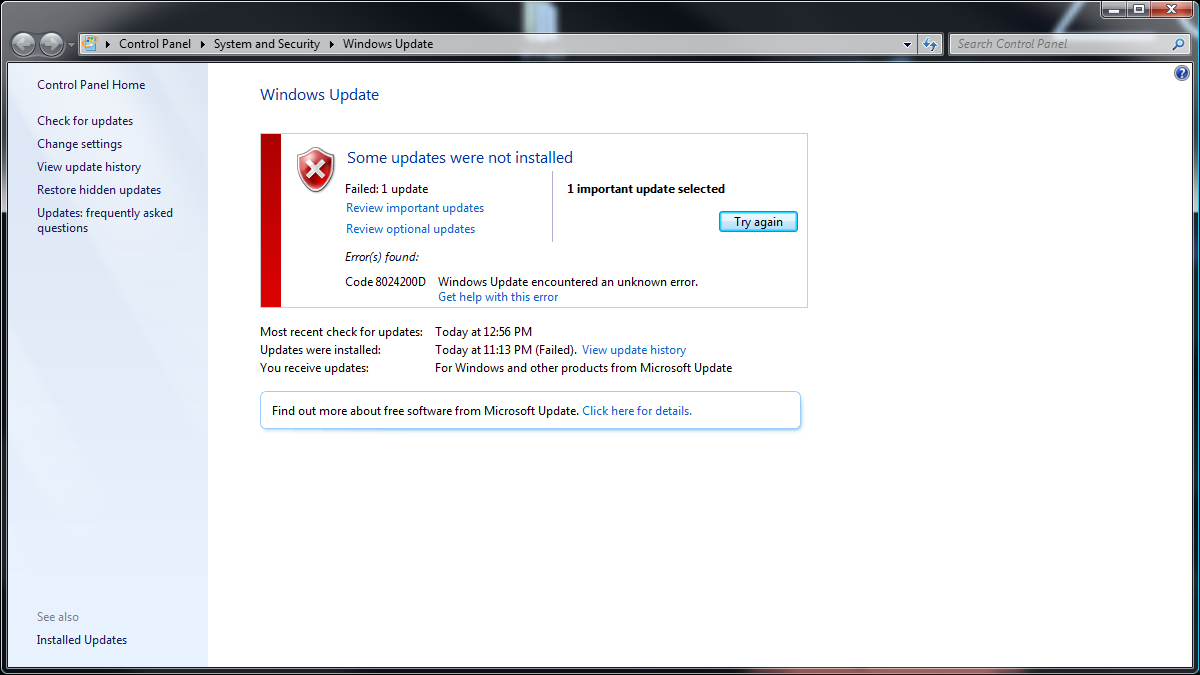
T4EgepN.png


I used the MS update database and downloaded the update manually and tried to install it.

Got this:
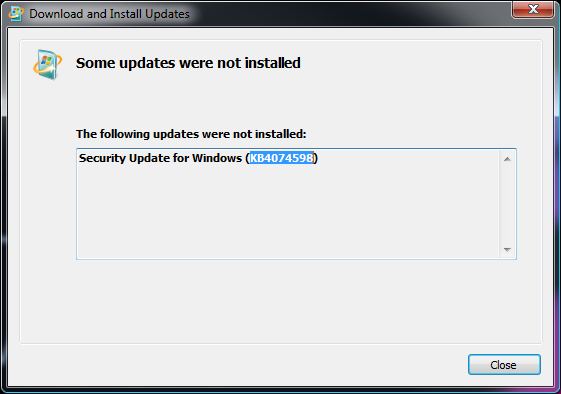
Vm7v7DM.png


Not sure what to do it's quite nagging. Also on a side note ever since I installed Windows 7 in Januaryish I have had a Windows update literally every single time I shut-down for months. Occasionally there won't be one. Damn is that normal? Basically a fresh install.
 

My Computer My Computer

At a glance

Windows 7 Ultimate x64 / Windows 10 Home x64Intel i7 6700K16GBGeForce GTX 980 TI
Computer type
PC/Desktop
Computer Manufacturer/Model Number
Custom Build
OS
Windows 7 Ultimate x64 / Windows 10 Home x64
CPU
Intel i7 6700K
Motherboard
ASRock Z170 Extreme7+ LGA 1151 Intel Z170 HDMI SATA 6Gb/s US
Memory
16GB
Graphics Card(s)
GeForce GTX 980 TI
Monitor(s) Displays
HP 25VX | AOC 27 Inch
Screen Resolution
1920x1080
Hard Drives
Windows 7: 250GB
Windows 10: 1TB
Storage: 3TB
PSU
CoolerMaster 700W
Case
ThermalTake Chaser MK-1
Cooling
Fan
Keyboard
Razer Blackwidow Chroma
Mouse
Razer Mamba
Antivirus
Kaspersky Total Security
Browser
Chrome

My Computer My Computer

At a glance

Win 10 x64, Linux Lite, Win 7 x64, BlackArch,...
Computer type
PC/Desktop
Computer Manufacturer/Model Number
HP Desktop & Compaq Laptop
OS
Win 10 x64, Linux Lite, Win 7 x64, BlackArch, & Kali
Hard Drives
Samsung 850 Pro 256Gb,
Hitachi HDD 1Tb,
Crucial MX SSD 250Gb
Segate 3Tb USB 3.0 Ext. Backup HDD
Internet Speed
150Mbps dn, 20Mbps up
Antivirus
Avast Free, Malwarebytes Anti-Exploit & Anti-Ransomware
Browser
Firefox, Chrome, Opera, & VPN
Hi Collin2011,
please follow Windows Update Posting Instructions


Have you tried:
Windows Update Troubleshooter: https://support.microsoft.com/en-us/help/4027322/windows-update-troubleshooter
If this does not help, try using Windows Update Readiness Tool: https://support.microsoft.com/en-us...-by-using-the-dism-or-system-update-readiness
If none helps, try performing a reset of Windows Update Components: https://support.microsoft.com/en-us/help/971058/how-do-i-reset-windows-update-components

I'm very sorry for not replying sooner...my life is a mess...sorry again.

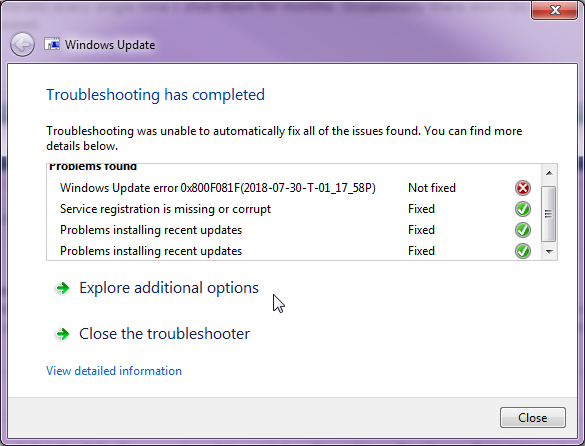
I ran the trouble shooter and it gave me this:

X6DZP6Q.png
 

My Computer My Computer

At a glance

Windows 7 Ultimate x64 / Windows 10 Home x64Intel i7 6700K16GBGeForce GTX 980 TI
Computer type
PC/Desktop
Computer Manufacturer/Model Number
Custom Build
OS
Windows 7 Ultimate x64 / Windows 10 Home x64
CPU
Intel i7 6700K
Motherboard
ASRock Z170 Extreme7+ LGA 1151 Intel Z170 HDMI SATA 6Gb/s US
Memory
16GB
Graphics Card(s)
GeForce GTX 980 TI
Monitor(s) Displays
HP 25VX | AOC 27 Inch
Screen Resolution
1920x1080
Hard Drives
Windows 7: 250GB
Windows 10: 1TB
Storage: 3TB
PSU
CoolerMaster 700W
Case
ThermalTake Chaser MK-1
Cooling
Fan
Keyboard
Razer Blackwidow Chroma
Mouse
Razer Mamba
Antivirus
Kaspersky Total Security
Browser
Chrome
No problem with the delay.

Would you please run System Update Readiness Tool per win update posting instructions and post
logs.

Log at: C:\Windows\
WindowsUpdate.log

Logs at: C:\Windows\Logs\CBS
CBS.log
CheckSUR.log

Don't need entire CBS folder or CBS persist logs.

CheckSUR.log is temporary in default location after running SURT tool. Be patient, SURT may take a while to complete.

Nic
 

My Computer My Computer

At a glance

Win 10 x64, Linux Lite, Win 7 x64, BlackArch,...
Computer type
PC/Desktop
Computer Manufacturer/Model Number
HP Desktop & Compaq Laptop
OS
Win 10 x64, Linux Lite, Win 7 x64, BlackArch, & Kali
Hard Drives
Samsung 850 Pro 256Gb,
Hitachi HDD 1Tb,
Crucial MX SSD 250Gb
Segate 3Tb USB 3.0 Ext. Backup HDD
Internet Speed
150Mbps dn, 20Mbps up
Antivirus
Avast Free, Malwarebytes Anti-Exploit & Anti-Ransomware
Browser
Firefox, Chrome, Opera, & VPN
Hi Snick,

A year or two ago I ran into the well-documented Windows Update problem and after trying a number of different fixes it was eventually sorted using the System Update readiness tool.

The problem has now resurfaced with recent updates. It started about a month ago with the monthly rollup downloading but failing to install then reverted to the old problem of just sitting reporting 'downloading' but with no progress.

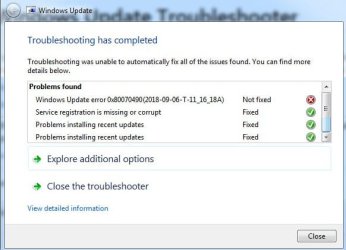
Following your post I tried the troubleshooter which initially found two issues that it couldn't fix, the Windows Update error and Service registration missing or corrupt. However I decided to try Windows Update again and it managed to download the monthly rollup but failed again whilst trying to install it.

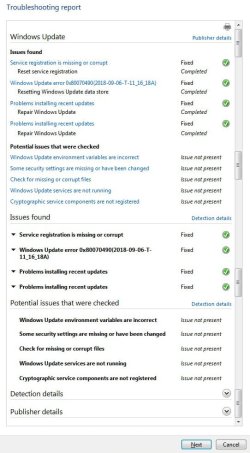
I ran the troubleshooter again and this time it only failed on the Windows Update error. The interesting thing was when I looked at the troubleshooting report it showed the error as fixed. I tried Windows Update again but with the same result.

A few days ago, before seeing your post, I tried re-running the System Update readiness tool but it hung part-way through and after about half an hour I eventually had to use Task Manager to kill it. In the process it seemed to have screwed my wi-fi card software as I then found I had to enter the WPA/PSK code every time I booted up. I managed to resolve this by removing and re-installing the software but this has made me very reluctant to try the System Update readiness tool again.

What are the implications of trying the Reset Windows Update Components?

I don't know how vital these monthly rollups are but I'm rather inclined to just ignore them from now on especially as support for Windows 7 will be ending sometime soon.

Incidentally I currently have 112Gb of free space on the System partition so I don't think it's a problem with disk space.
 

Attachments

  • Failed.jpg
    Failed.jpg
    45.6 KB · Views: 0
  • Problems.jpg
    Problems.jpg
    33.4 KB · Views: 37
  • Troubleshooting report.jpg
    Troubleshooting report.jpg
    73.3 KB · Views: 0

My Computer My Computer

At a glance

Windows 7 Professional 64-bit SP1Pentium Core i5-2500 3.3GHz2 x 4GB DDR3 1333MHzAsus GT440 1GB GDDR5
Computer type
PC/Desktop
Computer Manufacturer/Model Number
Home build
OS
Windows 7 Professional 64-bit SP1
CPU
Pentium Core i5-2500 3.3GHz
Motherboard
Gigabyte P61-USB3-B3
Memory
2 x 4GB DDR3 1333MHz
Graphics Card(s)
Asus GT440 1GB GDDR5
Sound Card
Realtek integrated sound
Monitor(s) Displays
LG L1942PE
Screen Resolution
1280 x 1024 @ 60Hz
Hard Drives
2 x 1TB Western Digital WD10EARS, 1 x 1TB Seagate ST1000DM010
PSU
EVGA 450BR
Case
Novatech Panther ATX
Cooling
Sharkoon Silent Eagle 1000 120mm in case rear extracting
Keyboard
Logitech K120
Hi, I'm still stuck with this problem. The monthly Malicious Software Removal Tool always downloads and reports success but the Security Monthly Quality Rollup fails. As mentioned in my earlier reply I tried troubleshooting Windows Update and it did find some issues which it claimed to have fixed. I tried it again and this time it didn't find anything.


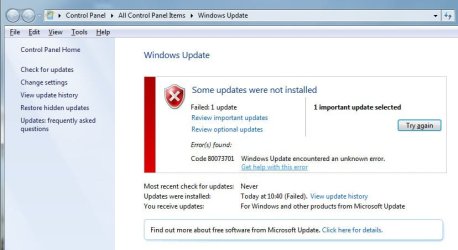
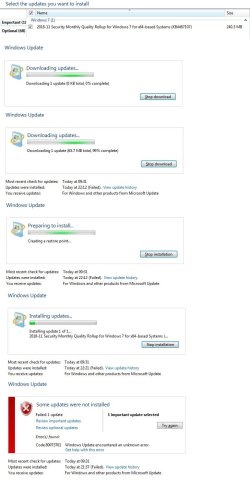
I've taken screenshots of the download sequence. I had to run it several times to get all the shots which is why the timestamps differ. Points to note from the attached image :


It sits showing (0 KB total, 0% complete) for about 2 minutes then instantly jumps to (65.7 MB total, 99% complete). Note, however that the true size shown in the Important updates list is 240.3 MB.


It then starts to create a restore point. This takes about 10 seconds which is far less time than the restore point created during the download of the Malicious Software Removal Tool.


It then reports "Installing update 1 of 1" but after about 5 seconds it fails with the message "Code 80073701 Windows Update encountered an unknown error". When I click on "Get help with this error" I am presented with a list of error numbers which, unsurprisingly, does not include this code.


Any further thoughts on this would be most welcome.
 

Attachments

  • Update_fail.jpg
    Update_fail.jpg
    89.3 KB · Views: 2

My Computer My Computer

At a glance

Windows 7 Professional 64-bit SP1Pentium Core i5-2500 3.3GHz2 x 4GB DDR3 1333MHzAsus GT440 1GB GDDR5
Computer type
PC/Desktop
Computer Manufacturer/Model Number
Home build
OS
Windows 7 Professional 64-bit SP1
CPU
Pentium Core i5-2500 3.3GHz
Motherboard
Gigabyte P61-USB3-B3
Memory
2 x 4GB DDR3 1333MHz
Graphics Card(s)
Asus GT440 1GB GDDR5
Sound Card
Realtek integrated sound
Monitor(s) Displays
LG L1942PE
Screen Resolution
1280 x 1024 @ 60Hz
Hard Drives
2 x 1TB Western Digital WD10EARS, 1 x 1TB Seagate ST1000DM010
PSU
EVGA 450BR
Case
Novatech Panther ATX
Cooling
Sharkoon Silent Eagle 1000 120mm in case rear extracting
Keyboard
Logitech K120
I've seen lots of the same problem on another thread here. I had the problem for almost a year. I believe the rollups are security updates, yet my machine ran just fine without them for 10 months. Problem was resolved when I did a Repair Install.
 

My Computer My Computer

At a glance

Win 7 Ult 64-bitG620 2.6GHZ Pentium R6 GB
Computer type
PC/Desktop
Computer Manufacturer/Model Number
HP p6-2020t
OS
Win 7 Ult 64-bit
CPU
G620 2.6GHZ Pentium R
Memory
6 GB
Monitor(s) Displays
25" HPLV2311
Screen Resolution
1920 x 1200
Hard Drives
1 SATA, 1 exterior SATA
Case
HP
Cooling
PSU
Antivirus
Glasswire
Browser
Waterfox; Firefox; Chrome for work
Other Info
Firewall--Glasswire
Similar specs in Gateway DX4200
Verizon FIOS Wired network

1 other Win7 computer-- has SSD
Do you mean a Repair Install from the Windows 7 OEM CD? I ask because in another thread a member was advised to download and run something called the Windows Repair Free tool and that caused them all sorts of problems. Having had my own problems from trying to re-run the System Update Readiness Tool I am now rather circumspect about running any repair software.
 

My Computer My Computer

At a glance

Windows 7 Professional 64-bit SP1Pentium Core i5-2500 3.3GHz2 x 4GB DDR3 1333MHzAsus GT440 1GB GDDR5
Computer type
PC/Desktop
Computer Manufacturer/Model Number
Home build
OS
Windows 7 Professional 64-bit SP1
CPU
Pentium Core i5-2500 3.3GHz
Motherboard
Gigabyte P61-USB3-B3
Memory
2 x 4GB DDR3 1333MHz
Graphics Card(s)
Asus GT440 1GB GDDR5
Sound Card
Realtek integrated sound
Monitor(s) Displays
LG L1942PE
Screen Resolution
1280 x 1024 @ 60Hz
Hard Drives
2 x 1TB Western Digital WD10EARS, 1 x 1TB Seagate ST1000DM010
PSU
EVGA 450BR
Case
Novatech Panther ATX
Cooling
Sharkoon Silent Eagle 1000 120mm in case rear extracting
Keyboard
Logitech K120
Repair Install I used was just a process using the CD, not a download of anything. Look up the repair install tutorials on this site. it repairs any corrupted system files by downloading fresh copies from the CD. It takes time, so do it when you have the time. Then you have to re-downlad all the updates using the Dism++ program. Dism will skip the updates forcing Win 10 on you and the telemetry, and it's faster than doing it manually.
 

My Computer My Computer

At a glance

Win 7 Ult 64-bitG620 2.6GHZ Pentium R6 GB
Computer type
PC/Desktop
Computer Manufacturer/Model Number
HP p6-2020t
OS
Win 7 Ult 64-bit
CPU
G620 2.6GHZ Pentium R
Memory
6 GB
Monitor(s) Displays
25" HPLV2311
Screen Resolution
1920 x 1200
Hard Drives
1 SATA, 1 exterior SATA
Case
HP
Cooling
PSU
Antivirus
Glasswire
Browser
Waterfox; Firefox; Chrome for work
Other Info
Firewall--Glasswire
Similar specs in Gateway DX4200
Verizon FIOS Wired network

1 other Win7 computer-- has SSD
Thanks for your help which is greatly appreciated but after looking at what I might have to do after a Repair Install I think I'll leave well alone.
 

My Computer My Computer

At a glance

Windows 7 Professional 64-bit SP1Pentium Core i5-2500 3.3GHz2 x 4GB DDR3 1333MHzAsus GT440 1GB GDDR5
Computer type
PC/Desktop
Computer Manufacturer/Model Number
Home build
OS
Windows 7 Professional 64-bit SP1
CPU
Pentium Core i5-2500 3.3GHz
Motherboard
Gigabyte P61-USB3-B3
Memory
2 x 4GB DDR3 1333MHz
Graphics Card(s)
Asus GT440 1GB GDDR5
Sound Card
Realtek integrated sound
Monitor(s) Displays
LG L1942PE
Screen Resolution
1280 x 1024 @ 60Hz
Hard Drives
2 x 1TB Western Digital WD10EARS, 1 x 1TB Seagate ST1000DM010
PSU
EVGA 450BR
Case
Novatech Panther ATX
Cooling
Sharkoon Silent Eagle 1000 120mm in case rear extracting
Keyboard
Logitech K120
Back
Top