Cannot install IE10 from Windows Update, Error 9C57

n0dyjeff

New member
Local time
3:35 AM
Messages
13
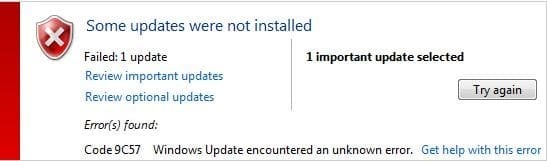
When I attempted to install IE10 from Windows Update, the update failed with Error 9C57.

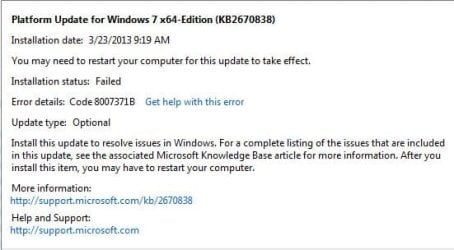
There was also a prior failure (also this morning) to install an optional update, Platform Update for Windows 7 x64 edition (KB2670838).

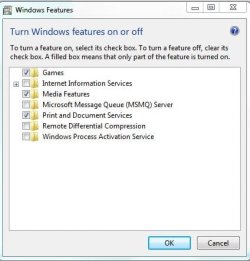
Finally, while this may be entirely unrelated, I noticed earlier this week that the "Turn Window Features On and Off" function under Programs and Features of the Control Panel is missing quite a few items that I know used to be there. For example, there's no longer a Telnet or FTP option. The list is only about 6 or 7 items long. I mention this in case it's useful for troubleshooting.

I'm attaching CBS.zip, screen caps of the two failed Windows updates, and a screen cap of the Windows Feature showing the very few items in it.

View attachment 260711
Capture.JPG

Windows Features.JPG

Platform Update.JPG

Thanks so much in advance for your help!

Rgds,
Jeff
 
Last edited:

My Computer

Computer type
PC/Desktop
Computer Manufacturer/Model Number
Custom
OS
Win 7 64 SP1
CPU
Intel Core i7 960
Motherboard
Intel DX58SO2
Memory
24 GB
Graphics Card(s)
NVIDIA Geforce 8800 GT
Hard Drives
256 GB SSD, 1000 GB SATA
Antivirus
MSAV
Browser
IE9
There are some very rare errors present in both CheckSUR and CBS logs - they'll take some researching.

back later (if Tom doesn't get in first! :))A
 

My Computer

Computer type
Laptop
Computer Manufacturer/Model Number
Asus K52F or Lenovo B51-80
OS
Win 7 x64 Home Premium (and x86 VirtualBox VM)/Win10
CPU
i3 370M/i7 6500U
Motherboard
Asus/Lenovo
Memory
8GB - finally :)/8GB
Graphics Card(s)
it's an i3, dude!/dual Intel&nVidia
Sound Card
onboard
Monitor(s) Displays
15.6" built-in
Screen Resolution
1366x768/1920x1080
Hard Drives
750GB Seagate internal
Sundry external drives attached to other computers on the local network
1TB SSD on the Lenovo
PSU
n/a
Internet Speed
as much as I can get - usually on a dongle/phone, so <1MB/s
Antivirus
MSE/Defender
Browser
IE11/12/Edge/Chrome/FF(if I must)
Thanks! Please let me know if there's any additional information needed.

Rgds,
Jeff
 

My Computer

Computer type
PC/Desktop
Computer Manufacturer/Model Number
Custom
OS
Win 7 64 SP1
CPU
Intel Core i7 960
Motherboard
Intel DX58SO2
Memory
24 GB
Graphics Card(s)
NVIDIA Geforce 8800 GT
Hard Drives
256 GB SSD, 1000 GB SATA
Antivirus
MSAV
Browser
IE9
I may have a hint of a clue :)

Please open an Elevated Command Prompt, and run the following commands - post the results.

REG LOAD HKLM\COMPONENTS C:\Windows\System32\config\COMPONENTS
REG QUERY HKLM\COMPONENTS
REG UNLOAD HKLM\COMPONENTS
DIR C:\Windows\System32\config /S


Here are some instructions to make life easier :)
1) To open an Elevated Command Prompt Window (the ECP window), click on Start, All Programs, Accessories – then right-click on Command Prompt, and select Run as Administrator. Accept the UAC prompt.
2) To run the commands easier, highlight the block of commands, and right-click on the highlight – select Copy. In the CP Window, click on the black/white icon at top left – select Paste. The commands will run but may not complete the last command, so hit the Enter Key once.
3) To copy the results... click on the Black/White icon in the top left, and select Edit... 'Select All', and hit the Enter key - then use Ctrl+V or r-click+Paste to paste it into your response.
 

My Computer

Computer type
Laptop
Computer Manufacturer/Model Number
Asus K52F or Lenovo B51-80
OS
Win 7 x64 Home Premium (and x86 VirtualBox VM)/Win10
CPU
i3 370M/i7 6500U
Motherboard
Asus/Lenovo
Memory
8GB - finally :)/8GB
Graphics Card(s)
it's an i3, dude!/dual Intel&nVidia
Sound Card
onboard
Monitor(s) Displays
15.6" built-in
Screen Resolution
1366x768/1920x1080
Hard Drives
750GB Seagate internal
Sundry external drives attached to other computers on the local network
1TB SSD on the Lenovo
PSU
n/a
Internet Speed
as much as I can get - usually on a dongle/phone, so <1MB/s
Antivirus
MSE/Defender
Browser
IE11/12/Edge/Chrome/FF(if I must)
Hi Noel,

Thanks for looking into this! Here are the results from following the instructions you sent:

Microsoft Windows [Version 6.1.7601]
Copyright (c) 2009 Microsoft Corporation. All rights reserved.


C:\Windows\system32>REG LOAD HKLM\COMPONENTS C:\Windows\System32\config\COMPONEN
TS
The operation completed successfully.


C:\Windows\system32>REG QUERY HKLM\COMPONENTS
HKEY_LOCAL_MACHINE\COMPONENTS
LastScavengeCookie REG_QWORD 0x1ce0a708a595a96
LastScavengeFlags REG_DWORD 0x7
HKEY_LOCAL_MACHINE\COMPONENTS\CanonicalData
HKEY_LOCAL_MACHINE\COMPONENTS\ccpinterface
HKEY_LOCAL_MACHINE\COMPONENTS\Configuration
HKEY_LOCAL_MACHINE\COMPONENTS\DerivedData
HKEY_LOCAL_MACHINE\COMPONENTS\Installers
HKEY_LOCAL_MACHINE\COMPONENTS\ServicingStackVersions


C:\Windows\system32>REG UNLOAD HKLM\COMPONENTS
The operation completed successfully.


C:\Windows\system32>DIR C:\Windows\System32\config /S
Volume in drive C has no label.
Volume Serial Number is 583D-F024
Directory of C:\Windows\System32\config
03/24/2013 11:41 AM <DIR> .
03/24/2013 11:41 AM <DIR> ..
08/18/2012 09:54 AM 28,672 BCD-Template
03/24/2013 10:53 AM 44,040,192 COMPONENTS
03/24/2013 11:19 AM 524,288 DEFAULT
07/13/2009 07:34 PM <DIR> Journal
03/15/2013 12:19 AM <DIR> RegBack
03/23/2013 09:25 AM 262,144 SAM
03/23/2013 09:26 AM 262,144 SECURITY
03/24/2013 11:40 AM 74,186,752 SOFTWARE
03/24/2013 11:40 AM 17,825,792 SYSTEM
11/20/2010 07:41 PM <DIR> systemprofile
01/12/2012 01:19 PM <DIR> TxR
7 File(s) 137,129,984 bytes
Directory of C:\Windows\System32\config\Journal
07/13/2009 07:34 PM <DIR> .
07/13/2009 07:34 PM <DIR> ..
0 File(s) 0 bytes
Directory of C:\Windows\System32\config\RegBack
03/15/2013 12:19 AM <DIR> .
03/15/2013 12:19 AM <DIR> ..
03/15/2013 12:19 AM 487,424 DEFAULT
03/15/2013 12:19 AM 36,864 SAM
03/15/2013 12:19 AM 36,864 SECURITY
03/15/2013 12:19 AM 73,728,000 SOFTWARE
03/15/2013 12:19 AM 17,661,952 SYSTEM
5 File(s) 91,951,104 bytes
Directory of C:\Windows\System32\config\systemprofile
11/20/2010 07:41 PM <DIR> .
11/20/2010 07:41 PM <DIR> ..
01/12/2012 01:16 PM 262,144 ntuser.dat
1 File(s) 262,144 bytes
Directory of C:\Windows\System32\config\systemprofile\AppData
07/13/2009 09:49 PM <DIR> Local
0 File(s) 0 bytes
Directory of C:\Windows\System32\config\systemprofile\AppData\Local
07/13/2009 09:49 PM <DIR> .
07/13/2009 09:49 PM <DIR> ..
01/19/2013 01:23 PM <DIR> Microsoft
0 File(s) 0 bytes
Directory of C:\Windows\System32\config\systemprofile\AppData\Local\Microsoft
01/19/2013 01:23 PM <DIR> .
01/19/2013 01:23 PM <DIR> ..
01/12/2012 11:18 PM <DIR> IdentityCRL
01/19/2013 01:23 PM <DIR> Internet Explorer
01/12/2012 01:18 PM <DIR> Portable Devices
07/13/2009 09:54 PM <DIR> Windows
0 File(s) 0 bytes
Directory of C:\Windows\System32\config\systemprofile\AppData\Local\Microsoft\I
dentityCRL
01/12/2012 11:18 PM <DIR> .
01/12/2012 11:18 PM <DIR> ..
01/12/2012 11:18 PM <DIR> production
0 File(s) 0 bytes
Directory of C:\Windows\System32\config\systemprofile\AppData\Local\Microsoft\I
dentityCRL\production
01/12/2012 11:18 PM <DIR> .
01/12/2012 11:18 PM <DIR> ..
01/12/2012 11:18 PM <DIR> temp
0 File(s) 0 bytes
Directory of C:\Windows\System32\config\systemprofile\AppData\Local\Microsoft\I
dentityCRL\production\temp
01/12/2012 11:18 PM <DIR> .
01/12/2012 11:18 PM <DIR> ..
0 File(s) 0 bytes
Directory of C:\Windows\System32\config\systemprofile\AppData\Local\Microsoft\I
nternet Explorer
01/19/2013 01:23 PM <DIR> .
01/19/2013 01:23 PM <DIR> ..
01/19/2013 01:23 PM 49,120 MSIMGSIZ.DAT
1 File(s) 49,120 bytes
Directory of C:\Windows\System32\config\systemprofile\AppData\Local\Microsoft\P
ortable Devices
01/12/2012 01:18 PM <DIR> .
01/12/2012 01:18 PM <DIR> ..
11/08/2012 10:35 PM 284 wpdlog00.sqm
09/20/2012 08:12 PM 284 wpdlog01.sqm
10/23/2012 07:39 AM 284 wpdlog02.sqm
3 File(s) 852 bytes
Directory of C:\Windows\System32\config\systemprofile\AppData\Local\Microsoft\W
indows
07/13/2009 09:54 PM <DIR> .
07/13/2009 09:54 PM <DIR> ..
07/13/2009 09:49 PM <DIR> Caches
0 File(s) 0 bytes
Directory of C:\Windows\System32\config\systemprofile\AppData\Local\Microsoft\W
indows\Caches
07/13/2009 09:49 PM <DIR> .
07/13/2009 09:49 PM <DIR> ..
0 File(s) 0 bytes
Directory of C:\Windows\System32\config\systemprofile\AppData\Local\Microsoft\W
indows\Temporary Internet Files\Content.IE5\2G3FEPDE
03/23/2013 09:23 AM 27,364 SetupPolicy[1].cab
1 File(s) 27,364 bytes
Directory of C:\Windows\System32\config\systemprofile\AppData\Local\Microsoft\W
indows\Temporary Internet Files\Content.IE5\KEQ0ZR6W
03/19/2013 06:14 AM 17,163 IDR_XML_DEFAULT_TRANSFORM[1]
1 File(s) 17,163 bytes
Directory of C:\Windows\System32\config\systemprofile\AppData\Local\Microsoft\W
indows\Temporary Internet Files\Content.IE5\QQ6VXP14
03/23/2013 09:47 AM 214 fwlink[1].htm
1 File(s) 214 bytes
Directory of C:\Windows\System32\config\systemprofile\AppData\LocalLow\Microsof
t
05/11/2012 08:41 AM <DIR> Silverlight
0 File(s) 0 bytes
Directory of C:\Windows\System32\config\systemprofile\AppData\LocalLow\Microsof
t\Silverlight
05/11/2012 08:41 AM <DIR> .
05/11/2012 08:41 AM <DIR> ..
0 File(s) 0 bytes
Directory of C:\Windows\System32\config\systemprofile\AppData\Roaming\Microsoft

01/12/2012 11:18 PM <DIR> IdentityCRL
05/04/2012 05:08 PM <DIR> Speech
07/13/2009 10:12 PM <DIR> Windows
0 File(s) 0 bytes
Directory of C:\Windows\System32\config\systemprofile\AppData\Roaming\Microsoft
\IdentityCRL
01/12/2012 11:18 PM <DIR> .
01/12/2012 11:18 PM <DIR> ..
01/12/2012 11:18 PM <DIR> production
0 File(s) 0 bytes
Directory of C:\Windows\System32\config\systemprofile\AppData\Roaming\Microsoft
\IdentityCRL\production
01/12/2012 11:18 PM <DIR> .
01/12/2012 11:18 PM <DIR> ..
03/24/2013 09:24 AM <DIR> temp
0 File(s) 0 bytes
Directory of C:\Windows\System32\config\systemprofile\AppData\Roaming\Microsoft
\IdentityCRL\production\temp
03/24/2013 09:24 AM <DIR> .
03/24/2013 09:24 AM <DIR> ..
0 File(s) 0 bytes
Directory of C:\Windows\System32\config\systemprofile\AppData\Roaming\Microsoft
\Speech
05/04/2012 05:08 PM <DIR> .
05/04/2012 05:08 PM <DIR> ..
05/04/2012 05:08 PM <DIR> Files
0 File(s) 0 bytes
Directory of C:\Windows\System32\config\systemprofile\AppData\Roaming\Microsoft
\Speech\Files
05/04/2012 05:08 PM <DIR> .
05/04/2012 05:08 PM <DIR> ..
05/04/2012 05:08 PM <DIR> UserLexicons
0 File(s) 0 bytes
Directory of C:\Windows\System32\config\systemprofile\AppData\Roaming\Microsoft
\Speech\Files\UserLexicons
05/04/2012 05:08 PM <DIR> .
05/04/2012 05:08 PM <DIR> ..
05/04/2012 05:08 PM 940 SP_79F248752F674415B4924913D0A475C5.dat
1 File(s) 940 bytes
Directory of C:\Windows\System32\config\systemprofile\AppData\Roaming\Microsoft
\Windows
07/13/2009 10:12 PM <DIR> .
07/13/2009 10:12 PM <DIR> ..
0 File(s) 0 bytes
Directory of C:\Windows\System32\config\TxR
01/12/2012 01:19 PM <DIR> .
01/12/2012 01:19 PM <DIR> ..
0 File(s) 0 bytes
Total Files Listed:
21 File(s) 229,438,885 bytes
65 Dir(s) 176,399,138,816 bytes free
C:\Windows\system32>
 

My Computer

Computer type
PC/Desktop
Computer Manufacturer/Model Number
Custom
OS
Win 7 64 SP1
CPU
Intel Core i7 960
Motherboard
Intel DX58SO2
Memory
24 GB
Graphics Card(s)
NVIDIA Geforce 8800 GT
Hard Drives
256 GB SSD, 1000 GB SATA
Antivirus
MSAV
Browser
IE9
There's a couple of values missing from the registry key - I'm going to have to research the proper values, and how to tell which is which.
The missing values are
StoreArchitecture (I think the data should be 09 00 00 00)
StoreFormatVersion (perhaps 0.0.0.6 ??)

Let's check the.NET version, as I think that has a bearing on the values...


Please run the following commands in an Elevated Command Prompt

REG QUERY HKCR\TypeLib\{565783C6-CB41-11D1-8B02-00600806D9B6} /S
DIR C:\Windows\regtlibv12.exe /S


Post the results
 

My Computer

Computer type
Laptop
Computer Manufacturer/Model Number
Asus K52F or Lenovo B51-80
OS
Win 7 x64 Home Premium (and x86 VirtualBox VM)/Win10
CPU
i3 370M/i7 6500U
Motherboard
Asus/Lenovo
Memory
8GB - finally :)/8GB
Graphics Card(s)
it's an i3, dude!/dual Intel&nVidia
Sound Card
onboard
Monitor(s) Displays
15.6" built-in
Screen Resolution
1366x768/1920x1080
Hard Drives
750GB Seagate internal
Sundry external drives attached to other computers on the local network
1TB SSD on the Lenovo
PSU
n/a
Internet Speed
as much as I can get - usually on a dongle/phone, so <1MB/s
Antivirus
MSE/Defender
Browser
IE11/12/Edge/Chrome/FF(if I must)
I'm fairly happy that the values/data above are correct...

Please open an Elevated Command Prompt, and run the following commands....

Code:
[B]REG LOAD HKLM\COMPONENTS C:\Windows\System32\config\COMPONENTS[/B]
[B]REG ADD HKLM\COMPONENTS /v StoreArchitecture /t REG_BINARY /d 0009000000 /f[/B]
[B]REG ADD HKLM\COMPONENTS /v StoreFormat /t REG_BINARY /d 30002E0030002E0030002E003600 /f[/B]
[B]REG UNLOAD HKLM\COMPONENTS[/B]
[B].[/B]

If you get any error messages, please STOP, and post back - otherwise reboot and run another CheckSUR and post the log.
 

My Computer

Computer type
Laptop
Computer Manufacturer/Model Number
Asus K52F or Lenovo B51-80
OS
Win 7 x64 Home Premium (and x86 VirtualBox VM)/Win10
CPU
i3 370M/i7 6500U
Motherboard
Asus/Lenovo
Memory
8GB - finally :)/8GB
Graphics Card(s)
it's an i3, dude!/dual Intel&nVidia
Sound Card
onboard
Monitor(s) Displays
15.6" built-in
Screen Resolution
1366x768/1920x1080
Hard Drives
750GB Seagate internal
Sundry external drives attached to other computers on the local network
1TB SSD on the Lenovo
PSU
n/a
Internet Speed
as much as I can get - usually on a dongle/phone, so <1MB/s
Antivirus
MSE/Defender
Browser
IE11/12/Edge/Chrome/FF(if I must)
Hi Noel,

Here are the results:

Microsoft Windows [Version 6.1.7601]
Copyright (c) 2009 Microsoft Corporation. All rights reserved.

C:\Windows\system32>REG QUERY HKCR\TypeLib\{565783C6-CB41-11D1-8B02-00600806D9B6
} /S
HKEY_CLASSES_ROOT\TypeLib\{565783C6-CB41-11D1-8B02-00600806D9B6}\1.2
(Default) REG_SZ Microsoft WMI Scripting V1.2 Library
HKEY_CLASSES_ROOT\TypeLib\{565783C6-CB41-11D1-8B02-00600806D9B6}\1.2\0
HKEY_CLASSES_ROOT\TypeLib\{565783C6-CB41-11D1-8B02-00600806D9B6}\1.2\0\win32
(Default) REG_EXPAND_SZ %SystemRoot%\system32\wbem\wbemdisp.TLB
HKEY_CLASSES_ROOT\TypeLib\{565783C6-CB41-11D1-8B02-00600806D9B6}\1.2\FLAGS
(Default) REG_SZ 0
HKEY_CLASSES_ROOT\TypeLib\{565783C6-CB41-11D1-8B02-00600806D9B6}\1.2\HELPDIR
(Default) REG_EXPAND_SZ %SystemRoot%\system32\wbem\

C:\Windows\system32>DIR C:\Windows\regtlibv12.exe /S
Volume in drive C has no label.
Volume Serial Number is 583D-F024

Directory of C:\Windows\Microsoft.NET\Framework\v4.0.30319
03/18/2010 02:16 PM 58,192 regtlibv12.exe
1 File(s) 58,192 bytes

Directory of C:\Windows\Microsoft.NET\Framework64\v4.0.30319
03/18/2010 03:27 PM 65,360 regtlibv12.exe
1 File(s) 65,360 bytes

Total Files Listed:
2 File(s) 123,552 bytes
0 Dir(s) 176,795,856,896 bytes free
C:\Windows\system32>
 

My Computer

Computer type
PC/Desktop
Computer Manufacturer/Model Number
Custom
OS
Win 7 64 SP1
CPU
Intel Core i7 960
Motherboard
Intel DX58SO2
Memory
24 GB
Graphics Card(s)
NVIDIA Geforce 8800 GT
Hard Drives
256 GB SSD, 1000 GB SATA
Antivirus
MSAV
Browser
IE9
Hi Noel,

Here's what I got from doing the last registry operation:

Since I got an error message, I haven't done anything further.

Jeff


C:\Windows\system32>REG LOAD HKLM\COMPONENTS C:\Windows\System32\config\COMPONENTS
The operation completed successfully.
C:\Windows\system32>REG ADD HKLM\COMPONENTS /v StoreArchitecture /t REG_BINARY /d 0009000000 /f
The operation completed successfully.
C:\Windows\system32>REG ADD HKLM\COMPONENTS /v StoreFormat /t REG_BINARY /d 30002E0030002E0030002E003600 /f
The operation completed successfully.
C:\Windows\system32>REG UNLOAD HKLM\COMPONENTS
ERROR: Access is denied.
C:\Windows\system32>
 

My Computer

Computer type
PC/Desktop
Computer Manufacturer/Model Number
Custom
OS
Win 7 64 SP1
CPU
Intel Core i7 960
Motherboard
Intel DX58SO2
Memory
24 GB
Graphics Card(s)
NVIDIA Geforce 8800 GT
Hard Drives
256 GB SSD, 1000 GB SATA
Antivirus
MSAV
Browser
IE9
The access denied error on unload is almost to be expected.

Wait another 10 minutes, then try that command (last one only) again - then reboot whatever the result.
 

My Computer

Computer type
Laptop
Computer Manufacturer/Model Number
Asus K52F or Lenovo B51-80
OS
Win 7 x64 Home Premium (and x86 VirtualBox VM)/Win10
CPU
i3 370M/i7 6500U
Motherboard
Asus/Lenovo
Memory
8GB - finally :)/8GB
Graphics Card(s)
it's an i3, dude!/dual Intel&nVidia
Sound Card
onboard
Monitor(s) Displays
15.6" built-in
Screen Resolution
1366x768/1920x1080
Hard Drives
750GB Seagate internal
Sundry external drives attached to other computers on the local network
1TB SSD on the Lenovo
PSU
n/a
Internet Speed
as much as I can get - usually on a dongle/phone, so <1MB/s
Antivirus
MSE/Defender
Browser
IE11/12/Edge/Chrome/FF(if I must)
Hi Noel,

Okay, I waited 10 minutes, then ran the REG UNLOAD HKLM\COMPONENTS command.

Here's what I got:

C:\Windows\system32>REG UNLOAD HKLM\COMPONENTS
ERROR: The parameter is incorrect.

Then I rebooted and ran CheckSUR. Here's the log:

View attachment 260918

I also got a Windows Update notification of a couple of available updates...one of which seems fairly old. I've attached a screenshot. Not sure if it's relevant, but providing for completeness.

Capture.JPG
 

My Computer

Computer type
PC/Desktop
Computer Manufacturer/Model Number
Custom
OS
Win 7 64 SP1
CPU
Intel Core i7 960
Motherboard
Intel DX58SO2
Memory
24 GB
Graphics Card(s)
NVIDIA Geforce 8800 GT
Hard Drives
256 GB SSD, 1000 GB SATA
Antivirus
MSAV
Browser
IE9
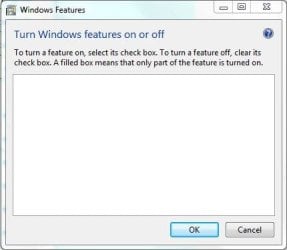
One additional tidbit that may be of interest: the "Turn Window Features On and Off" box is now completely empty.

Capture.JPG
 

My Computer

Computer type
PC/Desktop
Computer Manufacturer/Model Number
Custom
OS
Win 7 64 SP1
CPU
Intel Core i7 960
Motherboard
Intel DX58SO2
Memory
24 GB
Graphics Card(s)
NVIDIA Geforce 8800 GT
Hard Drives
256 GB SSD, 1000 GB SATA
Antivirus
MSAV
Browser
IE9
Well, that seems to be an improvement, at least! :)


[edit] The WU offerings, that is! [/edit]
Having said that, there's no change in the CheckSUR, so we need to run some more tests.

Let's check that the registry changes survived the reboot...

Please open an Elevated Command Prompt, and run the following commands - post the results.

REG LOAD HKLM\COMPONENTS C:\Windows\System32\config\COMPONENTS
REG QUERY HKLM\COMPONENTS
REG UNLOAD HKLM\COMPONENTS

also please run a new SFC /SCANNOW, and post the new CBS.log file
 

My Computer

Computer type
Laptop
Computer Manufacturer/Model Number
Asus K52F or Lenovo B51-80
OS
Win 7 x64 Home Premium (and x86 VirtualBox VM)/Win10
CPU
i3 370M/i7 6500U
Motherboard
Asus/Lenovo
Memory
8GB - finally :)/8GB
Graphics Card(s)
it's an i3, dude!/dual Intel&nVidia
Sound Card
onboard
Monitor(s) Displays
15.6" built-in
Screen Resolution
1366x768/1920x1080
Hard Drives
750GB Seagate internal
Sundry external drives attached to other computers on the local network
1TB SSD on the Lenovo
PSU
n/a
Internet Speed
as much as I can get - usually on a dongle/phone, so <1MB/s
Antivirus
MSE/Defender
Browser
IE11/12/Edge/Chrome/FF(if I must)

My Computer

Computer type
Laptop
Computer Manufacturer/Model Number
Asus K52F or Lenovo B51-80
OS
Win 7 x64 Home Premium (and x86 VirtualBox VM)/Win10
CPU
i3 370M/i7 6500U
Motherboard
Asus/Lenovo
Memory
8GB - finally :)/8GB
Graphics Card(s)
it's an i3, dude!/dual Intel&nVidia
Sound Card
onboard
Monitor(s) Displays
15.6" built-in
Screen Resolution
1366x768/1920x1080
Hard Drives
750GB Seagate internal
Sundry external drives attached to other computers on the local network
1TB SSD on the Lenovo
PSU
n/a
Internet Speed
as much as I can get - usually on a dongle/phone, so <1MB/s
Antivirus
MSE/Defender
Browser
IE11/12/Edge/Chrome/FF(if I must)
No, I haven't used any kind of registry cleaner, at least not intentionally :) I'm posting the results you asked for previously, then will download the Farbar Service and report back.

Here's the results of the Registry Commands and the sfc /scannow

Microsoft Windows [Version 6.1.7601]
Copyright (c) 2009 Microsoft Corporation. All rights reserved.
C:\Windows\system32>REG LOAD HKLM\COMPONENTS C:\Windows\System32\config\COMPONENTS
The operation completed successfully.
C:\Windows\system32>REG QUERY HKLM\COMPONENTS
HKEY_LOCAL_MACHINE\COMPONENTS
LastScavengeCookie REG_QWORD 0x1ce0a708a595a96
LastScavengeFlags REG_DWORD 0x7
StoreArchitecture REG_BINARY 0009000000
StoreFormat REG_BINARY 30002E0030002E0030002E003600
HKEY_LOCAL_MACHINE\COMPONENTS\CanonicalData
HKEY_LOCAL_MACHINE\COMPONENTS\ccpinterface
HKEY_LOCAL_MACHINE\COMPONENTS\Configuration
HKEY_LOCAL_MACHINE\COMPONENTS\DerivedData
HKEY_LOCAL_MACHINE\COMPONENTS\Installers
HKEY_LOCAL_MACHINE\COMPONENTS\ServicingStackVersions
C:\Windows\system32>REG UNLOAD HKLM\COMPONENTS
The operation completed successfully.
C:\Windows\system32>
C:\Windows\system32>sfc /scannow
Beginning system scan. This process will take some time.

Windows Resource Protection could not perform the requested operation.
C:\Windows\system32>

Here's the CBS.zip file:

View attachment 260924
 

My Computer

Computer type
PC/Desktop
Computer Manufacturer/Model Number
Custom
OS
Win 7 64 SP1
CPU
Intel Core i7 960
Motherboard
Intel DX58SO2
Memory
24 GB
Graphics Card(s)
NVIDIA Geforce 8800 GT
Hard Drives
256 GB SSD, 1000 GB SATA
Antivirus
MSAV
Browser
IE9

My Computer

Computer type
PC/Desktop
Computer Manufacturer/Model Number
Custom
OS
Win 7 64 SP1
CPU
Intel Core i7 960
Motherboard
Intel DX58SO2
Memory
24 GB
Graphics Card(s)
NVIDIA Geforce 8800 GT
Hard Drives
256 GB SSD, 1000 GB SATA
Antivirus
MSAV
Browser
IE9
Aaargh! - I got the value name wrong.

Please run the following in an Elevated command prompt to correct my error, and insert the proper value

Code:
[B]REG LOAD HKLM\COMPONENTS C:\Windows\System32\config\COMPONENTS[/B]
[B]REG DELETE HKLM\COMPONENTS /v StoreFormat /F[/B]
[B]REG ADD HKLM\COMPONENTS /v StoreFormatVersion /t REG_BINARY /d 30002E0030002E0030002E003600 /f[/B]
[B]REG UNLOAD HKLM\COMPONENTS[/B]
[B].[/B]
 

My Computer

Computer type
Laptop
Computer Manufacturer/Model Number
Asus K52F or Lenovo B51-80
OS
Win 7 x64 Home Premium (and x86 VirtualBox VM)/Win10
CPU
i3 370M/i7 6500U
Motherboard
Asus/Lenovo
Memory
8GB - finally :)/8GB
Graphics Card(s)
it's an i3, dude!/dual Intel&nVidia
Sound Card
onboard
Monitor(s) Displays
15.6" built-in
Screen Resolution
1366x768/1920x1080
Hard Drives
750GB Seagate internal
Sundry external drives attached to other computers on the local network
1TB SSD on the Lenovo
PSU
n/a
Internet Speed
as much as I can get - usually on a dongle/phone, so <1MB/s
Antivirus
MSE/Defender
Browser
IE11/12/Edge/Chrome/FF(if I must)
No worries!

OK, I ran the new set of registry commands - no errors. :) Then rebooted and ran the SUR tool and sfc /scannow.

This is what I got

Microsoft Windows [Version 6.1.7601]
Copyright (c) 2009 Microsoft Corporation. All rights reserved.
C:\Windows\system32>sfc /scannow
Beginning system scan. This process will take some time.

Windows Resource Protection could not perform the requested operation.
C:\Windows\system32>

I couldn't upload the entire CBS.zip file, it was too large. I got rid of the .CAB files and the CheckSUR.persist log and zipped it. Here's the abbreviated result

View attachment 260931

Also, the Add/Remove Windows components box is still empty, FWIW
 

My Computer

Computer type
PC/Desktop
Computer Manufacturer/Model Number
Custom
OS
Win 7 64 SP1
CPU
Intel Core i7 960
Motherboard
Intel DX58SO2
Memory
24 GB
Graphics Card(s)
NVIDIA Geforce 8800 GT
Hard Drives
256 GB SSD, 1000 GB SATA
Antivirus
MSAV
Browser
IE9
The CheckSUR log is a lot healthier (if you want to call it that)
Here's the summary
Code:
Summary:
Seconds executed: 243
 Found 63488 errors
 Fixed 63488 errors
  CSI Missing Component Key Total count: 6037
  Fixed: CSI Missing Component Key.  Total count: 6037
  CSI Missing Pinned Component Key Total count: 9128
  Fixed: CSI Missing Pinned Component Key.  Total count: 9128
  CSI Missing Identity Total count: 15165
  Fixed: CSI Missing Identity.  Total count: 15165
  CSI Missing C Mark Total count: 17617
  Fixed: CSI Missing C Mark.  Total count: 17617
  CSI F Mark Missing Total count: 24669
  Fixed: CSI F Mark Missing.  Total count: 24669

(I think that's the largest number I've ever seen there!)

The CBS log is interesting, to say the least - it has a large number (~1600?) of this type of error....
Code:
  Line 47589: 2013-03-24 13:49:53, Error                 CSI    00000e4a (F) Store architecture value set, but not sizeof ulong: {l:5 b:0009000000}[gle=0x80004005]
 Line 47590: 2013-03-24 13:49:53, Error                 CSI    [EMAIL="00000e4b@2013/3/24:20:49:53.194"]00000e4b@2013/3/24:20:49:53.194[/EMAIL] (F) d:\win7sp1_gdr\base\wcp\componentstore\com\store.cpp(5303): Error STATUS_SXS_COMPONENT_STORE_CORRUPT originated in function Windows::COM::VerifyStoreVersionNumber expression: (null)

I think it's worth running CheckSUR again - since there was so much corruption last time, it may have completely missed many errors.
it may however be that these errors are from updates which are not covered by the CheckSUR tool - in which case, the only solution is probably going to be a repair install (or even a clean install)
 

My Computer

Computer type
Laptop
Computer Manufacturer/Model Number
Asus K52F or Lenovo B51-80
OS
Win 7 x64 Home Premium (and x86 VirtualBox VM)/Win10
CPU
i3 370M/i7 6500U
Motherboard
Asus/Lenovo
Memory
8GB - finally :)/8GB
Graphics Card(s)
it's an i3, dude!/dual Intel&nVidia
Sound Card
onboard
Monitor(s) Displays
15.6" built-in
Screen Resolution
1366x768/1920x1080
Hard Drives
750GB Seagate internal
Sundry external drives attached to other computers on the local network
1TB SSD on the Lenovo
PSU
n/a
Internet Speed
as much as I can get - usually on a dongle/phone, so <1MB/s
Antivirus
MSE/Defender
Browser
IE11/12/Edge/Chrome/FF(if I must)
Of the 145200+ lines in the CheckSUR report, 143000+ are related to either the original RTM issue of files or the SP1 issue - only 2000 or so are related to updates.

Given the size of your Components file, I would have expected there to be many more update entries present - but it's very difficult to get similar results from a 'known good' machine (I may play and try to do it tomorrow)
 

My Computer

Computer type
Laptop
Computer Manufacturer/Model Number
Asus K52F or Lenovo B51-80
OS
Win 7 x64 Home Premium (and x86 VirtualBox VM)/Win10
CPU
i3 370M/i7 6500U
Motherboard
Asus/Lenovo
Memory
8GB - finally :)/8GB
Graphics Card(s)
it's an i3, dude!/dual Intel&nVidia
Sound Card
onboard
Monitor(s) Displays
15.6" built-in
Screen Resolution
1366x768/1920x1080
Hard Drives
750GB Seagate internal
Sundry external drives attached to other computers on the local network
1TB SSD on the Lenovo
PSU
n/a
Internet Speed
as much as I can get - usually on a dongle/phone, so <1MB/s
Antivirus
MSE/Defender
Browser
IE11/12/Edge/Chrome/FF(if I must)
Back
Top