Cannot install IE10 from Windows Update, Error 9C57

Hi Noel,

I reran the CheckSUR utility, and got a nice clean result. :D

Still getting an error running sfc /scannow, and still not components showing up in the Add/Remove Windows box.

Should I go ahead and install any updates that are recommended? Or should I wait until everything is clean?

Thanks,
Jeff
 

My Computer My Computer

Computer type
PC/Desktop
Computer Manufacturer/Model Number
Custom
OS
Win 7 64 SP1
CPU
Intel Core i7 960
Motherboard
Intel DX58SO2
Memory
24 GB
Graphics Card(s)
NVIDIA Geforce 8800 GT
Hard Drives
256 GB SSD, 1000 GB SATA
Antivirus
MSAV
Browser
IE9
I doubt very much that the updates will install - but if they do, the results could be interesting :)

First, just attempt to install the KB2676562 update and see what happens.
If it does install, run a new Check for Updates - see what's found.
 

My Computer My Computer

Computer type
Laptop
Computer Manufacturer/Model Number
Asus K52F or Lenovo B51-80
OS
Win 7 x64 Home Premium (and x86 VirtualBox VM)/Win10
CPU
i3 370M/i7 6500U
Motherboard
Asus/Lenovo
Memory
8GB - finally :)/8GB
Graphics Card(s)
it's an i3, dude!/dual Intel&nVidia
Sound Card
onboard
Monitor(s) Displays
15.6" built-in
Screen Resolution
1366x768/1920x1080
Hard Drives
750GB Seagate internal
Sundry external drives attached to other computers on the local network
1TB SSD on the Lenovo
PSU
n/a
Internet Speed
as much as I can get - usually on a dongle/phone, so <1MB/s
Antivirus
MSE/Defender
Browser
IE11/12/Edge/Chrome/FF(if I must)
Well, when I rebooted my computer, it apparently attempted to install both. And then it said they were still available. So I tried again. And they were still available.

Sorry I didn't follow your instructions exactly :o

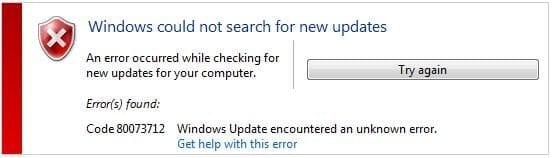
I now get an error when I look for updates

Capture.JPG

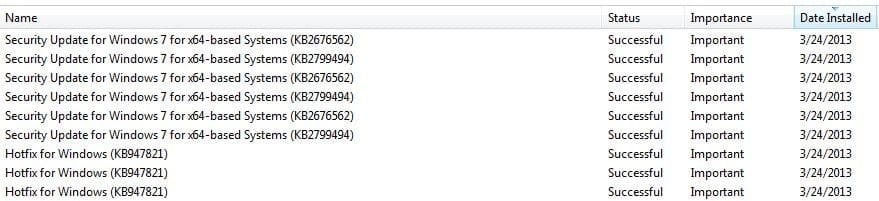
And the updates are showing as installed

Capture2.JPG
 

My Computer My Computer

Computer type
PC/Desktop
Computer Manufacturer/Model Number
Custom
OS
Win 7 64 SP1
CPU
Intel Core i7 960
Motherboard
Intel DX58SO2
Memory
24 GB
Graphics Card(s)
NVIDIA Geforce 8800 GT
Hard Drives
256 GB SSD, 1000 GB SATA
Antivirus
MSAV
Browser
IE9
That error is more what I expected, I have to admit :(
From what I can tell, the problem is of fairly long-standing (May last year) - but has only recently become obvious.
As a result, I think your only option is to back up your data to external storage, and then attempt a repair install.
Hopefully, what we've already done will enable the repair to work - historically, the original CheckSUR error has only ever been fixed by a clean install, so at least we're a step ahead of that if it works :)

See here for instructions. http://www.sevenforums.com/tutorials/3413-repair-install.html?ltr=R
 

My Computer My Computer

Computer type
Laptop
Computer Manufacturer/Model Number
Asus K52F or Lenovo B51-80
OS
Win 7 x64 Home Premium (and x86 VirtualBox VM)/Win10
CPU
i3 370M/i7 6500U
Motherboard
Asus/Lenovo
Memory
8GB - finally :)/8GB
Graphics Card(s)
it's an i3, dude!/dual Intel&nVidia
Sound Card
onboard
Monitor(s) Displays
15.6" built-in
Screen Resolution
1366x768/1920x1080
Hard Drives
750GB Seagate internal
Sundry external drives attached to other computers on the local network
1TB SSD on the Lenovo
PSU
n/a
Internet Speed
as much as I can get - usually on a dongle/phone, so <1MB/s
Antivirus
MSE/Defender
Browser
IE11/12/Edge/Chrome/FF(if I must)
Hi Noel,

Thanks for your help! :) Since it's a single user machine that gets regular backups to a Windows Home Server, I'm thinking I might as well bite the bullet and do a clean install. It's an opportunity to rid my system of the detritus that has accumulated over time. I can always recover anything missing by going to the server backup.

Regards,
Jeff
 

My Computer My Computer

Computer type
PC/Desktop
Computer Manufacturer/Model Number
Custom
OS
Win 7 64 SP1
CPU
Intel Core i7 960
Motherboard
Intel DX58SO2
Memory
24 GB
Graphics Card(s)
NVIDIA Geforce 8800 GT
Hard Drives
256 GB SSD, 1000 GB SATA
Antivirus
MSAV
Browser
IE9
That sounds like a plan, to me!

Good luck with it.
 

My Computer My Computer

Computer type
Laptop
Computer Manufacturer/Model Number
Asus K52F or Lenovo B51-80
OS
Win 7 x64 Home Premium (and x86 VirtualBox VM)/Win10
CPU
i3 370M/i7 6500U
Motherboard
Asus/Lenovo
Memory
8GB - finally :)/8GB
Graphics Card(s)
it's an i3, dude!/dual Intel&nVidia
Sound Card
onboard
Monitor(s) Displays
15.6" built-in
Screen Resolution
1366x768/1920x1080
Hard Drives
750GB Seagate internal
Sundry external drives attached to other computers on the local network
1TB SSD on the Lenovo
PSU
n/a
Internet Speed
as much as I can get - usually on a dongle/phone, so <1MB/s
Antivirus
MSE/Defender
Browser
IE11/12/Edge/Chrome/FF(if I must)
cannot install IE10, 9C57

I'm going thru the same thing, with updates in general often leading to Startup Repair, which may take 30 minutes or more.

I've had some luck installing updates manually and may try that with IE10. I would not go to the effort detailed above. Chrome works just fine; I like to keep IExx around for troublesome websites.
 

My Computer My Computer

Computer type
PC/Desktop
OS
w7 64 premium
Hi, i got the same problem, before i repaired an error in windows update that the service windows update was impossible to start, the problem was in winsxs folder that all files about the service are corrupted, and dont allow me start the service and neither install programs about to fix windows update and services, well i was make a copy/paste from a clean partition with 0 errors and updated perfectly, to mi corrupted winsxs files and folder that SFC says that are corrupted, and the problem was solved, the service windows update now is working perfect, but after updated the system, just IE10 is impossible to install, with error #9C57 from windows update, i tried all the methods listed in microsoft, fix it, clean boot, etc, implemeting all files from IE10 cleaned partition that dont exist in mi windows, in same folders, manifest, catroot and winsxs folders and is impossible to solve, the problem i think that is in IE9 because SFC launch me this errors:

Code:
2013-05-28 00:01:08, Info                  CSI    000000db [SR] Beginning Verify and Repair transaction
2013-05-28 00:01:09, Info                  CSI    000000de [SR] Cannot verify component files for Microsoft-Windows-InternetExplorer-Deployment, Version = 9.4.8112.16421, pA = PROCESSOR_ARCHITECTURE_AMD64 (9), Culture neutral, VersionScope = 1 nonSxS, PublicKeyToken = {l:8 b:31bf3856ad364e35}, Type neutral, TypeName neutral, PublicKey neutral, manifest is damaged (TRUE)
2013-05-28 00:01:13, Info                  CSI    000000e3 [SR] Verify complete
2013-05-28 00:01:15, Info                  CSI    000000e8 [SR] Verifying 100 (0x0000000000000064) components
2013-05-28 00:01:15, Info                  CSI    000000e9 [SR] Beginning Verify and Repair transaction
2013-05-28 00:01:18, Info                  CSI    000000eb [SR] Verify complete
2013-05-28 00:01:18, Info                  CSI    000000ec [SR] Verifying 100 (0x0000000000000064) components
2013-05-28 00:01:18, Info                  CSI    000000ed [SR] Beginning Verify and Repair transaction
2013-05-28 00:01:24, Info                  CSI    000000ef [SR] Verify complete
2013-05-28 00:01:24, Info                  CSI    000000f0 [SR] Verifying 100 (0x0000000000000064) components
2013-05-28 00:01:24, Info                  CSI    000000f1 [SR] Beginning Verify and Repair transaction
2013-05-28 00:01:25, Info                  CSI    000000f4 [SR] Cannot verify component files for Microsoft-Windows-InternetExplorer-Optional-Deployment, Version = 9.4.8112.16421, pA = PROCESSOR_ARCHITECTURE_AMD64 (9), Culture neutral, VersionScope = 1 nonSxS, PublicKeyToken = {l:8 b:31bf3856ad364e35}, Type neutral, TypeName neutral, PublicKey neutral, manifest is damaged (TRUE)
2013-05-28 00:01:25, Info                  CSI    000000f7 [SR] Cannot verify component files for Microsoft-Windows-InternetExplorer-OOB-Deployment, Version = 9.4.8112.16421, pA = PROCESSOR_ARCHITECTURE_AMD64 (9), Culture neutral, VersionScope = 1 nonSxS, PublicKeyToken = {l:8 b:31bf3856ad364e35}, Type neutral, TypeName neutral, PublicKey neutral, manifest is damaged (TRUE)
2013-05-28 00:09:38, Info                  CSI    0000020c [SR] Cannot verify component files for Microsoft-Windows-InternetExplorer-Deployment, Version = 9.4.8112.16421, pA = PROCESSOR_ARCHITECTURE_IA32_ON_WIN64 (10), Culture neutral, VersionScope = 1 nonSxS, PublicKeyToken = {l:8 b:31bf3856ad364e35}, Type neutral, TypeName neutral, PublicKey neutral, manifest is damaged (TRUE)
2013-05-28 00:09:42, Info                  CSI    0000020f [SR] Verify complete
2013-05-28 00:09:45, Info                  CSI    00000214 [SR] Verifying 100 (0x0000000000000064) components
2013-05-28 00:09:45, Info                  CSI    00000215 [SR] Beginning Verify and Repair transaction
2013-05-28 00:09:49, Info                  CSI    00000217 [SR] Verify complete
2013-05-28 00:09:49, Info                  CSI    00000218 [SR] Verifying 100 (0x0000000000000064) components
2013-05-28 00:09:49, Info                  CSI    00000219 [SR] Beginning Verify and Repair transaction
2013-05-28 00:09:52, Info                  CSI    0000021c [SR] Cannot verify component files for Microsoft-Windows-InternetExplorer-Optional-Deployment, Version = 9.4.8112.16421, pA = PROCESSOR_ARCHITECTURE_IA32_ON_WIN64 (10), Culture neutral, VersionScope = 1 nonSxS, PublicKeyToken = {l:8 b:31bf3856ad364e35}, Type neutral, TypeName neutral, PublicKey neutral, manifest is damaged (TRUE)
2013-05-28 00:09:52, Info                  CSI    0000021f [SR] Cannot verify component files for Microsoft-Windows-InternetExplorer-OOB-Deployment, Version = 9.4.8112.16421, pA = PROCESSOR_ARCHITECTURE_IA32_ON_WIN64 (10), Culture neutral, VersionScope = 1 nonSxS, PublicKeyToken = {l:8 b:31bf3856ad364e35}, Type neutral, TypeName neutral, PublicKey neutral, manifest is damaged (TRUE)
2013-05-28 00:14:47, Info                  CSI    00000336 [SR] Verify complete
2013-05-28 00:14:47, Info                  CSI    00000337 [SR] Repairing 6 components
2013-05-28 00:14:47, Info                  CSI    00000338 [SR] Beginning Verify and Repair transaction
2013-05-28 00:14:47, Info                  CSI    0000033b [SR] Cannot verify component files for Microsoft-Windows-InternetExplorer-Deployment, Version = 9.4.8112.16421, pA = PROCESSOR_ARCHITECTURE_AMD64 (9), Culture neutral, VersionScope = 1 nonSxS, PublicKeyToken = {l:8 b:31bf3856ad364e35}, Type neutral, TypeName neutral, PublicKey neutral, manifest is damaged (TRUE)
2013-05-28 00:14:47, Info                  CSI    0000033e [SR] Cannot verify component files for Microsoft-Windows-InternetExplorer-Optional-Deployment, Version = 9.4.8112.16421, pA = PROCESSOR_ARCHITECTURE_AMD64 (9), Culture neutral, VersionScope = 1 nonSxS, PublicKeyToken = {l:8 b:31bf3856ad364e35}, Type neutral, TypeName neutral, PublicKey neutral, manifest is damaged (TRUE)
2013-05-28 00:14:47, Info                  CSI    00000341 [SR] Cannot verify component files for Microsoft-Windows-InternetExplorer-OOB-Deployment, Version = 9.4.8112.16421, pA = PROCESSOR_ARCHITECTURE_AMD64 (9), Culture neutral, VersionScope = 1 nonSxS, PublicKeyToken = {l:8 b:31bf3856ad364e35}, Type neutral, TypeName neutral, PublicKey neutral, manifest is damaged (TRUE)
2013-05-28 00:14:47, Info                  CSI    00000344 [SR] Cannot verify component files for Microsoft-Windows-InternetExplorer-Deployment, Version = 9.4.8112.16421, pA = PROCESSOR_ARCHITECTURE_IA32_ON_WIN64 (10), Culture neutral, VersionScope = 1 nonSxS, PublicKeyToken = {l:8 b:31bf3856ad364e35}, Type neutral, TypeName neutral, PublicKey neutral, manifest is damaged (TRUE)
2013-05-28 00:14:47, Info                  CSI    00000347 [SR] Cannot verify component files for Microsoft-Windows-InternetExplorer-Optional-Deployment, Version = 9.4.8112.16421, pA = PROCESSOR_ARCHITECTURE_IA32_ON_WIN64 (10), Culture neutral, VersionScope = 1 nonSxS, PublicKeyToken = {l:8 b:31bf3856ad364e35}, Type neutral, TypeName neutral, PublicKey neutral, manifest is damaged (TRUE)
2013-05-28 00:14:47, Info                  CSI    0000034a [SR] Cannot verify component files for Microsoft-Windows-InternetExplorer-OOB-Deployment, Version = 9.4.8112.16421, pA = PROCESSOR_ARCHITECTURE_IA32_ON_WIN64 (10), Culture neutral, VersionScope = 1 nonSxS, PublicKeyToken = {l:8 b:31bf3856ad364e35}, Type neutral, TypeName neutral, PublicKey neutral, manifest is damaged (TRUE)
2013-05-28 00:14:47, Info                  CSI    0000034c [SR] Repair complete
2013-05-28 00:14:49, Info                  CSI    00000365 [SR] Committing transaction
2013-05-28 00:14:49, Info                  CSI    00000369 [SR] Verify and Repair Transaction completed. All files and registry keys listed in this transaction  have been successfully repaired

Microsoft Fix it center too launch me an error #0x80070057 when i try to fix and cant fix neither the error.
I tried to uninstall/delete IE9 from the system to reinstall after IE9 and IE10 but is impossible to uninstall IE9 neither.
The idea was that if i can delete IE9 from the system is possible to solve the problem, updating IE8 to IE9 or reinstalling IE9 and then i dont have errors in the manifest folder to install IE10, but cant uninstall IE9 neither.
I tried too to install this update Windows6.1-KB947821-v26-x64.msu from here http://www.microsoft.com/en-us/download/details.aspx?id=20858 but nothing, is impossible, the update fix and repair, but without changes about my problem.
Help me plz, im desperate.
 
Last edited:

My Computer My Computer

Computer type
PC/Desktop
Computer Manufacturer/Model Number
custom
OS
win 7 x64 utimate
CPU
I7 2700k
Motherboard
asus p8z68
Memory
8gb
Graphics Card(s)
evga 560 ti 2win SLI
Antivirus
avast
Browser
waterfox 64

My Computer My Computer

Computer type
Laptop
Computer Manufacturer/Model Number
Asus K52F or Lenovo B51-80
OS
Win 7 x64 Home Premium (and x86 VirtualBox VM)/Win10
CPU
i3 370M/i7 6500U
Motherboard
Asus/Lenovo
Memory
8GB - finally :)/8GB
Graphics Card(s)
it's an i3, dude!/dual Intel&nVidia
Sound Card
onboard
Monitor(s) Displays
15.6" built-in
Screen Resolution
1366x768/1920x1080
Hard Drives
750GB Seagate internal
Sundry external drives attached to other computers on the local network
1TB SSD on the Lenovo
PSU
n/a
Internet Speed
as much as I can get - usually on a dongle/phone, so <1MB/s
Antivirus
MSE/Defender
Browser
IE11/12/Edge/Chrome/FF(if I must)

My Computer My Computer

Computer type
PC/Desktop
Computer Manufacturer/Model Number
custom
OS
win 7 x64 utimate
CPU
I7 2700k
Motherboard
asus p8z68
Memory
8gb
Graphics Card(s)
evga 560 ti 2win SLI
Antivirus
avast
Browser
waterfox 64
I started a search since I'm encountering the same issues with Windows Updates failing to install.

I did come across this problem before and I've been here before. After reading the posts, it jogged my memory and I remember the only way I got to fix this problem was to do a Windows "in place upgrade / install".

Running the windows setup from the disc "from within windows".
Insert the Windows installation disc, open "Computer" (Mine has a different name), open the Windows 7 disc and double click setup.exe, go through the installation procedure as an "upgrade".

Gonna run it possibly after I receive my new hard drives I ordered. I'm currently installed on a Laptop drive now temporarily.

I will post my results after.
 

My Computer My Computer

OS
Windows 7 7077

My Computer My Computer

Computer type
Laptop
Computer Manufacturer/Model Number
Asus K52F or Lenovo B51-80
OS
Win 7 x64 Home Premium (and x86 VirtualBox VM)/Win10
CPU
i3 370M/i7 6500U
Motherboard
Asus/Lenovo
Memory
8GB - finally :)/8GB
Graphics Card(s)
it's an i3, dude!/dual Intel&nVidia
Sound Card
onboard
Monitor(s) Displays
15.6" built-in
Screen Resolution
1366x768/1920x1080
Hard Drives
750GB Seagate internal
Sundry external drives attached to other computers on the local network
1TB SSD on the Lenovo
PSU
n/a
Internet Speed
as much as I can get - usually on a dongle/phone, so <1MB/s
Antivirus
MSE/Defender
Browser
IE11/12/Edge/Chrome/FF(if I must)
Hoo boy...:rolleyes:

I was just trying to help, as I stated... this was the only solution that worked to rectify my problem.
After trying everything I could find again, (All the Windows Update Fixes, The Microsoft FixIt Tool, etc.) I'm pretty certain that this will resolve the issue.
 

My Computer My Computer

OS
Windows 7 7077
Back
Top