S Sevendaez New member Local time 10:48 PM Messages 24 May 11, 2019 #1 Network page connection lines See second post. Last edited: May 13, 2019 My Computer My Computer At a glance Windows 7 Pro x64Computer typePC/DesktopOSWindows 7 Pro x64
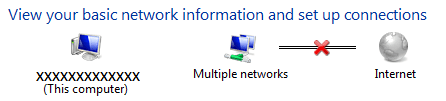
S Sevendaez New member Thread Starter Local time 10:48 PM Messages 24 May 11, 2019 #2 I had a network issue I sorted out, and am wondering what the following graphic means? Attachments network lines.png 4.5 KB · Views: 24 Last edited: May 13, 2019 My Computer My Computer At a glance Windows 7 Pro x64Computer typePC/DesktopOSWindows 7 Pro x64
W wither 2 New member Pro User VIP Local time 11:48 PM Messages 2,247 May 16, 2019 #3 It appears you have more than one network and at least one of them doesn't have an internet connection. My Computer My Computer At a glance Windows 7 Pro SP1 64 bit8 GBComputer typeLaptopComputer Manufacturer/Model NumberDell M6500 Precision Work StationOSWindows 7 Pro SP1 64 bitMemory8 GBScreen Resolution1920xInternet Speed30 MbpsAntivirusNorton SecurityBrowserIE 11
It appears you have more than one network and at least one of them doesn't have an internet connection.
S Sevendaez New member Thread Starter Local time 10:48 PM Messages 24 May 16, 2019 #4 Yes I didn't re-write the thread correctly. I'm using a VPN. I could browse un-restrictedly. Looking in the properties of each connection, one was connected, one not. However.....the map shows blues lines. My Computer My Computer At a glance Windows 7 Pro x64Computer typePC/DesktopOSWindows 7 Pro x64
Yes I didn't re-write the thread correctly. I'm using a VPN. I could browse un-restrictedly. Looking in the properties of each connection, one was connected, one not. However.....the map shows blues lines.
W wither 2 New member Pro User VIP Local time 11:48 PM Messages 2,247 May 17, 2019 #5 Are you saying that neither network shows an X, as in your original post? Have you tried using the Diagnose option for each network? My Computer My Computer At a glance Windows 7 Pro SP1 64 bit8 GBComputer typeLaptopComputer Manufacturer/Model NumberDell M6500 Precision Work StationOSWindows 7 Pro SP1 64 bitMemory8 GBScreen Resolution1920xInternet Speed30 MbpsAntivirusNorton SecurityBrowserIE 11
Are you saying that neither network shows an X, as in your original post? Have you tried using the Diagnose option for each network?
S Sevendaez New member Thread Starter Local time 10:48 PM Messages 24 May 17, 2019 #6 The map [now] shows blues lines from computer to network(s) to internet, which is why I marked it 'solved'. My Computer My Computer At a glance Windows 7 Pro x64Computer typePC/DesktopOSWindows 7 Pro x64
The map [now] shows blues lines from computer to network(s) to internet, which is why I marked it 'solved'.
W wither 2 New member Pro User VIP Local time 11:48 PM Messages 2,247 May 18, 2019 #7 Okay. I guess that's because you connected the one that wasn't connected. Glad you're problem is resolved. My Computer My Computer At a glance Windows 7 Pro SP1 64 bit8 GBComputer typeLaptopComputer Manufacturer/Model NumberDell M6500 Precision Work StationOSWindows 7 Pro SP1 64 bitMemory8 GBScreen Resolution1920xInternet Speed30 MbpsAntivirusNorton SecurityBrowserIE 11
Okay. I guess that's because you connected the one that wasn't connected. Glad you're problem is resolved.