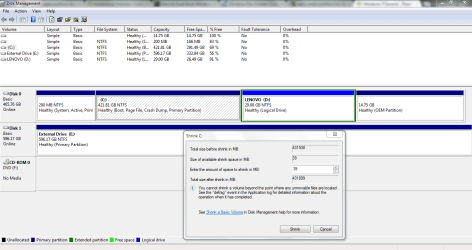
Cannot make large enough partition for dual boot.

lrm537

New member
Member
Local time
4:12 AM
Messages
36
Location
Aberdeen
Been trying to dual boot win8 on to my laptop. While trying to make a partition on the hd i'm not able to make one of sufficient size. I have plenty of room left on the hd but it won't let me go over 39mb.

Any ideas how to solve this?

Any questions, just gimme a shout
:confused:
Screenshot included.

:confused:
 

Attachments

  • 2012-05-10 15-09-00_Disk Management.png
    2012-05-10 15-09-00_Disk Management.png
    37.5 KB · Views: 66

My Computer

Computer Manufacturer/Model Number
Lenovo Ideapad Z570
OS
Windows 7 Home Premium 64
CPU
Intel Core i3-2350M CPU @ 2.30GHz Sandy Bridge
Motherboard
LENOVO Emerald Lake
Memory
8.00 GB Dual-Channel DDR3 @ 665MHz
Graphics Card(s)
1024MB GeForce GT 520M
Sound Card
Realtek High Definition Audio Intel(R) Display Audio
Monitor(s) Displays
15.6
Screen Resolution
1366x768
Hard Drives
500GB Seagate 2.5" SATA @5400 & a 600GB Lacie external HDD
Mouse
hp
Internet Speed
Never fast enough

My Computer

Computer type
PC/Desktop
Computer Manufacturer/Model Number
Self Assembled
OS
Microsoft Windows 10 Pro Insider Preview 64-bit
CPU
Intel(R) Core(TM) i3-4130 CPU @ 3.40GHz
Motherboard
Gigabyte Technology Co., Ltd. B85M-D3H
Memory
Corsair Vengence 4GB x2 (8.00GB Dual-Channel DDR3 @ 798MHz)
Graphics Card(s)
2047MB GeForce GTS 450 (ZOTAC International)
Sound Card
Onboard (Realtek High Definition Audio)
Monitor(s) Displays
LG Flatron E2040T
Screen Resolution
1600x900
Hard Drives
Western Digital 1 TB
Seagate 500 GB
PSU
Corsair VS550
Case
Cooler Master K380
Cooling
Cooler Master Seidon 120V Plus
Keyboard
Logitech MK260r
Mouse
Logitech MK260r
Internet Speed
PMPL Broadband
Antivirus
Windows Defender + MBAM
Browser
Firefox
Other Info
Dell Studio 15" Laptop
The problem you're faced with is this: You already have three primary partitions and a logical partition D, which happens to be part of the extended C drive.

If it were me, I'd first make sure I've created a set of Lenovo recovery discs so that I have a way of getting the computer back to its factory state if need be.

I would then delete the 29Gb D drive and the 15Gb OEM partition, shrink your C drive to suit, and then create another primary partition for Windows 8.

Do not delete the System Reserved partition because that has the Active flag and will hold the boot files for your dual-boot setup.

If you try and create another primary partition on your current drive structure you run the risk of converting the drive to a dynamic drive and that would cause you problems.

http://www.eightforums.com/tutorials/2344-dual-boot-installation-windows-8-windows-7-vista.html
 

My Computer

Computer Manufacturer/Model Number
HP Pavilion Elite 495UK
OS
Windows 7 Ultimate SP1 64-Bit
CPU
Intel Core i7 870 @ 2.93GHz
Motherboard
MSI 2A9C (CPU1)
Memory
8Gb Dual-Channel DDR3 @ 664MHz
Graphics Card(s)
nVidia GeForce GTX 460 1024MB dedicated RAM
Sound Card
Realtek HD Audio
Monitor(s) Displays
HP2310i
Screen Resolution
1920 x 1080
Hard Drives
1x1954GB Hitachi HDS22020ALA 330 (RAID), 1x1954GB Hitachi External for backup and storage
PSU
460W
Case
HP Elite
Cooling
Air cooled
Keyboard
Logitech K750 solar-powered keyboard
Mouse
Logitech Wireless M180 mouse
Internet Speed
2Mb
Other Info
Pure Avanti Flow Internet Radio with iPod Dock, 64Gb iPod, HP USB Speakers, Sony MDR-V500 Headphones, Sony Vaio F-Series Laptop
The problem you're faced with is this: You already have three primary partitions and a logical partition D, which happens to be part of the extended C drive.

If it were me, I'd first make sure I've created a set of Lenovo recovery discs so that I have a way of getting the computer back to its factory state if need be.

I would then delete the 29Gb D drive and the 15Gb OEM partition, shrink your C drive to suit, and then create another primary partition for Windows 8.

Do not delete the System Reserved partition because that has the Active flag and will hold the boot files for your dual-boot setup.

If you try and create another primary partition on your current drive structure you run the risk of converting the drive to a dynamic drive and that would cause you problems.

http://www.eightforums.com/tutorials/2344-dual-boot-installation-windows-8-windows-7-vista.html

Thanks for the response. I'm in the process of making the recovery discs now. I don't suppose you know what is on the 15Gb OEM partition? I'd like to know what I'm about to delete before i delete it. As for the "D" drive, I never saw the point of it in the first place, they could've put the driver, that were stored there, into a folder on "C". So in your opinion deleting those 2 partitions shouldn't cause any problems?
 

My Computer

Computer Manufacturer/Model Number
Lenovo Ideapad Z570
OS
Windows 7 Home Premium 64
CPU
Intel Core i3-2350M CPU @ 2.30GHz Sandy Bridge
Motherboard
LENOVO Emerald Lake
Memory
8.00 GB Dual-Channel DDR3 @ 665MHz
Graphics Card(s)
1024MB GeForce GT 520M
Sound Card
Realtek High Definition Audio Intel(R) Display Audio
Monitor(s) Displays
15.6
Screen Resolution
1366x768
Hard Drives
500GB Seagate 2.5" SATA @5400 & a 600GB Lacie external HDD
Mouse
hp
Internet Speed
Never fast enough
Apparently, it's all to do with Lenovo's factory restore.

What may be a better idea before you delete it, is to create a system image of your current setup, which you can then restore in the event your computer had to be returned to Lenovo for repair.

You might want to read through this thread as it has a lot of information relevant to your problem.

http://www.sevenforums.com/backup-restore/166842-oem-partition.html
 

My Computer

Computer Manufacturer/Model Number
HP Pavilion Elite 495UK
OS
Windows 7 Ultimate SP1 64-Bit
CPU
Intel Core i7 870 @ 2.93GHz
Motherboard
MSI 2A9C (CPU1)
Memory
8Gb Dual-Channel DDR3 @ 664MHz
Graphics Card(s)
nVidia GeForce GTX 460 1024MB dedicated RAM
Sound Card
Realtek HD Audio
Monitor(s) Displays
HP2310i
Screen Resolution
1920 x 1080
Hard Drives
1x1954GB Hitachi HDS22020ALA 330 (RAID), 1x1954GB Hitachi External for backup and storage
PSU
460W
Case
HP Elite
Cooling
Air cooled
Keyboard
Logitech K750 solar-powered keyboard
Mouse
Logitech Wireless M180 mouse
Internet Speed
2Mb
Other Info
Pure Avanti Flow Internet Radio with iPod Dock, 64Gb iPod, HP USB Speakers, Sony MDR-V500 Headphones, Sony Vaio F-Series Laptop
I would only delete your Recovery partition as a last resort and when/if you are of the mind to abandon factory bloatware altogether, choosing to Clean Up Factory Bloatware or even eventually follow the course of most tech enthusiasts to Clean Reinstall - Factory OEM Windows 7.

Until then having the Recovery partition is the most stable method of Recovery, for which disks are really only a backup method.

What I would do here unless you're sure you want to get rid of Recovery is to Resize C from the right using free Partition Wizard bootable CD, create a Logical partition there for Win8. PW views Primary Unallocated Space (which will result from resizing) and Logical Free Space as the same for purposes of creating a new partition.

Just be sure to choose a Logical partition to create, give it a label and Win8 will do the drive lettering.
 
I would only delete your Recovery partition as a last resort and when/if you are of the mind to abandon factory bloatware altogether, choosing to Clean Up Factory Bloatware or even eventually follow the course of most tech enthusiasts to Clean Reinstall - Factory OEM Windows 7.

Until then having the Recovery partition is the most stable method of Recovery, for which disks are really only a backup method.

What I would do here unless you're sure you want to get rid of Recovery is to Resize C from the right using free Partition Wizard bootable CD, create a Logical partition there for Win8. PW views Primary Unallocated Space (which will result from resizing) and Logical Free Space as the same for purposes of creating a new partition.

Just be sure to choose a Logical partition to create, give it a label and Win8 will do the drive lettering.

Ideally I don't want to delete anything to do with recovery, but i do want to dual foot win 8. So by using Partition Wizard to create the partition I shouldn't have to touch anything? Leave the OEM partition in place and shrink "C" With PW? When you say "give it a label" do you mean that it should name the partition? Something like "Win8"?

Thanks for your help :)
 

My Computer

Computer Manufacturer/Model Number
Lenovo Ideapad Z570
OS
Windows 7 Home Premium 64
CPU
Intel Core i3-2350M CPU @ 2.30GHz Sandy Bridge
Motherboard
LENOVO Emerald Lake
Memory
8.00 GB Dual-Channel DDR3 @ 665MHz
Graphics Card(s)
1024MB GeForce GT 520M
Sound Card
Realtek High Definition Audio Intel(R) Display Audio
Monitor(s) Displays
15.6
Screen Resolution
1366x768
Hard Drives
500GB Seagate 2.5" SATA @5400 & a 600GB Lacie external HDD
Mouse
hp
Internet Speed
Never fast enough
Yes.

Burn PW CD ISO to disk using Windows Image Burner or ImgBurn,

Boot PW CD, rightclick C to Resize, drag right border to the left by as much space as you want for Win8, click OK. http://partitionwizard.com/video-help/moveresizepartition/moveresizepartition.html

Now select Create New partition, NTFS, Logical, type in chosen name, skip letter, click OK. Apply both steps.

Both steps are shown in this video. The only difference is you already have a Logical Recovery partition which is fine since it's contiguous as it must be: http://partitionwizard.com/video-help/create-partition/create-partition.html

Burn the WIn8 ISO to DVD using ImgBurn at 4x speed, boot it to install to Created Partition.
 
Yes.

Burn PW CD ISO to disk using Windows Image Burner or ImgBurn,

Boot PW CD, rightclick C to Resize, drag right border to the left by as much space as you want for Win8, click OK. http://partitionwizard.com/video-help/moveresizepartition/moveresizepartition.html

Now select Create New partition, NTFS, Logical, type in chosen name, skip letter, click OK. Apply both steps.

Both steps are shown in this video. The only difference is you already have a Logical Recovery partition which is fine since it's contiguous as it must be: http://partitionwizard.com/video-help/create-partition/create-partition.html

Burn the WIn8 ISO to DVD using ImgBurn at 4x speed, boot it to install to Created Partition.

Brilliant. Thanks a lot, i'll get on it just as soon as the system recovery is finished doing it's thing.
 

My Computer

Computer Manufacturer/Model Number
Lenovo Ideapad Z570
OS
Windows 7 Home Premium 64
CPU
Intel Core i3-2350M CPU @ 2.30GHz Sandy Bridge
Motherboard
LENOVO Emerald Lake
Memory
8.00 GB Dual-Channel DDR3 @ 665MHz
Graphics Card(s)
1024MB GeForce GT 520M
Sound Card
Realtek High Definition Audio Intel(R) Display Audio
Monitor(s) Displays
15.6
Screen Resolution
1366x768
Hard Drives
500GB Seagate 2.5" SATA @5400 & a 600GB Lacie external HDD
Mouse
hp
Internet Speed
Never fast enough
Yes.

Burn PW CD ISO to disk using Windows Image Burner or ImgBurn,

Boot PW CD, rightclick C to Resize, drag right border to the left by as much space as you want for Win8, click OK. http://partitionwizard.com/video-help/moveresizepartition/moveresizepartition.html

Now select Create New partition, NTFS, Logical, type in chosen name, skip letter, click OK. Apply both steps.

Both steps are shown in this video. The only difference is you already have a Logical Recovery partition which is fine since it's contiguous as it must be: http://partitionwizard.com/video-help/create-partition/create-partition.html

Burn the WIn8 ISO to DVD using ImgBurn at 4x speed, boot it to install to Created Partition.

Still not working. Still shows the C drive with 0 unallocated space.
 

My Computer

Computer Manufacturer/Model Number
Lenovo Ideapad Z570
OS
Windows 7 Home Premium 64
CPU
Intel Core i3-2350M CPU @ 2.30GHz Sandy Bridge
Motherboard
LENOVO Emerald Lake
Memory
8.00 GB Dual-Channel DDR3 @ 665MHz
Graphics Card(s)
1024MB GeForce GT 520M
Sound Card
Realtek High Definition Audio Intel(R) Display Audio
Monitor(s) Displays
15.6
Screen Resolution
1366x768
Hard Drives
500GB Seagate 2.5" SATA @5400 & a 600GB Lacie external HDD
Mouse
hp
Internet Speed
Never fast enough
Windows cannot be installed to this disk The selected disk has an MBR

I managed to create the partition as per your instructions. Only thing is now i'm getting this error when trying to install win 8.

"Windows cannot be installed to this disk The selected disk has an MBR partition table. On EFI systems, Windows can only be installed to GPT disks."

Now as much as i know about pc's....i know nothing about this. Never seen this particular error.

Any ideas?
 

My Computer

Computer Manufacturer/Model Number
Lenovo Ideapad Z570
OS
Windows 7 Home Premium 64
CPU
Intel Core i3-2350M CPU @ 2.30GHz Sandy Bridge
Motherboard
LENOVO Emerald Lake
Memory
8.00 GB Dual-Channel DDR3 @ 665MHz
Graphics Card(s)
1024MB GeForce GT 520M
Sound Card
Realtek High Definition Audio Intel(R) Display Audio
Monitor(s) Displays
15.6
Screen Resolution
1366x768
Hard Drives
500GB Seagate 2.5" SATA @5400 & a 600GB Lacie external HDD
Mouse
hp
Internet Speed
Never fast enough

My Computer

Computer Manufacturer/Model Number
HP Pavilion Elite 495UK
OS
Windows 7 Ultimate SP1 64-Bit
CPU
Intel Core i7 870 @ 2.93GHz
Motherboard
MSI 2A9C (CPU1)
Memory
8Gb Dual-Channel DDR3 @ 664MHz
Graphics Card(s)
nVidia GeForce GTX 460 1024MB dedicated RAM
Sound Card
Realtek HD Audio
Monitor(s) Displays
HP2310i
Screen Resolution
1920 x 1080
Hard Drives
1x1954GB Hitachi HDS22020ALA 330 (RAID), 1x1954GB Hitachi External for backup and storage
PSU
460W
Case
HP Elite
Cooling
Air cooled
Keyboard
Logitech K750 solar-powered keyboard
Mouse
Logitech Wireless M180 mouse
Internet Speed
2Mb
Other Info
Pure Avanti Flow Internet Radio with iPod Dock, 64Gb iPod, HP USB Speakers, Sony MDR-V500 Headphones, Sony Vaio F-Series Laptop
Back
Top