
Solved Best way to back up a Win 7/Win10 dual boot system

snoopx

New member
Local time
1:41 AM
Messages
3
Hi,
I originally had only Win 7 installed on my SSD and used Macrium reflect (MR) to make periodic back ups in case of needing a reinstall.
Recently I installed Win 10 on the same SSD so I now have the option to boot and run either operating system.
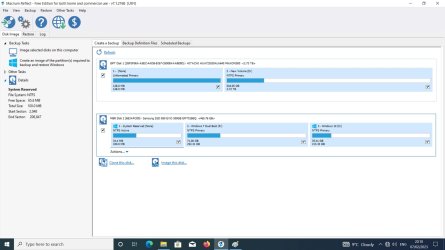
What now is the best way to back up Win 10 on this dual boot system with MR? When I start up MR it automatically loads the GUI as in the attached screen grab offering to back up all 3 partitions, which kind of makes sense if I wanted to backup and restore both Win 7 & 10 at the same time. But what if just Win 10 became corrupted and needed a reinstall?
Can I just back up the Win 10 partition alone for just such a scenario? When I try to do this, MR allows me to uncheck the Win 7 partition, but one of the arrows on the boot partition is greyed out, forcing me to back it up too. Is this the correct way to go for backing up just the Win 10 partition? Or should I go with MR's defaults and back up all 3 partitions containing both Win 7&10 rather than a single partition and operating system? Which boxes should be checked?
Thanks in advance for any advice/info.
 

Attachments
  • Untitled3.jpg
    Untitled3.jpg
    104.3 KB · Views: 4

My Computers My Computers

  • At a glance

    Windows 7 Ultimate x64
    OS
    Windows 7 Ultimate x64
  • Computer type
    PC/Desktop
I have a dual-boot of Windows 7 and 10 but in my case they are on different drives. I backup each disk separately using a backup program on Windows 10.

Have you created the rescue media on a flash drive. If you need to restore the disk you can boot from the flash drive. That way it doesn't make any difference if either of the operating systems are unbootable,
 

My Computers My Computers

  • At a glance

    Windows 7 Home Premium 64-bitsAMD FX-8350GSKILL Ripjaw-X PC3 12800 8GB (2x4GB)ASUS ROG STRIX GTX 1060 6GB
    Computer type
    PC/Desktop
    Computer Manufacturer/Model Number
    Custom build
    OS
    Windows 7 Home Premium 64-bits
    CPU
    AMD FX-8350
    Motherboard
    Gigabyte GA-990FXA-UD3 (AM3+)
    Memory
    GSKILL Ripjaw-X PC3 12800 8GB (2x4GB)
    Graphics Card(s)
    ASUS ROG STRIX GTX 1060 6GB
    Sound Card
    Integrated
    Monitor(s) Displays
    Asus VE228H (21.5-in)
    Screen Resolution
    1920x1080 60Hz
    Hard Drives
    SAMSUNG 870 EVO 2.5 Inch SATA SSD (1TB)
    SAMSUNG 870 EVO 2.5 Inch SATA SSD (1TB)
    SAMSUNG 870 EVO 2.5 Inch SATA SSD (1TB)
    PSU
    Corsair RM750x (750 watts)
    Case
    Corsair Carbide Series 200R
    Cooling
    Corsair Hydro Series H60 (CWCH60)
    Keyboard
    Logitech Elite
    Mouse
    Logitech M510 Wireless Mouse
    Internet Speed
    Comcast Gigabit Extra (1200Mbps down / 35Mbps up)
    Antivirus
    Malwarebytes
    Browser
    Firefox, Edge, Chrome
    Other Info
    ASUS DRW-24B1ST DVD-RW (24X) optical drive
    Seagate Expansion Desk (5TB) external SATA/USB HDD
    Comcast XB8 Internet Gateway
  • At a glance

    Windows 7 Pro (64-bit)AMD Phenom II 960T X4Corsair XMS2 DDR2-800 8GB (4x2GB)ASUS ENGTX560 DCII OC/2DI/1GD5 1GB
    Computer type
    PC/Desktop
    System Manufacturer/Model Number
    Custom
    OS
    Windows 7 Pro (64-bit)
    CPU
    AMD Phenom II 960T X4
    Motherboard
    ASUS M4N82 Deluxe
    Memory
    Corsair XMS2 DDR2-800 8GB (4x2GB)
    Graphics Card(s)
    ASUS ENGTX560 DCII OC/2DI/1GD5 1GB
    Monitor(s) Displays
    Samsung 930B 19-inch LCD
    Screen Resolution
    1280x1024
    Hard Drives
    Samsung SSD 870 EVO 1000 GB (Windows 10)
    Seagate ST1000DM003 1000 GB (Windows 7)
    PSU
    Antec TruePower (new) TP-650
    Case
    Antec Three Hundred
    Cooling
    AMD stock cooler from FX8350
    Mouse
    Logitech M100
    Internet Speed
    Xfinity Gigabit Extra 1200/35 Mbps
Can I just back up the Win 10 partition alone for just such a scenario? When I try to do this, MR allows me to uncheck the Win 7 partition, but one of the arrows on the boot partition is greyed out, forcing me to back it up too. Is this the correct way to go for backing up just the Win 10 partition?

The System Reserved partition is so small that there is no harm in backing it up with your Win 10 partition.

But yes, you can backup any individual partition, if desired. To backup just the Win 10 partition by itself, untick the selection box at the far left end of the "MBR Disk 2" schematic, then click on the "Windows 10" partition. The "Actions" drop-down menu will move to that partition, and from the drop-down you can select "Image this partition only".

If your backup image includes multiple partitions, at restore time you can choose to restore any or all partitions, as desired. For instance, if you have a three-partition image and Win 10 becomes corrupted, you can choose to restore just the Win 10 partition from that image.

Note that by definition a complete backup would include all three partitions, but they need not be at the same time nor in a single image. For example, say you have a three-partition image and several months later reimage only the third partition. If you were to restore to a new, larger hard drive, you would restore partitions 1 & 2 from the first image, and partition 3 from the later image.

Also, just as a tangential comment, make sure you go into Win 10 and disable "Fast Startup". That's a sort of hybrid hibernation feature that can play havoc with multi-boot systems.


(BTW, in case it helps, I made a video awhile back to illustrate how to use Macrium with multi-boot systems.)
 

My Computer My Computer

At a glance

Windows 7/8.1/10 multibootIntel Core i7-770048GB (2x16GB Crucial DDR4-3200 + 2x8GB Hynix ...Intel HD630 + AMD Radeon R7 450 PCIe
Computer type
PC/Desktop
Computer Manufacturer/Model Number
Dell Optiplex 7050
OS
Windows 7/8.1/10 multiboot
CPU
Intel Core i7-7700
Motherboard
Dell, Intel Q270 chipset
Memory
48GB (2x16GB Crucial DDR4-3200 + 2x8GB Hynix DDR4-2400)
Graphics Card(s)
Intel HD630 + AMD Radeon R7 450 PCIe
Monitor(s) Displays
Asus VC279 (27")
Screen Resolution
1920x1080
Hard Drives
Toshiba M.2 NVMe (256GB),
Samsung 960 Evo (500GB),
WD Red Plus 80EFBX (8TB)
Have you created the rescue media on a flash drive. If you need to restore the disk you can boot from the flash drive. That way it doesn't make any difference if either of the operating systems are unbootable,
Thanks. Yes, I have a rescue media disk created on DVD. Tried booting from it the other day and it seems to load the familiar MR GUI so should be usuable by me if the need arises.

- - - Updated - - -

The System Reserved partition is so small that there is no harm in backing it up with your Win 10 partitio...{snip}
Many thanks for your detailed reply and the link to your great Youtube tutorial.
That's a lot clearer now on my backup options on a dual boot system and the best way to go about it with MR.
PS I initially tried posting this query on the official MR message board but it requires a software key to sign up and only allows paid users of the software to register and post there which it identifies by the key.
 

My Computers My Computers

  • At a glance

    Windows 7 Ultimate x64
    OS
    Windows 7 Ultimate x64
  • Computer type
    PC/Desktop
Back
Top