Cannot move bar(s) in windows, it bounces back

Happy Hopping

New member
Local time
7:01 AM
Messages
15
nrhy.jpg


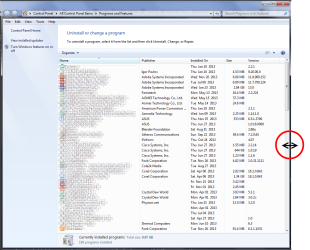
I install a brand new PC w/ win 7, and for whatever reason, I cannot move the bar (circle in green) to the left, win 7 bounces that bar back to the right.

Now, that USB mouse is old. So I plug in a 2nd USB mouse, same thing.
what could cause this?

I also notice that I have the same problem as this person:

http://productforums.google.com/forum/#!topic/chrome/zHjbnRxjQs4

When I click the button to the right of the omnibox and just below the exit button in the upper right hand corner of the browser titled "Customize and control Chrome" nothing happens. Can someone please tell me why?

Again, what I did is uninstall chrome and re-install, also try a new USB Mouse, same thing.

Could these 2 problems be related? AS this is a brand new installed PC w/ win 7 SP1
 

My Computer My Computer

OS
win 7 pro 32 bit
Can`t you just maximize the window ? There should be no drag bar at the bottom like that. Even on a standard 4x3 monitor.
 

My Computer My Computer

Computer type
PC/Desktop
Computer Manufacturer/Model Number
Skylake Special #666
OS
Windows 10 Pro x64
CPU
Intel Core i7 6700K
Motherboard
Asus Sabertooth Z170 Mark 1
Memory
GSkill TridentZ RGB 16GB 3600 16-16-16-36
Graphics Card(s)
EVGA GTX 980 Ti SC x2
Sound Card
Realtek High Definition
Monitor(s) Displays
AOC G2460PG
Screen Resolution
1920 x 1080 144Hz
Hard Drives
Samsung 860 Pro 256GB, Seagate Barracuda 4TB x2
PSU
EVGA 1000 P2, EVGA White Custom Braided Cables
Case
Corsair Vengeance C70 Gunmetal Black
Cooling
Corsair H100i v2, Corsair ML120 x2, Thermal Grizzly Kryonaut
Keyboard
Logitech G910 Orion Spectrum
Mouse
Logitech G700s
Internet Speed
Verizon Fios Quantum Gateway 75/75
Antivirus
Windows Defender, Malwarebytes Free 3.8.3
Browser
Chrome
Other Info
Corsair SP120 x4, LG Blu-ray Drive, Durabrand HT-395 100 Watt Dolby Digital Amp, Corsair H2100 Wireless 7.1 Headset
  • Like
Reactions: whs
what do you mean by no drag bar? On my own PC, my control panel is always a small rectangle. And all these years, I can move the bar at the bottom. So on that new PC, it should work the same way.
 

My Computer My Computer

OS
win 7 pro 32 bit
Try reducing the width of the Publisher pane in your screen shot. It only needs to be wide enough to fit the width of the widest publisher. If you do that you should not have a drag bar at the bottom as AddRam says.

You can also Maximise the Control Panel window the same way as maximising any other window.
 

My Computer My Computer

Computer type
PC/Desktop
Computer Manufacturer/Model Number
Self built using existing case
OS
Windows 7 Home Premium 64 bit sp1
CPU
Intel i5 3570 3.4Ghz Ivy Bridge SKT 1155 quad core
Motherboard
Gigabyte Z77-HD3 SKT 1155 2xSata 3, 4x USB 3.0
Memory
G-Skill Rip Jaws 16Gb (8x2) DDR3 -1600 PC3 12800 CL 10 red
Graphics Card(s)
Gigabyte NVIDIA GT610 1Gb DDR3 810/1200 PCI-E 2.0 Silent
Sound Card
NVIDIA High Definition & Realtech High Definition Audio
Monitor(s) Displays
2 x Philips 226V4L 16:9 aspect ratio
Screen Resolution
1920 x 1080 HD
Hard Drives
Samsung 840 Pro 256gb SSD, SATA 3.
Hitachi Touro Portable 1tb, USB 3.0 HDD used for image b/ups.
PSU
Corsair VS450
Case
Codeng
Cooling
PSU fan & CPU fan
Keyboard
Logitech
Mouse
Logitech Wireless trackball M570
Internet Speed
Wireless 3G. 3mg down & 550kb up.
Antivirus
Bitdefender Internet Security 2020
Browser
Opera (Current Version) & Firefox
Other Info
MS Office 2013 Pro. Davis weather station software. MGE Nova 600 avr UPS.
Well, here's my control panel, after all these years no "drag bar", it's a horizontal scroll bar.

Hover your cursor over the right edge of the window then drag to the right until the bar disappears.

window.png

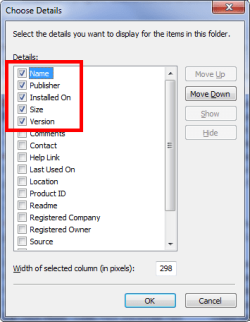
Also in the View/Choose Details menu you can uncheck some items so they don't clog up the window.

details.png
 

My Computer My Computer

Computer type
PC/Desktop
Computer Manufacturer/Model Number
Home Built Desktop By DataTech
OS
Windows 7 Ultimate X64 SP1
CPU
Intel i5-2550K, Differing ~4.4-4.8GHz No built in GPU
Motherboard
ASUS P8Z68-V PRO/GEN3
Memory
16GB G.Skill Sniper 1866MHz @ 2133MHz 2x8GB
Graphics Card(s)
ASUS GTX650TIB-DC2OC-2GD5, (650TI Boost)
Sound Card
Onboard Realtek 5-1
Monitor(s) Displays
Samsung P2570HD
Screen Resolution
1920x1080
Hard Drives
Samsung 840 Pro 256GB SSD for OS, 500GB Seagate Constellation (Enterprise drive) for Data
PSU
Corsair HX650W
Case
Inwin Dragon Rider
Cooling
Hyper 212 EVO w/two Noctua fans, push-pull, @1300 RPM
Keyboard
E-Z Eyes, bright yellow keys with large characters
Mouse
steelseries SENSEI Laser Pro Gaming
Internet Speed
48-51Mbs Mbs down, 11 Mbs up Xfinity Cable
Antivirus
Norton Internet Security 2013
Browser
IE 10, Opera, Pale Moon if needed
Other Info
4 case fans, LG BluRay-RE, ASUS DVD-RW, Mr. Fusion power supply, 1.21 gigawatts.
Just maximize the window and your problem will be solved. I have no idea why your bar is not letting you do what you want. But, there is no reason to have the window that small anyway.
 

My Computer My Computer

Computer type
PC/Desktop
Computer Manufacturer/Model Number
Skylake Special #666
OS
Windows 10 Pro x64
CPU
Intel Core i7 6700K
Motherboard
Asus Sabertooth Z170 Mark 1
Memory
GSkill TridentZ RGB 16GB 3600 16-16-16-36
Graphics Card(s)
EVGA GTX 980 Ti SC x2
Sound Card
Realtek High Definition
Monitor(s) Displays
AOC G2460PG
Screen Resolution
1920 x 1080 144Hz
Hard Drives
Samsung 860 Pro 256GB, Seagate Barracuda 4TB x2
PSU
EVGA 1000 P2, EVGA White Custom Braided Cables
Case
Corsair Vengeance C70 Gunmetal Black
Cooling
Corsair H100i v2, Corsair ML120 x2, Thermal Grizzly Kryonaut
Keyboard
Logitech G910 Orion Spectrum
Mouse
Logitech G700s
Internet Speed
Verizon Fios Quantum Gateway 75/75
Antivirus
Windows Defender, Malwarebytes Free 3.8.3
Browser
Chrome
Other Info
Corsair SP120 x4, LG Blu-ray Drive, Durabrand HT-395 100 Watt Dolby Digital Amp, Corsair H2100 Wireless 7.1 Headset
I fully agree if I max. out the windows, then I don't need to move that horizontal bar. But as you all know, that's not the point. I have work on many PC, I never have problem moving that horizontal bar.

Anyhoo, what about the 2nd part of my question in regards to Chrome: Could these 2 issues be related? Any chance it's a mouse problem? As the 1st mouse has about 5 buttons, and I didn't bother program it, I just plug it in. There is no CD to install any program anyway

As I plug in the 2nd mouse (only 2 buttons and the scroll) as a test, I didn't bother un-plug the 1st mouse, and because it yields the same results
 

My Computer My Computer

OS
win 7 pro 32 bit
Does the scroll bar fail on similar control panel windows?

Please check the list of Installed Updates.
You can click on the link named View installed updates.

Maybe check Control Panel\Network and Internet\Network Connections also (in the detailed view).

If the problem only happens in the list of installed programs, then perhaps there is a problem with the data that records the column width for one or more of those columns.
Try resizing each column while full screened...
...exit that listing while full screened
...open and size the window as desired
...check the scroll bar action in question.

If that fails to solve the issue, try this:
http://www.sevenforums.com/tutorials/11359-folder-view-reset-all-folders.html
and/or this:
http://www.sevenforums.com/tutorials/15692-folder-view-settings-reset-all-default.html

Another thing that you might try is a new user account/profile - just as a test. See if the scrolling issue shows up in that test account.

I have no idea what to try for the Chrome issue nor do I know if these issues are related. Let's tackle that one after we know how widespread the scroll bar issue is.
 

My Computer My Computer

Computer type
Laptop
Computer Manufacturer/Model Number
Employer provided Dell Latitude
OS
W7 Pro SP1 64bit
CPU
i7
Memory
8GB
Graphics Card(s)
Intel HD Graphics
Hard Drives
crappy SSD
Antivirus
Employer mandated Symantec Endpoint Protection
Browser
Pale Moon 64bit, IE11 64bit & Chrome 64bit
I fix it. Her mouse is an old mouse, most likely USB 1.1, that's why Win 7 is not working properly
 

My Computer My Computer

OS
win 7 pro 32 bit
Back
Top