Solved Cannot open downloads folder thru IE9

maddog65

New member
Local time
9:51 AM
Messages
22
When I am downloading a file I used to be able to click on View Download and it would open up a new window with all of my downloads and the status. That doesn't work now also if I go to press Ctrl+J that doesn't work.
Any suggestions??

Thanks
 

My Computer My Computer

Computer type
PC/Desktop
OS
Windows 7 Home Premuum 64bit
CPU
Intel E6800 3.3Ghz 2MB Cache
Motherboard
XFX Nforce 750i
Memory
Corsair XMS2 PC2-6400 8GB
Graphics Card(s)
NVIDIA GeForce 640GT 2GB
Hello maddog,

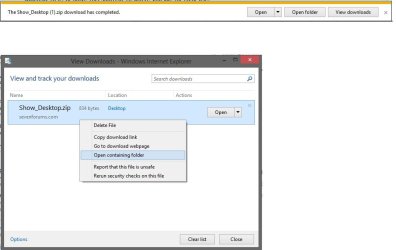
Are you not getting the "View Downloads" option anymore after the download finishes like below?

downloads.jpg
 

My Computer My Computer

Computer type
PC/Desktop
Computer Manufacturer/Model Number
Self built custom
OS
64-bit Windows 11 Pro for Workstations
CPU
Intel i7-8700K OC'd to 5 GHz
Motherboard
ASUS ROG Maximus XI Formula Z390
Memory
64 GB (4x16GB) G.SKILL TridentZ RGB DDR4 3600 MHz
Graphics Card(s)
ASUS ROG-STRIX-GTX1080TI-O11G-GAMING
Sound Card
Integrated
Monitor(s) Displays
2 x Samsung Odyssey G7 27"
Screen Resolution
2560x1440
Hard Drives
1TB Samsung 990 PRO M.2,
4TB Samsung 990 PRO PRO M.2,
TerraMaster F8 SSD Plus NAS
PSU
Seasonic Prime Titanium 850W
Case
Thermaltake Core P3
Cooling
Corsair Hydro H115i
Keyboard
Logitech wireless K800
Mouse
Logitech MX Master 4
Internet Speed
2 Gb/s Download and 100 Mb/s Upload
Antivirus
Malwarebyte Anti-Malware Premium
Browser
Google Chrome
Other Info
Logitech Z625 speaker system,
Logitech BRIO 4K Pro webcam,
HP Color LaserJet Pro MFP M477fdn,
APC SMART-UPS RT 1000 XL - SURT1000XLI,
Galaxy S23 Plus phone
I get the little taskbar that says whatever is downloading but when I go to click on View downloads nothing happens. So I can't see the View and Track Downloads window anymore. Also when I ask to open something on download instead of save it will not work, say like an adobe flash update.
 

My Computer My Computer

Computer type
PC/Desktop
OS
Windows 7 Home Premuum 64bit
CPU
Intel E6800 3.3Ghz 2MB Cache
Motherboard
XFX Nforce 750i
Memory
Corsair XMS2 PC2-6400 8GB
Graphics Card(s)
NVIDIA GeForce 640GT 2GB
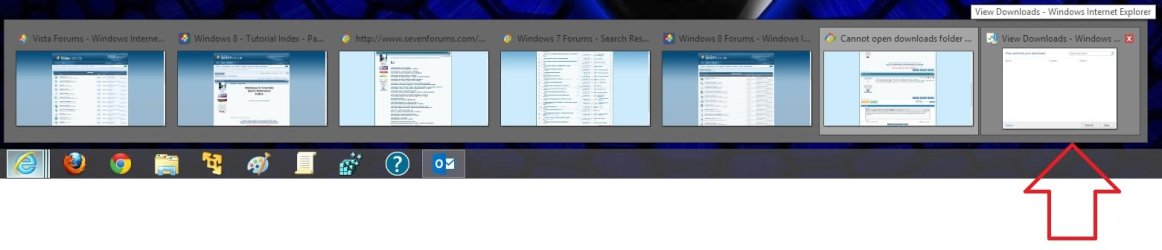
When you click on "View downloads" from Tools (menu bar) or Gear icon in IE, double check the IE taskbar thumbnail previews to see if shows the "View downloads" window may be open but just off screen where you cannot see it anymore.

thumbnail_previews.jpg
 

My Computer My Computer

Computer type
PC/Desktop
Computer Manufacturer/Model Number
Self built custom
OS
64-bit Windows 11 Pro for Workstations
CPU
Intel i7-8700K OC'd to 5 GHz
Motherboard
ASUS ROG Maximus XI Formula Z390
Memory
64 GB (4x16GB) G.SKILL TridentZ RGB DDR4 3600 MHz
Graphics Card(s)
ASUS ROG-STRIX-GTX1080TI-O11G-GAMING
Sound Card
Integrated
Monitor(s) Displays
2 x Samsung Odyssey G7 27"
Screen Resolution
2560x1440
Hard Drives
1TB Samsung 990 PRO M.2,
4TB Samsung 990 PRO PRO M.2,
TerraMaster F8 SSD Plus NAS
PSU
Seasonic Prime Titanium 850W
Case
Thermaltake Core P3
Cooling
Corsair Hydro H115i
Keyboard
Logitech wireless K800
Mouse
Logitech MX Master 4
Internet Speed
2 Gb/s Download and 100 Mb/s Upload
Antivirus
Malwarebyte Anti-Malware Premium
Browser
Google Chrome
Other Info
Logitech Z625 speaker system,
Logitech BRIO 4K Pro webcam,
HP Color LaserJet Pro MFP M477fdn,
APC SMART-UPS RT 1000 XL - SURT1000XLI,
Galaxy S23 Plus phone
Nope that isn't the problem. Even if I go to the gear icon and select View Downloads it doesn't open. It's like the shorcut is broken or something like that. no idea where to check to see if it is missing.
 

My Computer My Computer

Computer type
PC/Desktop
OS
Windows 7 Home Premuum 64bit
CPU
Intel E6800 3.3Ghz 2MB Cache
Motherboard
XFX Nforce 750i
Memory
Corsair XMS2 PC2-6400 8GB
Graphics Card(s)
NVIDIA GeForce 640GT 2GB
You would hover you mouse pointer over the IE icon on your taskbar to have it's thumbnail previews open like in my screenshot above. Afterwards, look at each thumbnail preview to see if one of them is for "View Downloads".
 

My Computer My Computer

Computer type
PC/Desktop
Computer Manufacturer/Model Number
Self built custom
OS
64-bit Windows 11 Pro for Workstations
CPU
Intel i7-8700K OC'd to 5 GHz
Motherboard
ASUS ROG Maximus XI Formula Z390
Memory
64 GB (4x16GB) G.SKILL TridentZ RGB DDR4 3600 MHz
Graphics Card(s)
ASUS ROG-STRIX-GTX1080TI-O11G-GAMING
Sound Card
Integrated
Monitor(s) Displays
2 x Samsung Odyssey G7 27"
Screen Resolution
2560x1440
Hard Drives
1TB Samsung 990 PRO M.2,
4TB Samsung 990 PRO PRO M.2,
TerraMaster F8 SSD Plus NAS
PSU
Seasonic Prime Titanium 850W
Case
Thermaltake Core P3
Cooling
Corsair Hydro H115i
Keyboard
Logitech wireless K800
Mouse
Logitech MX Master 4
Internet Speed
2 Gb/s Download and 100 Mb/s Upload
Antivirus
Malwarebyte Anti-Malware Premium
Browser
Google Chrome
Other Info
Logitech Z625 speaker system,
Logitech BRIO 4K Pro webcam,
HP Color LaserJet Pro MFP M477fdn,
APC SMART-UPS RT 1000 XL - SURT1000XLI,
Galaxy S23 Plus phone
I don't have that. When I do like you posted no new window opens. It's like the shortcut isn't there. I can click on it (View downloads) and nothing happens.
 

My Computer My Computer

Computer type
PC/Desktop
OS
Windows 7 Home Premuum 64bit
CPU
Intel E6800 3.3Ghz 2MB Cache
Motherboard
XFX Nforce 750i
Memory
Corsair XMS2 PC2-6400 8GB
Graphics Card(s)
NVIDIA GeForce 640GT 2GB
Could you post a screenshot showing what you see instead to see if that may be related?
 

My Computer My Computer

Computer type
PC/Desktop
Computer Manufacturer/Model Number
Self built custom
OS
64-bit Windows 11 Pro for Workstations
CPU
Intel i7-8700K OC'd to 5 GHz
Motherboard
ASUS ROG Maximus XI Formula Z390
Memory
64 GB (4x16GB) G.SKILL TridentZ RGB DDR4 3600 MHz
Graphics Card(s)
ASUS ROG-STRIX-GTX1080TI-O11G-GAMING
Sound Card
Integrated
Monitor(s) Displays
2 x Samsung Odyssey G7 27"
Screen Resolution
2560x1440
Hard Drives
1TB Samsung 990 PRO M.2,
4TB Samsung 990 PRO PRO M.2,
TerraMaster F8 SSD Plus NAS
PSU
Seasonic Prime Titanium 850W
Case
Thermaltake Core P3
Cooling
Corsair Hydro H115i
Keyboard
Logitech wireless K800
Mouse
Logitech MX Master 4
Internet Speed
2 Gb/s Download and 100 Mb/s Upload
Antivirus
Malwarebyte Anti-Malware Premium
Browser
Google Chrome
Other Info
Logitech Z625 speaker system,
Logitech BRIO 4K Pro webcam,
HP Color LaserJet Pro MFP M477fdn,
APC SMART-UPS RT 1000 XL - SURT1000XLI,
Galaxy S23 Plus phone
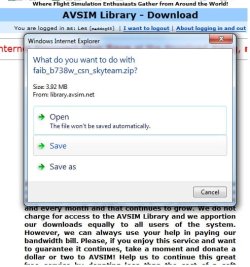
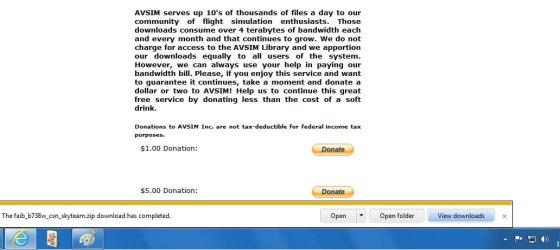
Okay here is what I see in shot 1 I am clicking save

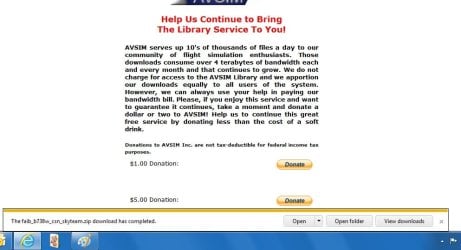
Shot 2 the file is done

Shot 3 I am clicking View Downloads and nothing happens

Shot 4 I am going thru settings and clicking on View Downloads again nothing happens

If I click on View Folder my download folder opens

If I click open nothing happens and the info bar goes away.

HTH
 

Attachments

  • Cannot download 1.jpg
    Cannot download 1.jpg
    47.5 KB · Views: 5
  • Cannot download 2.jpg
    Cannot download 2.jpg
    57.2 KB · Views: 4
  • Cannot download 3.jpg
    Cannot download 3.jpg
    53.8 KB · Views: 4
  • Cannot download 4.jpg
    Cannot download 4.jpg
    33.2 KB · Views: 4

My Computer My Computer

Computer type
PC/Desktop
OS
Windows 7 Home Premuum 64bit
CPU
Intel E6800 3.3Ghz 2MB Cache
Motherboard
XFX Nforce 750i
Memory
Corsair XMS2 PC2-6400 8GB
Graphics Card(s)
NVIDIA GeForce 640GT 2GB

My Computer My Computer

Computer type
PC/Desktop
Computer Manufacturer/Model Number
Self built custom
OS
64-bit Windows 11 Pro for Workstations
CPU
Intel i7-8700K OC'd to 5 GHz
Motherboard
ASUS ROG Maximus XI Formula Z390
Memory
64 GB (4x16GB) G.SKILL TridentZ RGB DDR4 3600 MHz
Graphics Card(s)
ASUS ROG-STRIX-GTX1080TI-O11G-GAMING
Sound Card
Integrated
Monitor(s) Displays
2 x Samsung Odyssey G7 27"
Screen Resolution
2560x1440
Hard Drives
1TB Samsung 990 PRO M.2,
4TB Samsung 990 PRO PRO M.2,
TerraMaster F8 SSD Plus NAS
PSU
Seasonic Prime Titanium 850W
Case
Thermaltake Core P3
Cooling
Corsair Hydro H115i
Keyboard
Logitech wireless K800
Mouse
Logitech MX Master 4
Internet Speed
2 Gb/s Download and 100 Mb/s Upload
Antivirus
Malwarebyte Anti-Malware Premium
Browser
Google Chrome
Other Info
Logitech Z625 speaker system,
Logitech BRIO 4K Pro webcam,
HP Color LaserJet Pro MFP M477fdn,
APC SMART-UPS RT 1000 XL - SURT1000XLI,
Galaxy S23 Plus phone
I download the run command and I still had the same problem. I can not open the view downloads.
 

My Computer My Computer

Computer type
PC/Desktop
OS
Windows 7 Home Premuum 64bit
CPU
Intel E6800 3.3Ghz 2MB Cache
Motherboard
XFX Nforce 750i
Memory
Corsair XMS2 PC2-6400 8GB
Graphics Card(s)
NVIDIA GeForce 640GT 2GB
Does it happen with this particular file or others as well?
 

My Computer My Computer

Computer type
PC/Desktop
Computer Manufacturer/Model Number
Self assembled
OS
Windows 10 Home 64Bit
CPU
Intel Core i5 10400 @ 2.90GHz
Motherboard
Intel Corporation DG41WV (PROCESSOR)
Memory
8.00GB Single-Channel Unknown @ 1329MHz (16-20-20-38)
Sound Card
Realtek High Definition Audio
Monitor(s) Displays
DELL E170S
Screen Resolution
1280x1024 pixels
Hard Drives
931GB TOSHIBA DT01ACA100 (SATA)
238GB TEAM TM8PS7256G (SATA SSD)
Case
Nothing Fancy
Cooling
Fans
Keyboard
A4 Tech Co LTD
Mouse
A4 Tech Co Ltd/Logitech
Internet Speed
25 Mbps
This happens with anything I download. I am starting to think maybe it is a registry problem but I don't like playing around there.
 

My Computer My Computer

Computer type
PC/Desktop
OS
Windows 7 Home Premuum 64bit
CPU
Intel E6800 3.3Ghz 2MB Cache
Motherboard
XFX Nforce 750i
Memory
Corsair XMS2 PC2-6400 8GB
Graphics Card(s)
NVIDIA GeForce 640GT 2GB
OK,


Perform a System File Check:
  • Click on the start :orb:
  • Type CMD on Search
  • Left click and Run as Administrator
  • Type SFC /scannow
Full tutorial here:
Download and install CCleaner: CCleaner - PC Optimization and Cleaning - Free Download

  1. Open CCleaner and go to the registry tab.
  2. Scan for issues.
  3. After its done finding them.
  4. Click on fix selected issues (Save a back up before fixing them)
Reset IE settings to default: http://www.sevenforums.com/tutorials/1222-internet-explorer-reset.html

Let us know if this helps or not.
 
Last edited by a moderator:

My Computer My Computer

Computer type
PC/Desktop
Computer Manufacturer/Model Number
Self assembled
OS
Windows 10 Home 64Bit
CPU
Intel Core i5 10400 @ 2.90GHz
Motherboard
Intel Corporation DG41WV (PROCESSOR)
Memory
8.00GB Single-Channel Unknown @ 1329MHz (16-20-20-38)
Sound Card
Realtek High Definition Audio
Monitor(s) Displays
DELL E170S
Screen Resolution
1280x1024 pixels
Hard Drives
931GB TOSHIBA DT01ACA100 (SATA)
238GB TEAM TM8PS7256G (SATA SSD)
Case
Nothing Fancy
Cooling
Fans
Keyboard
A4 Tech Co LTD
Mouse
A4 Tech Co Ltd/Logitech
Internet Speed
25 Mbps
Koolkat,
Thank you so much for the help
results of SCANNOW - no integrity errors
CClean - Cleaned
Reset IE - download problem fixed.
 

My Computer My Computer

Computer type
PC/Desktop
OS
Windows 7 Home Premuum 64bit
CPU
Intel E6800 3.3Ghz 2MB Cache
Motherboard
XFX Nforce 750i
Memory
Corsair XMS2 PC2-6400 8GB
Graphics Card(s)
NVIDIA GeForce 640GT 2GB
My pleasure :)

Happy new year!
 

My Computer My Computer

Computer type
PC/Desktop
Computer Manufacturer/Model Number
Self assembled
OS
Windows 10 Home 64Bit
CPU
Intel Core i5 10400 @ 2.90GHz
Motherboard
Intel Corporation DG41WV (PROCESSOR)
Memory
8.00GB Single-Channel Unknown @ 1329MHz (16-20-20-38)
Sound Card
Realtek High Definition Audio
Monitor(s) Displays
DELL E170S
Screen Resolution
1280x1024 pixels
Hard Drives
931GB TOSHIBA DT01ACA100 (SATA)
238GB TEAM TM8PS7256G (SATA SSD)
Case
Nothing Fancy
Cooling
Fans
Keyboard
A4 Tech Co LTD
Mouse
A4 Tech Co Ltd/Logitech
Internet Speed
25 Mbps
Great news. :)
 

My Computer My Computer

Computer type
PC/Desktop
Computer Manufacturer/Model Number
Self built custom
OS
64-bit Windows 11 Pro for Workstations
CPU
Intel i7-8700K OC'd to 5 GHz
Motherboard
ASUS ROG Maximus XI Formula Z390
Memory
64 GB (4x16GB) G.SKILL TridentZ RGB DDR4 3600 MHz
Graphics Card(s)
ASUS ROG-STRIX-GTX1080TI-O11G-GAMING
Sound Card
Integrated
Monitor(s) Displays
2 x Samsung Odyssey G7 27"
Screen Resolution
2560x1440
Hard Drives
1TB Samsung 990 PRO M.2,
4TB Samsung 990 PRO PRO M.2,
TerraMaster F8 SSD Plus NAS
PSU
Seasonic Prime Titanium 850W
Case
Thermaltake Core P3
Cooling
Corsair Hydro H115i
Keyboard
Logitech wireless K800
Mouse
Logitech MX Master 4
Internet Speed
2 Gb/s Download and 100 Mb/s Upload
Antivirus
Malwarebyte Anti-Malware Premium
Browser
Google Chrome
Other Info
Logitech Z625 speaker system,
Logitech BRIO 4K Pro webcam,
HP Color LaserJet Pro MFP M477fdn,
APC SMART-UPS RT 1000 XL - SURT1000XLI,
Galaxy S23 Plus phone
Back
Top