Cannot open downloads from specific browsers

Twinqe

New member
Local time
1:02 PM
Messages
4
Hello all! Firstly, I wasn't entirely sure which subforum this belonged under, so I went for General. Sorry if this is meant somewhere else!

My issue is that, inexplicably, I can no longer open downloads. This problem started randomly after I had been away from my computer for a few hours. I came back home (no one else had access to my computer), tried to download things, and suddenly got this error screen: "Windows cannot find [file name here]. Make sure you typed the file name correctly, and try again." When I looked in the downloads folder, nothing was there. I quickly found that Firefox, Chrome, and IE all shared this problem, though with different error messages. When I tried IE, it said something along the lines of "Viruses were detected". So, I realized it must be an issue with the web browsers thinking all my downloads have viruses.

I went back to Firefox, and disabled all automatic virus scanning by the browser. And, HURRAH! It worked. However, Chrome and IE are still borked. I have tried updating my Win7, updating Microsoft Security Essentials (my anti virus), changing the download location, and I'm currently running a full virus scan. Does anyone have any idea on how I can fix this issue? It's very frustrating to have to use FF because Chrome suddenly removes all my downloads, especially when I am positive they do not contain viruses or other malicious things.

Also, it may be worth nothing I reinstalled Chrome through IE downloading it on the internet with no problems. I have downloaded/installed a new game on Steam and played it with no problems

Thanks for any help you can provide.
 
Last edited:

My Computer

OS
Home Premium 64 bit
Welcome to the Seven Forums.

Your computer could be infected in a way that is not being detected by MSE.
You might want to scan with WDO:
What is Windows Defender Offline?
 

My Computer

Computer type
Laptop
Computer Manufacturer/Model Number
Employer provided Dell Latitude
OS
W7 Pro SP1 64bit
CPU
i7
Memory
8GB
Graphics Card(s)
Intel HD Graphics
Hard Drives
crappy SSD
Antivirus
Employer mandated Symantec Endpoint Protection
Browser
Pale Moon 64bit, IE11 64bit & Chrome 64bit
Ran WDO, no success. This is very strange -- anyone else have any ideas?
 

My Computer

OS
Home Premium 64 bit
Maybe Process Monitor filtered to show file operations would show what app is doing the actual deletion. I've not seen IE delete stuff on it's own.
 

My Computer

Computer type
Laptop
Computer Manufacturer/Model Number
Employer provided Dell Latitude
OS
W7 Pro SP1 64bit
CPU
i7
Memory
8GB
Graphics Card(s)
Intel HD Graphics
Hard Drives
crappy SSD
Antivirus
Employer mandated Symantec Endpoint Protection
Browser
Pale Moon 64bit, IE11 64bit & Chrome 64bit
Could you walk me through how to do that? I have installed the program.
 

My Computer

OS
Home Premium 64 bit
Here is a post where I detail watching registry changes for explorer.exe
http://www.sevenforums.com/general-discussion/252949-missing-start-menu-icons-2.html#post2105453

Follow the steps mentioned in that post - except:
1) Filter on iexplore.exe
2) Deselect all but file actions...
...(see the upper right part of screenshot one)

Stop following that other post after the last screenshot.

You do not want to start collecting the data until the download is almost complete. Pick a file to download that is large enough to give you time to start the data collection.

Open Windows (file) Explorer
Create a temp folder in the root of the system drive
(this will make it easier to find in the data collected)
Name that temp folder something silly and a bit long like:
"why-do-my-files-go-away"
(again, this will make it easier to find in the data collected)
[Assuming that your system drive is C...
...then the path would be C:\why-do-my-files-go-away\]

Keep the Windows (file) Explorer open to that folder.
Position the windows of these three apps so that they can all be seen:
...Windows (file) Explorer
...IE
...Process Explorer

Start your download
Notice: when you get the prompt at the bottom of the IE9 window asking you if you want to run/save a file, the download is already happening in the background. Hence the need to pick a file large enough to give you time to select save as and the location of your temp folder with a silly name and to start the data collection process.

Stop the data collection by Process Monitor once you see the downloaded file appear and disappear in the temp folder with a silly name.

Review the data collected to see if IE deleted the file.
 
Last edited:

My Computer

Computer type
Laptop
Computer Manufacturer/Model Number
Employer provided Dell Latitude
OS
W7 Pro SP1 64bit
CPU
i7
Memory
8GB
Graphics Card(s)
Intel HD Graphics
Hard Drives
crappy SSD
Antivirus
Employer mandated Symantec Endpoint Protection
Browser
Pale Moon 64bit, IE11 64bit & Chrome 64bit
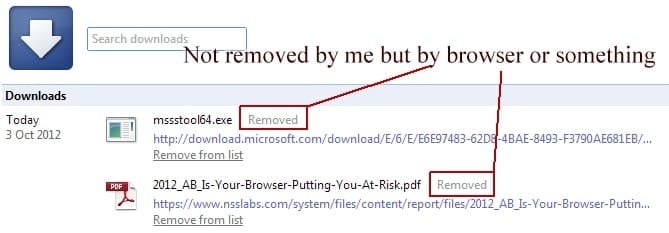
I can't download anything as well! Heck not even the offline Windows Defender through Microsoft themselves at What is Windows Defender Offline?

What is going on? :cry:

Some people suspect since Windows has just updated (twice in one week) that major changes have screwed things up. Hopefully this will be fixed soon. Is Microsoft trying to control what we download? :sarc:

Others are saying it has to do with a file in AVG but others who don't have that file are experiencing this issue as well...
 

Attachments

  • Chrome_downloads_removed_Oct3rd12.jpg
    Chrome_downloads_removed_Oct3rd12.jpg
    21.3 KB · Views: 16
Last edited:

My Computer

Computer type
PC/Desktop
Computer Manufacturer/Model Number
HP-Pavilion-a6000-Desktop-PC
OS
Microsoft Windows 7 Professional Edition Service Pack 1 (build 7601), 64-bit
CPU
Intel(R) Core(TM)2 Quad Q9550 @2.83GHz (Xeon) Socket 775 LGA
Motherboard
ASUSTeK Computer INC. Benicia (P35/G33/G31)
Memory
4095 MB (4 x 1024 MBytes DDR2 Dual Symmetric)
Graphics Card(s)
Sapphire HD 7770 GHz Edition (shows Radeon R7 200)
Sound Card
Realtek High Definition Audio Driver Version 6.0.1.6662
Monitor(s) Displays
HP w19b 18.6" 5:3 (SN: CNC703PN1G)
Screen Resolution
1440 x 900
Hard Drives
1080 GB total
C: (320Gb): WDC WD3200AAKS-75L9A0 ATA
D: (Optical Drive): ATAPI DVD A DH16A6S ATA Device
E: (1Tb): WDC WD10EARS-00S8B1 ATA
F: (Backup 2 Tb): Clikfree Backup Drive USB
PSU
GX750
Case
Black/Blue APEVIA X-Hermes
Cooling
2 Top , 1 back, 1 front fan all 180 mm & side 200mm
Keyboard
Logitech G110
Mouse
Logitech G500s
Internet Speed
High speed cable
Antivirus
Avast! Internet Security 2014.9.0.2021
Browser
Firefox 44 (x86 en-US)
Other Info
BIOS American Megatrends
Date:
09/10/09 10:25:18 Ver: 5.43
@Kabo0m,
Hopefully you can download things like WDO and Process Monitor via another computer. Do you see the files appear in the download folder for a brief second?
 

My Computer

Computer type
Laptop
Computer Manufacturer/Model Number
Employer provided Dell Latitude
OS
W7 Pro SP1 64bit
CPU
i7
Memory
8GB
Graphics Card(s)
Intel HD Graphics
Hard Drives
crappy SSD
Antivirus
Employer mandated Symantec Endpoint Protection
Browser
Pale Moon 64bit, IE11 64bit & Chrome 64bit

My Computer

Computer type
PC/Desktop
Computer Manufacturer/Model Number
HP-Pavilion-a6000-Desktop-PC
OS
Microsoft Windows 7 Professional Edition Service Pack 1 (build 7601), 64-bit
CPU
Intel(R) Core(TM)2 Quad Q9550 @2.83GHz (Xeon) Socket 775 LGA
Motherboard
ASUSTeK Computer INC. Benicia (P35/G33/G31)
Memory
4095 MB (4 x 1024 MBytes DDR2 Dual Symmetric)
Graphics Card(s)
Sapphire HD 7770 GHz Edition (shows Radeon R7 200)
Sound Card
Realtek High Definition Audio Driver Version 6.0.1.6662
Monitor(s) Displays
HP w19b 18.6" 5:3 (SN: CNC703PN1G)
Screen Resolution
1440 x 900
Hard Drives
1080 GB total
C: (320Gb): WDC WD3200AAKS-75L9A0 ATA
D: (Optical Drive): ATAPI DVD A DH16A6S ATA Device
E: (1Tb): WDC WD10EARS-00S8B1 ATA
F: (Backup 2 Tb): Clikfree Backup Drive USB
PSU
GX750
Case
Black/Blue APEVIA X-Hermes
Cooling
2 Top , 1 back, 1 front fan all 180 mm & side 200mm
Keyboard
Logitech G110
Mouse
Logitech G500s
Internet Speed
High speed cable
Antivirus
Avast! Internet Security 2014.9.0.2021
Browser
Firefox 44 (x86 en-US)
Other Info
BIOS American Megatrends
Date:
09/10/09 10:25:18 Ver: 5.43
Okay the issue was a Windows Update issue and all was resolved by running this (seems a few people have had this issue and have been complaining on the Microsoft forums): Open the Windows Update troubleshooter
 

My Computer

Computer type
PC/Desktop
Computer Manufacturer/Model Number
HP-Pavilion-a6000-Desktop-PC
OS
Microsoft Windows 7 Professional Edition Service Pack 1 (build 7601), 64-bit
CPU
Intel(R) Core(TM)2 Quad Q9550 @2.83GHz (Xeon) Socket 775 LGA
Motherboard
ASUSTeK Computer INC. Benicia (P35/G33/G31)
Memory
4095 MB (4 x 1024 MBytes DDR2 Dual Symmetric)
Graphics Card(s)
Sapphire HD 7770 GHz Edition (shows Radeon R7 200)
Sound Card
Realtek High Definition Audio Driver Version 6.0.1.6662
Monitor(s) Displays
HP w19b 18.6" 5:3 (SN: CNC703PN1G)
Screen Resolution
1440 x 900
Hard Drives
1080 GB total
C: (320Gb): WDC WD3200AAKS-75L9A0 ATA
D: (Optical Drive): ATAPI DVD A DH16A6S ATA Device
E: (1Tb): WDC WD10EARS-00S8B1 ATA
F: (Backup 2 Tb): Clikfree Backup Drive USB
PSU
GX750
Case
Black/Blue APEVIA X-Hermes
Cooling
2 Top , 1 back, 1 front fan all 180 mm & side 200mm
Keyboard
Logitech G110
Mouse
Logitech G500s
Internet Speed
High speed cable
Antivirus
Avast! Internet Security 2014.9.0.2021
Browser
Firefox 44 (x86 en-US)
Other Info
BIOS American Megatrends
Date:
09/10/09 10:25:18 Ver: 5.43
thx for posting back - seems like an odd fix, but is it works :-)
 

My Computer

Computer type
Laptop
Computer Manufacturer/Model Number
Employer provided Dell Latitude
OS
W7 Pro SP1 64bit
CPU
i7
Memory
8GB
Graphics Card(s)
Intel HD Graphics
Hard Drives
crappy SSD
Antivirus
Employer mandated Symantec Endpoint Protection
Browser
Pale Moon 64bit, IE11 64bit & Chrome 64bit
Back
Top