Cannot read old hard drive from usb

James56

New member
Local time
9:41 PM
Messages
6
I've just installed a new hard drive and installed windows and when I try to connect my old one via a usb enclosure it won't read the main partition. It reads the recovery partition fine but when accessing the main partition it keeps asking me whether I want to format the drive or not and shows up to have 0 bytes out of 0 bytes. (obviously I'm not going to format it) I know the drive is still working and not corrupted as when I replace it back into my laptop it works fine again. The drive is a 500GB sata 2 if that helpsAnybody any ideas on how I can read it? I don't understand how it can read the recovery partition but not the main one.
 

My Computer

OS
Windows 7 Home Premium 32bit
Hello.


See if the HDD/partition shows up in diskpart from an elevated command window type the following commands followed by <enter> after each and be sure to post back with any further questions you may have and to keep us informed.


diskpart

list disk # # your disk #

list partition #
 

My Computer

Computer Manufacturer/Model Number
* BFK Customs *
OS
W 7 64-bit Ultimate
CPU
Intel Q9550 Yorkfield
Motherboard
ASUS P5Q Pro
Memory
8GB Dominator 8500C5D
Graphics Card(s)
ATI : XFX 5870
Sound Card
Realtek HD Audio 7-1
Monitor(s) Displays
1x 47" LCD HDMI & 3x 26" LCD HDMI
Screen Resolution
1920x1080P & 1920x1200
Hard Drives
1x 80GB Intel X25-M G2 SSD : 1x 500GB & 1x 640GB WD Caviar Black(s)
PSU
Corsair 620HX
Case
Cooler Master RC-690
Cooling
Tuniq Tower 120, 2x 140mm and 3x 120mm case fans
Keyboard
Microsoft 500
Mouse
Razer Diamondback 3G
Internet Speed
14 Mb/s
Other Info
1x Koutech 3Gb/s SATA HDD Hot Swap Rack
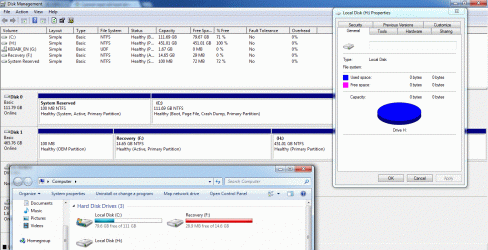
All 3 partitions showing up
Partition 1 OEM 100mb
Partition 2 Primary 14gb
Partition 3 Primary 451gb

also checked disk management and all 3 are shown there too. But why does it want me to reformat the 3rd on windows explorer?
 

My Computer

OS
Windows 7 Home Premium 32bit

My Computer

Computer Manufacturer/Model Number
* BFK Customs *
OS
W 7 64-bit Ultimate
CPU
Intel Q9550 Yorkfield
Motherboard
ASUS P5Q Pro
Memory
8GB Dominator 8500C5D
Graphics Card(s)
ATI : XFX 5870
Sound Card
Realtek HD Audio 7-1
Monitor(s) Displays
1x 47" LCD HDMI & 3x 26" LCD HDMI
Screen Resolution
1920x1080P & 1920x1200
Hard Drives
1x 80GB Intel X25-M G2 SSD : 1x 500GB & 1x 640GB WD Caviar Black(s)
PSU
Corsair 620HX
Case
Cooler Master RC-690
Cooling
Tuniq Tower 120, 2x 140mm and 3x 120mm case fans
Keyboard
Microsoft 500
Mouse
Razer Diamondback 3G
Internet Speed
14 Mb/s
Other Info
1x Koutech 3Gb/s SATA HDD Hot Swap Rack
Here
 

Attachments

  • disk management.gif
    disk management.gif
    200.7 KB · Views: 18

My Computer

OS
Windows 7 Home Premium 32bit
If there is a Windows install there have you tried booting the HDD in the BIOS at startup?
 

My Computer

Computer Manufacturer/Model Number
* BFK Customs *
OS
W 7 64-bit Ultimate
CPU
Intel Q9550 Yorkfield
Motherboard
ASUS P5Q Pro
Memory
8GB Dominator 8500C5D
Graphics Card(s)
ATI : XFX 5870
Sound Card
Realtek HD Audio 7-1
Monitor(s) Displays
1x 47" LCD HDMI & 3x 26" LCD HDMI
Screen Resolution
1920x1080P & 1920x1200
Hard Drives
1x 80GB Intel X25-M G2 SSD : 1x 500GB & 1x 640GB WD Caviar Black(s)
PSU
Corsair 620HX
Case
Cooler Master RC-690
Cooling
Tuniq Tower 120, 2x 140mm and 3x 120mm case fans
Keyboard
Microsoft 500
Mouse
Razer Diamondback 3G
Internet Speed
14 Mb/s
Other Info
1x Koutech 3Gb/s SATA HDD Hot Swap Rack
There's no windows installation files on if that's what you mean but I have tried booting it up just to run windows by usb and it still won't work. I have another usb enclosure and it doesn't seem to work in that one either. It still works if its plugged directly into my laptop though. I'm wondering if maybe there's some driver or software that I need to install for it or if its somehow locked to only being able to read from inside my laptop. (don't know if that's possible) The bios certainly doesn't have any lock on it. And then the only other thing I can think of is that both the usb enclosures aren't good enough to run it but they should as it said up to 750GB on them when I bought them.
 

My Computer

OS
Windows 7 Home Premium 32bit
There's no windows installation files on if that's what you mean but I have tried booting it up just to run windows by usb and it still won't work. I have another usb enclosure and it doesn't seem to work in that one either. It still works if its plugged directly into my laptop though. I'm wondering if maybe there's some driver or software that I need to install for it or if its somehow locked to only being able to read from inside my laptop. (don't know if that's possible) The bios certainly doesn't have any lock on it. And then the only other thing I can think of is that both the usb enclosures aren't good enough to run it but they should as it said up to 750GB on them when I bought them.


That's a possibility, at least you have a way to access the data.

Have you looked in Windows Device Manager to see if there's anything there?
 

My Computer

Computer Manufacturer/Model Number
* BFK Customs *
OS
W 7 64-bit Ultimate
CPU
Intel Q9550 Yorkfield
Motherboard
ASUS P5Q Pro
Memory
8GB Dominator 8500C5D
Graphics Card(s)
ATI : XFX 5870
Sound Card
Realtek HD Audio 7-1
Monitor(s) Displays
1x 47" LCD HDMI & 3x 26" LCD HDMI
Screen Resolution
1920x1080P & 1920x1200
Hard Drives
1x 80GB Intel X25-M G2 SSD : 1x 500GB & 1x 640GB WD Caviar Black(s)
PSU
Corsair 620HX
Case
Cooler Master RC-690
Cooling
Tuniq Tower 120, 2x 140mm and 3x 120mm case fans
Keyboard
Microsoft 500
Mouse
Razer Diamondback 3G
Internet Speed
14 Mb/s
Other Info
1x Koutech 3Gb/s SATA HDD Hot Swap Rack
yea it shows as usb mass storage device. Tried reinstalling and updating the drivers but still no luck. Might have to look into buying a more expensive enclosure.
 

My Computer

OS
Windows 7 Home Premium 32bit
Back
Top