
I cannot for the life of me get my RDP connection working from Windows 7 Ultimate x64 to my laptop running XP Pro SP3. I can ping the laptop by IP (and now by name as I added it to the HOSTS file in 7) and I can remote from the XP machine to the 7 machine.
I have enabled Remote Desktop on the 7 machine, I have selected "Allow connections from computers running any version of RD...". I cannot see the XP machine in the Network and Sharing centre.
I am logged on to an Administrator account on both machines and they are connected to WORKGROUP. I have allowed RDP connections through the firewall on the 7 machine, and the firewall is disabled on the XP machine. The XP machine is running the Terminal Services service. I do not know how Telnet works on Windows 7 so haven't tested if the XP machine is listening on port 3389.
The 7 machine is connected via cable to a Thompson TG585 v8 router and the XP machine is connected via wireless with WEP enabled and both machines can access the internet (not that this matters as I can ping the XP machine from 7).
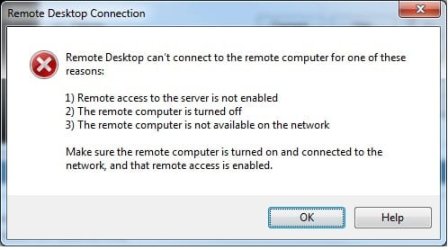
I have attached a jpeg of the error I get in Windows 7.
I normally don't have too much trouble fault finding these things but this one has me stuck.
Any ideas?
Thanks in advance,
Richard.
I have enabled Remote Desktop on the 7 machine, I have selected "Allow connections from computers running any version of RD...". I cannot see the XP machine in the Network and Sharing centre.
I am logged on to an Administrator account on both machines and they are connected to WORKGROUP. I have allowed RDP connections through the firewall on the 7 machine, and the firewall is disabled on the XP machine. The XP machine is running the Terminal Services service. I do not know how Telnet works on Windows 7 so haven't tested if the XP machine is listening on port 3389.
The 7 machine is connected via cable to a Thompson TG585 v8 router and the XP machine is connected via wireless with WEP enabled and both machines can access the internet (not that this matters as I can ping the XP machine from 7).
I have attached a jpeg of the error I get in Windows 7.
I normally don't have too much trouble fault finding these things but this one has me stuck.
Any ideas?
Thanks in advance,
Richard.
Attachments
My Computer
- Computer Manufacturer/Model Number
- ASUS
- OS
- Windows 7 Ultimate x64
- CPU
- Intel Core i7 930
- Motherboard
- ASUS P6X58D Premium
- Memory
- Corsair 6 GB DDR3
- Graphics Card(s)
- EVGA GeForce 470 GTX
- Sound Card
- Onboard
- Monitor(s) Displays
- Dual LG W2252TQ
- Hard Drives
- Segate 500 GB SATA 3
- PSU
- Corsair


