Cannot remove previous Win 7 install.

nedjinski

New member
Local time
4:32 PM
Messages
30
Recently I upgraded my computer by installing a new SSD as my C: main system drive.
I did a fresh install of Win 7 on the new SSD.
The old HD still has the old copy of Win 7 on it.
I want to but cannot remove / delete the old Win 7 folder from the old HD.
I have tried all suggested techniques - turned of UAC, taken ownership of the folder, etc. but nothing works.
No matter what I do I always get the "you will need permission from the administartor", etc. - and I cannot delete the folder.

Any ideas?
 

My Computer

OS
Windows 7 64 bit Professional
CPU
Intel Q6600 - no OC
Motherboard
EP45-UD3R
Memory
g. Skill 8GB
Graphics Card(s)
ATI 5770
Sound Card
Realtek
Monitor(s) Displays
Dell U3011
Hard Drives
WD RE3 1TB
WD Caviar Black 1TB
Samsung 500GB
PSU
Tagan 450
Case
Lian Li
Internet Speed
5 Mbps
Not clear how you did the new install.

Is the 7 partition on the old HD showing up as "system" in disk management?
 

My Computers

System One System Two

  • Computer type
    PC/Desktop
    OS
    7 X64
    CPU
    i5 8400
    Motherboard
    gigabyte b365m ds3h
    Memory
    2x8gb 3200mhz
    Hard Drives
    various
    PSU
    pure power 11 400w cm
    Case
    Coolermaster
    Cooling
    cryorig m9i
  • Computer type
    PC/Desktop
    OS
    7x64
    CPU
    g5400
    Motherboard
    ga b365m ds3h
    Memory
    8gb ddr4 2400
    PSU
    xfx pro 450w
Your bootmgr is probably on the HDD since you probably did not disconnect the HDD when you installed on the SSD.

You can test that easily. Disconnect the HDD and try to boot from the SSD. I bet you will get a "bootmgr missing".

If you manage to erase the partitions on the HDD, your system will not boot any more. Post a screenshot of your full disk management page so that we can tell for certain what is going on.
 

My Computer

Computer Manufacturer/Model Number
HP, Dell, Gateway, Toshiba - 4 laptops and 2 desktops
OS
Vista, Windows7, Mint Mate, Zorin, Windows 8
CPU
from 1.6GHz Duo to i7
Monitor(s) Displays
2x HP w2207
Hard Drives
5x HDD, 7x SSD, 12x Externals
Keyboard
with trackball - no mices
Mouse
Trackball mice
Internet Speed
DSL 6000
The correct way to delete an OS is in Disk Management, after making sure it is not holding the System Boot Files for the current OS.

Please post back a screenshot of your maximized Disk Management drive map with listings, using the Snipping Tool in Start Menu. Screen Shots.

Tell us what is on each partition and we will give you the steps to safely remove the old installation.
 
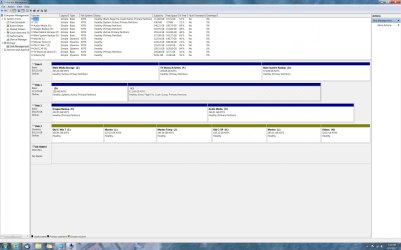
this is a screenshot of my computer - it looks to me that all system critical files are on the C: drive where they should be.
 

Attachments

  • Untitled-1.jpg
    Untitled-1.jpg
    258.6 KB · Views: 111

My Computer

OS
Windows 7 64 bit Professional
CPU
Intel Q6600 - no OC
Motherboard
EP45-UD3R
Memory
g. Skill 8GB
Graphics Card(s)
ATI 5770
Sound Card
Realtek
Monitor(s) Displays
Dell U3011
Hard Drives
WD RE3 1TB
WD Caviar Black 1TB
Samsung 500GB
PSU
Tagan 450
Case
Lian Li
Internet Speed
5 Mbps
Pretty messy:

1. on partition 'Z' Disk0 you have a bootmgr. How did that get there and is there a dependency with your C - in other words did you ever boot from the SSD with disk0 disconnected

2. the SSD looks OK, at least from the surface

3. disk3 has all dynamic volumes. I assume it is there where you want to delete a partition. Suggest you first reconvert those to basic volumes: http://www.bestshareware.net/howto/convert-dynamic-disk-to-basic-disk.htm
 

My Computer

Computer Manufacturer/Model Number
HP, Dell, Gateway, Toshiba - 4 laptops and 2 desktops
OS
Vista, Windows7, Mint Mate, Zorin, Windows 8
CPU
from 1.6GHz Duo to i7
Monitor(s) Displays
2x HP w2207
Hard Drives
5x HDD, 7x SSD, 12x Externals
Keyboard
with trackball - no mices
Mouse
Trackball mice
Internet Speed
DSL 6000
So which drive are you trying to format ?
 

My Computer

Computer type
PC/Desktop
Computer Manufacturer/Model Number
Skylake Special #666
OS
Windows 10 Pro x64
CPU
Intel Core i7 6700K
Motherboard
Asus Sabertooth Z170 Mark 1
Memory
GSkill TridentZ RGB 16GB 3600 16-16-16-36
Graphics Card(s)
EVGA GTX 980 Ti SC x2
Sound Card
Realtek High Definition
Monitor(s) Displays
AOC G2460PG
Screen Resolution
1920 x 1080 144Hz
Hard Drives
Samsung 860 Pro 256GB, Seagate Barracuda 4TB x2
PSU
EVGA 1000 P2, EVGA White Custom Braided Cables
Case
Corsair Vengeance C70 Gunmetal Black
Cooling
Corsair H100i v2, Corsair ML120 x2, Thermal Grizzly Kryonaut
Keyboard
Logitech G910 Orion Spectrum
Mouse
Logitech G700s
Internet Speed
Verizon Fios Quantum Gateway 75/75
Antivirus
Windows Defender, Malwarebytes Free 3.8.3
Browser
Chrome
Other Info
Corsair SP120 x4, LG Blu-ray Drive, Durabrand HT-395 100 Watt Dolby Digital Amp, Corsair H2100 Wireless 7.1 Headset
if the Z: partition has bootmgr on it, it must have been a leftover when that hard drive had the OS on it.
should I remove (if possible) the bootmgr from that drive - it is only a storage drive at the moment.
as to disk 3 - it's not that I even want to delete a partition - I just wand to be able to delete files/folders from the partition.
is the fact that that disk is all dynamic a problem? or is it limited in it's functionality?

AddRAM - not trying to format any disk - just trying to have control of / access to the files / folders on any given drive / partition.
 

My Computer

OS
Windows 7 64 bit Professional
CPU
Intel Q6600 - no OC
Motherboard
EP45-UD3R
Memory
g. Skill 8GB
Graphics Card(s)
ATI 5770
Sound Card
Realtek
Monitor(s) Displays
Dell U3011
Hard Drives
WD RE3 1TB
WD Caviar Black 1TB
Samsung 500GB
PSU
Tagan 450
Case
Lian Li
Internet Speed
5 Mbps
1. The bootmgr on 'Z' is not really a problem. But it probably does not hurt to remove it. I was just wondering how it got there.

2. The dynamic partitions are a bigger problem. There is a lot to be said about dynamics. I suggest you read up on it on the web starting with the link I gave you. They got there when you defined a 5th partition when you had 4 primaries. Next time convert one primary into a logical first so that you start out with only 3 primaries max.

I would convert the primaries to simple partitions. They can give you all kinds of problems - e.g. access.
 

My Computer

Computer Manufacturer/Model Number
HP, Dell, Gateway, Toshiba - 4 laptops and 2 desktops
OS
Vista, Windows7, Mint Mate, Zorin, Windows 8
CPU
from 1.6GHz Duo to i7
Monitor(s) Displays
2x HP w2207
Hard Drives
5x HDD, 7x SSD, 12x Externals
Keyboard
with trackball - no mices
Mouse
Trackball mice
Internet Speed
DSL 6000
thanks for all the help whs.

here's a side observation that i just made based on what you have said about dynamic disks. this may / may not be related but it is curious:

when booting up the computer the post does not show this drive in the normal place with the other drives.
the drive is listed on a different post page and is highlighted in bright green (a Gigabyte thing I guess).
could that be because it is a dynamic disk?
 

My Computer

OS
Windows 7 64 bit Professional
CPU
Intel Q6600 - no OC
Motherboard
EP45-UD3R
Memory
g. Skill 8GB
Graphics Card(s)
ATI 5770
Sound Card
Realtek
Monitor(s) Displays
Dell U3011
Hard Drives
WD RE3 1TB
WD Caviar Black 1TB
Samsung 500GB
PSU
Tagan 450
Case
Lian Li
Internet Speed
5 Mbps
That is certainly related. I never had dynamics because I avoid them like the plague. So I have no good insight of all the things that can happen. But dynamics are iffy and when you study the subject a bit, you will quickly find out.
 

My Computer

Computer Manufacturer/Model Number
HP, Dell, Gateway, Toshiba - 4 laptops and 2 desktops
OS
Vista, Windows7, Mint Mate, Zorin, Windows 8
CPU
from 1.6GHz Duo to i7
Monitor(s) Displays
2x HP w2207
Hard Drives
5x HDD, 7x SSD, 12x Externals
Keyboard
with trackball - no mices
Mouse
Trackball mice
Internet Speed
DSL 6000
Remove the drive letter from D as System Reserved should not have one so nothing can write to it. Drive Letter - Add, Change, or Remove in Windows 7 - Windows 7 Forums

I would also swap Disk0 and 1 cables so C is in Disk0 slot, since it's very easy for a repair to derail the System boot files to a preceding partition marked Active.

Either way, remove the Active flag from Z: Partition - Mark as Inactive - Windows 7 Forums . It doesn't hold the System flag but no non-System partition should be marked Active.

You can try to convert the Dynamic Disk to Basic non-destructively using Partiton Wizard bootable CD free version 4.2 which was the last time it offered this feature for free: pw422.zip ISO - Windows Live

Burn the CD to disk using Windows Image Burner or ImgBurn, boot it and attempt to Convert Disk to Basic. However I don't think it will budge until you delete all but four of the partitions, since as explained you may only have four Primaries on a Basic disk, or three Primaries and an extended Logical with as many Logical sub-partitions as you want.

PW CD can do this for you too if necessary: delete all but four partitions, convert to Basic, then convert one to Logical and add as many other Logicals as you want.
 
Hi Nedjiski.

Here is a little help if you have no external means to do the job.

If you strongly decided to install to a new drive a new Windows installation over all previous windows. You have to disconnect the drive that has windows installation in it. You may reconnect it when new windows is completely installed. But you should notice that windows system has a list of its important system files, though it reside on other drives still you might find windows denies the removal, and it is a total annoyance.

There is other simple way to go. You may start installing fresh windows with all drives connected. But, make sure you have the new drive set as first priority in the BIOS. When installation begin, on the page that you are prompted to choose which drive to install, go first to the old windows installation partition, and delete it. (I assume are able to identify the drive, and certainly don't have important data in it). If you don't delete the partition then the installation setup will find its system boot files and have it preserved. Once you done delete it, then go to the new drive and choose it to install (be sure you also delete the partition first if it contains the previous failed installation). It seems as a nasty way to go. But If you can do it exactly as directed. A good outcome is there.

If you try this, just do it cautiously.

I agree that you should consider avoiding dynamic drive, reduce you primary partitions.

Hope it can troubleshoot your problem.
 

My Computers

System One System Two

  • Computer type
    PC/Desktop
    Computer Manufacturer/Model Number
    MSI
    OS
    Windows 11 Prerelease
    CPU
    CORE i5 10400
    Motherboard
    MSI H510M Pro
    Memory
    16GB
    Graphics Card(s)
    GTX 750Ti
    Sound Card
    Realtek HD Integrated
    Monitor(s) Displays
    Samsung Curved 24"; Samsung TV 50"
    Screen Resolution
    1920 x 1080
    Hard Drives
    Vi-Gen NVMe 256GB
    WD 3 TB
    Seagate 2 TB
    Seagate 4TB
    PSU
    Power Striker
    Case
    VBR
    Cooling
    Conventional
    Keyboard
    Logitech Wireless
    Mouse
    Logitech Wireless
    Internet Speed
    2MBPs
  • Computer type
    Laptop
    System Manufacturer/Model Number
    Apple MacBook
    OS
    BigSur
    CPU
    Core i5
    Memory
    8 GB
    Monitor(s) Displays
    13 "
    Screen Resolution
    1366 x 768
    Hard Drives
    SSD 256 GB
You may start installing fresh windows with all drives connected. But, make sure you have the new drive set as first priority in the BIOS
Kevin I think that does not work. The disk to where you install has to be attached to port0 on the mobo - then the Win installer will for certain put the bootmgr on that disk.
 

My Computer

Computer Manufacturer/Model Number
HP, Dell, Gateway, Toshiba - 4 laptops and 2 desktops
OS
Vista, Windows7, Mint Mate, Zorin, Windows 8
CPU
from 1.6GHz Duo to i7
Monitor(s) Displays
2x HP w2207
Hard Drives
5x HDD, 7x SSD, 12x Externals
Keyboard
with trackball - no mices
Mouse
Trackball mice
Internet Speed
DSL 6000
You may start installing fresh windows with all drives connected. But, make sure you have the new drive set as first priority in the BIOS
Kevin I think that does not work. The disk to where you install has to be attached to port0 on the mobo - then the Win installer will for certain put the bootmgr on that disk.

Thanks Sir.
I take it as correction of my advice to Nedjinski. :thumbsup:
 

My Computers

System One System Two

  • Computer type
    PC/Desktop
    Computer Manufacturer/Model Number
    MSI
    OS
    Windows 11 Prerelease
    CPU
    CORE i5 10400
    Motherboard
    MSI H510M Pro
    Memory
    16GB
    Graphics Card(s)
    GTX 750Ti
    Sound Card
    Realtek HD Integrated
    Monitor(s) Displays
    Samsung Curved 24"; Samsung TV 50"
    Screen Resolution
    1920 x 1080
    Hard Drives
    Vi-Gen NVMe 256GB
    WD 3 TB
    Seagate 2 TB
    Seagate 4TB
    PSU
    Power Striker
    Case
    VBR
    Cooling
    Conventional
    Keyboard
    Logitech Wireless
    Mouse
    Logitech Wireless
    Internet Speed
    2MBPs
  • Computer type
    Laptop
    System Manufacturer/Model Number
    Apple MacBook
    OS
    BigSur
    CPU
    Core i5
    Memory
    8 GB
    Monitor(s) Displays
    13 "
    Screen Resolution
    1366 x 768
    Hard Drives
    SSD 256 GB
You are welcome. At one time I had the same thought as you stated. But I quickly found out that this does not work.

It is not a real tragedy if the bootmgr lands on another disk/partition because it can be easily moved. But it is, of course, better to do it right in the first place.
 

My Computer

Computer Manufacturer/Model Number
HP, Dell, Gateway, Toshiba - 4 laptops and 2 desktops
OS
Vista, Windows7, Mint Mate, Zorin, Windows 8
CPU
from 1.6GHz Duo to i7
Monitor(s) Displays
2x HP w2207
Hard Drives
5x HDD, 7x SSD, 12x Externals
Keyboard
with trackball - no mices
Mouse
Trackball mice
Internet Speed
DSL 6000
Hi All -

Thank you so much for your thoughts, information, and guides.

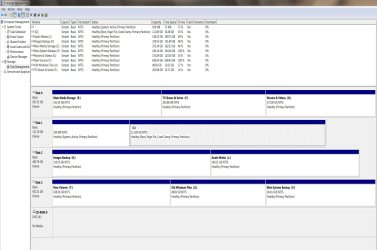
I was able to move files & folders to another drive temporarily so that I could work on the drive in question that was dynamic only. I have since formatted this drive and repartitioned it as per the image here.
So it looks much better and the only active partitions are on the SSD - the C: drive.

It was mentioned that ideally the C: drive (SSD) should be in the Disk 0 position on the motherboard. Is this something you would still recommend doing? or should I leave well enough alone?

Also, I had mentioned that the drive in question - the one that had all dynamic partitions on it, was not showing up in the BIOS post list of drives, but was showing up on a second BIOS post page by itself and was highlighted (by the Gigabyte BIOS) in bright green text. It seems that the Gigabyte BIOS is calling this drive a SCSI device as opposed to an IDE device so it is listed as such. This apparently has no effect on functionality and is just a naming situation in the BIOS but it is curious none the less and I thought that by reformating and setting up the drive as a Basic disk that it might show up normally in the BIOS.
 

Attachments

  • Untitled-1.jpg
    Untitled-1.jpg
    165.1 KB · Views: 15

My Computer

OS
Windows 7 64 bit Professional
CPU
Intel Q6600 - no OC
Motherboard
EP45-UD3R
Memory
g. Skill 8GB
Graphics Card(s)
ATI 5770
Sound Card
Realtek
Monitor(s) Displays
Dell U3011
Hard Drives
WD RE3 1TB
WD Caviar Black 1TB
Samsung 500GB
PSU
Tagan 450
Case
Lian Li
Internet Speed
5 Mbps
It does not really matter on which port the SSD is attached. Port0 is only recommended when you install the OS on the SSD without disconnecting the HDDs. Reason is because the Win7 installer always grabs the disk in the lowest port to install the bootmgr. And that is not a desirable configuration.

If you have Sata3 ports, I would attach the SSD to one of those. But for that you need a Sata3 cable which costs only a few bucks.
 

My Computer

Computer Manufacturer/Model Number
HP, Dell, Gateway, Toshiba - 4 laptops and 2 desktops
OS
Vista, Windows7, Mint Mate, Zorin, Windows 8
CPU
from 1.6GHz Duo to i7
Monitor(s) Displays
2x HP w2207
Hard Drives
5x HDD, 7x SSD, 12x Externals
Keyboard
with trackball - no mices
Mouse
Trackball mice
Internet Speed
DSL 6000
that should work - this motherboard - Gigabyte ga-ep-45-ud3r - has 6 SATA 3.0 (8 total actually including the 2 from the onboard Gigabyte chip) - so that I will try.
 

My Computer

OS
Windows 7 64 bit Professional
CPU
Intel Q6600 - no OC
Motherboard
EP45-UD3R
Memory
g. Skill 8GB
Graphics Card(s)
ATI 5770
Sound Card
Realtek
Monitor(s) Displays
Dell U3011
Hard Drives
WD RE3 1TB
WD Caviar Black 1TB
Samsung 500GB
PSU
Tagan 450
Case
Lian Li
Internet Speed
5 Mbps
Back
Top