
Cannot save files onto logical drive (partition)

bawldiggle

GrayGhost2 ret.
Pro User
VIP
Local time
8:20 PM
Messages
895
Location
Australia
My new external HDD has 3 logical drives
- no Primary partitions

The three logical drives are J,K, L + one unallocated area
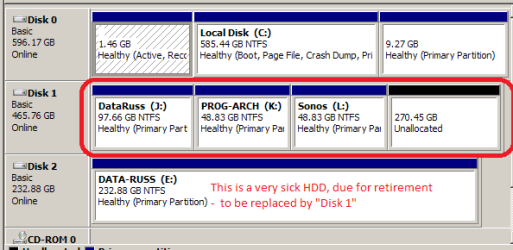
my partitions.PNG

I cannot save files directly onto any of the logical drives
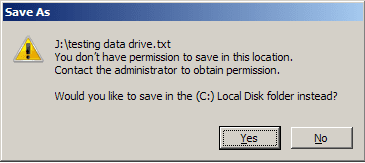
access denied.png

I can ...
1. create folders directly onto the drives
2, not save files directly onto the drives
3. save files into folders on the drives J, K, L
4. save files directly onto C:\ but not directly onto J, K, L drives
I am a newbie to partitioning and using Mini-Tool to create partitions
- determined to work it out for myself but now I need help

Q1:What have I done wrong :( ... or what am I missing ?
 

My Computer My Computer

Computer type
PC/Desktop
Computer Manufacturer/Model Number
Toshiba, Lenovo (laptops) + 4 rigs
OS
XP Pro (x86) | 7 HP (x86) & (x64) | 7 Pro (x64)
Well; one of the quirks with windows 7; is that even if your user name is set as administrator; you need to "add" your user name to the administrators group in order for you to obtain full access because for some odd reason; Microsoft decided to design the default access for administrators so that even with being a admin; unless your user name is a member of the actual admin group; then you will probably get errors like that. Try assigning your user name to the admin group then try and save and see what happens.
 

My Computer My Computer

Computer type
PC/Desktop
Computer Manufacturer/Model Number
custom built
OS
Windows 7 ultimate 64-bit
CPU
Intel I7 2600K 3.4ghz
Motherboard
Asus Evo P8P67
Memory
Corsair 16gb ddr3 1600mhz
Graphics Card(s)
Nvidia Geforce gt 430
Sound Card
Sound Blaster Titanium x-fi pci express
Monitor(s) Displays
Dell E198WFP
Hard Drives
1 western digital 2TB drive.
PSU
Antec 1200 watt
Case
Inwin Dragon Rider
Cooling
6 case supplied cooling fans
Keyboard
logitech mk700
Mouse
logitech m705
Internet Speed
25-50mbps download; 10mbps upload(i think)
Antivirus
avg free 2014
Browser
mozilla firefox
Other Info
Also have a pretty bad speaker setup which is a klipsch promedia 5.1 surround speaker setup with huge subwoofer and lg blu ray player/writer. Also a hp officejet pro 8600 plus wireless all in one and a logitech s7500 webcam.
Thanks matts6887 :)

Would I apply the "user" (me) to each logical drive, or just the first drive "J"

And how do I do that ?
- the last time I did anything with privileges was about 2 years ago

If the HDD is connected to another PC I would have to establish "me" as part of that machines admin group ?

This is my first dalliance with changing security privileges ... on trainer wheels :o

Group or user names (list) ... "Full Control" settings
Everyone:- Allow [ ] | Deny [ ]
Creator Owner:- Allow [ ] | Deny [ ]
System:- Allow [x] | Deny [ ]
Administrators (Owner-PC\Administrators):- Allow [x] | Deny [ ]
Users (Owner-PC\Users):- Allow [x] | Deny [ ]​

... why all these variations of "Security" ?
Can these be thinned-out, or are they all "required"
- this is an external HDD with 3 logical drives J, K, L
It is not imperative that I save files directly onto drives, I can live with the current protocol, of saving into folders
- now very curious as to why the zealous security settings by default
- I have a mutant "why?" gene ;)

Thank you ... :)
 

My Computer My Computer

Computer type
PC/Desktop
Computer Manufacturer/Model Number
Toshiba, Lenovo (laptops) + 4 rigs
OS
XP Pro (x86) | 7 HP (x86) & (x64) | 7 Pro (x64)
Back
Top