
Cannot save files onto logical drive (partition)

bawldiggle

GrayGhost2 ret.
Pro User
VIP
Local time
1:29 AM
Messages
895
Location
Australia
My new external HDD has 3 logical drives
- no Primary partitions

The three logical drives are J,K, L + one unallocated area
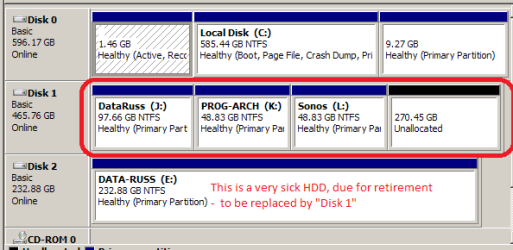
my partitions.PNG

I cannot save files directly onto any of the logical drives
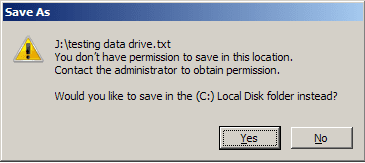
access denied.png

I can ...
1. create folders directly onto the drives
2, not save files directly onto the drives
3. save files into folders on the drives J, K, L
4. save files directly onto C:\ but not directly onto J, K, L drives
I am a newbie to partitioning and using Mini-Tool to create partitions
- determined to work it out for myself but now I need help

Q1:What have I done wrong :( ... or what am I missing ?
 

My Computer

Computer type
PC/Desktop
Computer Manufacturer/Model Number
Toshiba, Lenovo (laptops) + 4 rigs
OS
XP Pro (x86) | 7 HP (x86) & (x64) | 7 Pro (x64)
Well; one of the quirks with windows 7; is that even if your user name is set as administrator; you need to "add" your user name to the administrators group in order for you to obtain full access because for some odd reason; Microsoft decided to design the default access for administrators so that even with being a admin; unless your user name is a member of the actual admin group; then you will probably get errors like that. Try assigning your user name to the admin group then try and save and see what happens.
 

My Computer

Computer type
PC/Desktop
Computer Manufacturer/Model Number
custom built
OS
Windows 7 ultimate 64-bit
CPU
Intel I7 2600K 3.4ghz
Motherboard
Asus Evo P8P67
Memory
Corsair 16gb ddr3 1600mhz
Graphics Card(s)
Nvidia Geforce gt 430
Sound Card
Sound Blaster Titanium x-fi pci express
Monitor(s) Displays
Dell E198WFP
Hard Drives
1 western digital 2TB drive.
PSU
Antec 1200 watt
Case
Inwin Dragon Rider
Cooling
6 case supplied cooling fans
Keyboard
logitech mk700
Mouse
logitech m705
Internet Speed
25-50mbps download; 10mbps upload(i think)
Antivirus
avg free 2014
Browser
mozilla firefox
Other Info
Also have a pretty bad speaker setup which is a klipsch promedia 5.1 surround speaker setup with huge subwoofer and lg blu ray player/writer. Also a hp officejet pro 8600 plus wireless all in one and a logitech s7500 webcam.
Thanks matts6887 :)

Would I apply the "user" (me) to each logical drive, or just the first drive "J"

And how do I do that ?
- the last time I did anything with privileges was about 2 years ago

If the HDD is connected to another PC I would have to establish "me" as part of that machines admin group ?

This is my first dalliance with changing security privileges ... on trainer wheels :o

Group or user names (list) ... "Full Control" settings
Everyone:- Allow [ ] | Deny [ ]
Creator Owner:- Allow [ ] | Deny [ ]
System:- Allow [x] | Deny [ ]
Administrators (Owner-PC\Administrators):- Allow [x] | Deny [ ]
Users (Owner-PC\Users):- Allow [x] | Deny [ ]​

... why all these variations of "Security" ?
Can these be thinned-out, or are they all "required"
- this is an external HDD with 3 logical drives J, K, L
It is not imperative that I save files directly onto drives, I can live with the current protocol, of saving into folders
- now very curious as to why the zealous security settings by default
- I have a mutant "why?" gene ;)

Thank you ... :)
 

My Computer

Computer type
PC/Desktop
Computer Manufacturer/Model Number
Toshiba, Lenovo (laptops) + 4 rigs
OS
XP Pro (x86) | 7 HP (x86) & (x64) | 7 Pro (x64)
Back
Top