
Solved Cannot see Multimedia Settings under "Change advanced power settings"

dfg555

New member
Local time
12:16 PM
Messages
41
Cannot see Multimedia Settings under "Change advanced power settings"

I have already clicked "Change settings that are currently available" but it still does not show it, restarted the PC and still same result.
MSE disabled
Windows 7 Starter 32-bit
Power Plan: High Performance
System Model: HP Mini 110-3500
 

Attachments
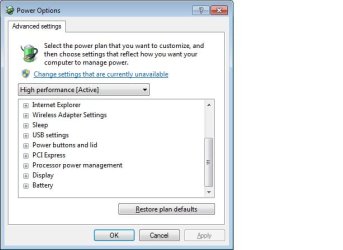
  • Untitled.jpg
    Untitled.jpg
    28.7 KB · Views: 22
Last edited:

My Computer My Computer

Computer type
PC/Desktop
OS
DOS
Please help.
 

My Computer My Computer

Computer type
PC/Desktop
OS
DOS
Go to control panel and click on windows firewall and check if you can enable MSE in there.
 

My Computer My Computer

Computer Manufacturer/Model Number
Dell Dimension E510
OS
Windows 7 Home Premium 32bits
CPU
Intel Pentium 4 521
Motherboard
Dell Inc. ORD203
Memory
DDR2 4096MBytes
Graphics Card(s)
ATI Radeon HD 2400 Series
Sound Card
On-Board Sigma Tel High Definition Audio
Monitor(s) Displays
Dell ST2210 1920x1080x60 hertz
Hard Drives
320 SATA
500 SATA
PSU
Antec 430 Watts
Case
Dell
Cooling
Standard Fans
Go to control panel and click on windows firewall and check if you can enable MSE in there.
I disabled it on purpose thinking it might fix the issue, but nope it doesn't. What's even weirder is that I also cannot find "Multimedia Settings" on my other laptop but both have different programs and anti-virus installed. Is this some kind of Windows Update? I've already done a system file check and the results were all good.
 
Last edited:

My Computer My Computer

Computer type
PC/Desktop
OS
DOS
Welcome to Seven Forums dfg555. Make sure Media Features is checked in Turn windows features on or off

28bb79x.jpg


http://www.sevenforums.com/tutorials/5023-windows-features-turn-off.html

A Guy
 

My Computer My Computer

Computer type
PC/Desktop
OS
Windows 10 Home x64
CPU
INTEL Core i5-750 Quad-Core 3.37GHz
Motherboard
ASUS P7P55D
Memory
HyperX Fury Black Series 8GB (2 x 4GB) 1866Mhz
Graphics Card(s)
EVGA GeForce GTX 750 Superclocked 1GB 128-Bit GDDR5
Monitor(s) Displays
LG 32MA68HY 32" IPS
Screen Resolution
1920 x 1080
Hard Drives
Samsung 840 Evo 120GB, SEAGATE 500GB Barracuda® 7200.12, SATA 3 Gb/s, 7200 RPM, 16MB cache
PSU
ANTEC TruePower New TP-550, 80 PLUS, 550W
Case
ANTEC Three Hundred Illusion
Cooling
COOLER MASTER Hyper 212 Plus, 4 x 120mm 1 x 140mm Noctua's
Internet Speed
85 + Mbps
Antivirus
Avast
Browser
Vivaldi
Hmm that seems to have solved the problem, thanks! Does optimizing it for video quality also impact on the performance of VLC Media Player? I don't like using WMP as my media player.
 

My Computer My Computer

Computer type
PC/Desktop
OS
DOS
Good, glad that was it. I doubt you'd see much difference. VLC is likely optimized to run on any settings. But I could not confirm one way or the other. A Guy
 

My Computer My Computer

Computer type
PC/Desktop
OS
Windows 10 Home x64
CPU
INTEL Core i5-750 Quad-Core 3.37GHz
Motherboard
ASUS P7P55D
Memory
HyperX Fury Black Series 8GB (2 x 4GB) 1866Mhz
Graphics Card(s)
EVGA GeForce GTX 750 Superclocked 1GB 128-Bit GDDR5
Monitor(s) Displays
LG 32MA68HY 32" IPS
Screen Resolution
1920 x 1080
Hard Drives
Samsung 840 Evo 120GB, SEAGATE 500GB Barracuda® 7200.12, SATA 3 Gb/s, 7200 RPM, 16MB cache
PSU
ANTEC TruePower New TP-550, 80 PLUS, 550W
Case
ANTEC Three Hundred Illusion
Cooling
COOLER MASTER Hyper 212 Plus, 4 x 120mm 1 x 140mm Noctua's
Internet Speed
85 + Mbps
Antivirus
Avast
Browser
Vivaldi
Back
Top