Solved cannot select Type with the Arrange By Button

Kirkp

New member
Local time
12:23 AM
Messages
3
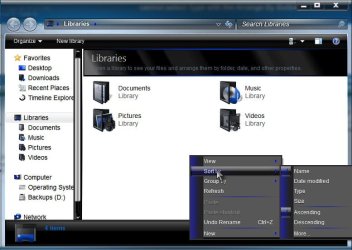
I am using Windows 7 Home Premium and when using Libraries, the options to select Arrange by Type etc seem to be disabled. It seems to be locked on Folder.
On my other computer with Windows Professional it was possible to list files by Type, Name date etc.
Is this feature disable on the Home version, or is there some setting that needs to be changed?
 

My Computer My Computer

OS
Windows 7 Home Premium 64 bit
Last edited by a moderator:

My Computer My Computer

Computer type
PC/Desktop
OS
Windows 10 Home x64
CPU
INTEL Core i5-750 Quad-Core 3.37GHz
Motherboard
ASUS P7P55D
Memory
HyperX Fury Black Series 8GB (2 x 4GB) 1866Mhz
Graphics Card(s)
EVGA GeForce GTX 750 Superclocked 1GB 128-Bit GDDR5
Monitor(s) Displays
LG 32MA68HY 32" IPS
Screen Resolution
1920 x 1080
Hard Drives
Samsung 840 Evo 120GB, SEAGATE 500GB Barracuda® 7200.12, SATA 3 Gb/s, 7200 RPM, 16MB cache
PSU
ANTEC TruePower New TP-550, 80 PLUS, 550W
Case
ANTEC Three Hundred Illusion
Cooling
COOLER MASTER Hyper 212 Plus, 4 x 120mm 1 x 140mm Noctua's
Internet Speed
85 + Mbps
Antivirus
Avast
Browser
Vivaldi
Thanks for your reply.
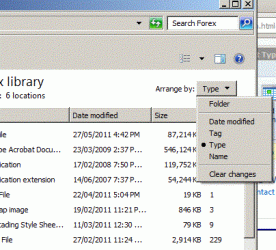
It is the Arrange By Drop Down Menu at the top right of the Explorer page.
Found the solution by accident, when in frustration, I tried the search function above it.
Had to accept a message to turn on Index. Now able to select Arrange by Type.
Only reference to Index is hidden away in the Help, but thats just to be expected with MS !

Here is a screenshot.
 

Attachments

  • arrange.gif
    arrange.gif
    30.3 KB · Views: 1
Last edited by a moderator:

My Computer My Computer

OS
Windows 7 Home Premium 64 bit
By hook or by crook ;)

A Guy
 

My Computer My Computer

Computer type
PC/Desktop
OS
Windows 10 Home x64
CPU
INTEL Core i5-750 Quad-Core 3.37GHz
Motherboard
ASUS P7P55D
Memory
HyperX Fury Black Series 8GB (2 x 4GB) 1866Mhz
Graphics Card(s)
EVGA GeForce GTX 750 Superclocked 1GB 128-Bit GDDR5
Monitor(s) Displays
LG 32MA68HY 32" IPS
Screen Resolution
1920 x 1080
Hard Drives
Samsung 840 Evo 120GB, SEAGATE 500GB Barracuda® 7200.12, SATA 3 Gb/s, 7200 RPM, 16MB cache
PSU
ANTEC TruePower New TP-550, 80 PLUS, 550W
Case
ANTEC Three Hundred Illusion
Cooling
COOLER MASTER Hyper 212 Plus, 4 x 120mm 1 x 140mm Noctua's
Internet Speed
85 + Mbps
Antivirus
Avast
Browser
Vivaldi
Back
Top