
Cannot share folders or a printer amongst four Win 7 machines

gfr92y

New member
Member
Local time
1:37 PM
Messages
81
Location
Richmond, Virginia
I feel like this should be like falling out of bed!

I have two desktops hardwired to an Actiontec router and two laptops wifi-connected. All machines are 64-bit Windows 7 Home Premium except one laptop that is 64-bit Windows 7 Professional.

One of the two desktops is connected to an old HP LaserJet 3015 AIO (not to be confused with an equally old HP Business LaserJet 3015, which is an absolutely different kind of printer).

I cannot share folders or a printer amongst the four machines.

Please let me know how I can help you help me.

Thanks!

Joe
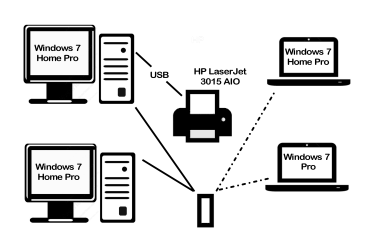
LAN.png
 
Last edited:

My Computer My Computer

At a glance

Windows 10 Home C1H12.30 gigahertz Intel Core i7-10510U12GBIntel UHD Graphics
Computer type
Laptop
Computer Manufacturer/Model Number
HP Laptop 17t-by200 CTO
OS
Windows 10 Home C1H1
CPU
2.30 gigahertz Intel Core i7-10510U
Motherboard
HP 865A 64.17
Memory
12GB
Graphics Card(s)
Intel UHD Graphics
Monitor(s) Displays
HP 27es
The computer that the printer is connected to has to have the drivers installed. Can you print using that computer? I don't know what you have tried or how you have set it up but try these guides. Also for the computer with the printer you will want to go into the router's setting and reserve an ipaddress for that computer. See your router's documentation on how to do that.

Share a printer - Windows Help
How to share a printer with the network in Windows
 

My Computers My Computers

  • At a glance

    Windows 7 pro/Windows 10 ProIntel i7 860 Quad core 2.8 ghz8 gbATI Radeon HD 5770 1 gb ram
    Computer type
    PC/Desktop
    Computer Manufacturer/Model Number
    HP Pavillion Elite HPE-250f
    OS
    Windows 7 pro/Windows 10 Pro
    CPU
    Intel i7 860 Quad core 2.8 ghz
    Memory
    8 gb
    Graphics Card(s)
    ATI Radeon HD 5770 1 gb ram
    Monitor(s) Displays
    Alienware 25 AW2521HF & Viewsonic
    Screen Resolution
    1920 x1080 & 1680x1050
    Hard Drives
    WD blue 1 tb & 500 gb.
    Browser
    FF of course.
    Other Info
    https://www.bestbuy.com/site/hp-pavilion-elite-desktop-intel-core-i7-processor-8gb-memory-1tb-hard-drive/9921493.p?skuId=9921493
  • At a glance

    Windows 2012 R2 Data center/Linux Minti3 9100 3.6GHz, 8M cache, 4C/4T8GB 2666MT/s DDR4 ECC UDIMM
    Computer type
    PC/Desktop
    System Manufacturer/Model Number
    Dell Poweredge T140
    OS
    Windows 2012 R2 Data center/Linux Mint
    CPU
    i3 9100 3.6GHz, 8M cache, 4C/4T
    Memory
    8GB 2666MT/s DDR4 ECC UDIMM
    Monitor(s) Displays
    Viewsonic
    Screen Resolution
    1680x1050
    Hard Drives
    1 TB & 750 GB
    Other Info
    https://www.dell.com/en-us/work/shop/productdetailstxn/poweredge-t140?~ck=bt
townsbg,

Thanks for the response!

The computer that the printer is connected to has to have the drivers installed. Can you print using that computer?

Yes, I can print from the Gateway desktop that is connected to the printer by USB cable.

I don't know what you have tried or how you have set it up...
Brief history...
  1. Before my wife got the 64-bit Windows 7 Pro Lenovo laptop, she had a 32-bit Windows XP HP/Compac notebook with a stylus-only interactive screen and her and I could both print and share files.
  2. When my children got their 64-bit Windows 7 Home Premium (not Home Professional as previously reported) machines, I could not network the 32-bit XP notebook and the two 64-bit Windows 7 machines, and since the kids had school work, they got access to the printer and my wife lost access.
  3. When my wife got her 64-bit Windows 7 Professional Lenovo ThinkPad, the XP was decommissioned and I screwed up homegroups such that her Lenovo could not join my homegroup and my Gateway could not join the Lenovo's homegroup. (I have NO idea how I created two homegroups; one of each machine.)
  4. Ever since I created the homegroup debacle, I have been the only one who can print and occasionally some of us can share files with others, but we have never been able to share files amongst ourselves in a stable sense.

That's a great suggestion! I will do so and report back the results.


Also for the computer with the printer you will want to go into the router's setting and reserve an ipaddress for that computer. See your router's documentation on how to do that.
Oh. That makes sense. I will try and report back.

Thanks again for your help and if anyone else has anything they would like to share with me, I look forward to hearing from you.

Sincerely,

Joe
 

My Computer My Computer

At a glance

Windows 10 Home C1H12.30 gigahertz Intel Core i7-10510U12GBIntel UHD Graphics
Computer type
Laptop
Computer Manufacturer/Model Number
HP Laptop 17t-by200 CTO
OS
Windows 10 Home C1H1
CPU
2.30 gigahertz Intel Core i7-10510U
Motherboard
HP 865A 64.17
Memory
12GB
Graphics Card(s)
Intel UHD Graphics
Monitor(s) Displays
HP 27es
Back
Top