Solved cannot shutdown after using shutdown script

JAYBEEV

New member
Local time
9:32 AM
Messages
7
Hello,

I tried adding a shutdown script to my Windows 7 PC. The script is as follows:
Code:
Set WshShell=WScript.CreateObject("WScript.Shell")
On Error Resume Next
menuSel=MsgBox("Have you completed your timesheet ?" & vbCrLf & "Have you sent in the Invoice?" & vbCrLf & "Have you forgotten anything at all?" & vbCrLf & "Think hard!", vbYesNo)
If menuSel=vbYes Then
    WshShell.Run "Shutdown -a"
End If
It was saved on a text file, and loaded using gpedit.msc.
Unfortunately, it didn't work, so I removed it.
The problem now is, my PC does not shutdown.

How can I restore it to it's normal operation?

Thanks.
 

My Computer

OS
Windows 7 Professional 32-bit
CPU
Intel 2 Duo
Memory
4
Hello JAYBEEV and welcome to Seven Forums.

I think the quickest fix is to restore your computer to a date/time prior to running the script.

http://www.sevenforums.com/tutorials/700-system-restore.html

If you don't have any restore points, or if it doesn't work, you could try running a system file checker scan from an elevated command prompt (option two.) This will try to repair any damaged or corrupt system files. If problems are found, run the scan 3 times and reboot the computer after each scan.

http://www.sevenforums.com/tutorials/1538-sfc-scannow-command-system-file-checker.html
 

My Computer

Computer type
Laptop
Computer Manufacturer/Model Number
Sony Vaio VPCEB47GM Laptop
OS
Win 7 Pro 64-bit
CPU
Intel i5 2.4 Ghz
Memory
8GB DDR3
Graphics Card(s)
Intel HD 3000
Sound Card
IDT High Definition
Monitor(s) Displays
15.6 WGXA Anti-Glare LED
Screen Resolution
1280x800
Hard Drives
640Gb 7200rpm
Antivirus
MSE
Browser
Opera (primary) with IE9 backup
marsmimar,

I didn't have any restore points, and the sfc reported no violations.. still, I can't shutdown properly.
Any other suggestions?

thanks.
 

My Computer

OS
Windows 7 Professional 32-bit
CPU
Intel 2 Duo
Memory
4
See if this Shutdown Shortcut (option two in the tutorial) allows the computer to shutdown. If it does, you might consider pinning the shortcut to a convenient location (taskbar, system tray, etc) and using it.

http://www.sevenforums.com/tutorials/61294-shut-down-computer-shortcut-create.html

If it doesn't work I would suspect that something within the Registry has changed. My best guess is the "NoClose" value may have changed from 0 (zero) to 1 (one).
   Warning
THIS IS ONLY A GUESS! Any changes to the registry could result in a non-working computer.
Try navigating to the following registry key:

HKEY_CURRENT_USER\Software\Microsoft\Windows\CurrentVersion\Policies\Explorer

Click on Explorer and in the right panel see what vaue is assigned to NoClose. If it is 1 you could try changing it to 0. But I would strongly suggest creating a restore point prior to editing the registry.

It might be safer to try a repair install. A repair install will try to fix your installed Windows 7 while preserving user accounts, customizations, system drivers, etc. A repair install will take about an hour. If successful you would have to reinstall Windows Updates which could take another hour or two.

http://www.sevenforums.com/tutorials/3413-repair-install.html

I have to say again that editing the registry incorrectly could have very bad consequences.
 

My Computer

Computer type
Laptop
Computer Manufacturer/Model Number
Sony Vaio VPCEB47GM Laptop
OS
Win 7 Pro 64-bit
CPU
Intel i5 2.4 Ghz
Memory
8GB DDR3
Graphics Card(s)
Intel HD 3000
Sound Card
IDT High Definition
Monitor(s) Displays
15.6 WGXA Anti-Glare LED
Screen Resolution
1280x800
Hard Drives
640Gb 7200rpm
Antivirus
MSE
Browser
Opera (primary) with IE9 backup
An error in your script:

Your script as you posted it first checks that you have not forgotten anything, then if not, it aborts an earlier timed shutdown using the abort switch -a with shutdown command.

If no delayed shutdown process is active, the shutdown -a does nothing:

Command_Shutdown_13.png

Change the switch in shutdown command from -a (abort) to -s (shutdown).

To clarify: To stop executing an active delayed shutdown process (abort it):
Code:
shutdown[B] -a[/B]
To shutdown:
Code:
shutdown [B]-s[/B]
Delayed shutdown after X seconds:
Code:
shutdown [B]-s -t[/B] [COLOR="DarkRed"][B]X[/B][/COLOR]

Kari
 

My Computer

Computer type
Laptop
Computer Manufacturer/Model Number
HP ENVY 17-1150eg
OS
Windows 10 Pro x64 EN-GB
CPU
1.6 GHz Intel Core i7-720QM Processor
Memory
6 GB
Graphics Card(s)
ATI Mobility Radeon HD 5850 Graphics
Sound Card
Beats sound system with integrated subwoofer
Monitor(s) Displays
17" laptop display, 22" LED and 32" Full HD TV through HDMI
Screen Resolution
1600*900 (1), 1920*1080 (2&3)
Hard Drives
Internal: 2 x 500 GB SATA Hard Disk Drive 7200 rpm
External: 2TB for backups, 3TB USB3 network drive for media
Cooling
As Envy runs a bit warm, I have it on a Cooler Master pad
Keyboard
Logitech diNovo Media Desktop Laser (bluetooth)
Mouse
Logitech Performance Mouse MX
Internet Speed
50/10 Mbps VDSL
Antivirus
Windows Defender 4.3.9431.0
Browser
Maxthon 3.5.2., IE11
You could also try looking in the Group Policy editor to see if you can find something that your script changed.
Just my wild guess of something I would check because you stated
It was saved on a text file, and loaded using gpedit.msc.
 

My Computer

Computer type
PC/Desktop
Computer Manufacturer/Model Number
home built
OS
Multi-Boot W7_Pro_x64 W8.1_Pro_x64 W10_Pro_x64 +Linux_VMs +Chromium_VM
CPU
AMD Athlon II x4 620
Motherboard
Gigabyte GA-MA785G-UD3H
Memory
6GB GSkill DDR2 800
Graphics Card(s)
AMD 4670 GPU + AMD 4200 IGP
Sound Card
on board Realtek ALC889A
Monitor(s) Displays
RCA 40" LCD TV, Insignia 32" LCD TV, HP 15" LCD monitor
Screen Resolution
1680 x 1050
Hard Drives
OCZ Vertex 3 120GB,
Samsung F3 1TB (3),
Several others - WD, Seagate, Hitachi, ...
PSU
Corsair 500 W
Case
Rosewill mid tower
Cooling
CM 90mm rifle
Keyboard
Gyration wireless, Logitech wireless, Dell USB wired
Mouse
Gyration wireless, Logitech wireless, V7 USB wired
Internet Speed
Spectrum - 100Mbps D / 10Mbps U
Antivirus
Avast, MBAM3, EMET, WinPatrol
Browser
Pale Moon, Firefox, IE
Other Info
2 multi-boot PC's
Mainly HTPC/Office/Gen purpose (no gaming).
Trendnet USB KVM.
LG DVD burner/Blue Ray Player.
Tray system for removable SATA backup drives.

Not currently OCd, under-volted.
I use Hybrid sleep, rarely re-boot or shutdown.

Hauppauge HD-PVR, Avermedia PCIe TV Tuner, Hauppauge PCI TV Tuner.
Can't help with your current problem but it's my belief that Shutdown -a cannot abort a shutdown that has been started by clicking shutdown on the Start Menu or by pressing the power button and if the shutdown is started by a script it still won't work from the Startup/Shutdown Script section in gpedit.msc as the user is logged off and the shutdown process is too far in before scripts are run.

Only way I could see it working is to change your script and use it from a shortcut to shutdown.

Anybody feel free to correct me if I'm wrong.
 

My Computer

Computer Manufacturer/Model Number
Self built
OS
Windows 7 Ultimate x64
CPU
Intel Pentium Dual Core E5200 2.5GHz (3.77GHz OC)
Motherboard
Asus P5Q-E
Memory
Corsair 4GB DDR2 (4x1GB CM2X1024-6400C4)
Graphics Card(s)
Palit GeForce GTS 250 (1024MB)
Sound Card
On Board (ADI AD2000B 8ch HD)
Monitor(s) Displays
Samsung 32in LCD TV
Screen Resolution
1360x768
Hard Drives
2 x 1TB Samsung 103SJ (Raid0)
2 x External 500GB Samsung 502IJ (NexStar 3 HD Enclosures)
PSU
550W Antec Neo HE 550
Case
Antec P180
Cooling
Xigmatex Red Scorpion CPU Cooler. 3x120mm Fans
Keyboard
Logitech MX5000 Laser (Combo)
Mouse
Logitech MX5000 Laser (Combo)
Internet Speed
ADSL2+ (avg 10 Mbps Down, 0.80 Mbps up)
Other Info
Gigabyte GN-WP01GS 54g Wireless Lan Card
Can't help with your current problem but it's my belief that Shutdown -a cannot abort a shutdown that has been started by clicking shutdown on the Start Menu or by pressing the power button and if the shutdown is started by a script it still won't work from the Startup/Shutdown Script section in gpedit.msc as the user is logged off and the shutdown process is too far in before scripts are run.

Only way I could see it working is to change your script and use it from a shortcut to shutdown.

Anybody feel free to correct me if I'm wrong.

Scroll two post up from your post...
 

My Computer

Computer type
Laptop
Computer Manufacturer/Model Number
HP ENVY 17-1150eg
OS
Windows 10 Pro x64 EN-GB
CPU
1.6 GHz Intel Core i7-720QM Processor
Memory
6 GB
Graphics Card(s)
ATI Mobility Radeon HD 5850 Graphics
Sound Card
Beats sound system with integrated subwoofer
Monitor(s) Displays
17" laptop display, 22" LED and 32" Full HD TV through HDMI
Screen Resolution
1600*900 (1), 1920*1080 (2&3)
Hard Drives
Internal: 2 x 500 GB SATA Hard Disk Drive 7200 rpm
External: 2TB for backups, 3TB USB3 network drive for media
Cooling
As Envy runs a bit warm, I have it on a Cooler Master pad
Keyboard
Logitech diNovo Media Desktop Laser (bluetooth)
Mouse
Logitech Performance Mouse MX
Internet Speed
50/10 Mbps VDSL
Antivirus
Windows Defender 4.3.9431.0
Browser
Maxthon 3.5.2., IE11
Can't help with your current problem but it's my belief that Shutdown -a cannot abort a shutdown that has been started by clicking shutdown on the Start Menu or by pressing the power button and if the shutdown is started by a script it still won't work from the Startup/Shutdown Script section in gpedit.msc as the user is logged off and the shutdown process is too far in before scripts are run.

Only way I could see it working is to change your script and use it from a shortcut to shutdown.

Anybody feel free to correct me if I'm wrong.

Scroll two post up from your post...

I guess your referring to these two lines as it's basically what I said, although just changing from -a to -s is not going to help running it from gpedit so It's not actually incorrect info I gave is it?.
An error in your script:
If no delayed shutdown process is active, the shutdown -a does nothing:

Change the switch in shutdown command from -a (abort) to -s (shutdown).
 

My Computer

Computer Manufacturer/Model Number
Self built
OS
Windows 7 Ultimate x64
CPU
Intel Pentium Dual Core E5200 2.5GHz (3.77GHz OC)
Motherboard
Asus P5Q-E
Memory
Corsair 4GB DDR2 (4x1GB CM2X1024-6400C4)
Graphics Card(s)
Palit GeForce GTS 250 (1024MB)
Sound Card
On Board (ADI AD2000B 8ch HD)
Monitor(s) Displays
Samsung 32in LCD TV
Screen Resolution
1360x768
Hard Drives
2 x 1TB Samsung 103SJ (Raid0)
2 x External 500GB Samsung 502IJ (NexStar 3 HD Enclosures)
PSU
550W Antec Neo HE 550
Case
Antec P180
Cooling
Xigmatex Red Scorpion CPU Cooler. 3x120mm Fans
Keyboard
Logitech MX5000 Laser (Combo)
Mouse
Logitech MX5000 Laser (Combo)
Internet Speed
ADSL2+ (avg 10 Mbps Down, 0.80 Mbps up)
Other Info
Gigabyte GN-WP01GS 54g Wireless Lan Card
My mistake, suffering from the worst hangover this millennium, writing confusing posts. Let's try to clarify:

I did not take a stand on if this script of our OP's can or can not be run using GPEDIT. I was only showing him one simple error in his script and explaining what the -a switch in shutdown command does.

Kari
 

My Computer

Computer type
Laptop
Computer Manufacturer/Model Number
HP ENVY 17-1150eg
OS
Windows 10 Pro x64 EN-GB
CPU
1.6 GHz Intel Core i7-720QM Processor
Memory
6 GB
Graphics Card(s)
ATI Mobility Radeon HD 5850 Graphics
Sound Card
Beats sound system with integrated subwoofer
Monitor(s) Displays
17" laptop display, 22" LED and 32" Full HD TV through HDMI
Screen Resolution
1600*900 (1), 1920*1080 (2&3)
Hard Drives
Internal: 2 x 500 GB SATA Hard Disk Drive 7200 rpm
External: 2TB for backups, 3TB USB3 network drive for media
Cooling
As Envy runs a bit warm, I have it on a Cooler Master pad
Keyboard
Logitech diNovo Media Desktop Laser (bluetooth)
Mouse
Logitech Performance Mouse MX
Internet Speed
50/10 Mbps VDSL
Antivirus
Windows Defender 4.3.9431.0
Browser
Maxthon 3.5.2., IE11
That's cool, your post is valid nonetheless.
 

My Computer

Computer Manufacturer/Model Number
Self built
OS
Windows 7 Ultimate x64
CPU
Intel Pentium Dual Core E5200 2.5GHz (3.77GHz OC)
Motherboard
Asus P5Q-E
Memory
Corsair 4GB DDR2 (4x1GB CM2X1024-6400C4)
Graphics Card(s)
Palit GeForce GTS 250 (1024MB)
Sound Card
On Board (ADI AD2000B 8ch HD)
Monitor(s) Displays
Samsung 32in LCD TV
Screen Resolution
1360x768
Hard Drives
2 x 1TB Samsung 103SJ (Raid0)
2 x External 500GB Samsung 502IJ (NexStar 3 HD Enclosures)
PSU
550W Antec Neo HE 550
Case
Antec P180
Cooling
Xigmatex Red Scorpion CPU Cooler. 3x120mm Fans
Keyboard
Logitech MX5000 Laser (Combo)
Mouse
Logitech MX5000 Laser (Combo)
Internet Speed
ADSL2+ (avg 10 Mbps Down, 0.80 Mbps up)
Other Info
Gigabyte GN-WP01GS 54g Wireless Lan Card
Thanks guys, I appreciate all the efforts.

@marsmimar: I didn't find the registry key that you described. The shutdown command also does not work when run from the command prompt.

@kari: I didn't notice that error.. but still, that was not the problem. In fact, I believe the script was supposed to display a message box, but it doesn't.. when I click the shutdown button, it just closes everything, and then logoff, then displays the "shutting down" message but doesn't turn the computer off. I tried waiting up to 5 minutes... still nothing.

@DavidW7ncus: I really don't know what to look for in the policy editor.. and as far as I see, everything seems to be "not configured"..

@Duzzy: I tried to run the shutdown command from the prompt, but the effect is the same.

Just like marsmimar's idea, I think adding the script changed something in the registry, but I don't know where to start looking.. It seems too simple, but I want to do the repair install when everything else fails.. any more ideas? Thanks.
 

My Computer

OS
Windows 7 Professional 32-bit
CPU
Intel 2 Duo
Memory
4
@Duzzy: I tried to run the shutdown command from the prompt, but the effect is the same.
Not sure if you mean you tried "shutdown -a" or "shutdown -s" from the command promt but just to be clear like Kari said
If no delayed shutdown process is active, the shutdown -a does nothing:
Delayed shutdown after X seconds:
Code:
shutdown -s -t X
Kari
Another words the only way "shutdown -a" does anything is when "shutdown -t xx" has been ran to start a delayed shutdown or "shutdown -s" as this also provides a 1 minute or so delay. When you click Shutdown on the start menu or press the power button on the PC it immediately starts to shutdown with no delay.
@kari: I didn't notice that error.. but still, that was not the problem. In fact, I believe the script was supposed to display a message box, but it doesn't.. when I click the shutdown button, it just closes everything, and then logoff, then displays the "shutting down" message but doesn't turn the computer off. I tried waiting up to 5 minutes... still nothing.
I have preformed a couple quick test and you need to change another setting in gpedit to get it to display the message but "shutdown -a" does not work even if it's the first command in the script because of the my words above and the fact that the script is ran too late into the shutdown process.
@DavidW7ncus: I really don't know what to look for in the policy editor.. and as far as I see, everything seems to be "not configured"..
Have you double checked that your script has been removed from the shutdown scripts and maybe the logoff scripts if you played around trying to get it to work?
Just like marsmimar's idea, I think adding the script changed something in the registry, but I don't know where to start looking.. It seems too simple, but I want to do the repair install when everything else fails.. any more ideas? Thanks.
I tested the same script on my testing installation to see if I could reproduce your problem but I did not have any problems shutting down after the script was removed. While the script was set up to run it would hang on shutdown untill you clicked yes or no on the message and because you can not see the message it will probably hang indefinitely. With verbose shutdown enabled it hung on "Please wait for the Group Policy Client", so again I would double check that your script has been removed.
 
Last edited:

My Computer

Computer Manufacturer/Model Number
Self built
OS
Windows 7 Ultimate x64
CPU
Intel Pentium Dual Core E5200 2.5GHz (3.77GHz OC)
Motherboard
Asus P5Q-E
Memory
Corsair 4GB DDR2 (4x1GB CM2X1024-6400C4)
Graphics Card(s)
Palit GeForce GTS 250 (1024MB)
Sound Card
On Board (ADI AD2000B 8ch HD)
Monitor(s) Displays
Samsung 32in LCD TV
Screen Resolution
1360x768
Hard Drives
2 x 1TB Samsung 103SJ (Raid0)
2 x External 500GB Samsung 502IJ (NexStar 3 HD Enclosures)
PSU
550W Antec Neo HE 550
Case
Antec P180
Cooling
Xigmatex Red Scorpion CPU Cooler. 3x120mm Fans
Keyboard
Logitech MX5000 Laser (Combo)
Mouse
Logitech MX5000 Laser (Combo)
Internet Speed
ADSL2+ (avg 10 Mbps Down, 0.80 Mbps up)
Other Info
Gigabyte GN-WP01GS 54g Wireless Lan Card
Please post the contents of these files:
"%SystemRoot%\system32\GroupPolicy\gpt.ini
"%SystemRoot%\system32\GroupPolicy\Machine\Scripts\scripts.ini

The "no shutdown" behavior is repeatable using any line that requires user interaction. I tested inside a virtual machine using only this line:
Code:
menuSel=MsgBox("test", vbYesNo)
The action occurs and the user cannot interact with it - thus the hang.

I wonder why MS just did not process a logoff and then a shutdown? I guess that takes too long.

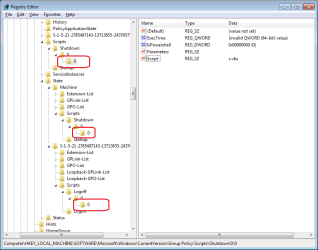
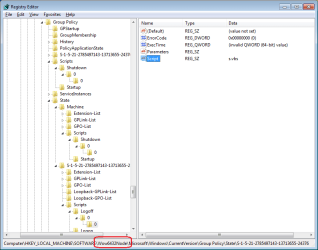
Anyway, when I set a shutdown script via gpedit, it changed these areas of the registry:
shutdown-reg.png
and again here for a 64 bit OS
shutdown-reg2.png
You might want to manually (and carefully) snoop around those areas to make sure that nothing is pointing to something.
 

My Computer

Computer type
Laptop
Computer Manufacturer/Model Number
Employer provided Dell Latitude
OS
W7 Pro SP1 64bit
CPU
i7
Memory
8GB
Graphics Card(s)
Intel HD Graphics
Hard Drives
crappy SSD
Antivirus
Employer mandated Symantec Endpoint Protection
Browser
Pale Moon 64bit, IE11 64bit & Chrome 64bit
@Duzzy, It took me so long to compose and post what I did - I missed seeing your post.

~~~
Another words the only way "shutdown -a" does anything is when "shutdown -t xx" has been ran to start a delayed shutdown. When you click Shutdown on the start menu or press the power button on the PC it immediately starts to shutdown with no delay.
~~~
I'm not picking at your declaration, just refining it.
Test this in a batch file:
Code:
shutdown -s
pause
shutdown -a
pause
As long as there is some delay, (which shutdown -s has some delay), then you can abort.

This does not abort
Code:
shutdown -s -t 0
shutdown -a
pause
~~~
I have preformed a couple quick test and you need to change another setting in gpedit to get it to display the message.....
~~~
I don't know too much about GPO settings - what needs to be changed to allow user interaction with a shutdown script?
 

My Computer

Computer type
Laptop
Computer Manufacturer/Model Number
Employer provided Dell Latitude
OS
W7 Pro SP1 64bit
CPU
i7
Memory
8GB
Graphics Card(s)
Intel HD Graphics
Hard Drives
crappy SSD
Antivirus
Employer mandated Symantec Endpoint Protection
Browser
Pale Moon 64bit, IE11 64bit & Chrome 64bit
The "no shutdown" behavior is repeatable using any line that requires user interaction. I tested inside a virtual machine using only this line:
Code:
menuSel=MsgBox("test", vbYesNo)
The action occurs and the user cannot interact with it - thus the hang.
I would like to just note for anybody that comes across this thread that you can interact with a script by changing a setting in gpedit under,

Computer Configuration > Administrative Templates > System > Scripts

Here you'll find "Run shutdown scripts visible" and "Run Startup scripts visible". Change both or only the one you need to interact with. Also under,

User Configuration > Administrative Templates > System > Scripts

You'll find "Run logon scripts visible" and "Run logoff scripts visible".

For those with Windows versions without access to gpedit I believe there are ways to run shutdown scripts but I don't know about other scripts or interacting with them. Interaction maybe possible by adding the registry values which are all DWORD's with their data value set to 0.
   Warning
1. Any changes to the registry could result in a non-working computer.
2. If the registry change does not enable interaction the system will hang during the running of the script and a forced reboot will be required.
3. If the script is a startup or logon then it will be ran again after a forced reboot so I would not recommend trying either of these
EDIT
I did find a setting in gpedit that suggest the maximum hang time while processing a script would be 10mins unless changed. Read more for "Maximum wait time for Group Policy scripts" under,

Computer Configuration > Administrative Templates > System > Scripts

I claim no responsibility if you cannot boot.
END EDIT


HideStartupScripts
HideShutdownScripts

Above two DWORD's under "HKEY_LOCAL_MACHINE\SOFTWARE\Microsoft\Windows\CurrentVersion\Policies\System" and

HideLogoffScripts
HideLogonScripts

DWORD's under "HKEY_CURRENT_USER\Software\Microsoft\Windows\CurrentVersion\Policies\System"

These registry keys are for 64bit Windows. 32bit bit I would think are the same but I take no responsibility for errors.
 
Last edited:

My Computer

Computer Manufacturer/Model Number
Self built
OS
Windows 7 Ultimate x64
CPU
Intel Pentium Dual Core E5200 2.5GHz (3.77GHz OC)
Motherboard
Asus P5Q-E
Memory
Corsair 4GB DDR2 (4x1GB CM2X1024-6400C4)
Graphics Card(s)
Palit GeForce GTS 250 (1024MB)
Sound Card
On Board (ADI AD2000B 8ch HD)
Monitor(s) Displays
Samsung 32in LCD TV
Screen Resolution
1360x768
Hard Drives
2 x 1TB Samsung 103SJ (Raid0)
2 x External 500GB Samsung 502IJ (NexStar 3 HD Enclosures)
PSU
550W Antec Neo HE 550
Case
Antec P180
Cooling
Xigmatex Red Scorpion CPU Cooler. 3x120mm Fans
Keyboard
Logitech MX5000 Laser (Combo)
Mouse
Logitech MX5000 Laser (Combo)
Internet Speed
ADSL2+ (avg 10 Mbps Down, 0.80 Mbps up)
Other Info
Gigabyte GN-WP01GS 54g Wireless Lan Card
I don't know too much about GPO settings - what needs to be changed to allow user interaction with a shutdown script?
I was actually in the middle of writing a post explaining that as you posted check post #16 above.

~~~
Another words the only way "shutdown -a" does anything is when "shutdown -t xx" has been ran to start a delayed shutdown. When you click Shutdown on the start menu or press the power button on the PC it immediately starts to shutdown with no delay.
~~~
I'm not picking at your declaration, just refining it.
Test this in a batch file:
Code:
shutdown -s
pause
shutdown -a
pause
As long as there is some delay, (which shutdown -s has some delay), then you can abort.
Opps I knew that, you are absolutely correct "shutdown -s" does provide a 1 min or so delay and I have modified my post to state that, thank you.
 

My Computer

Computer Manufacturer/Model Number
Self built
OS
Windows 7 Ultimate x64
CPU
Intel Pentium Dual Core E5200 2.5GHz (3.77GHz OC)
Motherboard
Asus P5Q-E
Memory
Corsair 4GB DDR2 (4x1GB CM2X1024-6400C4)
Graphics Card(s)
Palit GeForce GTS 250 (1024MB)
Sound Card
On Board (ADI AD2000B 8ch HD)
Monitor(s) Displays
Samsung 32in LCD TV
Screen Resolution
1360x768
Hard Drives
2 x 1TB Samsung 103SJ (Raid0)
2 x External 500GB Samsung 502IJ (NexStar 3 HD Enclosures)
PSU
550W Antec Neo HE 550
Case
Antec P180
Cooling
Xigmatex Red Scorpion CPU Cooler. 3x120mm Fans
Keyboard
Logitech MX5000 Laser (Combo)
Mouse
Logitech MX5000 Laser (Combo)
Internet Speed
ADSL2+ (avg 10 Mbps Down, 0.80 Mbps up)
Other Info
Gigabyte GN-WP01GS 54g Wireless Lan Card
...

HideShutdownScripts

Above two DWORD's under "HKEY_LOCAL_MACHINE\SOFTWARE\Microsoft\Windows\CurrentVersion\Policies\System" and

...

The good news is, this one worked! I added this to my registry, and now I can see the message and shutdown. I also tried removing the script, and it also shuts down properly.

Thank you very much.

The bad news is, the Yes/No option in the message doesn't work.. Both "Yes" and "No" proceeds to a shutdown. I even tried adding an else statement to the script, "shutdown -a", but it didn't work.

well, at least now I can shutdown properly.. hahaha..
 

My Computer

OS
Windows 7 Professional 32-bit
CPU
Intel 2 Duo
Memory
4
Good to hear you can shutdown normally.

...

HideShutdownScripts

Above two DWORD's under "HKEY_LOCAL_MACHINE\SOFTWARE\Microsoft\Windows\CurrentVersion\Policies\System" and

...

The good news is, this one worked! I added this to my registry, and now I can see the message and shutdown. I also tried removing the script, and it also shuts down properly.
You should have been able to enable this by gpedit, although it probably doesn't really matter adding it straight to the registry will not tell you that it is enabled when viewing in gpedit.

The bad news is, the Yes/No option in the message doesn't work.. Both "Yes" and "No" proceeds to a shutdown. I even tried adding an else statement to the script, "shutdown -a", but it didn't work.

I tried to explain earlier that it won't work because
...."shutdown -a" does not work even if it's the first command in the script because of the my words above and the fact that the script is ran too late into the shutdown process.

Also note
Another words the only way "shutdown -a" does anything is when "shutdown -t xx" has been ran to start a delayed shutdown or "shutdown -s" as this also provides a 1 minute or so delay. When you click Shutdown on the start menu or press the power button on the PC it immediately starts to shutdown with no delay.

If you would like to use a shortcut to shutdown the PC you can use a script that ask the questions and if ok then shutdown using "Shutdown -s" or "shutdown -s -t xx" or if something has been forgotten do nothing or display a message that shutdown has been aborted. For example,
Code:
Set WshShell=WScript.CreateObject("WScript.Shell")
On Error Resume Next
menuSel=MsgBox("Have you completed your timesheet ?" & vbCrLf & "Have you sent in the Invoice?" & vbCrLf & "Have you forgotten anything at all?" & vbCrLf & "Think hard!", vbYesNo)
If menuSel=vbNo Then
    WshShell.Run "Shutdown -s"
Else
    MsgBox "Shutdown has been aborted", vbOKOnly
End If
You may need to re-word your questions as to me it reads yes, yes, no or no, no, yes, so I wasn't sure if you wanted to shutdown on a yes or no.

The way I've written the script is if you click No it shutdowns with a 1min or so delay giving you time to manually abort with "shutdown -a" or if you click Yes it displays "Shutdown has been aborted" in a message box. To shutdown without delay use "shutdown -s -t 0" or to add more delay use "shutdown -s -t xx" replacing xx with the number of seconds you wish to delay for. I recommend at least the 1min delay in case you click the wrong button you can abort it.

To prevent using Shutdown from the Start Menu you can remove it via gpedit by enabling "Remove and prevent access to the Shut Down, Restart, Sleep, and Hibernate commands" found under,

User Configuration > Administrative Templates > Start Menu and Taskbar

This will only remove the commands from the Start Menu and the page that displays when you press "Ctrl + Alt + Del", this will not prevent other ways including software set to shutdown. Although this all works for shutting down I don't know any way to prevent logging off or a way to log off via a script if that matters
EDIT but you can remove logoff from the start menu or all ways to log off.

To remove logoff from start menu use "Remove logoff on the Start Menu" in the same path as above or to remove all ways use "Remove logoff on the Start Menu" and "Remove Logoff" under

User Configuration > Administrative Templates > System > Ctrl + Alt + Del Options

END EDIT

To prevent shutting down by the PC's power button set the action in the Advanced Power Settings in the Power Options for the power plans you use.

One last thing I did find a setting in gpedit that suggest the maximum hang time while processing a script would be 10mins unless changed. Read more for "Maximum wait time for Group Policy scripts" under,

Computer Configuration > Administrative Templates > System > Scripts
 
Last edited:

My Computer

Computer Manufacturer/Model Number
Self built
OS
Windows 7 Ultimate x64
CPU
Intel Pentium Dual Core E5200 2.5GHz (3.77GHz OC)
Motherboard
Asus P5Q-E
Memory
Corsair 4GB DDR2 (4x1GB CM2X1024-6400C4)
Graphics Card(s)
Palit GeForce GTS 250 (1024MB)
Sound Card
On Board (ADI AD2000B 8ch HD)
Monitor(s) Displays
Samsung 32in LCD TV
Screen Resolution
1360x768
Hard Drives
2 x 1TB Samsung 103SJ (Raid0)
2 x External 500GB Samsung 502IJ (NexStar 3 HD Enclosures)
PSU
550W Antec Neo HE 550
Case
Antec P180
Cooling
Xigmatex Red Scorpion CPU Cooler. 3x120mm Fans
Keyboard
Logitech MX5000 Laser (Combo)
Mouse
Logitech MX5000 Laser (Combo)
Internet Speed
ADSL2+ (avg 10 Mbps Down, 0.80 Mbps up)
Other Info
Gigabyte GN-WP01GS 54g Wireless Lan Card
I made some edits above if you have already read it.
 

My Computer

Computer Manufacturer/Model Number
Self built
OS
Windows 7 Ultimate x64
CPU
Intel Pentium Dual Core E5200 2.5GHz (3.77GHz OC)
Motherboard
Asus P5Q-E
Memory
Corsair 4GB DDR2 (4x1GB CM2X1024-6400C4)
Graphics Card(s)
Palit GeForce GTS 250 (1024MB)
Sound Card
On Board (ADI AD2000B 8ch HD)
Monitor(s) Displays
Samsung 32in LCD TV
Screen Resolution
1360x768
Hard Drives
2 x 1TB Samsung 103SJ (Raid0)
2 x External 500GB Samsung 502IJ (NexStar 3 HD Enclosures)
PSU
550W Antec Neo HE 550
Case
Antec P180
Cooling
Xigmatex Red Scorpion CPU Cooler. 3x120mm Fans
Keyboard
Logitech MX5000 Laser (Combo)
Mouse
Logitech MX5000 Laser (Combo)
Internet Speed
ADSL2+ (avg 10 Mbps Down, 0.80 Mbps up)
Other Info
Gigabyte GN-WP01GS 54g Wireless Lan Card
Back
Top