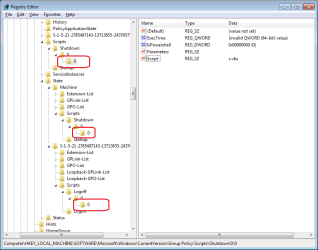
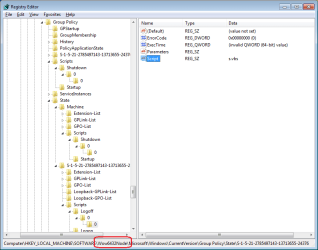
Good to hear you can shutdown normally.
...
HideShutdownScripts
Above two DWORD's under "HKEY_LOCAL_MACHINE\SOFTWARE\Microsoft\Windows\CurrentVersion\Policies\System" and
...
The
good news is, this one worked! I added this to my registry, and now I can see the message and shutdown. I also tried removing the script, and it also shuts down properly.
You should have been able to enable this by gpedit, although it probably doesn't really matter adding it straight to the registry will not tell you that it is enabled when viewing in gpedit.
The bad news is, the Yes/No option in the message doesn't work.. Both "Yes" and "No" proceeds to a shutdown. I even tried adding an else statement to the script, "shutdown -a", but it didn't work.
I tried to explain earlier that it won't work because
...."shutdown -a" does not work even if it's the first command in the script because of the my words above and the fact that the script is ran too late into the shutdown process.
Also note
Another words the only way "shutdown -a" does anything is when "shutdown -t xx" has been ran to start a delayed shutdown or "shutdown -s" as this also provides a 1 minute or so delay. When you click Shutdown on the start menu or press the power button on the PC it immediately starts to shutdown with no delay.
If you would like to use a shortcut to shutdown the PC you can use a script that ask the questions and if ok then shutdown using "Shutdown -s" or "shutdown -s -t xx" or if something has been forgotten do nothing or display a message that shutdown has been aborted. For example,
Code:
Set WshShell=WScript.CreateObject("WScript.Shell")
On Error Resume Next
menuSel=MsgBox("Have you completed your timesheet ?" & vbCrLf & "Have you sent in the Invoice?" & vbCrLf & "Have you forgotten anything at all?" & vbCrLf & "Think hard!", vbYesNo)
If menuSel=vbNo Then
    WshShell.Run "Shutdown -s"
Else
    MsgBox "Shutdown has been aborted", vbOKOnly
End If
You may need to re-word your questions as to me it reads yes, yes, no or no, no, yes, so I wasn't sure if you wanted to shutdown on a yes or no.
The way I've written the script is if you click No it shutdowns with a 1min or so delay giving you time to manually abort with "shutdown -a" or if you click Yes it displays "Shutdown has been aborted" in a message box. To shutdown without delay use "shutdown -s -t 0" or to add more delay use "shutdown -s -t xx" replacing xx with the number of seconds you wish to delay for. I recommend at least the 1min delay in case you click the wrong button you can abort it.
To prevent using Shutdown from the Start Menu you can remove it via gpedit by enabling "Remove and prevent access to the Shut Down, Restart, Sleep, and Hibernate commands" found under,
User Configuration > Administrative Templates > Start Menu and Taskbar
This will only remove the commands from the Start Menu and the page that displays when you press "Ctrl + Alt + Del", this will not prevent other ways including software set to shutdown. Although this all works for shutting down I don't know any way to prevent logging off or a way to log off via a script if that matters
EDIT but you can remove logoff from the start menu or all ways to log off.
To remove logoff from start menu use "Remove logoff on the Start Menu" in the same path as above or to remove all ways use "Remove logoff on the Start Menu" and "Remove Logoff" under
User Configuration > Administrative Templates > System > Ctrl + Alt + Del Options
END EDIT
To prevent shutting down by the PC's power button set the action in the Advanced Power Settings in the Power Options for the power plans you use.
One last thing I did find a setting in gpedit that suggest the maximum hang time while processing a script would be 10mins unless changed. Read more for "Maximum wait time for Group Policy scripts" under,
Computer Configuration > Administrative Templates > System > Scripts