Cannot upgrade to another version of Win7

Rpz79

New member
Member
Local time
6:53 PM
Messages
29
Location
Israel
Hi ,

I have licenced Windows 7 Ultimate which I got with my new laptop.
When I try to upgrade/change it to a customised version of Win7 Ultimate from an ISO it FAILS. At start It updates the installer (tried without updating also) and after that I select UPGRADE. The installtion progress starts and goes good over the first 4 steps but in the middle of the fifth and last step (something about gathering info about services) it just suddenly sends me a popup windows with a laconic message like:
Windows cannot upgrade to this version. use windows upgarde to determine compatibility issues. the installation program will now reboot and restore windows to it's previous state
I ran this installation as system. In the background it seems like the installation is still going or in an endless loop / deadlock situation so I pressed OK.


Then the system restarts and I get 2 options:
  1. Windows
  2. Windows setup rollback
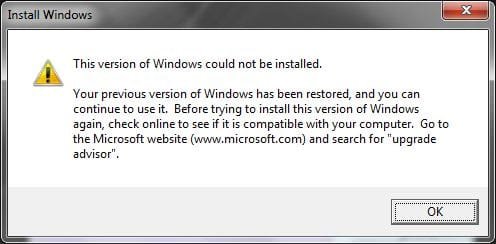
At first I tried the windows option which leeds again to the installation screen but still It wants to exit with the same error popup. I tried several other boot options with F8 but with no avail so aventually I had to press the rollback and return to my original Win7. The message I get after it is attached. Obviously my system have the requirements needed for Win7.
  1. Whrere/What is the problem ?
  2. How/where can I see the log of the setup/installation process ?
THNX ALOT FELLAS
:rolleyes:
 

Attachments

  • 1.jpg
    1.jpg
    18.1 KB · Views: 6

My Computer My Computer

Computer Manufacturer/Model Number
Hewlett-Packard HP Pavilion dv6-3120ej Notebook PC
OS
Windows 7 Ultimate x64
Have you tried formatting your drive first?
 

My Computer My Computer

Computer type
PC/Desktop
Computer Manufacturer/Model Number
LENOVO K450 @3.0GHZ
OS
64-bit Windows 8.1 Pro
CPU
Core(TM) i5 CPU 4330 Haswell @ 3.20GHz
Motherboard
LENOVO
Memory
12.00 GB
Graphics Card(s)
Intel(R) HD Graphics
Sound Card
Intel HD integtrated
Monitor(s) Displays
HP 25' ISP Monitor
Screen Resolution
1900/1020
Hard Drives
(1) ST1000DM003-1CH162 (2) Generic STORAGE DEVICE USB Device (3) Generic STORAGE DEVICE USB Device
Internet Speed
100mb down/10mb up

My Computer My Computer

Computer Manufacturer/Model Number
Custom
OS
Windows 7 Professional x64
CPU
Intel i7 2600K OC'd @ 4620 MHz
Motherboard
Asus P8Z68-V Pro
Memory
16GB GSkill Sniper 2133 Mhz (4x4GB)
Graphics Card(s)
EVGA GeForce GTX 480 SuperClocked+
Sound Card
Realtek High Definition Audio
Monitor(s) Displays
2x Acer S273HLbmii 27"
Screen Resolution
2 x 1920x1080
Hard Drives
64GB Crucial M4 SSD

Storage: Hitachi 1TB 5400RPM, Samsung 1.5TB 5400RPM
PSU
Corsair HW Series 750w (modular)
Case
Cooler Master HAF 932 Advanced Blue Edition
Cooling
CM Hyper 212+ CPU cooler, 3x 230mm + 1x 140mm case fans
Keyboard
Logitech MK320 (wireless)
Mouse
Logitech MK320 (wireless)
Internet Speed
30 Mb/s : 2 Mb/s
What you are trying to do is an unsupported upgrade scenario. From within win7 ultimate, you can only do a repair in place upgrade. That means, if the os gets mucked up, you can do a repair install using the regular dvd. Also, upgrading from one win7 edition to another can only be done through Anytime Upgrade (disk or online). In your case, since Ultimate is already installed, there is officially nothing to upgrade to.

Boot from your custom dvd and choose to do a Custom Install. You can either format your windows partition there or just go ahead with the install. In the latter case, your existing windows folder will get saved as windows.old. That folder can be safely deleted, if you dont plan to revert to regular win7.
 
Last edited:

My Computer My Computer

Computer Manufacturer/Model Number
Too many to describe...
OS
Windows 7 x64 pro/ Windows 7 x86 Pro/ XP SP3 x86
Hi ,

I have licenced Windows 7 Ultimate which I got with my new laptop.
When I try to upgrade/change it to a customised version of Win7 Ultimate from an ISO it FAILS. At start It updates the installer (tried without updating also) and after that I select UPGRADE. The installtion progress starts and goes good over the first 4 steps but in the middle of the fifth and last step (something about gathering info about services) it just suddenly sends me a popup windows with a laconic message like:
Windows cannot upgrade to this version. use windows upgarde to determine compatibility issues. the installation program will now reboot and restore windows to it's previous state
I ran this installation as system. In the background it seems like the installation is still going or in an endless loop / deadlock situation so I pressed OK.


Then the system restarts and I get 2 options:
  1. Windows
  2. Windows setup rollback
At first I tried the windows option which leeds again to the installation screen but still It wants to exit with the same error popup. I tried several other boot options with F8 but with no avail so aventually I had to press the rollback and return to my original Win7. The message I get after it is attached. Obviously my system have the requirements needed for Win7.
  1. Whrere/What is the problem ?
  2. How/where can I see the log of the setup/installation process ?
THNX ALOT FELLAS
:rolleyes:

I have one question. What does "customized" mean? We can only support valid MS releases, and since you already have the best one installed. I can but think customized means modified.

We cant support modified for we dont know what changes were made.

Ken
 

My Computer My Computer

Computer Manufacturer/Model Number
HP Pavillion dv-7 1005 Tx
OS
Win 8 Release candidate 8400
CPU
[email protected]
Memory
4 gigs
Graphics Card(s)
Nvidia 9600M
Sound Card
HD built-in
Monitor(s) Displays
17" Wxga
Screen Resolution
1440x900
Cooling
none
Internet Speed
45Mb down 5Mb up
Hi ,

I have licenced Windows 7 Ultimate which I got with my new laptop.
When I try to upgrade/change it to a customised version of Win7 Ultimate from an ISO it FAILS. At start It updates the installer (tried without updating also) and after that I select UPGRADE. The installtion progress starts and goes good over the first 4 steps but in the middle of the fifth and last step (something about gathering info about services) it just suddenly sends me a popup windows with a laconic message like:
Windows cannot upgrade to this version. use windows upgarde to determine compatibility issues. the installation program will now reboot and restore windows to it's previous state
I ran this installation as system. In the background it seems like the installation is still going or in an endless loop / deadlock situation so I pressed OK.


Then the system restarts and I get 2 options:
  1. Windows
  2. Windows setup rollback
At first I tried the windows option which leeds again to the installation screen but still It wants to exit with the same error popup. I tried several other boot options with F8 but with no avail so aventually I had to press the rollback and return to my original Win7. The message I get after it is attached. Obviously my system have the requirements needed for Win7.
  1. Whrere/What is the problem ?
  2. How/where can I see the log of the setup/installation process ?
THNX ALOT FELLAS
:rolleyes:

I have one question. What does "customized" mean? We can only support valid MS releases, and since you already have the best one installed. I can but think customized means modified.

We cant support modified for we dont know what changes were made.

Ken

Hopefully he's just using something he customized via adding preinstalled programs and whatnot and not a hacked version.

BTW: If you are using a hacked version, you're likely to get all sorts of errors & or malware/viruses. If that's the case, stick w/ your legal OS.
 

My Computer My Computer

Computer Manufacturer/Model Number
Apple Macbook Pro (April 2009)
OS
W7 Ult. x64 | OS X
CPU
Intel Mobile Core 2 Duo 2.93Ghz [T9800 Penryn]
Motherboard
NVIDIA nForce 730i Rev. B1 [Mac-F2268EC8 (U2E1)]
Memory
4096MB Samsung DDR3 Dual Channel [PC3-8500F 1066Mhz]
Graphics Card(s)
NVIDIA GeForce 9600M GT 512MB [G96M Rev. C1]
Sound Card
SB X-Fi Surround 5.1 USB | Onboard Realtek (Disabled)
Monitor(s) Displays
Acer x223wbd 22" | Apple Anti-Glare 17" (Disabled)
Screen Resolution
{Current} 1440x900 {Acer} 1680x1050 {Apple} 1920x1200
Hard Drives
{Internal}
Seagate Momentus 320GB 2.5" 7200RPM [ST9320421AS]

{Externals}
LaCie 320GB USB 2.0 HDD [301284UR]
LaCie 750GB USB 2.0 FW400 eSATA HDD [301314U]
LaCie 1TB USB 2.0 HDD [301304UR]
PSU
Magsafe
Case
Aluminum/Unibody (MBP52)
Cooling
2 x 6000 RPM Fans
Keyboard
Logitech G-15v2 [PN 920-000379]
Mouse
Logitech G-9 [PN 910-000338]
Internet Speed
12Mbps/2.5Mbps w/ 24Mbps Speed Boost [Comcast]
Other Info
Logitech X-540 Speakers [PN 970223-0122]
Sennheiser PC-151 Headset
Hopefully he's just using something he customized via adding preinstalled programs and whatnot and not a hacked version.

Exactly!! :D but still I cannot somehow upgrade from one version of Ultimate to another version of Ultimate and I don't know why...:huh:
Is it possible to:
  1. Have a log of the installation process ?
  2. Upgrade from boot ?
THNX ALOT
:geek:
 

My Computer My Computer

Computer Manufacturer/Model Number
Hewlett-Packard HP Pavilion dv6-3120ej Notebook PC
OS
Windows 7 Ultimate x64
Installer conflicts. :orb:
 

My Computer My Computer

Computer Manufacturer/Model Number
Self
OS
W7, Xp Pro
CPU
AMD Sempron 2600+
Motherboard
K8V-MX
Memory
1GB
Graphics Card(s)
Radeon HD3650
Sound Card
Soundmax
Monitor(s) Displays
17" HP CRT
Screen Resolution
1024x768
Hard Drives
1x WDC WD800BB
1x HDS728080
PSU
? 460W
Case
Coolermaster
Cooling
enough
Keyboard
M$S
Mouse
Optical
Internet Speed
1500kbs
Other Info
OLD!!! does the job i need.
Installer conflicts. :orb:
But it does work as a fresh install from boot :sarc:
There is no exception name or error number there just a laconic error popup messege :confused:

Can I upgrade from boot ?
Can I see/get a log file of the upgrade/installation process ?

THNX
:zip:
 

My Computer My Computer

Computer Manufacturer/Model Number
Hewlett-Packard HP Pavilion dv6-3120ej Notebook PC
OS
Windows 7 Ultimate x64
I would just do a clean install at this point...
 

My Computer My Computer

Computer type
PC/Desktop
Computer Manufacturer/Model Number
LENOVO K450 @3.0GHZ
OS
64-bit Windows 8.1 Pro
CPU
Core(TM) i5 CPU 4330 Haswell @ 3.20GHz
Motherboard
LENOVO
Memory
12.00 GB
Graphics Card(s)
Intel(R) HD Graphics
Sound Card
Intel HD integtrated
Monitor(s) Displays
HP 25' ISP Monitor
Screen Resolution
1900/1020
Hard Drives
(1) ST1000DM003-1CH162 (2) Generic STORAGE DEVICE USB Device (3) Generic STORAGE DEVICE USB Device
Internet Speed
100mb down/10mb up
Are you upgrading 32bit to 64bit?
If you are CLEAN INSTALL ONLY.
 

My Computer My Computer

OS
ME/XP/Vista/Win7
Need Help

Are you upgrading 32bit to 64bit?
If you are CLEAN INSTALL ONLY.
64bit to 64bit.
It stops the setup in the 5th and last phase "Transfering files, settings and programs" but I don't know which one of them causes the problem :sa:

Is there an option to see/create a log file of the (successful/unsuccessful)upgrade/installation after he rollsback to the previous windows 7 version ???

BTW what will happen if I'll delete the 200MB SYSTEM partition ? my OS will still boot ? maybe it's her causing the problems ? :confused:

Another thing , is there an option to upgrade an OEM version with a Retail one (x64->x64 , x32->x32) ?
In OEM I mean Win7 that comes installed with a brand (HP,Dell,Asus etc...) PC/Laptop and in retail I mean a DVD that you purchase. I mean there is the SLIC problem in brand computers isn't it ? :sarc:

THNX M8's
:geek:
 

My Computer My Computer

Computer Manufacturer/Model Number
Hewlett-Packard HP Pavilion dv6-3120ej Notebook PC
OS
Windows 7 Ultimate x64
Back
Top