Cannot use email links to get to Outlook

NashvilleKit

New member
Local time
12:40 AM
Messages
11
Location
Nashville TN USA
I have used Outlook 2003 (& its predecessors) for years without this problem (with Win98 & XP). Now I've done a clean upgrade to Win7 (Hm Prem, Public Release), re-installed Outlook03 and here's my problem: Email address links ("mailto:") on web pages, in emails, in Office documents, on PDF docs, etc. -- none of them work.

They either do nothing or I get the error "Could not perform this operation because the default mail client is not properly installed" in a dialogue box entitled "Mail client not found." Sometimes the attempt actually puts the focus on Outlook but still displays the error message and fails to launch a new message template.


The lame "Set your Default Programs" doesn't even show Outlook.
The "Set Program Access and Computer Defaults" just shows "E-mail program: Use my current e-mail program" and allows no change to this inane statement. In the Control Panel, if I click on "Mail," it gives me the options within Outlook to adjust, so it must "think" this is my default mail client.

Any ideas on how to fix this annoyance other than copy-pasting email addresses like I've been doing for months now?
 

My Computer My Computer

At a glance

Windows 7 Home Premium 64-bit SP1Intel Core i7-2600 @3.4GHz 4 Cores, 8 Threads...16 GB Dual-Channel DDR3 SDRAM @ 665.3 MHznVidia GeForce GT420 (1GB cache)
Computer Manufacturer/Model Number
Dell XPS 8300 (July 2011)
OS
Windows 7 Home Premium 64-bit SP1
CPU
Intel Core i7-2600 @3.4GHz 4 Cores, 8 Threads (8MB cache)
Motherboard
Dell 0Y2MRG (CPU 1)
Memory
16 GB Dual-Channel DDR3 SDRAM @ 665.3 MHz
Graphics Card(s)
nVidia GeForce GT420 (1GB cache)
Sound Card
nVidia/Realtek High Definition Audio
Monitor(s) Displays
Dell 24" ST2420L (1920x1080) & Dell E172FP (1280x1040)
Hard Drives
Seagate SATA-II (1.5 TB)
WD SATA-II (1TB)
Seagate FA GoFlex Desk USB Device (2TB)
Keyboard
Logitech HID-compliant Wireless
Mouse
Logitech HID-compliant Wireless
Internet Speed
Comcast Cable "Performance"
Other Info
I am the one and only user and the desktop is in a secure location. All this multi-user stuff and the security drives me absolutely crazy.
Try, in Default Programs, "Associate a File Type...", near the bottom there is a list of protocols, including "MAILTO". If you click "Change Program" at the top right, perhaps Outlook will appear there. If not, I'd try a reinstall of Outlook since the error message mentions "not properly installed".
 

My Computer My Computer

At a glance

Windows 8 Pro w/MC 32-bitIntel Atom 1.86 GHz2 GBIntel GMA 500
Computer type
PC/Desktop
Computer Manufacturer/Model Number
OQO 2+
OS
Windows 8 Pro w/MC 32-bit
CPU
Intel Atom 1.86 GHz
Motherboard
OQO 2+
Memory
2 GB
Graphics Card(s)
Intel GMA 500
Sound Card
IDT
Monitor(s) Displays
LCD
Screen Resolution
800 x 480 (portable) 1280 x 1024 (docked)
Hard Drives
64 GB SSD
PSU
9 Ah Battery (portable) or OQO Brick (docked)
Case
Shirt Pocket Sized
Cooling
Tiny Fan
Keyboard
Slide out (portable) DiNovo Edge (docked)
Mouse
Eraser head (portable) Logitech Bluetooth (docked)
Internet Speed
WWAN or 802.11G (portable) T1 (docked)
Browser
IE 10
Other Info
DVD-RW OQO Docking Station
I thought I had tried that (going to the Associate a file type or protocol ...) but I tried again and there is no MAILTO protocol. Among the extensions is .mapimail and it does point to Outlook but that is used by the SendTo context menu item as far as I can tell.

As for re-installing Outlook, I have no desire to have to rebuild years of email and contact files just to remove a slight annoyance.

But thanks, roncerr, for trying to help me.

___________________________________________________________
Think how much deeper the oceans would be without all those sponges


My Computer My Computer

At a glance

Windows 7 Home Premium 64-bit SP1Intel Core i7-2600 @3.4GHz 4 Cores, 8 Threads...16 GB Dual-Channel DDR3 SDRAM @ 665.3 MHznVidia GeForce GT420 (1GB cache)
Computer Manufacturer/Model Number
Dell XPS 8300 (July 2011)
OS
Windows 7 Home Premium 64-bit SP1
CPU
Intel Core i7-2600 @3.4GHz 4 Cores, 8 Threads (8MB cache)
Motherboard
Dell 0Y2MRG (CPU 1)
Memory
16 GB Dual-Channel DDR3 SDRAM @ 665.3 MHz
Graphics Card(s)
nVidia GeForce GT420 (1GB cache)
Sound Card
nVidia/Realtek High Definition Audio
Monitor(s) Displays
Dell 24" ST2420L (1920x1080) & Dell E172FP (1280x1040)
Hard Drives
Seagate SATA-II (1.5 TB)
WD SATA-II (1TB)
Seagate FA GoFlex Desk USB Device (2TB)
Keyboard
Logitech HID-compliant Wireless
Mouse
Logitech HID-compliant Wireless
Internet Speed
Comcast Cable "Performance"
Other Info
I am the one and only user and the desktop is in a secure location. All this multi-user stuff and the security drives me absolutely crazy.
As for re-installing Outlook, I have no desire to have to rebuild years of email and contact files just to remove a slight annoyance.

Hi, NashvilleKit, welcome to the Seven Forums! :)

A reinstall will not get rid of your emails and contacts. I've uninstalled 2003 (and re-installed a number of times), installed 2007, uninstalled 2007, installed 2010 and never lost an email, contact or calendar. As a safeguard, be sure to back up your *.pst files.
 

My Computer My Computer

At a glance

Windows 7 Ultimate x64 SP1Core2 Duo4 GBGM965 on-board
Computer Manufacturer/Model Number
Toshiba L355D
OS
Windows 7 Ultimate x64 SP1
CPU
Core2 Duo
Motherboard
Intel
Memory
4 GB
Graphics Card(s)
GM965 on-board
Sound Card
RealTek on-board
Monitor(s) Displays
19"+17"(laptop)
Screen Resolution
1440x900 (x 2)
Hard Drives
500GB Ext. 200GB Internal
PSU
N/A
Case
N/A
Cooling
N/A
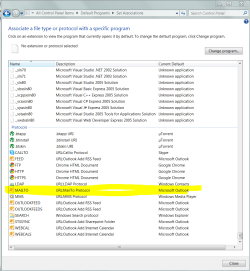
Are you CERTAIN that there is no MAILTO protocol listed?

Scroll to the very bottom (a section headed Protocols).

If it is not there, your problem is not limited to Outlook. Please check even if you have already checked. We will fix this within the hour.
 

Attachments

  • Capture.PNG
    Capture.PNG
    41.6 KB · Views: 51

My Computer My Computer

At a glance

Windows 7 Ultimate x64P4 3.2DDR 400ATI HD3850
OS
Windows 7 Ultimate x64
CPU
P4 3.2
Motherboard
Intel 815GM
Memory
DDR 400
Graphics Card(s)
ATI HD3850
Sound Card
C-Media 7.1
Monitor(s) Displays
SyncMaster 244T
Screen Resolution
1920*1200
Hard Drives
Several
PSU
500
Case
PowerSpec $24
Cooling
ThermalTake copper
Internet Speed
Blazing
Here is my screencap of the same thing on my PC:
Image.gif

See, no MAILTO protocol. Could it be that I need to repair some part of the Windows 7 installation? Where would I start, if so?
 

My Computer My Computer

At a glance

Windows 7 Home Premium 64-bit SP1Intel Core i7-2600 @3.4GHz 4 Cores, 8 Threads...16 GB Dual-Channel DDR3 SDRAM @ 665.3 MHznVidia GeForce GT420 (1GB cache)
Computer Manufacturer/Model Number
Dell XPS 8300 (July 2011)
OS
Windows 7 Home Premium 64-bit SP1
CPU
Intel Core i7-2600 @3.4GHz 4 Cores, 8 Threads (8MB cache)
Motherboard
Dell 0Y2MRG (CPU 1)
Memory
16 GB Dual-Channel DDR3 SDRAM @ 665.3 MHz
Graphics Card(s)
nVidia GeForce GT420 (1GB cache)
Sound Card
nVidia/Realtek High Definition Audio
Monitor(s) Displays
Dell 24" ST2420L (1920x1080) & Dell E172FP (1280x1040)
Hard Drives
Seagate SATA-II (1.5 TB)
WD SATA-II (1TB)
Seagate FA GoFlex Desk USB Device (2TB)
Keyboard
Logitech HID-compliant Wireless
Mouse
Logitech HID-compliant Wireless
Internet Speed
Comcast Cable "Performance"
Other Info
I am the one and only user and the desktop is in a secure location. All this multi-user stuff and the security drives me absolutely crazy.

My Computer My Computer

At a glance

Windows 7 Ultimate x64P4 3.2DDR 400ATI HD3850
OS
Windows 7 Ultimate x64
CPU
P4 3.2
Motherboard
Intel 815GM
Memory
DDR 400
Graphics Card(s)
ATI HD3850
Sound Card
C-Media 7.1
Monitor(s) Displays
SyncMaster 244T
Screen Resolution
1920*1200
Hard Drives
Several
PSU
500
Case
PowerSpec $24
Cooling
ThermalTake copper
Internet Speed
Blazing
Looking again at our 2 screencaps, I noticed that Outlook hasn't registered several other protocols that you show. I think that tends to mean that Outlook itself is the problem here.

Reinstallation seems like something I should try. I know how to backup my PST file. I do it at least weekly both to an external drive and to an offsite service (Mozy). But how do I re-associate the baced-up PST file with a new install of Outlook?
_______________________________________

Added: Now that our msgs passed in the ether, I'll look at your instructions first. Thx, DeVandal.
 
Last edited:

My Computer My Computer

At a glance

Windows 7 Home Premium 64-bit SP1Intel Core i7-2600 @3.4GHz 4 Cores, 8 Threads...16 GB Dual-Channel DDR3 SDRAM @ 665.3 MHznVidia GeForce GT420 (1GB cache)
Computer Manufacturer/Model Number
Dell XPS 8300 (July 2011)
OS
Windows 7 Home Premium 64-bit SP1
CPU
Intel Core i7-2600 @3.4GHz 4 Cores, 8 Threads (8MB cache)
Motherboard
Dell 0Y2MRG (CPU 1)
Memory
16 GB Dual-Channel DDR3 SDRAM @ 665.3 MHz
Graphics Card(s)
nVidia GeForce GT420 (1GB cache)
Sound Card
nVidia/Realtek High Definition Audio
Monitor(s) Displays
Dell 24" ST2420L (1920x1080) & Dell E172FP (1280x1040)
Hard Drives
Seagate SATA-II (1.5 TB)
WD SATA-II (1TB)
Seagate FA GoFlex Desk USB Device (2TB)
Keyboard
Logitech HID-compliant Wireless
Mouse
Logitech HID-compliant Wireless
Internet Speed
Comcast Cable "Performance"
Other Info
I am the one and only user and the desktop is in a secure location. All this multi-user stuff and the security drives me absolutely crazy.
You can use the Mail applet in control panel, among other ways. See Data Files.

Because the PST files are so important to me, I re-map them from here anyway on install.
 

My Computer My Computer

At a glance

Windows 7 Ultimate x64P4 3.2DDR 400ATI HD3850
OS
Windows 7 Ultimate x64
CPU
P4 3.2
Motherboard
Intel 815GM
Memory
DDR 400
Graphics Card(s)
ATI HD3850
Sound Card
C-Media 7.1
Monitor(s) Displays
SyncMaster 244T
Screen Resolution
1920*1200
Hard Drives
Several
PSU
500
Case
PowerSpec $24
Cooling
ThermalTake copper
Internet Speed
Blazing
I have that issue in Firefox 3.6.6. mailto links give a file not found error.
works fine in IE, just not in Firefox.
 

My Computer My Computer

At a glance

Windows 7 Ultimate 64bitIntel i7 3770K16GB DDR3 1333 Corsair XMS3XFX HD6950 2GB EyeFinity
Computer Manufacturer/Model Number
HAL-9000
OS
Windows 7 Ultimate 64bit
CPU
Intel i7 3770K
Motherboard
Asus Sabertooth Z77
Memory
16GB DDR3 1333 Corsair XMS3
Graphics Card(s)
XFX HD6950 2GB EyeFinity
Sound Card
Logitech G35 & Sennheiser PC135 & VIA HD
Monitor(s) Displays
23" HP 2310e, 23" Samsung B2230, 21.5" Viewsonic
Screen Resolution
5760x1080
Hard Drives
16TB of Storage
128GB & 256GB Crucial M4 SSD's, 2X 1TB WD Black, 3x 2TB WD, 3x 2TB Samsung F4, 1.5TB Seagate, WD 500GB,
PSU
Antec True Power New 650watt
Case
Cooler Master HAF-932
Cooling
Corsair H60 Hydro Cooler, 3x 230mm Fans, 2x120mm Fan
Keyboard
Logitech G15 and G13
Mouse
Logitech G700 Gaming Mouse
Internet Speed
50/10 Mbit
Other Info
Speakers : Alesis M1 Active Mk2 Studio Monitors , APC RS 1200 UPS, HP 4500DN Color Laser, HP P1006 mono Laser, Kodak 8500 Dye-Sub, Epson 1280 inkjet, Epson Worforce 610 MFC
DeVandal, again, thank you for your help. I followed Microsoft's instructions to the letter in RegEdit:
Image2.gif

Then I rebooted. I still didn't have a MAILTO protocol. I tried a MAILTO link in Internet Explorer and same result: "Could not perform this operation because the default mail client is no properly installed."
-------------------
Noticed that I inadvertently set the default value for HKEY_CLASSES_ROOT to URL:MAILTO Protocol. I doubt that hurt anything, but I deleted it. Now I'll reboot and try again.
 

My Computer My Computer

At a glance

Windows 7 Home Premium 64-bit SP1Intel Core i7-2600 @3.4GHz 4 Cores, 8 Threads...16 GB Dual-Channel DDR3 SDRAM @ 665.3 MHznVidia GeForce GT420 (1GB cache)
Computer Manufacturer/Model Number
Dell XPS 8300 (July 2011)
OS
Windows 7 Home Premium 64-bit SP1
CPU
Intel Core i7-2600 @3.4GHz 4 Cores, 8 Threads (8MB cache)
Motherboard
Dell 0Y2MRG (CPU 1)
Memory
16 GB Dual-Channel DDR3 SDRAM @ 665.3 MHz
Graphics Card(s)
nVidia GeForce GT420 (1GB cache)
Sound Card
nVidia/Realtek High Definition Audio
Monitor(s) Displays
Dell 24" ST2420L (1920x1080) & Dell E172FP (1280x1040)
Hard Drives
Seagate SATA-II (1.5 TB)
WD SATA-II (1TB)
Seagate FA GoFlex Desk USB Device (2TB)
Keyboard
Logitech HID-compliant Wireless
Mouse
Logitech HID-compliant Wireless
Internet Speed
Comcast Cable "Performance"
Other Info
I am the one and only user and the desktop is in a secure location. All this multi-user stuff and the security drives me absolutely crazy.
Well, that sux. Try a re-install of Office.
 

My Computer My Computer

At a glance

Windows 7 Ultimate x64P4 3.2DDR 400ATI HD3850
OS
Windows 7 Ultimate x64
CPU
P4 3.2
Motherboard
Intel 815GM
Memory
DDR 400
Graphics Card(s)
ATI HD3850
Sound Card
C-Media 7.1
Monitor(s) Displays
SyncMaster 244T
Screen Resolution
1920*1200
Hard Drives
Several
PSU
500
Case
PowerSpec $24
Cooling
ThermalTake copper
Internet Speed
Blazing
Back
Top