
Solved Cannot view nor edit mp3 files in explorer.

Great news 41023, the kudos belong to Callender. Why not tip the scales on his Audioshell post (I did)

so I went to check if I had Callender's gender correct (could be her Audioshell post ya know) and that didn't help. Chris could be male or female! :roflmao:

I liked the mp3 you picked (2nd image, post# 40)
Nothings wrong - quite apripos :)

Bill
.
 

My Computer My Computer

Computer type
Laptop
Computer Manufacturer/Model Number
HP Pavilion dv6-6c10us
OS
x64 (6.3.9600) Win8.1 Pro & soon dual boot x64 (6.1.7601) Win7_SP1 HomePrem
CPU
AMD A6-3420M APU with Radeon(tm) HD Graphics
Motherboard
Hewlett-Packard 1805
Memory
6.00 GB
Graphics Card(s)
AMD Radeon(TM) HD 6520G
Sound Card
(1) AMD High Definition Audio Device (2) IDT High Definiti
Monitor(s) Displays
HP W2072a 20" LCD (1600 x 900) @ 60 Hz
Screen Resolution
1366 x 768 x 32 bits (4294967296 colors) @ 60 Hz
Hard Drives
ST640LM0 00 HM641JI SATA Disk Device
Keyboard
Logitech k520 wireless KB
Mouse
Logitech m320 wireless mouse (bundled with KB)
Internet Speed
15/5 | 54 MB Wireless 'n'
Antivirus
Realtime: Defender or Avast | On-demand: Malwarebytes, ESET
Browser
IE 11 on Win8, IE 10 on win 7
Other Info
Media: [Gimp, Audacity, VLC] || Comm: [WEmail 2012, Skype] || Productivity: [OpenOffice,| Textpad] || Utils: [Sysinternals, cCleaner, Speccy, Defraggler]
Great news 41023, the kudos belong to Callender. Why not tip the scales on his Audioshell post (I did)

so I went to check if I had Callender's gender correct (could be her Audioshell post ya know) and that didn't help. Chris could be male or female! :roflmao:

I liked the mp3 you picked (2nd image, post# 40)
Nothings wrong - quite apripos :)

Bill
.
Thank you too, Bill, for helping me all this time.
 

My Computer My Computer

Computer type
PC/Desktop
OS
Windows 7 Home Premium 64bit
You're most welcome, you already thanked me and it is appreciated.

Callender's post# 39 is what solved the issue for you - other people that have the problem can try that 1st.

Ok then... I'm out!

Bill
.
 

My Computer My Computer

Computer type
Laptop
Computer Manufacturer/Model Number
HP Pavilion dv6-6c10us
OS
x64 (6.3.9600) Win8.1 Pro & soon dual boot x64 (6.1.7601) Win7_SP1 HomePrem
CPU
AMD A6-3420M APU with Radeon(tm) HD Graphics
Motherboard
Hewlett-Packard 1805
Memory
6.00 GB
Graphics Card(s)
AMD Radeon(TM) HD 6520G
Sound Card
(1) AMD High Definition Audio Device (2) IDT High Definiti
Monitor(s) Displays
HP W2072a 20" LCD (1600 x 900) @ 60 Hz
Screen Resolution
1366 x 768 x 32 bits (4294967296 colors) @ 60 Hz
Hard Drives
ST640LM0 00 HM641JI SATA Disk Device
Keyboard
Logitech k520 wireless KB
Mouse
Logitech m320 wireless mouse (bundled with KB)
Internet Speed
15/5 | 54 MB Wireless 'n'
Antivirus
Realtime: Defender or Avast | On-demand: Malwarebytes, ESET
Browser
IE 11 on Win8, IE 10 on win 7
Other Info
Media: [Gimp, Audacity, VLC] || Comm: [WEmail 2012, Skype] || Productivity: [OpenOffice,| Textpad] || Utils: [Sysinternals, cCleaner, Speccy, Defraggler]
Hi,

I've been following this thread with interest but must confess that I don't have a clue as to how to fix the cause of the problem. Personally I don't use WMP and prefer alternatives.

However I have a suggestion that could be tried to see if it helps.

If you install ID3 tag editor - AudioShell freeware music files tag editor - direct tag editing from Windows Vista/7/8 Explorer

What happens after a reboot? Do you see the tag editor in your context menu if you right click an mp3 file?

If not - simply uninstall AudioShell as it will be of no use!
Even though my problem could be solved with this program, but my explorer has been stopped working and had to be restarted already mutiple times since.
 

My Computer My Computer

Computer type
PC/Desktop
OS
Windows 7 Home Premium 64bit

My Computer My Computer

Computer type
PC/Desktop
Computer Manufacturer/Model Number
n/a
OS
W7 Ultimate SP1, LM19.2 MATE, W10 Home 1703, W10 Pro 1703 VM, #All 64 bit
CPU
AMD Phenom II x6 1100T, 3.3 GHz
Motherboard
ASUS M4A88T-M/USB3 (AM3)
Memory
12GB DDR3 1333 G-Skill (4GB x 2), G-Skill (2GB x 2)
Graphics Card(s)
NVIDIA GeForce GTX 660
Sound Card
Realtek?
Monitor(s) Displays
Samsung S23B350
Screen Resolution
1920x1080
Hard Drives
WD Green 2TB (SATA), WD Green 3TB (SATA), WD Blue 4TB (SATA), WD Blue 6TB (SATA)
PSU
Cooler Master
Case
Antec GX300 Tower
Cooling
3x Antec TRICOOL 120mm Fans
Mouse
Wired Optical
Internet Speed
DSL
Antivirus
Avast
Browser
Pale Moon (64 bit)
Other Info
2018-12-27 Upgraded HDDs
2015-12-10 Upgraded case, graphics card, storage
2015-08-15 Upgraded motherboard & RAM
2015-07-15 Upgraded LM17.1 to LM17.2
Ideas

I've a couple of ideas. Will post later.
 

My Computer My Computer

Computer type
Laptop
Computer Manufacturer/Model Number
ASUS
OS
Microsoft Windows 7 Home Premium 64-bit 7601 Multiprocessor Free Service Pack 1
CPU
AMD C-60 APU with Radeon(tm) HD Graphics
Motherboard
ASUSTeK COMPUTER INC. X501U
Memory
4.00 GB
Graphics Card(s)
AMD Radeon HD 6290 Graphics
Sound Card
(1) AMD High Definition Audio Device (2) Realtek High Defi
Screen Resolution
1366 x 768 x 32 bits (4294967296 colors) @ 60 Hz
Hard Drives
Hitachi HTS545050A7E380 SATA Disk Device
Antivirus
Comodo CIS & FW, SecureAplus App Whitelisting, Threatfire
Browser
Cyberfox 64bit, Opera 64bit, Airfox
Other Info
Spy-The-Spy, HitmanPro.Alert, Norton Connect Safe, MJRegWatcher, BitDefender TrafficLight, Voodoo Shield, Zemana AntiMalware
Error message

What error message do you see?

Some options include:

Use system restore to restore to a point in time before you installed AudioShell. That might fix the Explorer problem but leave you with your original problem.

On the other hand Audioshell seemed to fix the tag issue but if Explorer is crashing it could indicate that there's a corrupt media file somewhere on your hard drive and that's tricky to find and fix.

See the article here:

Windows Explorer Has Stopped Working Fix | gHacks Technology News

I've had the Explorer crash issue on my machine in the past. In my experience running System File Checker isn't much use as it nearly always detects problems that are not problems at all - they can be related to customizations made by the user such as disabling hibernation and so on. If running SFC in my opinion it's best to use the verify only method as shown in the following tutorial then upload the log for an expert on system files to look at.

http://www.sevenforums.com/tutorials/1538-sfc-scannow-command-system-file-checker.html

Scan Disk: I see that you've run a disk check already but if you want to run it again use Step 2 in the tutorial as shown here:

http://www.sevenforums.com/tutorials/433-disk-check.html

Use chkdsk C: /r /f where C: is the letter of the drive to be checked - replace C: if necessary.

I've worked through all the steps in the first article in this post in the past and the only fix that worked was to move all user created media files onto an external drive then reboot. After that it involved moving folders a few at a time to track down the folder that contained the culprit. It was very time consuming!

Anyway I reckon that it would be best to try uninstalling AudioShell for a start followed by a reboot.
 

My Computer My Computer

Computer type
Laptop
Computer Manufacturer/Model Number
ASUS
OS
Microsoft Windows 7 Home Premium 64-bit 7601 Multiprocessor Free Service Pack 1
CPU
AMD C-60 APU with Radeon(tm) HD Graphics
Motherboard
ASUSTeK COMPUTER INC. X501U
Memory
4.00 GB
Graphics Card(s)
AMD Radeon HD 6290 Graphics
Sound Card
(1) AMD High Definition Audio Device (2) Realtek High Defi
Screen Resolution
1366 x 768 x 32 bits (4294967296 colors) @ 60 Hz
Hard Drives
Hitachi HTS545050A7E380 SATA Disk Device
Antivirus
Comodo CIS & FW, SecureAplus App Whitelisting, Threatfire
Browser
Cyberfox 64bit, Opera 64bit, Airfox
Other Info
Spy-The-Spy, HitmanPro.Alert, Norton Connect Safe, MJRegWatcher, BitDefender TrafficLight, Voodoo Shield, Zemana AntiMalware
Let's collect some data:
Download DDS from Bleepingcomputer
On the Download action bar
.....Select Save (the default location is Downloads)

On the Download Complete action bar:
.....Select Open folder and lauch dds (dbl click)

Answer Yes (or Run) to any security prompts

Make sure both txt file options are ticked on the dds options window under Scan
picture.php
dds.txt
picture.php
attach.txt

Press Start​
A Command Prompt window shows the DDS progress. When dds is done, two text files will open (dds and attach) - save these to your desktop if they are not already there.

Please attach both files to a new post on this thread.

After reviewing the dds files, I'll probably recommend that you uninstall teh 3rd party add-on that fixed the issue but seems to cause WinExplorer to crash.

We'll have to go step by step so that Callender and I don't run into conflicting suggestions. So, let's see what dds tells me about your system.

You can answer one question for me though. Do you have the Advanced System Care utility installed? (I noticed the shred icon on one of your screen shots). If you do, I'll recommend that it be uninstalled.... but don't do anything now. Callender already said that he has a few suggestions, let's see what he posts and give me a chance to look at the dds files before taking action.

Basically you're in a holding pattern until then - but please post the dds files and let me know if you have Advance System Care installed.

Thanks,

Bill
.
 

My Computer My Computer

Computer type
Laptop
Computer Manufacturer/Model Number
HP Pavilion dv6-6c10us
OS
x64 (6.3.9600) Win8.1 Pro & soon dual boot x64 (6.1.7601) Win7_SP1 HomePrem
CPU
AMD A6-3420M APU with Radeon(tm) HD Graphics
Motherboard
Hewlett-Packard 1805
Memory
6.00 GB
Graphics Card(s)
AMD Radeon(TM) HD 6520G
Sound Card
(1) AMD High Definition Audio Device (2) IDT High Definiti
Monitor(s) Displays
HP W2072a 20" LCD (1600 x 900) @ 60 Hz
Screen Resolution
1366 x 768 x 32 bits (4294967296 colors) @ 60 Hz
Hard Drives
ST640LM0 00 HM641JI SATA Disk Device
Keyboard
Logitech k520 wireless KB
Mouse
Logitech m320 wireless mouse (bundled with KB)
Internet Speed
15/5 | 54 MB Wireless 'n'
Antivirus
Realtime: Defender or Avast | On-demand: Malwarebytes, ESET
Browser
IE 11 on Win8, IE 10 on win 7
Other Info
Media: [Gimp, Audacity, VLC] || Comm: [WEmail 2012, Skype] || Productivity: [OpenOffice,| Textpad] || Utils: [Sysinternals, cCleaner, Speccy, Defraggler]
let's collect some data:
download dds from bleepingcomputer
on the download action bar
.....select save (the default location is downloads)

on the download complete action bar:
.....select open folder and lauch dds (dbl click)

answer yes (or run) to any security prompts

make sure both txt file options are ticked on the dds options window under scan
picture.php
dds.txt
picture.php
attach.txt

press start​
a command prompt window shows the dds progress. When dds is done, two text files will open (dds and attach) - save these to your desktop if they are not already there.

Please attach both files to a new post on this thread.

After reviewing the dds files, i'll probably recommend that you uninstall teh 3rd party add-on that fixed the issue but seems to cause winexplorer to crash.

We'll have to go step by step so that callender and i don't run into conflicting suggestions. So, let's see what dds tells me about your system.

You can answer one question for me though. Do you have the advanced system care utility installed? (i noticed the shred icon on one of your screen shots). If you do, i'll recommend that it be uninstalled.... But don't do anything now. Callender already said that he has a few suggestions, let's see what he posts and give me a chance to look at the dds files before taking action.

Basically you're in a holding pattern until then - but please post the dds files and let me know if you have advance system care installed.

Thanks,

bill
.
View attachment Attach.txt
View attachment DDS.txt
 

My Computer My Computer

Computer type
PC/Desktop
OS
Windows 7 Home Premium 64bit
What error message do you see?

Some options include:

Use system restore to restore to a point in time before you installed AudioShell. That might fix the Explorer problem but leave you with your original problem.

On the other hand Audioshell seemed to fix the tag issue but if Explorer is crashing it could indicate that there's a corrupt media file somewhere on your hard drive and that's tricky to find and fix.

See the article here:

Windows Explorer Has Stopped Working Fix | gHacks Technology News

I've had the Explorer crash issue on my machine in the past. In my experience running System File Checker isn't much use as it nearly always detects problems that are not problems at all - they can be related to customizations made by the user such as disabling hibernation and so on. If running SFC in my opinion it's best to use the verify only method as shown in the following tutorial then upload the log for an expert on system files to look at.

http://www.sevenforums.com/tutorials/1538-sfc-scannow-command-system-file-checker.html

Scan Disk: I see that you've run a disk check already but if you want to run it again use Step 2 in the tutorial as shown here:

http://www.sevenforums.com/tutorials/433-disk-check.html

Use chkdsk C: /r /f where C: is the letter of the drive to be checked - replace C: if necessary.

I've worked through all the steps in the first article in this post in the past and the only fix that worked was to move all user created media files onto an external drive then reboot. After that it involved moving folders a few at a time to track down the folder that contained the culprit. It was very time consuming!

Anyway I reckon that it would be best to try uninstalling AudioShell for a start followed by a reboot.
I just uninstalled Audioshell and that didn't undo the good deed, I can still view and edit the mp3 tags in explorer. So now let's just hope the explorer would become stable.
 

My Computer My Computer

Computer type
PC/Desktop
OS
Windows 7 Home Premium 64bit
Tag editing

Well it seems that AudioShell made some unspecified changes that fixed something but who knows what that was?

If removal solved the Explorer issue then perhaps there was a problem with the shell extensions:

ShellExView.jpg

Hopefully the Explorer issue won't reappear!
 

My Computer My Computer

Computer type
Laptop
Computer Manufacturer/Model Number
ASUS
OS
Microsoft Windows 7 Home Premium 64-bit 7601 Multiprocessor Free Service Pack 1
CPU
AMD C-60 APU with Radeon(tm) HD Graphics
Motherboard
ASUSTeK COMPUTER INC. X501U
Memory
4.00 GB
Graphics Card(s)
AMD Radeon HD 6290 Graphics
Sound Card
(1) AMD High Definition Audio Device (2) Realtek High Defi
Screen Resolution
1366 x 768 x 32 bits (4294967296 colors) @ 60 Hz
Hard Drives
Hitachi HTS545050A7E380 SATA Disk Device
Antivirus
Comodo CIS & FW, SecureAplus App Whitelisting, Threatfire
Browser
Cyberfox 64bit, Opera 64bit, Airfox
Other Info
Spy-The-Spy, HitmanPro.Alert, Norton Connect Safe, MJRegWatcher, BitDefender TrafficLight, Voodoo Shield, Zemana AntiMalware
This is a very odd issue. Malware scanners report clean

I don't see a real time AntiVirus pgm - did I miss it? Do you have one?

Please download a real-time AV program to protect your system.

Real time protection (use only one)
  • avast! be free Antivirus
    picture.php
  • AVG | Free
    picture.php
  • Microsoft Security Essentials (MSE)

    :warn: When installing be alert to untick all checkboxes that are cross marketing and not part of the application. These are mostly toolbars or the Chrome browser. Read the dialog boxes during and after the install and look for checkboxes - remove the tick from anything that isn't part of the AV application.

    Also, do not accept the offer of a free trial, you want to install the FREE version.


==== Installed Programs ======================
.
Do you know what these apps are? No uninstall them.

2345ºÃѹ
2345¿´Í¼Íõ
360°²È«ÎÀÊ¿
360ÊÖ»úÖúÊÖ
360ɱ¶¾

I would uninstall these one by one to see if one one them is causing the issue

If you have objection to uninstalling any, let me know and I'll do some further reaearch.

If you have a paid version, make sure you have the license key BEFORE uninstalling.

You have a number of media players. VLC should handle almost everything.
You also have a number of codecs - these are known to cause issues (plus VLC has almost every codec already)

Some are just housekeeping and won't have any affect on the issue (i.e.Bonjour, silverlight)

BaiduPlayer1.19.0.78
Bonjour
CopyTrans Suite Remove Only
Driver Booster
Game Assistant
Google Chrome
Google Update Helper
Internet Download Manager
Java 7 Update 45
Java 7 Update 45 (64-bit)
Java Auto Updater
K-Lite Codec Pack 10.4.0 Full
LogMeIn Hamachi
Microsoft Silverlight
Nexon Game Manager
Pando Media Booster
Smart Defrag 3
Surfing Protection
Tencent QQMail Plugin
Xvid Video Codec

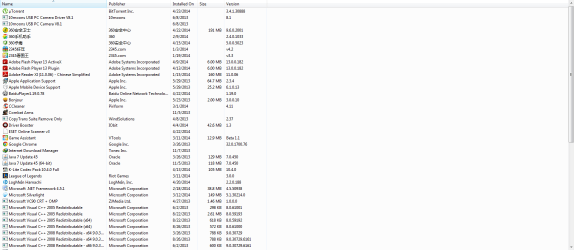
These following are suspicious to me (could be my text editor though). If you don't know what they are, uininstall them if . A screen shot of installed pgms. would eliminate it being my text editor

¦ÌTorrent
ǧǧ¾²Ìý£¨°Ù¶ÈÒôÀְ棩 7.0.2.0
°Ù¶ÈÔÆ¹Ü¼Ò
°Ù¶ÈÒôÀÖ2013 8.2.12.7
ÌÚѶQQ
¹È¸èÆ´ÒôÊäÈë·¨ 2.7
³´óʦ
.

I'd like to see another dds - thanks
 

My Computer My Computer

Computer type
Laptop
Computer Manufacturer/Model Number
HP Pavilion dv6-6c10us
OS
x64 (6.3.9600) Win8.1 Pro & soon dual boot x64 (6.1.7601) Win7_SP1 HomePrem
CPU
AMD A6-3420M APU with Radeon(tm) HD Graphics
Motherboard
Hewlett-Packard 1805
Memory
6.00 GB
Graphics Card(s)
AMD Radeon(TM) HD 6520G
Sound Card
(1) AMD High Definition Audio Device (2) IDT High Definiti
Monitor(s) Displays
HP W2072a 20" LCD (1600 x 900) @ 60 Hz
Screen Resolution
1366 x 768 x 32 bits (4294967296 colors) @ 60 Hz
Hard Drives
ST640LM0 00 HM641JI SATA Disk Device
Keyboard
Logitech k520 wireless KB
Mouse
Logitech m320 wireless mouse (bundled with KB)
Internet Speed
15/5 | 54 MB Wireless 'n'
Antivirus
Realtime: Defender or Avast | On-demand: Malwarebytes, ESET
Browser
IE 11 on Win8, IE 10 on win 7
Other Info
Media: [Gimp, Audacity, VLC] || Comm: [WEmail 2012, Skype] || Productivity: [OpenOffice,| Textpad] || Utils: [Sysinternals, cCleaner, Speccy, Defraggler]
This is a very odd issue. Malware scanners report clean

I don't see a real time AntiVirus pgm - did I miss it? Do you have one?

Please download a real-time AV program to protect your system.

Real time protection (use only one)
  • avast! be free Antivirus
    picture.php
  • AVG | Free
    picture.php
  • Microsoft Security Essentials (MSE)

    :warn: When installing be alert to untick all checkboxes that are cross marketing and not part of the application. These are mostly toolbars or the Chrome browser. Read the dialog boxes during and after the install and look for checkboxes - remove the tick from anything that isn't part of the AV application.

    Also, do not accept the offer of a free trial, you want to install the FREE version.


==== Installed Programs ======================
.
Do you know what these apps are? No uninstall them.

2345ºÃѹ
2345¿´Í¼Íõ
360°²È«ÎÀÊ¿
360ÊÖ»úÖúÊÖ
360ɱ¶¾

I would uninstall these one by one to see if one one them is causing the issue

If you have objection to uninstalling any, let me know and I'll do some further reaearch.

If you have a paid version, make sure you have the license key BEFORE uninstalling.

You have a number of media players. VLC should handle almost everything.
You also have a number of codecs - these are known to cause issues (plus VLC has almost every codec already)

Some are just housekeeping and won't have any affect on the issue (i.e.Bonjour, silverlight)

BaiduPlayer1.19.0.78
Bonjour
CopyTrans Suite Remove Only
Driver Booster
Game Assistant
Google Chrome
Google Update Helper
Internet Download Manager
Java 7 Update 45
Java 7 Update 45 (64-bit)
Java Auto Updater
K-Lite Codec Pack 10.4.0 Full
LogMeIn Hamachi
Microsoft Silverlight
Nexon Game Manager
Pando Media Booster
Smart Defrag 3
Surfing Protection
Tencent QQMail Plugin
Xvid Video Codec

These following are suspicious to me (could be my text editor though). If you don't know what they are, uininstall them if . A screen shot of installed pgms. would eliminate it being my text editor

¦ÌTorrent
ǧǧ¾²Ìý£¨°Ù¶ÈÒôÀְ棩 7.0.2.0
°Ù¶ÈÔÆ¹Ü¼Ò
°Ù¶ÈÒôÀÖ2013 8.2.12.7
ÌÚѶQQ
¹È¸èÆ´ÒôÊäÈë·¨ 2.7
³´óʦ
.

I'd like to see another dds - thanks
I know those programs. After uninstalled Audioshell the explorer has not crashed since, so I guess it's all right from here. I'll post if the problem occur again, if not then that means I'm done with it.
Thank you.
 

My Computer My Computer

Computer type
PC/Desktop
OS
Windows 7 Home Premium 64bit
Ok, I figured that auioshell was casuing WinExplorer to crash - not sure why, but 3rd party add-ons often cause other issues.

Did you install an AV pgm?

I read my post suggesting uninstlaling programs and it wasn't all that clear.

I was asking if you knew the first and last group of pgms. Your response was that you knew the pgms, that uninstalling Audioshell stopped WinExplorer crashes and that it's all right from here.

If this means that you can edit properties in WinExplorer, great. You can skip the the rest of this post.
I'm guessing that editing mp3 properties in WinExplorer is still an issue - please comfirm.

I should have asked this before.. is this only an issue with audio files? Can you edit properties of other type of files in WinExplorer? Try an image file (jpg, png - date taken, title, etc)

I'm leaning towards resetting mp3 in the registry if it's only mp3 files.

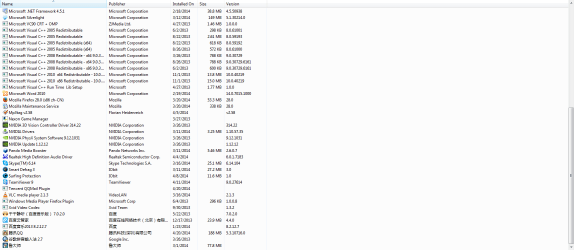
Regarding uninstalling pgms: Could you post a screen shot of Control panel installed programs? All I see when I look at the dds attach file are what I'm guessing are unicode characters that my text editor can't handle.

I suggested uninstalling the middle gorup of 20 pgms unless you really need them. The codec packs are know to cause issues on some machines, different players set parameters that might conflict with WinExplorer, Bonjour, chrome, and Jave have also caused issues on some machines. The rest of the list seem to be unecessary 3rd party apps - any 3rd party app is always suspect (see what audioshell did?)

Please let me know where the issue stands, I don't want to suggest anything else until I know what has already been done or if the issue is already resolved.

Thanks,

Bill
.
 

My Computer My Computer

Computer type
Laptop
Computer Manufacturer/Model Number
HP Pavilion dv6-6c10us
OS
x64 (6.3.9600) Win8.1 Pro & soon dual boot x64 (6.1.7601) Win7_SP1 HomePrem
CPU
AMD A6-3420M APU with Radeon(tm) HD Graphics
Motherboard
Hewlett-Packard 1805
Memory
6.00 GB
Graphics Card(s)
AMD Radeon(TM) HD 6520G
Sound Card
(1) AMD High Definition Audio Device (2) IDT High Definiti
Monitor(s) Displays
HP W2072a 20" LCD (1600 x 900) @ 60 Hz
Screen Resolution
1366 x 768 x 32 bits (4294967296 colors) @ 60 Hz
Hard Drives
ST640LM0 00 HM641JI SATA Disk Device
Keyboard
Logitech k520 wireless KB
Mouse
Logitech m320 wireless mouse (bundled with KB)
Internet Speed
15/5 | 54 MB Wireless 'n'
Antivirus
Realtime: Defender or Avast | On-demand: Malwarebytes, ESET
Browser
IE 11 on Win8, IE 10 on win 7
Other Info
Media: [Gimp, Audacity, VLC] || Comm: [WEmail 2012, Skype] || Productivity: [OpenOffice,| Textpad] || Utils: [Sysinternals, cCleaner, Speccy, Defraggler]
Ok, I figured that auioshell was casuing WinExplorer to crash - not sure why, but 3rd party add-ons often cause other issues.

Did you install an AV pgm?

I read my post suggesting uninstlaling programs and it wasn't all that clear.

I was asking if you knew the first and last group of pgms. Your response was that you knew the pgms, that uninstalling Audioshell stopped WinExplorer crashes and that it's all right from here.

If this means that you can edit properties in WinExplorer, great. You can skip the the rest of this post.
I'm guessing that editing mp3 properties in WinExplorer is still an issue - please comfirm.

I should have asked this before.. is this only an issue with audio files? Can you edit properties of other type of files in WinExplorer? Try an image file (jpg, png - date taken, title, etc)

I'm leaning towards resetting mp3 in the registry if it's only mp3 files.

Regarding uninstalling pgms: Could you post a screen shot of Control panel installed programs? All I see when I look at the dds attach file are what I'm guessing are unicode characters that my text editor can't handle.

I suggested uninstalling the middle gorup of 20 pgms unless you really need them. The codec packs are know to cause issues on some machines, different players set parameters that might conflict with WinExplorer, Bonjour, chrome, and Jave have also caused issues on some machines. The rest of the list seem to be unecessary 3rd party apps - any 3rd party app is always suspect (see what audioshell did?)

Please let me know where the issue stands, I don't want to suggest anything else until I know what has already been done or if the issue is already resolved.

Thanks,

Bill
.
My anti virus program is called 360, it's Chinese.
Now I can still edit mp3 even after uninstalled Audioshell.
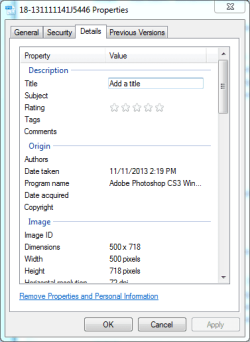
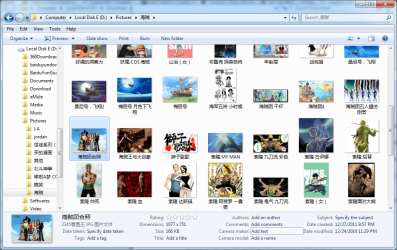
Well, I can edit the date taken of PNG but not JPG.

QQ截图20140426142517.png

QQ截图20140426142527.png

The issue is resolved, I can edit mp3s in explorer and it's not crashing any more.
 

My Computer My Computer

Computer type
PC/Desktop
OS
Windows 7 Home Premium 64bit
Excellent news, thanks for the feedback.

re: image property editing in WinExplorer.
Date taken is the only field I can edit for PNG, but can edit other fields (ratings, tag, title, etc) for JPG.
Can you edit ANY fields for JPG?

Please run the attached batch file that queries entries in the registry and outputs the results to your downloads folder as FileAsc_JPG.txt
Attach the output file to a post. I might suggest restoring the default values for JPG after seeing the file.

I don't want to do this piecemeal. If restoring JPG resolved the issue for that file type, then you can pick and choose which file types you might need to default as you come across them. There's a tutorial with all file types - but let's start with JPG.

Audioshell must have reset the defaults for mp3, and it stuck even after you uninstalled that app.

Bill
.
 

Attachments

Last edited:

My Computer My Computer

Computer type
Laptop
Computer Manufacturer/Model Number
HP Pavilion dv6-6c10us
OS
x64 (6.3.9600) Win8.1 Pro & soon dual boot x64 (6.1.7601) Win7_SP1 HomePrem
CPU
AMD A6-3420M APU with Radeon(tm) HD Graphics
Motherboard
Hewlett-Packard 1805
Memory
6.00 GB
Graphics Card(s)
AMD Radeon(TM) HD 6520G
Sound Card
(1) AMD High Definition Audio Device (2) IDT High Definiti
Monitor(s) Displays
HP W2072a 20" LCD (1600 x 900) @ 60 Hz
Screen Resolution
1366 x 768 x 32 bits (4294967296 colors) @ 60 Hz
Hard Drives
ST640LM0 00 HM641JI SATA Disk Device
Keyboard
Logitech k520 wireless KB
Mouse
Logitech m320 wireless mouse (bundled with KB)
Internet Speed
15/5 | 54 MB Wireless 'n'
Antivirus
Realtime: Defender or Avast | On-demand: Malwarebytes, ESET
Browser
IE 11 on Win8, IE 10 on win 7
Other Info
Media: [Gimp, Audacity, VLC] || Comm: [WEmail 2012, Skype] || Productivity: [OpenOffice,| Textpad] || Utils: [Sysinternals, cCleaner, Speccy, Defraggler]
excellent news, thanks for the feedback.

Re: Image property editing in winexplorer.
Date taken is the only field i can edit for png, but can edit other fields (ratings, tag, title, etc) for jpg.
Can you edit any fields for jpg?

Please run the attached batch file that queries entries in the registry and outputs the results to your downloads folder as fileasc_jpg.txt
attach the output file to a post. I might suggest restoring the default values for jpg after seeing the file.

I don't want to do this piecemeal. If restoring jpg resolved the issue for that file type, then you can pick and choose which file types you might need to default as you come across them. There's a tutorial with all file types - but let's start with jpg.

Audioshell must have reset the defaults for mp3, and it stuck even after you uninstalled that app.

Bill
.
View attachment FileAsc_JPG.txt
 

My Computer My Computer

Computer type
PC/Desktop
OS
Windows 7 Home Premium 64bit
Thanks, it looks as though you are missing part of the JPG file association. I'm not certain, but it appears as though 2345 is responsble - at least 2345pic is associated with JPG.

There are reg files in this tutorial that will set file types to default values
http://www.sevenforums.com/tutorials/19449-default-file-type-associations-restore.html

Scroll down to JPG and download just that reg file
Double click the downloaded file to merge it inot your registry (answer yes to any security dialogs)

Then see if you can edit the properties for a JPG file in WinExplorer.

You should be able to edit certain properties for different file types. If you come across any file type that you want to edit in WinExplorer but cannot then pick the appropriate reg file from the tutorial, download, and merge it.

This is all based on if the JPG test worked - if you still can't edit JPG properties in WinExplorer after merging the defualt reg file, then it is something else.

Let me know how it goes.

Thanks,

Bill
 

My Computer My Computer

Computer type
Laptop
Computer Manufacturer/Model Number
HP Pavilion dv6-6c10us
OS
x64 (6.3.9600) Win8.1 Pro & soon dual boot x64 (6.1.7601) Win7_SP1 HomePrem
CPU
AMD A6-3420M APU with Radeon(tm) HD Graphics
Motherboard
Hewlett-Packard 1805
Memory
6.00 GB
Graphics Card(s)
AMD Radeon(TM) HD 6520G
Sound Card
(1) AMD High Definition Audio Device (2) IDT High Definiti
Monitor(s) Displays
HP W2072a 20" LCD (1600 x 900) @ 60 Hz
Screen Resolution
1366 x 768 x 32 bits (4294967296 colors) @ 60 Hz
Hard Drives
ST640LM0 00 HM641JI SATA Disk Device
Keyboard
Logitech k520 wireless KB
Mouse
Logitech m320 wireless mouse (bundled with KB)
Internet Speed
15/5 | 54 MB Wireless 'n'
Antivirus
Realtime: Defender or Avast | On-demand: Malwarebytes, ESET
Browser
IE 11 on Win8, IE 10 on win 7
Other Info
Media: [Gimp, Audacity, VLC] || Comm: [WEmail 2012, Skype] || Productivity: [OpenOffice,| Textpad] || Utils: [Sysinternals, cCleaner, Speccy, Defraggler]
Thanks, it looks as though you are missing part of the JPG file association. I'm not certain, but it appears as though 2345 is responsble - at least 2345pic is associated with JPG.

There are reg files in this tutorial that will set file types to default values
http://www.sevenforums.com/tutorials/19449-default-file-type-associations-restore.html

Scroll down to JPG and download just that reg file
Double click the downloaded file to merge it inot your registry (answer yes to any security dialogs)

Then see if you can edit the properties for a JPG file in WinExplorer.

You should be able to edit certain properties for different file types. If you come across any file type that you want to edit in WinExplorer but cannot then pick the appropriate reg file from the tutorial, download, and merge it.

This is all based on if the JPG test worked - if you still can't edit JPG properties in WinExplorer after merging the defualt reg file, then it is something else.

Let me know how it goes.

Thanks,

Bill
Yes! This is very helpful, now I can edit jpg and jpeg, and anything else I can't by using the link above.

QQ截图20140427131452.png

QQ截图20140427131622.png

Once again Bill, thank you for solving my problems.
 

My Computer My Computer

Computer type
PC/Desktop
OS
Windows 7 Home Premium 64bit
You're welcome- glad we finally nailed it, the issue is resolved, and you have the tools you need to repair any file type.

Bill
.
 

My Computer My Computer

Computer type
Laptop
Computer Manufacturer/Model Number
HP Pavilion dv6-6c10us
OS
x64 (6.3.9600) Win8.1 Pro & soon dual boot x64 (6.1.7601) Win7_SP1 HomePrem
CPU
AMD A6-3420M APU with Radeon(tm) HD Graphics
Motherboard
Hewlett-Packard 1805
Memory
6.00 GB
Graphics Card(s)
AMD Radeon(TM) HD 6520G
Sound Card
(1) AMD High Definition Audio Device (2) IDT High Definiti
Monitor(s) Displays
HP W2072a 20" LCD (1600 x 900) @ 60 Hz
Screen Resolution
1366 x 768 x 32 bits (4294967296 colors) @ 60 Hz
Hard Drives
ST640LM0 00 HM641JI SATA Disk Device
Keyboard
Logitech k520 wireless KB
Mouse
Logitech m320 wireless mouse (bundled with KB)
Internet Speed
15/5 | 54 MB Wireless 'n'
Antivirus
Realtime: Defender or Avast | On-demand: Malwarebytes, ESET
Browser
IE 11 on Win8, IE 10 on win 7
Other Info
Media: [Gimp, Audacity, VLC] || Comm: [WEmail 2012, Skype] || Productivity: [OpenOffice,| Textpad] || Utils: [Sysinternals, cCleaner, Speccy, Defraggler]
Back
Top