Solved Cannot view nor edit mp3 files in explorer.

I ran the delete and rebuild process then I went to sleep. The next morning it was completed, I restarted and check on the mp3 files, nothing changed.

So far I have not try system restore yet, hoping that I could find a solution without having to do so.

Ok, thanks - that's different... I thought the rebuild didn't work. The index was successfully rebuilt, but it did not change the issue.

AdwCleaner picked up and cleaned up some malware.
TFC cleaned out the temp files just in case something was lurking.
System protection Restore Points, not run.
Issue still exists.

I'm not sure if you uninstalled Advanced Care as I recommended - please advise.


The naming MS chose for some options throws a lot of people off. System Protection Restore Points only affect system stuff (registry and files). User data is not affected if you choose to do a Restore Point.

It is the fastest and safest way to resole issues. The only caveats are that if you installed something between then (RP chosen) and now, Windows doesn't know it was installed and you have to reinstall that app. Windows updates also need to be reinstalled (only the ones between then and now). The pgm files are still on the disk, windows just doesn't' know it.

Say that you know the problem started on April 5th and you have Restore Points from March 15th, March 28th, April 5th, and April 14th.

You should determine what pgms were installed between the set of possible RP dates (March 15, 28, and April 5th) and now by looking in control Panel Preograms and Features, sorted by install date. Make a note of any install between the RP you're going to try and when you actually try it. There shouldn't be too many, people normally don't do a whole bunch of installs at one time, more of an as needed basis. You can ignore any installs I asked you to do as part of this exercise.

As an example, on March 29th, Dinosours (a game) was installed and on April 6th you installed Muxik (a media player)

You could try the April 5th RP, if that solves the issue, great! In this case, only Muxik would have to be reinstalled.

If that RP doesn't solve the issue, go back one to March 28th, if that solves the issue, great! In this case, both Muxik and Dinosours would have to be reinstalled.

You would have to run Windows Update to pick up what is needed.


Your choice, but.... the other route is longer and might eventually end up back at system Protection Restore points. Keep in mind, this is NOT the same as restoring from backup, it's built in system protection that makes recovery much easier.

If you want to continue without running RP (it's your machine), the next step is another scanner

Follwo the instructions to run the ESET online scanner on this page:
Help: Free ESET Antivirus Online Scanner

ESET FAQ page: FAQ: Free ESET Antivirus Online Scanner

Please attach the ESET log to a new post
C:\Program Files\EsetOnlineScanner\log.txt

ESET online scanner takes a long time, it's very thorough.

After I see the ESET logs, there might be more scanners. There will be a system utility to check the system files and then either the issue is resolved or your back to trying a restore point.

Bill
.
I just uninstalled Advanced Systemcare. I also checked system restore, the earliest restore point I could go back to is April the 15th, but the problem occured before that so I guess is not an option any more.
I'm running the ESET scan and will upload the logs when I'm done.
 

My Computer My Computer

Computer type
PC/Desktop
OS
Windows 7 Home Premium 64bit
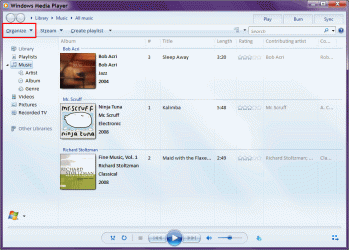
Automatically Update Media Info?

Do you have WMP 12 set to automatically update media info?
It's possible that WMP 12 updated your mp3 information to a tag version it doesn't understand.

WMP 12 will update mp3 file info from ID3v2.3 to ID3v2.4, but it can't understand them, so it won't let you edit them. :confused:
I have seen it do this on my PC (several years ago).

I had to use ID3Kill to remove all of the tag info and then manually re-enter it again.
 

My Computer My Computer

Computer type
PC/Desktop
Computer Manufacturer/Model Number
n/a
OS
W7 Ultimate SP1, LM19.2 MATE, W10 Home 1703, W10 Pro 1703 VM, #All 64 bit
CPU
AMD Phenom II x6 1100T, 3.3 GHz
Motherboard
ASUS M4A88T-M/USB3 (AM3)
Memory
12GB DDR3 1333 G-Skill (4GB x 2), G-Skill (2GB x 2)
Graphics Card(s)
NVIDIA GeForce GTX 660
Sound Card
Realtek?
Monitor(s) Displays
Samsung S23B350
Screen Resolution
1920x1080
Hard Drives
WD Green 2TB (SATA), WD Green 3TB (SATA), WD Blue 4TB (SATA), WD Blue 6TB (SATA)
PSU
Cooler Master
Case
Antec GX300 Tower
Cooling
3x Antec TRICOOL 120mm Fans
Mouse
Wired Optical
Internet Speed
DSL
Antivirus
Avast
Browser
Pale Moon (64 bit)
Other Info
2018-12-27 Upgraded HDDs
2015-12-10 Upgraded case, graphics card, storage
2015-08-15 Upgraded motherboard & RAM
2015-07-15 Upgraded LM17.1 to LM17.2
Do you have WMP 12 set to automatically update media info?
It's possible that WMP 12 updated your mp3 information to a tag version it doesn't understand.

WMP 12 will update mp3 file info from ID3v2.3 to ID3v2.4, but it can't understand them, so it won't let you edit them. :confused:
I have seen it do this on my PC (several years ago).

I had to use ID3Kill to remove all of the tag info and then manually re-enter it again.
How do I check that? I can't find the right setting.
 

My Computer My Computer

Computer type
PC/Desktop
OS
Windows 7 Home Premium 64bit
WMP Media Information Update Setting

Do you have WMP 12 set to automatically update media info?
It's possible that WMP 12 updated your mp3 information to a tag version it doesn't understand.

WMP 12 will update mp3 file info from ID3v2.3 to ID3v2.4, but it can't understand them, so it won't let you edit them. :confused:
I have seen it do this on my PC (several years ago).

I had to use ID3Kill to remove all of the tag info and then manually re-enter it again.
How do I check that? I can't find the right setting.
I'm not sure how to check the tag version of an mp3. :(
A program like Mp3tag should show you that information.

You can check the media information settings in WMP 12 by:

  • Clicking on Organize
  • Choosing Options
  • Clicking on the Library tab
Click on the picture for the animation.
WMP - Auto-Media Information Update.gif
 

My Computer My Computer

Computer type
PC/Desktop
Computer Manufacturer/Model Number
n/a
OS
W7 Ultimate SP1, LM19.2 MATE, W10 Home 1703, W10 Pro 1703 VM, #All 64 bit
CPU
AMD Phenom II x6 1100T, 3.3 GHz
Motherboard
ASUS M4A88T-M/USB3 (AM3)
Memory
12GB DDR3 1333 G-Skill (4GB x 2), G-Skill (2GB x 2)
Graphics Card(s)
NVIDIA GeForce GTX 660
Sound Card
Realtek?
Monitor(s) Displays
Samsung S23B350
Screen Resolution
1920x1080
Hard Drives
WD Green 2TB (SATA), WD Green 3TB (SATA), WD Blue 4TB (SATA), WD Blue 6TB (SATA)
PSU
Cooler Master
Case
Antec GX300 Tower
Cooling
3x Antec TRICOOL 120mm Fans
Mouse
Wired Optical
Internet Speed
DSL
Antivirus
Avast
Browser
Pale Moon (64 bit)
Other Info
2018-12-27 Upgraded HDDs
2015-12-10 Upgraded case, graphics card, storage
2015-08-15 Upgraded motherboard & RAM
2015-07-15 Upgraded LM17.1 to LM17.2
Do you have WMP 12 set to automatically update media info?
It's possible that WMP 12 updated your mp3 information to a tag version it doesn't understand.

WMP 12 will update mp3 file info from ID3v2.3 to ID3v2.4, but it can't understand them, so it won't let you edit them. :confused:
I have seen it do this on my PC (several years ago).

I had to use ID3Kill to remove all of the tag info and then manually re-enter it again.

Yes, I remember that!

mp3tag is the best tool to use to determine the ID3 version. When I started using Win7, I decided that two libraries for music was one too many. I uninstalled WMP, installed VLC and rebuilt my music lib using the native Win7 library for music.

If the ID3 version is the cause, mp3tag can rewrite the information in v2.3 format.

I would experiment on a copy of an mp3 file
How do I transfer tag information from one tag format to the other?

If that works, great, then you can do the same thing for the other mp3 files. I suggest small batches until you get used to mp3tag, even after you get used to mp3tag.

There were two things I saw in the files you posted (dds, ESET)
ddsAttach.txt: 4/13/2014 6:31:52 PM, Error: volmgr [46] - Crash dump initialization failed!
> I suggest that you run Chkdsk on the system drive
http://www.sevenforums.com/tutorials/433-disk-check.html
Steps 1 -> 4 & 11
The default options (automatically fix file system errors) should be the same as the Step 4 image
That's all you want to check this time.
Since it's your C:\ drive, it will be in use and you'll have to restart windows for it to run.
The log is written to the event viewer
http://www.sevenforums.com/tutorials/96938-check-disk-chkdsk-read-event-viewer-log.html
ESET: Found and cleaned Yontoo adware
# found=1
# cleaned=1
# scan_time=3957
sh=9B7AFC05F48AE3F56DBE1A2114F8FDF50067A187
ft=0
fh=0000000000000000
vn="JS/Adware.Yontoo.C application (cleaned by deleting - quarantined)"
ac=C
fn="C:\Users\Roronoa\AppData\Roaming\Mozilla\Firefox1\Profiles\kk9ip6h6.default-1368248395344\extensions\[email protected]\content\overlay.js"​

Unfortunately I forgot to ask you to change the scan options. I thought they were on the page I directed you to install and run ESET, but...

Please run ESET again but change the scan options to match the image below. Thanks and please accept my apologies for the oversight.
ESET Settings.png

Remember, ESET takes a while and the time is increased by adding scan options. Please post the log as you previously did.

Bill
.
 

My Computer My Computer

Computer type
Laptop
Computer Manufacturer/Model Number
HP Pavilion dv6-6c10us
OS
x64 (6.3.9600) Win8.1 Pro & soon dual boot x64 (6.1.7601) Win7_SP1 HomePrem
CPU
AMD A6-3420M APU with Radeon(tm) HD Graphics
Motherboard
Hewlett-Packard 1805
Memory
6.00 GB
Graphics Card(s)
AMD Radeon(TM) HD 6520G
Sound Card
(1) AMD High Definition Audio Device (2) IDT High Definiti
Monitor(s) Displays
HP W2072a 20" LCD (1600 x 900) @ 60 Hz
Screen Resolution
1366 x 768 x 32 bits (4294967296 colors) @ 60 Hz
Hard Drives
ST640LM0 00 HM641JI SATA Disk Device
Keyboard
Logitech k520 wireless KB
Mouse
Logitech m320 wireless mouse (bundled with KB)
Internet Speed
15/5 | 54 MB Wireless 'n'
Antivirus
Realtime: Defender or Avast | On-demand: Malwarebytes, ESET
Browser
IE 11 on Win8, IE 10 on win 7
Other Info
Media: [Gimp, Audacity, VLC] || Comm: [WEmail 2012, Skype] || Productivity: [OpenOffice,| Textpad] || Utils: [Sysinternals, cCleaner, Speccy, Defraggler]
All clear, just wanted to make sure that ESET didn't miss something because of the settings. Thanks for re-running it and posting the log.

Have you tried using mp3tag to identify the ID3 tag version? If it does turn out that the version ID3 v2.4 is causing the problem, I posted information that describes how to rewrite it in ID3 v2.3 format. It's really easy and beats having to fix all of the files by hand.

I'll wait to post anything else until I hear back on what you find re: if the tag is v2.4 or not.

Bill
.
 

My Computer My Computer

Computer type
Laptop
Computer Manufacturer/Model Number
HP Pavilion dv6-6c10us
OS
x64 (6.3.9600) Win8.1 Pro & soon dual boot x64 (6.1.7601) Win7_SP1 HomePrem
CPU
AMD A6-3420M APU with Radeon(tm) HD Graphics
Motherboard
Hewlett-Packard 1805
Memory
6.00 GB
Graphics Card(s)
AMD Radeon(TM) HD 6520G
Sound Card
(1) AMD High Definition Audio Device (2) IDT High Definiti
Monitor(s) Displays
HP W2072a 20" LCD (1600 x 900) @ 60 Hz
Screen Resolution
1366 x 768 x 32 bits (4294967296 colors) @ 60 Hz
Hard Drives
ST640LM0 00 HM641JI SATA Disk Device
Keyboard
Logitech k520 wireless KB
Mouse
Logitech m320 wireless mouse (bundled with KB)
Internet Speed
15/5 | 54 MB Wireless 'n'
Antivirus
Realtime: Defender or Avast | On-demand: Malwarebytes, ESET
Browser
IE 11 on Win8, IE 10 on win 7
Other Info
Media: [Gimp, Audacity, VLC] || Comm: [WEmail 2012, Skype] || Productivity: [OpenOffice,| Textpad] || Utils: [Sysinternals, cCleaner, Speccy, Defraggler]
All clear, just wanted to make sure that ESET didn't miss something because of the settings. Thanks for re-running it and posting the log.

Have you tried using mp3tag to identify the ID3 tag version? If it does turn out that the version ID3 v2.4 is causing the problem, I posted information that describes how to rewrite it in ID3 v2.3 format. It's really easy and beats having to fix all of the files by hand.

I'll wait to post anything else until I hear back on what you find re: if the tag is v2.4 or not.

Bill
.
I've checked, all my mp3 files are v2.3.
 

My Computer My Computer

Computer type
PC/Desktop
OS
Windows 7 Home Premium 64bit
Tags are v2.3 - so that's not the issue.

Chkdsk - normal FS fixes, nothing critical there.

Let's try this.... pick a small mp3 that you cannot modify in WinExplorer, put it in a compressed folder (.zip) and attach it to a post. I'll see if I can edit the meta data for that file on my machine. Since I don't have WMP, the only thing that will tell me is if the file itself is good or bad with regards to ID3 (I'm sure the mp3 plays or you would have posted something completely different ;)

I still suspect WMP. It's been so long since I had WMP on my system, I'll need your help on the next test.
Change WMP to exclude a folder when searching for music - this could be a new folder just for this test. In other words, I don't want files in the test folder to be added to the WMP library. There might be two settings that affect this, I just can't recall.

Then copy a few mp3 files to the new test folder
Can you edit the meta data in WinExplorer? I don't expect so, but now is a good time to ask.
Add the test folder to Windows Music Library
Select / higlight the test folder and either
click Include in Library
picture.php
on the Action bar
--OR--
Right clcik on the folder and select Include in Library from the contect menu
You want to include the folder in the Music Library.

Navigate to the Windows Music Library and see what is presented and if you can modify the meta data there.

Thanks, it's really a big help when members feed back the results - you're doing great!

Bill
.
 

My Computer My Computer

Computer type
Laptop
Computer Manufacturer/Model Number
HP Pavilion dv6-6c10us
OS
x64 (6.3.9600) Win8.1 Pro & soon dual boot x64 (6.1.7601) Win7_SP1 HomePrem
CPU
AMD A6-3420M APU with Radeon(tm) HD Graphics
Motherboard
Hewlett-Packard 1805
Memory
6.00 GB
Graphics Card(s)
AMD Radeon(TM) HD 6520G
Sound Card
(1) AMD High Definition Audio Device (2) IDT High Definiti
Monitor(s) Displays
HP W2072a 20" LCD (1600 x 900) @ 60 Hz
Screen Resolution
1366 x 768 x 32 bits (4294967296 colors) @ 60 Hz
Hard Drives
ST640LM0 00 HM641JI SATA Disk Device
Keyboard
Logitech k520 wireless KB
Mouse
Logitech m320 wireless mouse (bundled with KB)
Internet Speed
15/5 | 54 MB Wireless 'n'
Antivirus
Realtime: Defender or Avast | On-demand: Malwarebytes, ESET
Browser
IE 11 on Win8, IE 10 on win 7
Other Info
Media: [Gimp, Audacity, VLC] || Comm: [WEmail 2012, Skype] || Productivity: [OpenOffice,| Textpad] || Utils: [Sysinternals, cCleaner, Speccy, Defraggler]
Hi ,41023

- Do you get any error message while trying to edit mp3 tags on details pane?

Let us follow these methods:
Method 1.
You may temporarily disable the security software and check if this helps.
Disclaimer: If you have to temporarily disable the antivirus to install other software; you should enable the antivirus as soon as you're done. If you're connected to the Internet or a network while your antivirus software is disabled, your computer is vulnerable to virus attacks.

Method 2.
Boot the computer in safe mode and check if this helps to edit the mp3 tags.

OR
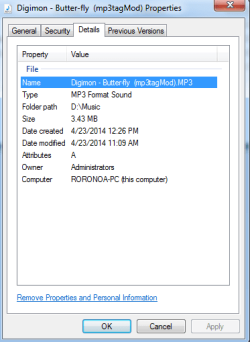
You can right click the MP3 file and click Properties. Switch to "Detail" tab and then you can edit the MP3 information, such as Title, Artists and Composers. Can you modify the information successfully?

Thanks,
Help Giver
 
Last edited:

My Computer My Computer

Computer type
PC/Desktop
Computer Manufacturer/Model Number
Compaq by Hewlett Packard
OS
Microsoft Windows 7 Home Basic 32-bit 7601 Multiprocessor Free Service Pack 1
CPU
Pentinum(R) Dual-Core CPU E5500 @ 2.80GHz
Motherboard
FOXCONN 2A8C
Memory
Ram - 1GB, Page File - 8500GB
Graphics Card(s)
ATI Radeon HD 5450 1GB DDR3
Sound Card
(1) USB Audio Device (2) AMD High Definition Audio Device
Monitor(s) Displays
Compaq W185q
Screen Resolution
1366 x 768
Hard Drives
(1) ST3320418AS ATA Device (2) Multiple Card Reader USB Device
Internet Speed
256 kbps
Antivirus
Avast Free Antivirus
Browser
Google Chrome
thanks 41023 - the file is fine on my machine.

It looks like kanji in the artist and album fields, but not quite kanji. Some of the characters don't appear to be in the character set - but I don't know kanji that well.

I've seen similar kanji-like characters when a file is corrupted, but can't say if this is the case with your file (scanned with avast - no threat found).

I modified all of the fields and added an album cover using mp3tag - the modified file is attached in a zip file. See if you can edit the meta data on this mp3 using WinExplorer.
 

My Computer My Computer

Computer type
Laptop
Computer Manufacturer/Model Number
HP Pavilion dv6-6c10us
OS
x64 (6.3.9600) Win8.1 Pro & soon dual boot x64 (6.1.7601) Win7_SP1 HomePrem
CPU
AMD A6-3420M APU with Radeon(tm) HD Graphics
Motherboard
Hewlett-Packard 1805
Memory
6.00 GB
Graphics Card(s)
AMD Radeon(TM) HD 6520G
Sound Card
(1) AMD High Definition Audio Device (2) IDT High Definiti
Monitor(s) Displays
HP W2072a 20" LCD (1600 x 900) @ 60 Hz
Screen Resolution
1366 x 768 x 32 bits (4294967296 colors) @ 60 Hz
Hard Drives
ST640LM0 00 HM641JI SATA Disk Device
Keyboard
Logitech k520 wireless KB
Mouse
Logitech m320 wireless mouse (bundled with KB)
Internet Speed
15/5 | 54 MB Wireless 'n'
Antivirus
Realtime: Defender or Avast | On-demand: Malwarebytes, ESET
Browser
IE 11 on Win8, IE 10 on win 7
Other Info
Media: [Gimp, Audacity, VLC] || Comm: [WEmail 2012, Skype] || Productivity: [OpenOffice,| Textpad] || Utils: [Sysinternals, cCleaner, Speccy, Defraggler]
I'm not paying a lot of attention to the details in this thread, but I just downloaded the U2 mp3 "Ordinary Love" and looked at it in MP3Tag.

It looks completely normal here. Tags shown for filename, artist, album, path, bitrate, codec, tag type, frequency, length, mode, size, and modified date.

Blank fields for title, album artist, track, disknumber, year, genre, comment, composer, BPM, and cover.

All in English, no sign of any problems or issue.

I didn't have any problems when I told MP3Tag to fill in the title field. It popped right up as expected.

I then was able to delete the artist and title tags using MP3Tag, without any issue. Looks editable to me.
 

My Computer My Computer

Computer type
PC/Desktop
Computer Manufacturer/Model Number
Ignatz Special; 4 speed manual gearbox; factory air conditioning; one of one
OS
Windows 7 Home Premium SP1, 64-bit
CPU
Intel Skylake i5-6600K, not overclocked
Motherboard
AsRock Z170M Extreme 4, micro ATX
Memory
8 GB HyperX DDR4-2666 (2 x 4 GB)
Graphics Card(s)
none; graphics are integrated on CPU
Sound Card
onboard: Realtek ALC1150; external: USB Behringer UF0-202
Monitor(s) Displays
Dell S2340M 23 inch IPS
Screen Resolution
1600 x 900
Hard Drives
System: Crucial MX100 series SSD, 128 GB;
Data: Samsung Spinpoint 103SJ, 1 TB;
Backup: WD Caviar Green WD30EZRX-00D8PB0, 3 TB
PSU
Rosewill SilentNight 500 watt fanless, semi-modular
Case
Antec Solo II
Cooling
Noctua NH-U12S; Noctua F12 intake, Noctua S12A exhaust
Keyboard
Microsoft 200 6JH-00001 USB
Mouse
Dell or Microsoft optical wired; USB
Antivirus
Microsoft Security Essentials and Malwarebytes Premium
Browser
Pale Moon
Other Info
All fans PWM; speeds at idle: CPU circa 500 rpm; intake circa 600 rpm; exhaust circa 600 rpm; CPU temps 27 idle and 47 C load in a warm room (27 C/81 F) when running Intel Extreme Tuning Utility stress test.

My Computer My Computer

Computer type
PC/Desktop
Computer Manufacturer/Model Number
Self Assembled
OS
Microsoft Windows 10 Pro Insider Preview 64-bit
CPU
Intel(R) Core(TM) i3-4130 CPU @ 3.40GHz
Motherboard
Gigabyte Technology Co., Ltd. B85M-D3H
Memory
Corsair Vengence 4GB x2 (8.00GB Dual-Channel DDR3 @ 798MHz)
Graphics Card(s)
2047MB GeForce GTS 450 (ZOTAC International)
Sound Card
Onboard (Realtek High Definition Audio)
Monitor(s) Displays
LG Flatron E2040T
Screen Resolution
1600x900
Hard Drives
Western Digital 1 TB
Seagate 500 GB
PSU
Corsair VS550
Case
Cooler Master K380
Cooling
Cooler Master Seidon 120V Plus
Keyboard
Logitech MK260r
Mouse
Logitech MK260r
Internet Speed
PMPL Broadband
Antivirus
Windows Defender + MBAM
Browser
Firefox
Other Info
Dell Studio 15" Laptop
hi ,41023

- do you get any error message while trying to edit mp3 tags on details pane?

Let us follow these methods:
Method 1.
You may temporarily disable the security software and check if this helps.
Disclaimer: If you have to temporarily disable the antivirus to install other software; you should enable the antivirus as soon as you're done. If you're connected to the internet or a network while your antivirus software is disabled, your computer is vulnerable to virus attacks.

Method 2.
Boot the computer in safe mode and check if this helps to edit the mp3 tags.

Or
you can right click the mp3 file and click properties. Switch to "detail" tab and then you can edit the mp3 information, such as title, artists and composers. Can you modify the information successfully?

Thanks,
help giver
Untitled2.png
 

My Computer My Computer

Computer type
PC/Desktop
OS
Windows 7 Home Premium 64bit
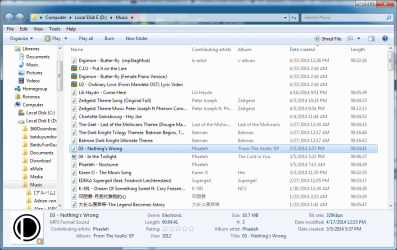
thanks 41023 - the file is fine on my machine.

It looks like kanji in the artist and album fields, but not quite kanji. Some of the characters don't appear to be in the character set - but I don't know kanji that well.

I've seen similar kanji-like characters when a file is corrupted, but can't say if this is the case with your file (scanned with avast - no threat found).

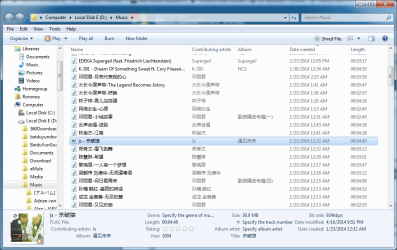
I modified all of the fields and added an album cover using mp3tag - the modified file is attached in a zip file. See if you can edit the meta data on this mp3 using WinExplorer.
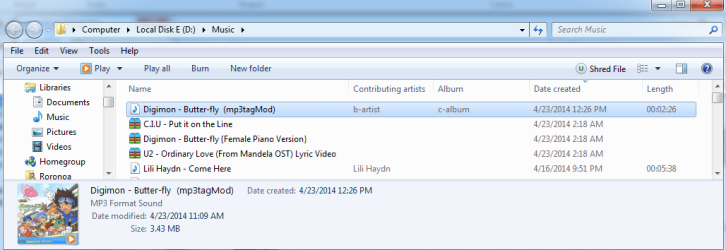
I can see the cover and the new tags but still unable to edit them.
Untitled3.png
 

My Computer My Computer

Computer type
PC/Desktop
OS
Windows 7 Home Premium 64bit
AudioShell

Hi,

I've been following this thread with interest but must confess that I don't have a clue as to how to fix the cause of the problem. Personally I don't use WMP and prefer alternatives.

However I have a suggestion that could be tried to see if it helps.

If you install ID3 tag editor - AudioShell freeware music files tag editor - direct tag editing from Windows Vista/7/8 Explorer

What happens after a reboot? Do you see the tag editor in your context menu if you right click an mp3 file?

If not - simply uninstall AudioShell as it will be of no use!
 

My Computer My Computer

Computer type
Laptop
Computer Manufacturer/Model Number
ASUS
OS
Microsoft Windows 7 Home Premium 64-bit 7601 Multiprocessor Free Service Pack 1
CPU
AMD C-60 APU with Radeon(tm) HD Graphics
Motherboard
ASUSTeK COMPUTER INC. X501U
Memory
4.00 GB
Graphics Card(s)
AMD Radeon HD 6290 Graphics
Sound Card
(1) AMD High Definition Audio Device (2) Realtek High Defi
Screen Resolution
1366 x 768 x 32 bits (4294967296 colors) @ 60 Hz
Hard Drives
Hitachi HTS545050A7E380 SATA Disk Device
Antivirus
Comodo CIS & FW, SecureAplus App Whitelisting, Threatfire
Browser
Cyberfox 64bit, Opera 64bit, Airfox
Other Info
Spy-The-Spy, HitmanPro.Alert, Norton Connect Safe, MJRegWatcher, BitDefender TrafficLight, Voodoo Shield, Zemana AntiMalware
Hi,

I've been following this thread with interest but must confess that I don't have a clue as to how to fix the cause of the problem. Personally I don't use WMP and prefer alternatives.

However I have a suggestion that could be tried to see if it helps.

If you install ID3 tag editor - AudioShell freeware music files tag editor - direct tag editing from Windows Vista/7/8 Explorer

What happens after a reboot? Do you see the tag editor in your context menu if you right click an mp3 file?

If not - simply uninstall AudioShell as it will be of no use!
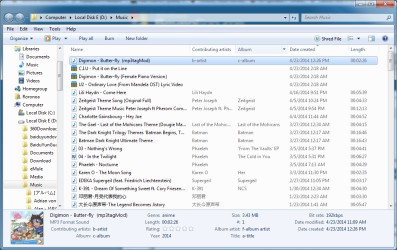
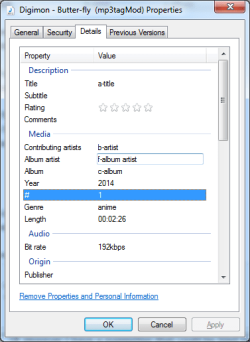
WOW, IT WORKED!!!
QQ截图20140423151626.png
QQ截图20140423151648.png
QQ截图20140423151701.png
QQ截图20140423151719.png

Thank you so much.

And I also want to thank everyone who made a suggestion especially Bill who stayed with me for so long, thank you.
 

My Computer My Computer

Computer type
PC/Desktop
OS
Windows 7 Home Premium 64bit
Back
Top