Solved Can't Access "Downloads" Folder

jacksunny

New member
Local time
7:16 AM
Messages
42
Hello,
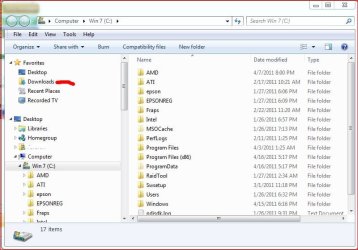
I am unable to access my "Downloads" Folder. When I click on it a error message pops up titled Explorer.exe. It reads "This file does not have a program associated with it for performing this action. Please install a program, or if one is already installed, create an association in the default programs control panel." I also tried accessing it through
C:/Users/Jack/Links/ and it doesn't open. Somebody please help me!!! Thanks.
 

My Computer

Computer Manufacturer/Model Number
Hewlett-Packard 100-5050
OS
Windows 7 Home Premium SP1 x64
CPU
AMD Athlon II X2 260u, 1800 mHz, 2 Core
Memory
6.0 GB
Sound Card
Realtek High Defenition Audio
Screen Resolution
1600*900
Hard Drives
600 GB
Internet Speed
1.44 Mbps
Hi jacksunny, Welcome to sevenforums :)

The correct path should be C:\Users\username\Downloads

Also when you open Computer in you left hand pane you should see "Downloads"

Capture.JPG

Let us know.
 

My Computer

Computer type
PC/Desktop
Computer Manufacturer/Model Number
Custom built by me.
OS
Windows 10 Pro
CPU
Intel Core i7-4770K (3.5Ghz)
Motherboard
Gigabyte G1 Sniper 5 (F10 Bios)
Memory
32 gig Corsair Dominator Platinum (4x8Gig)
Graphics Card(s)
Sapphire Tri-X R9 Fury
Sound Card
Soundblaster ZXR
Monitor(s) Displays
NEC PA242W 24" LCD Monitor
Screen Resolution
1920 x 1200
Hard Drives
Primary - Samsung 850 Pro (512gig), Samsung 840 Pro (256gig), 2TB WD Caviar Black.
PSU
EVGA Supernova 1000 G2
Case
Cooler Master HAF X
Cooling
Corsair H100i with Corsair Air Series SP120 Quiet Fans
Keyboard
Logitech Wireless Wave
Mouse
Logitech Performance MX
Internet Speed
High Speed Cable
Antivirus
Norton Security
Browser
IE11
Other Info
Memory Timings - 1866MHz @ 9-9-9-27-1T @ 1.5 volts
Thanks for a quick reply...
In the left hand pane there I do see downloads, but I just realized now that it no longer shows a folder icon, but shows a blank white icon. I now have 2 questions
1. How do I change the path???
2. If I just delete "Downloads" from Links and make a new folder titled "downloads" will it fix the problem?
 

My Computer

Computer Manufacturer/Model Number
Hewlett-Packard 100-5050
OS
Windows 7 Home Premium SP1 x64
CPU
AMD Athlon II X2 260u, 1800 mHz, 2 Core
Memory
6.0 GB
Sound Card
Realtek High Defenition Audio
Screen Resolution
1600*900
Hard Drives
600 GB
Internet Speed
1.44 Mbps

My Computer

Computer type
PC/Desktop
Computer Manufacturer/Model Number
Bruce ... somewhere in his 40's
OS
Windows 7 Ultimate 32bit SP1
CPU
Intel(R) Core(TM)2 Quad CPU @ 2.40GHz, 2400 MHz
Motherboard
INTEL/D975XBX2
Memory
4 GB
Graphics Card(s)
ATI Radeon HD 2600 Pro
Monitor(s) Displays
Samsung SyncMaster 914v
Screen Resolution
1280 x 1024
Hard Drives
2/500GB each ... ST3500630AS ATA Device.
One is not connected
PSU
Rocketfish 700 W
Case
G.Skill Gigabyte Chassis
Keyboard
Standard PS/2 Keyboard
Mouse
Microsoft PS/2 Mouse
Internet Speed
DSL
Antivirus
Avira Internet Security
Browser
IE 11
Other Info
ATI HDMI Audio
Thanks for a quick reply...
In the left hand pane there I do see downloads, but I just realized now that it no longer shows a folder icon, but shows a blank white icon. I now have 2 questions
1. How do I change the path???
2. If I just delete "Downloads" from Links and make a new folder titled "downloads" will it fix the problem?

You don't want to start deleting folders like that or else you screw the system!!!! Those folders are setup like that for a reason.

With that said, what did you delete??? Why?

Anyways if you've deleted/moved system folders, or are having major issues you may need to do a Repair Install

Actually I would try jacee's solution first, if that doesn't work, do the repair install.

And leave things alone.
 

My Computer

Computer type
PC/Desktop
Computer Manufacturer/Model Number
Custom built by me.
OS
Windows 10 Pro
CPU
Intel Core i7-4770K (3.5Ghz)
Motherboard
Gigabyte G1 Sniper 5 (F10 Bios)
Memory
32 gig Corsair Dominator Platinum (4x8Gig)
Graphics Card(s)
Sapphire Tri-X R9 Fury
Sound Card
Soundblaster ZXR
Monitor(s) Displays
NEC PA242W 24" LCD Monitor
Screen Resolution
1920 x 1200
Hard Drives
Primary - Samsung 850 Pro (512gig), Samsung 840 Pro (256gig), 2TB WD Caviar Black.
PSU
EVGA Supernova 1000 G2
Case
Cooler Master HAF X
Cooling
Corsair H100i with Corsair Air Series SP120 Quiet Fans
Keyboard
Logitech Wireless Wave
Mouse
Logitech Performance MX
Internet Speed
High Speed Cable
Antivirus
Norton Security
Browser
IE11
Other Info
Memory Timings - 1866MHz @ 9-9-9-27-1T @ 1.5 volts
NO NO NO I didn't delete it yet I'm just asking if it will be okay to delete it but obviously not.
 

My Computer

Computer Manufacturer/Model Number
Hewlett-Packard 100-5050
OS
Windows 7 Home Premium SP1 x64
CPU
AMD Athlon II X2 260u, 1800 mHz, 2 Core
Memory
6.0 GB
Sound Card
Realtek High Defenition Audio
Screen Resolution
1600*900
Hard Drives
600 GB
Internet Speed
1.44 Mbps
NO NO NO I didn't delete it yet I'm just asking if it will be okay to delete it but obviously not.

Yes.... DO NOT DELETE those folder!!!

And if you're having icon issues try jacee's solution first.

Good luck.
 

My Computer

Computer type
PC/Desktop
Computer Manufacturer/Model Number
Custom built by me.
OS
Windows 10 Pro
CPU
Intel Core i7-4770K (3.5Ghz)
Motherboard
Gigabyte G1 Sniper 5 (F10 Bios)
Memory
32 gig Corsair Dominator Platinum (4x8Gig)
Graphics Card(s)
Sapphire Tri-X R9 Fury
Sound Card
Soundblaster ZXR
Monitor(s) Displays
NEC PA242W 24" LCD Monitor
Screen Resolution
1920 x 1200
Hard Drives
Primary - Samsung 850 Pro (512gig), Samsung 840 Pro (256gig), 2TB WD Caviar Black.
PSU
EVGA Supernova 1000 G2
Case
Cooler Master HAF X
Cooling
Corsair H100i with Corsair Air Series SP120 Quiet Fans
Keyboard
Logitech Wireless Wave
Mouse
Logitech Performance MX
Internet Speed
High Speed Cable
Antivirus
Norton Security
Browser
IE11
Other Info
Memory Timings - 1866MHz @ 9-9-9-27-1T @ 1.5 volts
Just a quick question. Which of the .zip files from jacee's solution do I have to download? I downloaded the .lnk one but it never fixed the problem.
 

My Computer

Computer Manufacturer/Model Number
Hewlett-Packard 100-5050
OS
Windows 7 Home Premium SP1 x64
CPU
AMD Athlon II X2 260u, 1800 mHz, 2 Core
Memory
6.0 GB
Sound Card
Realtek High Defenition Audio
Screen Resolution
1600*900
Hard Drives
600 GB
Internet Speed
1.44 Mbps
Just a quick question. Which of the .zip files from jacee's solution do I have to download? I downloaded the .lnk one but it never fixed the problem.

Have you check the actual folder path as suggested by sygnus21?

Why not try that first.
 

My Computer

Computer Manufacturer/Model Number
Built be Me
OS
Windows 7 Pro x64
CPU
i5 760
Motherboard
Asus P7P55D-E Pro
Memory
16GB
Graphics Card(s)
Nvidia GTS450
Sound Card
On board
Monitor(s) Displays
Dell 2007WFP Dell 1800FP
Screen Resolution
1680x1050 1280x1024
Hard Drives
Seagate 250GB & 750GB
WD 1TB
PSU
Antec 750
Case
In Win
Cooling
Cooler Master Hyper 212+
Keyboard
IBM
Mouse
MS
Thanks for a quick reply...
In the left hand pane there I do see downloads, but I just realized now that it no longer shows a folder icon, but shows a blank white icon. I now have 2 questions
1. How do I change the path???
2. If I just delete "Downloads" from Links and make a new folder titled "downloads" will it fix the problem?

Just a quick question. Which of the .zip files from jacee's solution do I have to download? I downloaded the .lnk one but it never fixed the problem.

Since you say you're having icon issues you need to check this area under the link jacee provided.

library-ms - Library folder.


NOTE: To restore the default icons, you may need to do these as well.
Any issues with that and you'll have to post there as I've not used any of those procedures.

But as I suggested, and shootist reiterated, why not click the downloads folder I pointed to first to see if that fixes your issue. If not, you have to follow the tutorial jacee provided.
 
Last edited by a moderator:

My Computer

Computer type
PC/Desktop
Computer Manufacturer/Model Number
Custom built by me.
OS
Windows 10 Pro
CPU
Intel Core i7-4770K (3.5Ghz)
Motherboard
Gigabyte G1 Sniper 5 (F10 Bios)
Memory
32 gig Corsair Dominator Platinum (4x8Gig)
Graphics Card(s)
Sapphire Tri-X R9 Fury
Sound Card
Soundblaster ZXR
Monitor(s) Displays
NEC PA242W 24" LCD Monitor
Screen Resolution
1920 x 1200
Hard Drives
Primary - Samsung 850 Pro (512gig), Samsung 840 Pro (256gig), 2TB WD Caviar Black.
PSU
EVGA Supernova 1000 G2
Case
Cooler Master HAF X
Cooling
Corsair H100i with Corsair Air Series SP120 Quiet Fans
Keyboard
Logitech Wireless Wave
Mouse
Logitech Performance MX
Internet Speed
High Speed Cable
Antivirus
Norton Security
Browser
IE11
Other Info
Memory Timings - 1866MHz @ 9-9-9-27-1T @ 1.5 volts
Just a quick question. Which of the .zip files from jacee's solution do I have to download? I downloaded the .lnk one but it never fixed the problem.

exe - Executable application files. Click to "save" and save it in a convient place.
 
Last edited by a moderator:

My Computer

Computer type
PC/Desktop
Computer Manufacturer/Model Number
Bruce ... somewhere in his 40's
OS
Windows 7 Ultimate 32bit SP1
CPU
Intel(R) Core(TM)2 Quad CPU @ 2.40GHz, 2400 MHz
Motherboard
INTEL/D975XBX2
Memory
4 GB
Graphics Card(s)
ATI Radeon HD 2600 Pro
Monitor(s) Displays
Samsung SyncMaster 914v
Screen Resolution
1280 x 1024
Hard Drives
2/500GB each ... ST3500630AS ATA Device.
One is not connected
PSU
Rocketfish 700 W
Case
G.Skill Gigabyte Chassis
Keyboard
Standard PS/2 Keyboard
Mouse
Microsoft PS/2 Mouse
Internet Speed
DSL
Antivirus
Avira Internet Security
Browser
IE 11
Other Info
ATI HDMI Audio
Just a quick question. Which of the .zip files from jacee's solution do I have to download? I downloaded the .lnk one but it never fixed the problem.

exe - Executable application files. Click to "save" and save it in a convient place.

jacee he states his icons are messed up. Will that fix those. That's the issue.

Thanks.
 
Last edited by a moderator:

My Computer

Computer type
PC/Desktop
Computer Manufacturer/Model Number
Custom built by me.
OS
Windows 10 Pro
CPU
Intel Core i7-4770K (3.5Ghz)
Motherboard
Gigabyte G1 Sniper 5 (F10 Bios)
Memory
32 gig Corsair Dominator Platinum (4x8Gig)
Graphics Card(s)
Sapphire Tri-X R9 Fury
Sound Card
Soundblaster ZXR
Monitor(s) Displays
NEC PA242W 24" LCD Monitor
Screen Resolution
1920 x 1200
Hard Drives
Primary - Samsung 850 Pro (512gig), Samsung 840 Pro (256gig), 2TB WD Caviar Black.
PSU
EVGA Supernova 1000 G2
Case
Cooler Master HAF X
Cooling
Corsair H100i with Corsair Air Series SP120 Quiet Fans
Keyboard
Logitech Wireless Wave
Mouse
Logitech Performance MX
Internet Speed
High Speed Cable
Antivirus
Norton Security
Browser
IE11
Other Info
Memory Timings - 1866MHz @ 9-9-9-27-1T @ 1.5 volts
IT WORKS!!! Thanks so much for your help. It is really appreciated :D
BTW it was the Library-MS file I had to download to fix the problem.
 

My Computer

Computer Manufacturer/Model Number
Hewlett-Packard 100-5050
OS
Windows 7 Home Premium SP1 x64
CPU
AMD Athlon II X2 260u, 1800 mHz, 2 Core
Memory
6.0 GB
Sound Card
Realtek High Defenition Audio
Screen Resolution
1600*900
Hard Drives
600 GB
Internet Speed
1.44 Mbps
IT WORKS!!! Thanks so much for your help. It is really appreciated :D
BTW it was the Library-MS file I had to download to fix the problem.

Thanks for letting us know. Glad we were able to help.

Now leave things alone :):D

Peace :cool:
 

My Computer

Computer type
PC/Desktop
Computer Manufacturer/Model Number
Custom built by me.
OS
Windows 10 Pro
CPU
Intel Core i7-4770K (3.5Ghz)
Motherboard
Gigabyte G1 Sniper 5 (F10 Bios)
Memory
32 gig Corsair Dominator Platinum (4x8Gig)
Graphics Card(s)
Sapphire Tri-X R9 Fury
Sound Card
Soundblaster ZXR
Monitor(s) Displays
NEC PA242W 24" LCD Monitor
Screen Resolution
1920 x 1200
Hard Drives
Primary - Samsung 850 Pro (512gig), Samsung 840 Pro (256gig), 2TB WD Caviar Black.
PSU
EVGA Supernova 1000 G2
Case
Cooler Master HAF X
Cooling
Corsair H100i with Corsair Air Series SP120 Quiet Fans
Keyboard
Logitech Wireless Wave
Mouse
Logitech Performance MX
Internet Speed
High Speed Cable
Antivirus
Norton Security
Browser
IE11
Other Info
Memory Timings - 1866MHz @ 9-9-9-27-1T @ 1.5 volts
Yay!
a041.gif
 

My Computer

Computer type
PC/Desktop
Computer Manufacturer/Model Number
Bruce ... somewhere in his 40's
OS
Windows 7 Ultimate 32bit SP1
CPU
Intel(R) Core(TM)2 Quad CPU @ 2.40GHz, 2400 MHz
Motherboard
INTEL/D975XBX2
Memory
4 GB
Graphics Card(s)
ATI Radeon HD 2600 Pro
Monitor(s) Displays
Samsung SyncMaster 914v
Screen Resolution
1280 x 1024
Hard Drives
2/500GB each ... ST3500630AS ATA Device.
One is not connected
PSU
Rocketfish 700 W
Case
G.Skill Gigabyte Chassis
Keyboard
Standard PS/2 Keyboard
Mouse
Microsoft PS/2 Mouse
Internet Speed
DSL
Antivirus
Avira Internet Security
Browser
IE 11
Other Info
ATI HDMI Audio
Hello,
I have the same problem like jacksunny. I am unable to access my "Downloads" Folder. When I click on it a error message pops up titled Explorer.exe. It reads "This file does not have a program associated with it for performing this action. Please install a program, or if one is already installed, create an association in the default programs control panel." I also tried accessing it through
C:/Users/Jack/Links/ and it doesn't open.
i downloaded the ms library, but now i don't know what to do. Somebody help please cause im new in this forums.
thanks.
 

My Computer

OS
windows 7 32bit

My Computer

Computer type
PC/Desktop
Computer Manufacturer/Model Number
Self built custom
OS
64-bit Windows 11 Pro for Workstations
CPU
Intel i7-8700K OC'd to 5 GHz
Motherboard
ASUS ROG Maximus XI Formula Z390
Memory
64 GB (4x16GB) G.SKILL TridentZ RGB DDR4 3600 MHz
Graphics Card(s)
ASUS ROG-STRIX-GTX1080TI-O11G-GAMING
Sound Card
Integrated
Monitor(s) Displays
2 x Samsung Odyssey G7 27"
Screen Resolution
2560x1440
Hard Drives
1TB Samsung 990 PRO M.2,
4TB Samsung 990 PRO PRO M.2,
TerraMaster F8 SSD Plus NAS
PSU
Seasonic Prime Titanium 850W
Case
Thermaltake Core P3
Cooling
Corsair Hydro H115i
Keyboard
Logitech wireless K800
Mouse
Logitech MX Master 4
Internet Speed
2 Gb/s Download and 100 Mb/s Upload
Antivirus
Malwarebyte Anti-Malware Premium
Browser
Google Chrome
Other Info
Logitech Z625 speaker system,
Logitech BRIO 4K Pro webcam,
HP Color LaserJet Pro MFP M477fdn,
APC SMART-UPS RT 1000 XL - SURT1000XLI,
Galaxy S23 Plus phone
thank you Brink. I downloaded library-ms and merged it...then i followed the tutorial but when i run the libraryicochanger.exe file (2nd step in "How to change a Library icon in Windows 7) the "Downloads" icon doesn't appear in the screen shot. There are only Documents, Music, Picture and Video icon present, if you know what i mean. What do you suggest? thanks
 

My Computer

OS
windows 7 32bit

My Computer

Computer type
PC/Desktop
Computer Manufacturer/Model Number
Self built custom
OS
64-bit Windows 11 Pro for Workstations
CPU
Intel i7-8700K OC'd to 5 GHz
Motherboard
ASUS ROG Maximus XI Formula Z390
Memory
64 GB (4x16GB) G.SKILL TridentZ RGB DDR4 3600 MHz
Graphics Card(s)
ASUS ROG-STRIX-GTX1080TI-O11G-GAMING
Sound Card
Integrated
Monitor(s) Displays
2 x Samsung Odyssey G7 27"
Screen Resolution
2560x1440
Hard Drives
1TB Samsung 990 PRO M.2,
4TB Samsung 990 PRO PRO M.2,
TerraMaster F8 SSD Plus NAS
PSU
Seasonic Prime Titanium 850W
Case
Thermaltake Core P3
Cooling
Corsair Hydro H115i
Keyboard
Logitech wireless K800
Mouse
Logitech MX Master 4
Internet Speed
2 Gb/s Download and 100 Mb/s Upload
Antivirus
Malwarebyte Anti-Malware Premium
Browser
Google Chrome
Other Info
Logitech Z625 speaker system,
Logitech BRIO 4K Pro webcam,
HP Color LaserJet Pro MFP M477fdn,
APC SMART-UPS RT 1000 XL - SURT1000XLI,
Galaxy S23 Plus phone
what about my docs at the existing download location? can i restore them?
 

My Computer

OS
windows 7 32bit
Back
Top