Will moving Downloads folder change program default save location?

pcwin

New member
Member
VIP
Local time
5:46 AM
Messages
112
The Downloads folder by default is at C:\Users\User-Name\Downloads

I have another hard disk D:\ that I use it to save data files only and I would like to move the Downloads folder to the D:\Downloads

I will follow http://www.sevenforums.com/tutorials/18629-user-folders-change-default-location.html to move the Downloads folder.

Many programs (e.g. internet browser) "save files"/"download location" by default is pointing to C:\Users\User-Name\Downloads

Q1) After I have moved to D:\Downloads, will the programs "save files"/"download location" automatically point to the new location D:\Downloads ?

Q2) If the programs "save files"/"download location" is still pointing to C:\Users\User-Name\Downloads, will the programs still save downloads to C:\Users\User-Name\Downloads ?

Q3) Do I need to manually go through one by one program settings to change the "save files"/"download location" to D:\Downloads ?

Thanks
 

My Computer

Computer type
PC/Desktop
Computer Manufacturer/Model Number
Custom Build
OS
Windows 7 Home Premium 64 Bit
CPU
Intel
Motherboard
ASUS P7P55DE-PRO
Memory
8GB
Graphics Card(s)
Radeon HD 5770
Hard Drives
WD Black
Antivirus
MSE
Why bother with moving the folder? Every browser I've used may default to the downloads folder on the C: drive but also allows you to specify a different folder. I simply point the browser to the downloads folder on my D: drive and oftentimes I even create a new subfolder for that download. Works for me.
 

My Computer

Computer type
PC/Desktop
Computer Manufacturer/Model Number
Home Built desktop, Dell G15 5511 Gaming laptop,MS Surface Pro 7 tablet
OS
W10 Pro desktop, W11 laptop, W11 Pro tablet (all 64-bit)
CPU
3.7Ghz 8700K i7, i7-11800H, i7-1065G7
Motherboard
ASUS TUF Z370-Pro Gaming in desktop
Memory
16G desktop, 16G laptop, 4G tablet
Graphics Card(s)
AMD Radeon RX580, RTX 3060, Intel Iris Plus
Sound Card
High Definition Audio (Built-in to mobo)
Monitor(s) Displays
Samsung U32J59 32" (2x), 15.6", 12"
Screen Resolution
3840x2160, 3840x2160, 1920x1080, 2160x1440
Hard Drives
500G SSD for OS; 2T, 10T & 15T HDDs for Data on Desktop, 1TB SSD laptop, 128G SSD tablet.
PSU
Corsair CX 750M
Case
Antec 100
Cooling
CM 212+
Keyboard
IBM Model M - used continuously since 1986
Mouse
Microsoft Pro IntelliMouse
Internet Speed
400M down 8M up
Antivirus
Windows Defender
Browser
FireFox
Other Info
Built my first computer (8Mhz 8088cpu, 640K RAM, 20MB HDD, 2 360K floppy drives) in 1985 and have been building them for myself, relatives and friends ever since.
Firefox uses the Downloads folder under the user account on the C: drive unless you check the Always ask me where to save files box under Option on the General tab.
 

My Computer

Computer type
PC/Desktop
Computer Manufacturer/Model Number
Lenovo IdeaCenter 450
OS
Windows 10 Pro X64
CPU
Intel Quad Core i7-4770 @ 3.4Ghz
Memory
16.0GB PC3-12800 DDR3 SDRAM 1600 MHz
Graphics Card(s)
Intel Integrated HD Graphics
Sound Card
Realtek HD Audio
Monitor(s) Displays
HP 22" LCD
Screen Resolution
1680 x 1050
Hard Drives
250GB Samsung EVO SATA-3 SSD
2TB Seagate ST2000DM001 SATA-2
1.5TB Seagate ST3150041AS SATA
Keyboard
Dell USB
Mouse
Lenovo USB
Internet Speed
Cable via Road Runner 3MB Upload, 30MB Download
Antivirus
Windows Defender, MBAM Pro, MBAE
Browser
Seamonkey
Other Info
UEFI/GPT
PLDS DVD-RW DH16AERSH
Q1) After I have moved to D:\Downloads, will the programs "save files"/"download location" automatically point to the new location D:\Downloads ?

A1: Windows will point to the new folder on D: and programs should honor that definition.

Q2) If the programs "save files"/"download location" is still pointing to C:\Users\User-Name\Downloads, will the programs still save downloads to C:\Users\User-Name\Downloads ?

A2: Not sure, but the tutorial asks you to verify that the original folder on C: and it's contents were moved. Some pgms might still try C:\downloads, but they would be fairly old programs.

Q3) Do I need to manually go through one by one program settings to change the "save files"/"download location" to D:\Downloads ?

A3: You shouldn't have to, but pay attention for the first week or two as you download things - where are they placed...
How many pgms actually download stuff? Browsers mostly right... how many browsers do you have 2?
I think you'll be fine - just follow every step in OPTION TWO of the tutorial.

Bill
.
 

My Computer

Computer type
Laptop
Computer Manufacturer/Model Number
HP Pavilion dv6-6c10us
OS
x64 (6.3.9600) Win8.1 Pro & soon dual boot x64 (6.1.7601) Win7_SP1 HomePrem
CPU
AMD A6-3420M APU with Radeon(tm) HD Graphics
Motherboard
Hewlett-Packard 1805
Memory
6.00 GB
Graphics Card(s)
AMD Radeon(TM) HD 6520G
Sound Card
(1) AMD High Definition Audio Device (2) IDT High Definiti
Monitor(s) Displays
HP W2072a 20" LCD (1600 x 900) @ 60 Hz
Screen Resolution
1366 x 768 x 32 bits (4294967296 colors) @ 60 Hz
Hard Drives
ST640LM0 00 HM641JI SATA Disk Device
Keyboard
Logitech k520 wireless KB
Mouse
Logitech m320 wireless mouse (bundled with KB)
Internet Speed
15/5 | 54 MB Wireless 'n'
Antivirus
Realtime: Defender or Avast | On-demand: Malwarebytes, ESET
Browser
IE 11 on Win8, IE 10 on win 7
Other Info
Media: [Gimp, Audacity, VLC] || Comm: [WEmail 2012, Skype] || Productivity: [OpenOffice,| Textpad] || Utils: [Sysinternals, cCleaner, Speccy, Defraggler]
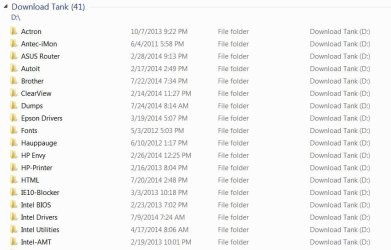
I didn't move any folders. I just created a folder named "Download Tank" on the D drive and download into various folders there. In IE, I simply choose Save As. It remembers the last folder but it's easy to change if I'm grouping downloads like Intel Drivers, Microsoft Software, etc. Everything I download goes there first. I even included it in my Libraries.
 

Attachments

  • DownloadTank.JPG
    DownloadTank.JPG
    77.5 KB · Views: 1

My Computer

Computer type
PC/Desktop
Computer Manufacturer/Model Number
Built 2/11/2011
OS
Windows 7 Pro-x64
CPU
i7-2600 3.4GHz - 3.8GHz Turbo
Motherboard
Intel DH67BL-B3
Memory
8Gb - 2x4GB, Muskin 991770 PC3-1333
Graphics Card(s)
Integrated Intel HD 2000
Sound Card
Integrated Intel 10.1 HD, RealTek ALC892
Monitor(s) Displays
Asus LCD VH222H, Haier HL24XSL2a
Screen Resolution
1920x1080, 1920x1080
Hard Drives
Crucial SSD C300-128Gb,
Western Digital WD5002AALX - 500Gb,
Western Digital WD7501AALS - 750Gb
PSU
Seasonic 650W 80+ Gold Modular
Case
Rosewill Defender
Cooling
Stock CPU, Four 120mm case fans, PCH fan added
Keyboard
Logitech EX100 Y-RBH94 Wireless
Mouse
Logitech EX100 M-RCE95 Wireless
Internet Speed
3.0/1.5 Mbs
Antivirus
Microsoft Security Essentials
Browser
Microsoft Internet Explorer 11
Other Info
Antec Veris Premier-Multimedia IR Station,
Cyber Accoustics-3602 Speakers,
AFT XM-5U Card Reader,
Hauppauge TV-HVR-2250,
Sony LX300 USB Turntable
Back
Top