Can't access files/folders on my USB Stick

Zuko53

New member
Local time
7:24 PM
Messages
89
Location
Van Buren, Arkansas
Greetings: Re: Windows 7 O/S
Recently, I did a re-installation of Windows 7 on my computer. Before I did that, I backed up all my files and pics using a USB stick. Now, I want to access my documents on the stick and it won't open.
 

My Computer My Computer

At a glance

Windows 7 upgraded from Vista 32bit
Computer type
PC/Desktop
Computer Manufacturer/Model Number
Dell Inspiron 546
OS
Windows 7 upgraded from Vista 32bit
Antivirus
McAfee
what won't open?
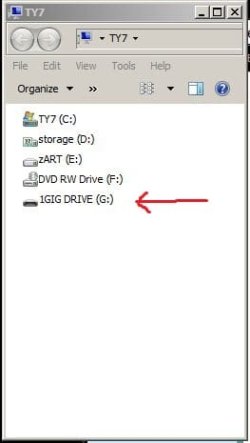
can you see the USB stick in windows explorer?
did you use backup software to backup your files and pics? or did you just copy files to USB drive?
 

My Computer My Computer

At a glance

Windows 7 Ultimate 32bitIntel Core 2 Extreme QX68504 gbNVIDIA GeForce 8400GS
Computer type
PC/Desktop
Computer Manufacturer/Model Number
SALEON Systems V3.1
OS
Windows 7 Ultimate 32bit
CPU
Intel Core 2 Extreme QX6850
Motherboard
ASUSTeK P5G41-M LE
Memory
4 gb
Graphics Card(s)
NVIDIA GeForce 8400GS
Hard Drives
Intel 120 GB SSD, Seagate 250GB, Seagate 2TB
Antivirus
Comodo
Browser
Chrome
No, I tried to open with IE and all of the others like word pad, paint, name it and I tried it. I simply copied the files and pics to the stick.
 

My Computer My Computer

At a glance

Windows 7 upgraded from Vista 32bit
Computer type
PC/Desktop
Computer Manufacturer/Model Number
Dell Inspiron 546
OS
Windows 7 upgraded from Vista 32bit
Antivirus
McAfee
windows explorer as in 'Computer' or My Computer--not Internet Explorer---CAN YOU SEE THE USB DRIVE?
(see screenshot)
if so copy files to a folder on the hard drive (documents, pictures, etc)
 

Attachments

  • Capture.JPG
    Capture.JPG
    17.6 KB · Views: 11

My Computer My Computer

At a glance

Windows 7 Ultimate 32bitIntel Core 2 Extreme QX68504 gbNVIDIA GeForce 8400GS
Computer type
PC/Desktop
Computer Manufacturer/Model Number
SALEON Systems V3.1
OS
Windows 7 Ultimate 32bit
CPU
Intel Core 2 Extreme QX6850
Motherboard
ASUSTeK P5G41-M LE
Memory
4 gb
Graphics Card(s)
NVIDIA GeForce 8400GS
Hard Drives
Intel 120 GB SSD, Seagate 250GB, Seagate 2TB
Antivirus
Comodo
Browser
Chrome
Yes, I know what you mean. I can see the list of items/files/on the USB drive and I picked out one item at random and sent it to "Documents" and I opened it at it's all jibberish.
 

My Computer My Computer

At a glance

Windows 7 upgraded from Vista 32bit
Computer type
PC/Desktop
Computer Manufacturer/Model Number
Dell Inspiron 546
OS
Windows 7 upgraded from Vista 32bit
Antivirus
McAfee
what you are probably seeing is the postscript code--try using the ''open with' (right click file name) to assign the proper file association
 

My Computer My Computer

At a glance

Windows 7 Ultimate 32bitIntel Core 2 Extreme QX68504 gbNVIDIA GeForce 8400GS
Computer type
PC/Desktop
Computer Manufacturer/Model Number
SALEON Systems V3.1
OS
Windows 7 Ultimate 32bit
CPU
Intel Core 2 Extreme QX6850
Motherboard
ASUSTeK P5G41-M LE
Memory
4 gb
Graphics Card(s)
NVIDIA GeForce 8400GS
Hard Drives
Intel 120 GB SSD, Seagate 250GB, Seagate 2TB
Antivirus
Comodo
Browser
Chrome
PROBLEM SOLVED. I am happy to report that, for a change, I solved this problem on my own, as follows; As I posted in the beginning, I did a re-installation of Windows 7 O/S on my computer. I reasoned that the file that I was trying to open was originated with one of the programs that I had on my Control Panel before I did the re-installation. As we all know, we lose all the "stuff" on the Control Panel when we re-install. So, the problem was to try to recall all of the programs and re-install them on my computer. Since I am 81 yrs of age, this was no easy task. I usually don't have a great amount of programs installed, so I started to re-install them as I thought of them. After each one, I tried to open the programs/files in the USB stick and I hit pay dirt with the installation of Office 2003. Then I recalled that the file I was trying to open was formed on Excel which, of course, is part of Office 2003. . Thank You all for your help.
 

My Computer My Computer

At a glance

Windows 7 upgraded from Vista 32bit
Computer type
PC/Desktop
Computer Manufacturer/Model Number
Dell Inspiron 546
OS
Windows 7 upgraded from Vista 32bit
Antivirus
McAfee
Back
Top