
I changed the Permissions for my External Hard Drive (I am the Admin in this computer), I actually wanted to passport-protect it, and now Windows doesn’t let me change it back (my HD will not work in other computers either). Please help!
First I tried system restore, that was useless, but then again I have never been able to fully complete successfully a system restore on this netbook, it always restores somewhat but gives me an error message.
Then tried this http://www.sevenforums.com/tutorials/1911-take-ownership-shortcut.html Option 3 “Add "Take Ownership" with Pause to Context Menu” The “take ownership” option appeared successfully, when I took ownership of the folders a long list of messages saying that is was successful appeared, but when I did this on the Drive, the black dialog box opens and closes so quick that I can’t see any message on it, if there is any, so I can’t see if it was successful.
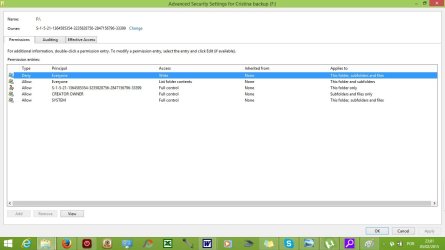
Creator Owner appeared on list after doing this, but the only Alowed box ticked was “Special Permissions” everything else was unticked with neither Allowed nor Denied.
User Everyone has List folder contents as Allowed and Write as Denied, everything else unticked.
User SYSTEM has everything ticked as Allowed except for Special Permissions.
And there is a 4th user with a very long number as a name and a question mark on the person of the icon, which has the same Special Permissions as the Creator Owner (this was there before Taking Ownership.
Before taking ownership I was able to delete files, but not copy or modify them (documents appear as read-only files). Now I’m able to both delete and copy files to another location (clicking on providing admin permission when prompted) but I cannot write any new information or copy files to the HD (no pop-up asking to give admin permission here). So at least I can access my files now, but still my Disk is useless as a back-up.
Again, the Edit button on Security doesn’t allow me to change anything, I can’t tick or untick any boxes, and the Advanced button is just the same: when I click on Change Permission another dialog just the same appears where I can only click View, Ok or Cancel. The Add, Remove and Apply buttons appear greyed-out. The funny thing is that Creator Owner appears as having full control of Subfolders and Files only, so in theory I should be able to write over files.
This is the current print screen:
Thirdly, I have tried finding the “Access Control Settings for Local Disk dialog box” but I’m using Windows 8 and I’m afraid this just isn’t an option there.
What else can I try?
First I tried system restore, that was useless, but then again I have never been able to fully complete successfully a system restore on this netbook, it always restores somewhat but gives me an error message.
Then tried this http://www.sevenforums.com/tutorials/1911-take-ownership-shortcut.html Option 3 “Add "Take Ownership" with Pause to Context Menu” The “take ownership” option appeared successfully, when I took ownership of the folders a long list of messages saying that is was successful appeared, but when I did this on the Drive, the black dialog box opens and closes so quick that I can’t see any message on it, if there is any, so I can’t see if it was successful.
Creator Owner appeared on list after doing this, but the only Alowed box ticked was “Special Permissions” everything else was unticked with neither Allowed nor Denied.
User Everyone has List folder contents as Allowed and Write as Denied, everything else unticked.
User SYSTEM has everything ticked as Allowed except for Special Permissions.
And there is a 4th user with a very long number as a name and a question mark on the person of the icon, which has the same Special Permissions as the Creator Owner (this was there before Taking Ownership.
Before taking ownership I was able to delete files, but not copy or modify them (documents appear as read-only files). Now I’m able to both delete and copy files to another location (clicking on providing admin permission when prompted) but I cannot write any new information or copy files to the HD (no pop-up asking to give admin permission here). So at least I can access my files now, but still my Disk is useless as a back-up.
Again, the Edit button on Security doesn’t allow me to change anything, I can’t tick or untick any boxes, and the Advanced button is just the same: when I click on Change Permission another dialog just the same appears where I can only click View, Ok or Cancel. The Add, Remove and Apply buttons appear greyed-out. The funny thing is that Creator Owner appears as having full control of Subfolders and Files only, so in theory I should be able to write over files.
This is the current print screen:
Thirdly, I have tried finding the “Access Control Settings for Local Disk dialog box” but I’m using Windows 8 and I’m afraid this just isn’t an option there.
What else can I try?
Attachments
My Computer
- Computer type
- Laptop
- Computer Manufacturer/Model Number
- Acer Aspire One
- OS
- Windows 8 x64
- Hard Drives
- MyPassport


