Can't access network computers

Firestrider

New member
Power User
VIP
Local time
11:47 AM
Messages
333
Every time I try to access a computer on the network I get this error:
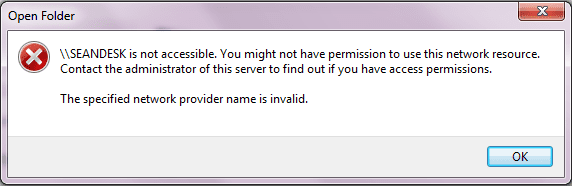
network.PNG

I am the only user on this computer and am part of the administrators group.
 

My Computer

Computer Manufacturer/Model Number
Intel WBIBX10J
OS
Linux (Debian, Android)
CPU
Intel Core i7 860
Motherboard
Intel DP55WB
Memory
2x 2GB Kingston DDR3-1333
Graphics Card(s)
AMD Radeon HD 5750
Sound Card
Realtek ALC888
Monitor(s) Displays
2x Dell Inc. E248WFP
Screen Resolution
3840x1200
Hard Drives
Intel X25-V
Samsung HD103SJ
PSU
Corsair CX400
Case
Silverstone GD05
Cooling
Stock
Keyboard
Dell Inc. Bluetooth Wireless
Internet Speed
30 Mbps
Do you have access to those computers that you are trying to access?
 

My Computers

System One System Two

  • Computer type
    PC/Desktop
    Computer Manufacturer/Model Number
    The Beast Model A (homebrew)
    OS
    Windows 11 21H2 Current build
    CPU
    AMD Ryzen 9 3950X
    Motherboard
    MSI MEG X570 GODLIKE
    Memory
    4 * 32 GB - Corsair Vengeance 3600 MHz
    Graphics Card(s)
    EVGA GeForce RTX 3080 Ti XC3 ULTRA GAMING (12G-P5-3955-KR)
    Sound Card
    Realtek® ALC1220 Codec
    Monitor(s) Displays
    2x Eve Spectrum ES07D03 4K Gaming Monitor (Matte) | Eve Spec
    Screen Resolution
    3x 3840 x 2160
    Hard Drives
    3x Samsung 980 Pro NVMe PCIe 4 M.2 2 TB SSD (MZ-V8P2T0B/AM) } 3x Sabrent Rocket NVMe 4.0 1 TB SSD
    PSU
    PC Power & Cooling’s Silencer Series 1050 Watt, 80 Plus Plat
    Case
    Fractal Design Define 7 XL Dark ATX Full Tower Case
    Cooling
    SteelSeries Apex Pro Wired Gaming Keyboard
    Keyboard
    SteelSeries Apex Pro
    Mouse
    Logitech MX Master 3S | MX Master 3 for business
    Internet Speed
    AT&T LightSpeed Gigabit Duplex Ftth
    Antivirus
    Windows Defender + MB 3
    Browser
    Nightly (default) + Firefox (stable),Chrome, Edge
  • Computer type
    PC/Desktop
    System Manufacturer/Model Number
    Dell Latitude E5470
    OS
    ChromeOS Flex Dev Channel (current)
    CPU
    Intel(R) Core(TM) i5-6300U CPU @ 2.40GHz, 2501 Mhz, 2 Core(s), 4 Logical Processor(s)
    Motherboard
    Dell
    Memory
    16 GB
    Graphics Card(s)
    Intel(R) HD Graphics 520
    Sound Card
    Intel(R) HD Graphics 520 + RealTek Audio
    Monitor(s) Displays
    Dell laptop display 15"
    Screen Resolution
    1920 * 1080
    Hard Drives
    Toshiba 128GB M.2 22300 drive
    INTEL Cherryville 520 Series SSDSC2CW180A 180 GB SATA III SSD
    PSU
    Dell
    Case
    Dell
    Cooling
    Dell
    Keyboard
    Dell
    Mouse
    Logitech MX Master 3S (shared w. Sys 1) | Dell TouchPad
    Internet Speed
    AT&T LightSpeed Gigabit Duplex Ftth

My Computer

Computer Manufacturer/Model Number
Custom Built
OS
Windows 7 Rc Build 7264 x86, Ubuntu
CPU
Intel Q8200 Quad Core
Motherboard
Asus P5QL
Memory
2 Gb
Graphics Card(s)
nVidia 8400GS
Sound Card
Stock Realtek HD Audio
Monitor(s) Displays
Hp 2207h and LG 42in LCD
Screen Resolution
1680 x 1050, 1360 x 768
Hard Drives
250 Gb seagate internal, (2) Western Digital 1 Tb external
PSU
Corsair 550W
Case
Thermaltake DH 102
Cooling
Unmodified
Keyboard
Microsoft Wireless
Mouse
Microsoft Wireless
Internet Speed
Time Warner - 15mb\s
Other Info
4 ATI Digital Cable Tuners, 1 XBox 360, Life|Ware home automation,Yamaha RX-V765, Harmony 1000 Remote
The one I'm trying to access is my own computer. I tried resetting the windows firewall to default policy and turned network discovery and file sharing back on but that didn't change anything.

I have no other software firewall.
 

My Computer

Computer Manufacturer/Model Number
Intel WBIBX10J
OS
Linux (Debian, Android)
CPU
Intel Core i7 860
Motherboard
Intel DP55WB
Memory
2x 2GB Kingston DDR3-1333
Graphics Card(s)
AMD Radeon HD 5750
Sound Card
Realtek ALC888
Monitor(s) Displays
2x Dell Inc. E248WFP
Screen Resolution
3840x1200
Hard Drives
Intel X25-V
Samsung HD103SJ
PSU
Corsair CX400
Case
Silverstone GD05
Cooling
Stock
Keyboard
Dell Inc. Bluetooth Wireless
Internet Speed
30 Mbps
you cannot access your own computer *from* your own computer?

Hmm - interesting - I have mine working perfectly fine. What AV software are you using?
 

My Computers

System One System Two

  • Computer type
    PC/Desktop
    Computer Manufacturer/Model Number
    The Beast Model A (homebrew)
    OS
    Windows 11 21H2 Current build
    CPU
    AMD Ryzen 9 3950X
    Motherboard
    MSI MEG X570 GODLIKE
    Memory
    4 * 32 GB - Corsair Vengeance 3600 MHz
    Graphics Card(s)
    EVGA GeForce RTX 3080 Ti XC3 ULTRA GAMING (12G-P5-3955-KR)
    Sound Card
    Realtek® ALC1220 Codec
    Monitor(s) Displays
    2x Eve Spectrum ES07D03 4K Gaming Monitor (Matte) | Eve Spec
    Screen Resolution
    3x 3840 x 2160
    Hard Drives
    3x Samsung 980 Pro NVMe PCIe 4 M.2 2 TB SSD (MZ-V8P2T0B/AM) } 3x Sabrent Rocket NVMe 4.0 1 TB SSD
    PSU
    PC Power & Cooling’s Silencer Series 1050 Watt, 80 Plus Plat
    Case
    Fractal Design Define 7 XL Dark ATX Full Tower Case
    Cooling
    SteelSeries Apex Pro Wired Gaming Keyboard
    Keyboard
    SteelSeries Apex Pro
    Mouse
    Logitech MX Master 3S | MX Master 3 for business
    Internet Speed
    AT&T LightSpeed Gigabit Duplex Ftth
    Antivirus
    Windows Defender + MB 3
    Browser
    Nightly (default) + Firefox (stable),Chrome, Edge
  • Computer type
    PC/Desktop
    System Manufacturer/Model Number
    Dell Latitude E5470
    OS
    ChromeOS Flex Dev Channel (current)
    CPU
    Intel(R) Core(TM) i5-6300U CPU @ 2.40GHz, 2501 Mhz, 2 Core(s), 4 Logical Processor(s)
    Motherboard
    Dell
    Memory
    16 GB
    Graphics Card(s)
    Intel(R) HD Graphics 520
    Sound Card
    Intel(R) HD Graphics 520 + RealTek Audio
    Monitor(s) Displays
    Dell laptop display 15"
    Screen Resolution
    1920 * 1080
    Hard Drives
    Toshiba 128GB M.2 22300 drive
    INTEL Cherryville 520 Series SSDSC2CW180A 180 GB SATA III SSD
    PSU
    Dell
    Case
    Dell
    Cooling
    Dell
    Keyboard
    Dell
    Mouse
    Logitech MX Master 3S (shared w. Sys 1) | Dell TouchPad
    Internet Speed
    AT&T LightSpeed Gigabit Duplex Ftth
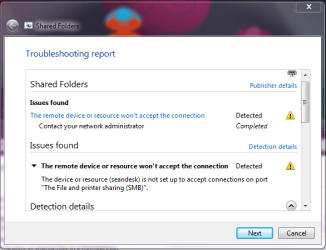
This is what it says in the troubleshooter:

sharedfolder.PNG

I'm using Microsoft Security Essentials 64-bit.
 

My Computer

Computer Manufacturer/Model Number
Intel WBIBX10J
OS
Linux (Debian, Android)
CPU
Intel Core i7 860
Motherboard
Intel DP55WB
Memory
2x 2GB Kingston DDR3-1333
Graphics Card(s)
AMD Radeon HD 5750
Sound Card
Realtek ALC888
Monitor(s) Displays
2x Dell Inc. E248WFP
Screen Resolution
3840x1200
Hard Drives
Intel X25-V
Samsung HD103SJ
PSU
Corsair CX400
Case
Silverstone GD05
Cooling
Stock
Keyboard
Dell Inc. Bluetooth Wireless
Internet Speed
30 Mbps
That might be the issue then. Try disabling that and see if it works- also, did you let the troubleshooter complete all tasks?
 

My Computers

System One System Two

  • Computer type
    PC/Desktop
    Computer Manufacturer/Model Number
    The Beast Model A (homebrew)
    OS
    Windows 11 21H2 Current build
    CPU
    AMD Ryzen 9 3950X
    Motherboard
    MSI MEG X570 GODLIKE
    Memory
    4 * 32 GB - Corsair Vengeance 3600 MHz
    Graphics Card(s)
    EVGA GeForce RTX 3080 Ti XC3 ULTRA GAMING (12G-P5-3955-KR)
    Sound Card
    Realtek® ALC1220 Codec
    Monitor(s) Displays
    2x Eve Spectrum ES07D03 4K Gaming Monitor (Matte) | Eve Spec
    Screen Resolution
    3x 3840 x 2160
    Hard Drives
    3x Samsung 980 Pro NVMe PCIe 4 M.2 2 TB SSD (MZ-V8P2T0B/AM) } 3x Sabrent Rocket NVMe 4.0 1 TB SSD
    PSU
    PC Power & Cooling’s Silencer Series 1050 Watt, 80 Plus Plat
    Case
    Fractal Design Define 7 XL Dark ATX Full Tower Case
    Cooling
    SteelSeries Apex Pro Wired Gaming Keyboard
    Keyboard
    SteelSeries Apex Pro
    Mouse
    Logitech MX Master 3S | MX Master 3 for business
    Internet Speed
    AT&T LightSpeed Gigabit Duplex Ftth
    Antivirus
    Windows Defender + MB 3
    Browser
    Nightly (default) + Firefox (stable),Chrome, Edge
  • Computer type
    PC/Desktop
    System Manufacturer/Model Number
    Dell Latitude E5470
    OS
    ChromeOS Flex Dev Channel (current)
    CPU
    Intel(R) Core(TM) i5-6300U CPU @ 2.40GHz, 2501 Mhz, 2 Core(s), 4 Logical Processor(s)
    Motherboard
    Dell
    Memory
    16 GB
    Graphics Card(s)
    Intel(R) HD Graphics 520
    Sound Card
    Intel(R) HD Graphics 520 + RealTek Audio
    Monitor(s) Displays
    Dell laptop display 15"
    Screen Resolution
    1920 * 1080
    Hard Drives
    Toshiba 128GB M.2 22300 drive
    INTEL Cherryville 520 Series SSDSC2CW180A 180 GB SATA III SSD
    PSU
    Dell
    Case
    Dell
    Cooling
    Dell
    Keyboard
    Dell
    Mouse
    Logitech MX Master 3S (shared w. Sys 1) | Dell TouchPad
    Internet Speed
    AT&T LightSpeed Gigabit Duplex Ftth
Yeah I let the troubleshooter go through all the steps and disabled/renabled file sharing.

I tried pinging \\seandesk and net view \\seandesk and both were successful.

I also flushed the DNS cache and restarted the DNS Client service.

None of that seemed to fix it.
 

My Computer

Computer Manufacturer/Model Number
Intel WBIBX10J
OS
Linux (Debian, Android)
CPU
Intel Core i7 860
Motherboard
Intel DP55WB
Memory
2x 2GB Kingston DDR3-1333
Graphics Card(s)
AMD Radeon HD 5750
Sound Card
Realtek ALC888
Monitor(s) Displays
2x Dell Inc. E248WFP
Screen Resolution
3840x1200
Hard Drives
Intel X25-V
Samsung HD103SJ
PSU
Corsair CX400
Case
Silverstone GD05
Cooling
Stock
Keyboard
Dell Inc. Bluetooth Wireless
Internet Speed
30 Mbps
Are your public folders on? Also, was this an upgrade or a clean install? I have had some major issues with upgrading in terms of permissions problems with folders on a second HD that is not the system drive yet where I do store system-related stuff, like program files for games installations, my Special folders, etc.
 

My Computers

System One System Two

  • Computer type
    PC/Desktop
    Computer Manufacturer/Model Number
    The Beast Model A (homebrew)
    OS
    Windows 11 21H2 Current build
    CPU
    AMD Ryzen 9 3950X
    Motherboard
    MSI MEG X570 GODLIKE
    Memory
    4 * 32 GB - Corsair Vengeance 3600 MHz
    Graphics Card(s)
    EVGA GeForce RTX 3080 Ti XC3 ULTRA GAMING (12G-P5-3955-KR)
    Sound Card
    Realtek® ALC1220 Codec
    Monitor(s) Displays
    2x Eve Spectrum ES07D03 4K Gaming Monitor (Matte) | Eve Spec
    Screen Resolution
    3x 3840 x 2160
    Hard Drives
    3x Samsung 980 Pro NVMe PCIe 4 M.2 2 TB SSD (MZ-V8P2T0B/AM) } 3x Sabrent Rocket NVMe 4.0 1 TB SSD
    PSU
    PC Power & Cooling’s Silencer Series 1050 Watt, 80 Plus Plat
    Case
    Fractal Design Define 7 XL Dark ATX Full Tower Case
    Cooling
    SteelSeries Apex Pro Wired Gaming Keyboard
    Keyboard
    SteelSeries Apex Pro
    Mouse
    Logitech MX Master 3S | MX Master 3 for business
    Internet Speed
    AT&T LightSpeed Gigabit Duplex Ftth
    Antivirus
    Windows Defender + MB 3
    Browser
    Nightly (default) + Firefox (stable),Chrome, Edge
  • Computer type
    PC/Desktop
    System Manufacturer/Model Number
    Dell Latitude E5470
    OS
    ChromeOS Flex Dev Channel (current)
    CPU
    Intel(R) Core(TM) i5-6300U CPU @ 2.40GHz, 2501 Mhz, 2 Core(s), 4 Logical Processor(s)
    Motherboard
    Dell
    Memory
    16 GB
    Graphics Card(s)
    Intel(R) HD Graphics 520
    Sound Card
    Intel(R) HD Graphics 520 + RealTek Audio
    Monitor(s) Displays
    Dell laptop display 15"
    Screen Resolution
    1920 * 1080
    Hard Drives
    Toshiba 128GB M.2 22300 drive
    INTEL Cherryville 520 Series SSDSC2CW180A 180 GB SATA III SSD
    PSU
    Dell
    Case
    Dell
    Cooling
    Dell
    Keyboard
    Dell
    Mouse
    Logitech MX Master 3S (shared w. Sys 1) | Dell TouchPad
    Internet Speed
    AT&T LightSpeed Gigabit Duplex Ftth
Check your WORKGROUP. Make sure it is the same on all computers. (go to control panel, system)
 

My Computer

Computer Manufacturer/Model Number
a BOBPUTER (I'm Bob)
OS
Windows 7 64bit
CPU
AMD 955 Quad Black Edition
Motherboard
ASUS M3A78-T
Memory
8 GB OCZ
Graphics Card(s)
ATI 4890 1GB DDR3
Sound Card
7.1 Digital
Monitor(s) Displays
HD 1080i
Screen Resolution
1080i
Hard Drives
4 WD VelociRaptor 300gb,
4 Samaung 7200.11 1TB
PSU
850W Ultra X3
Case
Antec Full Tower
Cooling
Zalman MFC2
Internet Speed
Int: Xtreme-N wireless. Ext: Cable 10+down, 1+up
Other Info
Other O/S: XP, Vista, Ubuntu(full) ,Ubuntu Netbook Remix
you cannot access your own computer *from* your own computer?

Hmm - interesting - I have mine working perfectly fine. What AV software are you using?

same computer - as in I am logged into TheBeastIV trying to access (via network) TheBeastIV.
 

My Computers

System One System Two

  • Computer type
    PC/Desktop
    Computer Manufacturer/Model Number
    The Beast Model A (homebrew)
    OS
    Windows 11 21H2 Current build
    CPU
    AMD Ryzen 9 3950X
    Motherboard
    MSI MEG X570 GODLIKE
    Memory
    4 * 32 GB - Corsair Vengeance 3600 MHz
    Graphics Card(s)
    EVGA GeForce RTX 3080 Ti XC3 ULTRA GAMING (12G-P5-3955-KR)
    Sound Card
    Realtek® ALC1220 Codec
    Monitor(s) Displays
    2x Eve Spectrum ES07D03 4K Gaming Monitor (Matte) | Eve Spec
    Screen Resolution
    3x 3840 x 2160
    Hard Drives
    3x Samsung 980 Pro NVMe PCIe 4 M.2 2 TB SSD (MZ-V8P2T0B/AM) } 3x Sabrent Rocket NVMe 4.0 1 TB SSD
    PSU
    PC Power & Cooling’s Silencer Series 1050 Watt, 80 Plus Plat
    Case
    Fractal Design Define 7 XL Dark ATX Full Tower Case
    Cooling
    SteelSeries Apex Pro Wired Gaming Keyboard
    Keyboard
    SteelSeries Apex Pro
    Mouse
    Logitech MX Master 3S | MX Master 3 for business
    Internet Speed
    AT&T LightSpeed Gigabit Duplex Ftth
    Antivirus
    Windows Defender + MB 3
    Browser
    Nightly (default) + Firefox (stable),Chrome, Edge
  • Computer type
    PC/Desktop
    System Manufacturer/Model Number
    Dell Latitude E5470
    OS
    ChromeOS Flex Dev Channel (current)
    CPU
    Intel(R) Core(TM) i5-6300U CPU @ 2.40GHz, 2501 Mhz, 2 Core(s), 4 Logical Processor(s)
    Motherboard
    Dell
    Memory
    16 GB
    Graphics Card(s)
    Intel(R) HD Graphics 520
    Sound Card
    Intel(R) HD Graphics 520 + RealTek Audio
    Monitor(s) Displays
    Dell laptop display 15"
    Screen Resolution
    1920 * 1080
    Hard Drives
    Toshiba 128GB M.2 22300 drive
    INTEL Cherryville 520 Series SSDSC2CW180A 180 GB SATA III SSD
    PSU
    Dell
    Case
    Dell
    Cooling
    Dell
    Keyboard
    Dell
    Mouse
    Logitech MX Master 3S (shared w. Sys 1) | Dell TouchPad
    Internet Speed
    AT&T LightSpeed Gigabit Duplex Ftth
Check your WORKGROUP. Make sure it is the same on all computers. (go to control panel, system)

It's the same default WORKGROUP for all computers and I'm not on a domain.

I'm really confused why this is happening, but I'm inclined it has something to do with HomeGroup since I had that set up but then left it.

Also this is a clean install of 7100 x64
 

My Computer

Computer Manufacturer/Model Number
Intel WBIBX10J
OS
Linux (Debian, Android)
CPU
Intel Core i7 860
Motherboard
Intel DP55WB
Memory
2x 2GB Kingston DDR3-1333
Graphics Card(s)
AMD Radeon HD 5750
Sound Card
Realtek ALC888
Monitor(s) Displays
2x Dell Inc. E248WFP
Screen Resolution
3840x1200
Hard Drives
Intel X25-V
Samsung HD103SJ
PSU
Corsair CX400
Case
Silverstone GD05
Cooling
Stock
Keyboard
Dell Inc. Bluetooth Wireless
Internet Speed
30 Mbps
I just recently had some issues with Homegroup, and subsequently left the home group in favor of traditional Network file sharing, and solved the network access problem by rebooting the Modem, Router and each machine. Everything became unlocked then.

But first I spent a few hours trying to "figure out the problem" . Hopefully, it is something that simple for you...
 

My Computer

Computer Manufacturer/Model Number
HTPC
OS
Windows 7 Home Premium x64,
CPU
E5200
Motherboard
EVGA 730i
Memory
4GB Nvidia 6400
Graphics Card(s)
EVGA8500GT + Onboard
Sound Card
Onboard S/Pdif to Sony STR DG710
Monitor(s) Displays
Bravia 40" LCD
Screen Resolution
1080p
Hard Drives
WD Black250g Sata
PSU
Ultra LSP 550w
Case
Thermaltake Bach with Pinnacle ir reciever in display window
Keyboard
BTC 9019URF, URC RF200 Remote
Mouse
Integrated joystick
Internet Speed
depends on the state of the dilithium crystal
Other Info
Workstation: Thermaltake Shark Dual Boot XP Pro, Windows 7 Home Premiumx64, 6GB Corsair 6400, Same Board and Processor as HTPC, WD Black 250GB(XP), WD Blue 250GB(7x64), 2x WDBlue 500GB
Server: Shuttle xpc, Freenas , 2TB
networking

Every time I try to access a computer on the network I get this error:

View attachment 16525


OK we need all the specs of your computer and network

But I will bet that you have a new win 7 install and the other computer is on xp, right?

Ken

I am the only user on this computer and am part of the administrators group.[/QUOTE]
 

My Computer

Computer Manufacturer/Model Number
HP Pavillion dv-7 1005 Tx
OS
Win 8 Release candidate 8400
CPU
[email protected]
Memory
4 gigs
Graphics Card(s)
Nvidia 9600M
Sound Card
HD built-in
Monitor(s) Displays
17" Wxga
Screen Resolution
1440x900
Cooling
none
Internet Speed
45Mb down 5Mb up
Both computers have windows 7 x64 build 7100 one is a laptop with Dell wireless-g network card the other is a desktop with a Linksys wireless-g network card.

I already tried rebooting the router remotely and each computer.
 

My Computer

Computer Manufacturer/Model Number
Intel WBIBX10J
OS
Linux (Debian, Android)
CPU
Intel Core i7 860
Motherboard
Intel DP55WB
Memory
2x 2GB Kingston DDR3-1333
Graphics Card(s)
AMD Radeon HD 5750
Sound Card
Realtek ALC888
Monitor(s) Displays
2x Dell Inc. E248WFP
Screen Resolution
3840x1200
Hard Drives
Intel X25-V
Samsung HD103SJ
PSU
Corsair CX400
Case
Silverstone GD05
Cooling
Stock
Keyboard
Dell Inc. Bluetooth Wireless
Internet Speed
30 Mbps
permissions prob

Both computers have windows 7 x64 build 7100 one is a laptop with Dell wireless-g network card the other is a desktop with a Linksys wireless-g network card.

I already tried rebooting the router remotely and each computer.

That error only comes up if the other computer is not connected, or if there is something wrong in network permissions. can you see the other computers in networking (without connecting)?

Is it a homegroup?
do you have the password the same on both computers?
is the homegroup the same?

I hate to suggest simple stuff like this but sometimes it is that simple.

Hope this helps a bit, let us know

Ken
 

My Computer

Computer Manufacturer/Model Number
HP Pavillion dv-7 1005 Tx
OS
Win 8 Release candidate 8400
CPU
[email protected]
Memory
4 gigs
Graphics Card(s)
Nvidia 9600M
Sound Card
HD built-in
Monitor(s) Displays
17" Wxga
Screen Resolution
1440x900
Cooling
none
Internet Speed
45Mb down 5Mb up
That error only comes up if the other computer is not connected, or if there is something wrong in network permissions. can you see the other computers in networking (without connecting)?

Is it a homegroup?
do you have the password the same on both computers?
is the homegroup the same?

I hate to suggest simple stuff like this but sometimes it is that simple.

Hope this helps a bit, let us know

Ken

Yes I can see other computers in the network but I cannot connect to them as it gives me the same error. I am not in a HomeGroup.
 

My Computer

Computer Manufacturer/Model Number
Intel WBIBX10J
OS
Linux (Debian, Android)
CPU
Intel Core i7 860
Motherboard
Intel DP55WB
Memory
2x 2GB Kingston DDR3-1333
Graphics Card(s)
AMD Radeon HD 5750
Sound Card
Realtek ALC888
Monitor(s) Displays
2x Dell Inc. E248WFP
Screen Resolution
3840x1200
Hard Drives
Intel X25-V
Samsung HD103SJ
PSU
Corsair CX400
Case
Silverstone GD05
Cooling
Stock
Keyboard
Dell Inc. Bluetooth Wireless
Internet Speed
30 Mbps
networking

Yes I can see other computers in the network but I cannot connect to them as it gives me the same error. I am not in a HomeGroup.

OK
Not a homegroup, then a workgroup. what are you trying to access on the other computer? is it a shared lib, or data like in xp networking? who owns the data you are trying to access? Is the user id the same on both computers/

Ken
 

My Computer

Computer Manufacturer/Model Number
HP Pavillion dv-7 1005 Tx
OS
Win 8 Release candidate 8400
CPU
[email protected]
Memory
4 gigs
Graphics Card(s)
Nvidia 9600M
Sound Card
HD built-in
Monitor(s) Displays
17" Wxga
Screen Resolution
1440x900
Cooling
none
Internet Speed
45Mb down 5Mb up
Really I'm just trying to access my own computer through the network right now since that is supposed to work as it does on my laptop with same operating system. Both my laptop and desktop are on WORKGROUP, yes. The user ID and password is the same on both computers and all the data is my own. The shares are located at \\<COMPUTERNAME>\Users\Public on each computer. I tried reseting windows firewall to default policies and then turning it off. I tried resetting my router, and restarting my computer. I tried deleting stored Generic Credentials and flushing the DNS cache.
 

My Computer

Computer Manufacturer/Model Number
Intel WBIBX10J
OS
Linux (Debian, Android)
CPU
Intel Core i7 860
Motherboard
Intel DP55WB
Memory
2x 2GB Kingston DDR3-1333
Graphics Card(s)
AMD Radeon HD 5750
Sound Card
Realtek ALC888
Monitor(s) Displays
2x Dell Inc. E248WFP
Screen Resolution
3840x1200
Hard Drives
Intel X25-V
Samsung HD103SJ
PSU
Corsair CX400
Case
Silverstone GD05
Cooling
Stock
Keyboard
Dell Inc. Bluetooth Wireless
Internet Speed
30 Mbps
Back
Top