Solved Cant access partition, slow system & file record segment unreadable.

Jumanji, I guess no drive letters because it was taken from bootable PW?!

Green drives are best for backup as they have a tech called IntelliPower, which slows and powers down the drive to prolong life and save energy. If 1TB is enough for you, you can also consider a Blue (max 1 TB). Similar to a black in features but 2 year warranty, price should be more affordable.

Programs are best to be kept on the SSD, they don't take very much space. Unless you have a 10GB program :p There are apps that can change the location of installed apps (Application Mover - Funduc Software). But I guess you would need to be able to access the problem partition in the first place.
 
Last edited:

My Computer My Computer

At a glance

Windows 7 Ultimate x64 SP1AMD Phenom 2 1090T2x8GB Kingston HyperX Fury Black 1600Mhz Unga...MSI GTX 970 Gaming 4G
Computer type
PC/Desktop
Computer Manufacturer/Model Number
Custom Build
OS
Windows 7 Ultimate x64 SP1
CPU
AMD Phenom 2 1090T
Motherboard
Gigabyte GA-890FXA-UD5
Memory
2x8GB Kingston HyperX Fury Black 1600Mhz Unganged
Graphics Card(s)
MSI GTX 970 Gaming 4G
Sound Card
Realtek On-Board HD 7.1 Audio / Logitech G35
Monitor(s) Displays
3xAcer GD245HQ
Screen Resolution
1920x1080
Hard Drives
Samsung 850 Pro 512GB SSD - OS /
WD Caviar Black SATA 3 - 1 TBx2 - Dynamic RAID 0 /
WD Caviar Green SATA 2 - 640GBx2 - Dynamic RAID 0 /
WD Caviar Green SATA 2 - 640GB - Internal Backup /
Seagate Barracude SATA 3 - 3TB - External Backup/ Sync
PSU
HighPower 1000W
Case
Cooler Master HAF 932
Cooling
Noctua NH-D14
Keyboard
Logitech G19
Mouse
Logitech G500
Internet Speed
100/4 Mbit Cable (100GB quota)
Antivirus
ZoneAlarm Extreme Security / MBAM Pro / MBAE Free / SAS Free
Browser
IE 11 - Firefox - Chrome
Other Info
Logitech F710/ G27/ G940/ Z5500 // TrackIR 5 // Nvidia 3D Surround Vision
Jumanji, I guess no drive letters because it was taken from bootable PW....

Yep, It struck me immediately after I posted the query. PW bootable runs on Linux. Long since I ran it from a bootable drive and my memory fails and shows up.:D

As regards the program files OP may consider uninstalling those programs and reinstalling again without shifting the install location. Atleast after facing this problem, he should consider that. But then it is upto him if there is a space constraint. ( I also during the initial days used to install the programs on a separate partition but the same drive. Later I felt it was a big botheration since every time I back up the OS partition, I also need to backup the programs partition to be in sync. I changed over to OS+programs all-in-one.)
 

My Computer My Computer

At a glance

Windows 7 Home Premium 32 bit
OS
Windows 7 Home Premium 32 bit
Got a brand new 1TB Caviar Black; let's hope it doesn't break this time! Took SSD out, left failing HDD in, and put the new one in.

I've started using ddrescue, but I get this message, is that ok? Are the drives selected ok? I'm really confused as to what to replace /sdb and /sdc with :(
 

Attachments

  • 20150918_211828[1].jpg
    20150918_211828[1].jpg
    678.6 KB · Views: 2

My Computer My Computer

At a glance

Windows 7 64-bit UltimateIntel i5-3570K @ OC 4.5GhZ8GB Corsair Vengeance 1600MhZASUS GeForce GTX 560 1GB GDDR5
OS
Windows 7 64-bit Ultimate
CPU
Intel i5-3570K @ OC 4.5GhZ
Motherboard
Gigabyte Z77-D3H
Memory
8GB Corsair Vengeance 1600MhZ
Graphics Card(s)
ASUS GeForce GTX 560 1GB GDDR5
Sound Card
Creative SoundBlaster Audigy SE
Hard Drives
120GB Corsair Force 3 SSD
1TB Western Digital Caviar Blue 7200rpm
PSU
Corsair 600W
Cooling
Noctua NH-D14
Now, I am not very knowledgeable with Linux but this is how Linux names the drives.

The first SATA(I believe SCSI too) disk is named sda (Sata Disk A - SDA)
The second one SDB and goes on.
Then the first partition on SDA is named SDA1, then SDA2. etc.

So your original HDD is sda (also as shown in your screenshot, this is because you removed SSD, or else (most likely) SSD would be sda and the failing drive would be sdb). You only need to try to recover sda3 (the problem partition). Just copy paste the first 2 partitions to another place (for example image with Macrium to your 2TB - then you can restore them back to the new drive later). Once you image the first 2 partitions, only try to recover sda3.

I would guess the command would then be (I hope) - you should wait for Jumanji (should be sleeping now, or partying hard! :D) as he is the expert here:
Code:
ddrescue -d -f -r3 /dev/sda3 /dev/sdb recovery.log
 

My Computer My Computer

At a glance

Windows 7 Ultimate x64 SP1AMD Phenom 2 1090T2x8GB Kingston HyperX Fury Black 1600Mhz Unga...MSI GTX 970 Gaming 4G
Computer type
PC/Desktop
Computer Manufacturer/Model Number
Custom Build
OS
Windows 7 Ultimate x64 SP1
CPU
AMD Phenom 2 1090T
Motherboard
Gigabyte GA-890FXA-UD5
Memory
2x8GB Kingston HyperX Fury Black 1600Mhz Unganged
Graphics Card(s)
MSI GTX 970 Gaming 4G
Sound Card
Realtek On-Board HD 7.1 Audio / Logitech G35
Monitor(s) Displays
3xAcer GD245HQ
Screen Resolution
1920x1080
Hard Drives
Samsung 850 Pro 512GB SSD - OS /
WD Caviar Black SATA 3 - 1 TBx2 - Dynamic RAID 0 /
WD Caviar Green SATA 2 - 640GBx2 - Dynamic RAID 0 /
WD Caviar Green SATA 2 - 640GB - Internal Backup /
Seagate Barracude SATA 3 - 3TB - External Backup/ Sync
PSU
HighPower 1000W
Case
Cooler Master HAF 932
Cooling
Noctua NH-D14
Keyboard
Logitech G19
Mouse
Logitech G500
Internet Speed
100/4 Mbit Cable (100GB quota)
Antivirus
ZoneAlarm Extreme Security / MBAM Pro / MBAE Free / SAS Free
Browser
IE 11 - Firefox - Chrome
Other Info
Logitech F710/ G27/ G940/ Z5500 // TrackIR 5 // Nvidia 3D Surround Vision
I was under the impression that this tool recovers all partitions? I think I have burned all of my CDs now with different software haha.

However, thanks for your explanation. I'll wait for jumanji's confirmation, just to be on the safe side!
 

My Computer My Computer

At a glance

Windows 7 64-bit UltimateIntel i5-3570K @ OC 4.5GhZ8GB Corsair Vengeance 1600MhZASUS GeForce GTX 560 1GB GDDR5
OS
Windows 7 64-bit Ultimate
CPU
Intel i5-3570K @ OC 4.5GhZ
Motherboard
Gigabyte Z77-D3H
Memory
8GB Corsair Vengeance 1600MhZ
Graphics Card(s)
ASUS GeForce GTX 560 1GB GDDR5
Sound Card
Creative SoundBlaster Audigy SE
Hard Drives
120GB Corsair Force 3 SSD
1TB Western Digital Caviar Blue 7200rpm
PSU
Corsair 600W
Cooling
Noctua NH-D14
It can, but why waste time a slow recovery when you can already read the 2 good partitions.

The correct for what Jumanji told is:
/dev/sda /dev/sdb
 

My Computer My Computer

At a glance

Windows 7 Ultimate x64 SP1AMD Phenom 2 1090T2x8GB Kingston HyperX Fury Black 1600Mhz Unga...MSI GTX 970 Gaming 4G
Computer type
PC/Desktop
Computer Manufacturer/Model Number
Custom Build
OS
Windows 7 Ultimate x64 SP1
CPU
AMD Phenom 2 1090T
Motherboard
Gigabyte GA-890FXA-UD5
Memory
2x8GB Kingston HyperX Fury Black 1600Mhz Unganged
Graphics Card(s)
MSI GTX 970 Gaming 4G
Sound Card
Realtek On-Board HD 7.1 Audio / Logitech G35
Monitor(s) Displays
3xAcer GD245HQ
Screen Resolution
1920x1080
Hard Drives
Samsung 850 Pro 512GB SSD - OS /
WD Caviar Black SATA 3 - 1 TBx2 - Dynamic RAID 0 /
WD Caviar Green SATA 2 - 640GBx2 - Dynamic RAID 0 /
WD Caviar Green SATA 2 - 640GB - Internal Backup /
Seagate Barracude SATA 3 - 3TB - External Backup/ Sync
PSU
HighPower 1000W
Case
Cooler Master HAF 932
Cooling
Noctua NH-D14
Keyboard
Logitech G19
Mouse
Logitech G500
Internet Speed
100/4 Mbit Cable (100GB quota)
Antivirus
ZoneAlarm Extreme Security / MBAM Pro / MBAE Free / SAS Free
Browser
IE 11 - Firefox - Chrome
Other Info
Logitech F710/ G27/ G940/ Z5500 // TrackIR 5 // Nvidia 3D Surround Vision
So to summarize:

ddrescue -d -f -r3 /dev/sda /dev/sdb recovery.log
...to rescue lost partition.

Then, copy over two remaining partitions using Macrium (is it available to boot via CD?), correct? Would hate myself if I got this wrong.
 

My Computer My Computer

At a glance

Windows 7 64-bit UltimateIntel i5-3570K @ OC 4.5GhZ8GB Corsair Vengeance 1600MhZASUS GeForce GTX 560 1GB GDDR5
OS
Windows 7 64-bit Ultimate
CPU
Intel i5-3570K @ OC 4.5GhZ
Motherboard
Gigabyte Z77-D3H
Memory
8GB Corsair Vengeance 1600MhZ
Graphics Card(s)
ASUS GeForce GTX 560 1GB GDDR5
Sound Card
Creative SoundBlaster Audigy SE
Hard Drives
120GB Corsair Force 3 SSD
1TB Western Digital Caviar Blue 7200rpm
PSU
Corsair 600W
Cooling
Noctua NH-D14
Correction:
ddrescue -d -f -r3 /dev/sda /dev/sdb recovery.log
To rescue whole disk sda.

If you rescue whole disk as above, then there is no need to image the working partitions.

It was my thought that instead, image working partitions and only try to rescue the problematic one.

In any case wait for what Jumanji will tell. :)
 

My Computer My Computer

At a glance

Windows 7 Ultimate x64 SP1AMD Phenom 2 1090T2x8GB Kingston HyperX Fury Black 1600Mhz Unga...MSI GTX 970 Gaming 4G
Computer type
PC/Desktop
Computer Manufacturer/Model Number
Custom Build
OS
Windows 7 Ultimate x64 SP1
CPU
AMD Phenom 2 1090T
Motherboard
Gigabyte GA-890FXA-UD5
Memory
2x8GB Kingston HyperX Fury Black 1600Mhz Unganged
Graphics Card(s)
MSI GTX 970 Gaming 4G
Sound Card
Realtek On-Board HD 7.1 Audio / Logitech G35
Monitor(s) Displays
3xAcer GD245HQ
Screen Resolution
1920x1080
Hard Drives
Samsung 850 Pro 512GB SSD - OS /
WD Caviar Black SATA 3 - 1 TBx2 - Dynamic RAID 0 /
WD Caviar Green SATA 2 - 640GBx2 - Dynamic RAID 0 /
WD Caviar Green SATA 2 - 640GB - Internal Backup /
Seagate Barracude SATA 3 - 3TB - External Backup/ Sync
PSU
HighPower 1000W
Case
Cooler Master HAF 932
Cooling
Noctua NH-D14
Keyboard
Logitech G19
Mouse
Logitech G500
Internet Speed
100/4 Mbit Cable (100GB quota)
Antivirus
ZoneAlarm Extreme Security / MBAM Pro / MBAE Free / SAS Free
Browser
IE 11 - Firefox - Chrome
Other Info
Logitech F710/ G27/ G940/ Z5500 // TrackIR 5 // Nvidia 3D Surround Vision
It is better to rescue the whole disk since you have clarified that you had run datalifeguard Diagnostic and it found bad sectors. It can be spread all over the three partitions.

sda is your source drive ( since it shows all three partitions) sdb is your destination drive.

So go ahead with the command
ddrescue -d -f -r3 /dev/sda /dev/sdb recovery.log

It is the same as rightly given by Gokay but you will be cloning the whole drive sda instead of cloning only sda3 the third partition.

It may take quite a long time for the second and third pass. So leave it alone and get going with your other work. Don't sit in front of the computer twiddling your finger. Just peep in once in a while to see the progress.
 
Last edited:

My Computer My Computer

At a glance

Windows 7 Home Premium 32 bit
OS
Windows 7 Home Premium 32 bit
Note: After close observation I find that you had given the wrong command
ddrescue -r3 -n -v /dev/sdb /dev/sda recovery.log

In this case ddrescue will clone your new drive to your old drive

My instructions:

. Next against the command prompt type:ddrescue -d -f -r3 /dev/sdb /dev/sdc recovery.log [ENTER]
( Note: ddrescue[space]-d[space]-f[space]-r3[space]/dev/sdb[space]/dev/sdc[space]recovery.log)

Note: Replace sdb and sdc with the correct device nomenclature of Source disk(in your case the failing disk) and Destination disk ( in your case the other good disk you had plugged into the other SATA port) as obtained in step 3. Make doubly sure.

You should have replaced sdb with your source disk ( failing disk) sda and sdc the destination disk your new disk sdb

And then you gave the command ddrescue -r3 -n -v /dev/sda /dev/sdb recovery.log

I only hope no damage has been done to your source disk. Anyway check. Quit ddrescue, Pull out your ddrescue pendrive, run Partition Wizard and check that your old disk remains as before without any change.

If everything is OK run ddrescue . The command I repeat
ddrescue -d -f -r3 /dev/sda /dev/sdb recovery.log ( assuming you haven't changed the positions of your old drive and new drive in the desktop)- not -r3 -n -v

I also told you to buy a 1.5TB drive. By buying a 1TB HDD ( The same capacity as your failing disk) you have made identification of the correct nomenclature of the source disk and destination disk difficult.Thank God since sda shows three partitions I can identify sda as the source disk.

While doing a data recovery you should always adhere to the instructions. By wrong execution you can ruin your failing drive further.
 

My Computer My Computer

At a glance

Windows 7 Home Premium 32 bit
OS
Windows 7 Home Premium 32 bit
Thank God since sda shows three partitions I can identify sda as the source disk
That was how I was able to identify the faulty drive as sda as well. Then deducted why it got labeled as such knowing SSD was removed.
 

My Computer My Computer

At a glance

Windows 7 Ultimate x64 SP1AMD Phenom 2 1090T2x8GB Kingston HyperX Fury Black 1600Mhz Unga...MSI GTX 970 Gaming 4G
Computer type
PC/Desktop
Computer Manufacturer/Model Number
Custom Build
OS
Windows 7 Ultimate x64 SP1
CPU
AMD Phenom 2 1090T
Motherboard
Gigabyte GA-890FXA-UD5
Memory
2x8GB Kingston HyperX Fury Black 1600Mhz Unganged
Graphics Card(s)
MSI GTX 970 Gaming 4G
Sound Card
Realtek On-Board HD 7.1 Audio / Logitech G35
Monitor(s) Displays
3xAcer GD245HQ
Screen Resolution
1920x1080
Hard Drives
Samsung 850 Pro 512GB SSD - OS /
WD Caviar Black SATA 3 - 1 TBx2 - Dynamic RAID 0 /
WD Caviar Green SATA 2 - 640GBx2 - Dynamic RAID 0 /
WD Caviar Green SATA 2 - 640GB - Internal Backup /
Seagate Barracude SATA 3 - 3TB - External Backup/ Sync
PSU
HighPower 1000W
Case
Cooler Master HAF 932
Cooling
Noctua NH-D14
Keyboard
Logitech G19
Mouse
Logitech G500
Internet Speed
100/4 Mbit Cable (100GB quota)
Antivirus
ZoneAlarm Extreme Security / MBAM Pro / MBAE Free / SAS Free
Browser
IE 11 - Firefox - Chrome
Other Info
Logitech F710/ G27/ G940/ Z5500 // TrackIR 5 // Nvidia 3D Surround Vision
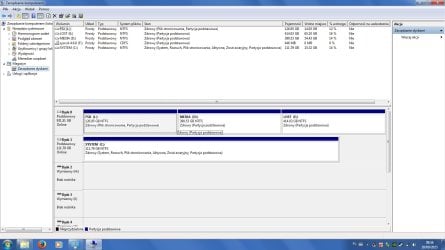
I have made a clone to the new drive, booted it up and it seems to run very well :) Every program I had installed runs fine, and I can access the lost partition! Here's a shot as requested from the Disk Manager; hoping that this is the end of the trouble...
 

Attachments

  • Untitled-1.jpg
    Untitled-1.jpg
    145.8 KB · Views: 9

My Computer My Computer

At a glance

Windows 7 64-bit UltimateIntel i5-3570K @ OC 4.5GhZ8GB Corsair Vengeance 1600MhZASUS GeForce GTX 560 1GB GDDR5
OS
Windows 7 64-bit Ultimate
CPU
Intel i5-3570K @ OC 4.5GhZ
Motherboard
Gigabyte Z77-D3H
Memory
8GB Corsair Vengeance 1600MhZ
Graphics Card(s)
ASUS GeForce GTX 560 1GB GDDR5
Sound Card
Creative SoundBlaster Audigy SE
Hard Drives
120GB Corsair Force 3 SSD
1TB Western Digital Caviar Blue 7200rpm
PSU
Corsair 600W
Cooling
Noctua NH-D14
Nice :) Did you run the ddrescue command or some other method? And did the faulty partition just showed up like that after cloning?

RMA the faulty one now? :D
 

My Computer My Computer

At a glance

Windows 7 Ultimate x64 SP1AMD Phenom 2 1090T2x8GB Kingston HyperX Fury Black 1600Mhz Unga...MSI GTX 970 Gaming 4G
Computer type
PC/Desktop
Computer Manufacturer/Model Number
Custom Build
OS
Windows 7 Ultimate x64 SP1
CPU
AMD Phenom 2 1090T
Motherboard
Gigabyte GA-890FXA-UD5
Memory
2x8GB Kingston HyperX Fury Black 1600Mhz Unganged
Graphics Card(s)
MSI GTX 970 Gaming 4G
Sound Card
Realtek On-Board HD 7.1 Audio / Logitech G35
Monitor(s) Displays
3xAcer GD245HQ
Screen Resolution
1920x1080
Hard Drives
Samsung 850 Pro 512GB SSD - OS /
WD Caviar Black SATA 3 - 1 TBx2 - Dynamic RAID 0 /
WD Caviar Green SATA 2 - 640GBx2 - Dynamic RAID 0 /
WD Caviar Green SATA 2 - 640GB - Internal Backup /
Seagate Barracude SATA 3 - 3TB - External Backup/ Sync
PSU
HighPower 1000W
Case
Cooler Master HAF 932
Cooling
Noctua NH-D14
Keyboard
Logitech G19
Mouse
Logitech G500
Internet Speed
100/4 Mbit Cable (100GB quota)
Antivirus
ZoneAlarm Extreme Security / MBAM Pro / MBAE Free / SAS Free
Browser
IE 11 - Firefox - Chrome
Other Info
Logitech F710/ G27/ G940/ Z5500 // TrackIR 5 // Nvidia 3D Surround Vision
Nice :) Did you run the ddrescue command or some other method? And did the faulty partition just showed up like that after cloning?

RMA the faulty one now? :D

I ran the last command given by Jumanji, and yes, it showed up like this.

What is RMA? Sorry if it's a stupid question.
 

My Computer My Computer

At a glance

Windows 7 64-bit UltimateIntel i5-3570K @ OC 4.5GhZ8GB Corsair Vengeance 1600MhZASUS GeForce GTX 560 1GB GDDR5
OS
Windows 7 64-bit Ultimate
CPU
Intel i5-3570K @ OC 4.5GhZ
Motherboard
Gigabyte Z77-D3H
Memory
8GB Corsair Vengeance 1600MhZ
Graphics Card(s)
ASUS GeForce GTX 560 1GB GDDR5
Sound Card
Creative SoundBlaster Audigy SE
Hard Drives
120GB Corsair Force 3 SSD
1TB Western Digital Caviar Blue 7200rpm
PSU
Corsair 600W
Cooling
Noctua NH-D14
Wiki:

RMA (Return Merchandise Authorization) - is a part of the process of
returning a product in order to receive a refund, replacement, or repair during
the product's warranty period.
 

My Computer My Computer

At a glance

Windows 7 Ultimate x64 SP1AMD Phenom 2 1090T2x8GB Kingston HyperX Fury Black 1600Mhz Unga...MSI GTX 970 Gaming 4G
Computer type
PC/Desktop
Computer Manufacturer/Model Number
Custom Build
OS
Windows 7 Ultimate x64 SP1
CPU
AMD Phenom 2 1090T
Motherboard
Gigabyte GA-890FXA-UD5
Memory
2x8GB Kingston HyperX Fury Black 1600Mhz Unganged
Graphics Card(s)
MSI GTX 970 Gaming 4G
Sound Card
Realtek On-Board HD 7.1 Audio / Logitech G35
Monitor(s) Displays
3xAcer GD245HQ
Screen Resolution
1920x1080
Hard Drives
Samsung 850 Pro 512GB SSD - OS /
WD Caviar Black SATA 3 - 1 TBx2 - Dynamic RAID 0 /
WD Caviar Green SATA 2 - 640GBx2 - Dynamic RAID 0 /
WD Caviar Green SATA 2 - 640GB - Internal Backup /
Seagate Barracude SATA 3 - 3TB - External Backup/ Sync
PSU
HighPower 1000W
Case
Cooler Master HAF 932
Cooling
Noctua NH-D14
Keyboard
Logitech G19
Mouse
Logitech G500
Internet Speed
100/4 Mbit Cable (100GB quota)
Antivirus
ZoneAlarm Extreme Security / MBAM Pro / MBAE Free / SAS Free
Browser
IE 11 - Firefox - Chrome
Other Info
Logitech F710/ G27/ G940/ Z5500 // TrackIR 5 // Nvidia 3D Surround Vision
RMA (Return Merchandise Authorization) - is a part of the process of returning a product in order to receive a refund, replacement, or repair during the product's warranty period.

I will be RMAing it then, yes.

Anything else left to do on the new drive? Windows wants to scan E on boot (I keep skipping), should I allow?
 

My Computer My Computer

At a glance

Windows 7 64-bit UltimateIntel i5-3570K @ OC 4.5GhZ8GB Corsair Vengeance 1600MhZASUS GeForce GTX 560 1GB GDDR5
OS
Windows 7 64-bit Ultimate
CPU
Intel i5-3570K @ OC 4.5GhZ
Motherboard
Gigabyte Z77-D3H
Memory
8GB Corsair Vengeance 1600MhZ
Graphics Card(s)
ASUS GeForce GTX 560 1GB GDDR5
Sound Card
Creative SoundBlaster Audigy SE
Hard Drives
120GB Corsair Force 3 SSD
1TB Western Digital Caviar Blue 7200rpm
PSU
Corsair 600W
Cooling
Noctua NH-D14

My Computer My Computer

At a glance

Windows 7 Ultimate x64 SP1AMD Phenom 2 1090T2x8GB Kingston HyperX Fury Black 1600Mhz Unga...MSI GTX 970 Gaming 4G
Computer type
PC/Desktop
Computer Manufacturer/Model Number
Custom Build
OS
Windows 7 Ultimate x64 SP1
CPU
AMD Phenom 2 1090T
Motherboard
Gigabyte GA-890FXA-UD5
Memory
2x8GB Kingston HyperX Fury Black 1600Mhz Unganged
Graphics Card(s)
MSI GTX 970 Gaming 4G
Sound Card
Realtek On-Board HD 7.1 Audio / Logitech G35
Monitor(s) Displays
3xAcer GD245HQ
Screen Resolution
1920x1080
Hard Drives
Samsung 850 Pro 512GB SSD - OS /
WD Caviar Black SATA 3 - 1 TBx2 - Dynamic RAID 0 /
WD Caviar Green SATA 2 - 640GBx2 - Dynamic RAID 0 /
WD Caviar Green SATA 2 - 640GB - Internal Backup /
Seagate Barracude SATA 3 - 3TB - External Backup/ Sync
PSU
HighPower 1000W
Case
Cooler Master HAF 932
Cooling
Noctua NH-D14
Keyboard
Logitech G19
Mouse
Logitech G500
Internet Speed
100/4 Mbit Cable (100GB quota)
Antivirus
ZoneAlarm Extreme Security / MBAM Pro / MBAE Free / SAS Free
Browser
IE 11 - Firefox - Chrome
Other Info
Logitech F710/ G27/ G940/ Z5500 // TrackIR 5 // Nvidia 3D Surround Vision
:). And yes allow check disk to run. It may correct some file system discrepancies. I don't anticipate any problems.

Please report after running check disk. If everything is fine then mark this thread as solved.

As GoKay advised keep your old disk for some more time until you are satisfied that it is no longer required.
 

My Computer My Computer

At a glance

Windows 7 Home Premium 32 bit
OS
Windows 7 Home Premium 32 bit
It's been a couple of days after running check disk, and everything seems to be fine. Only criticism is that I have noticed browsers to be really choppy; for example on Soundcloud, the track playing will keep jumping forwards and backwards, until you intervene. Maybe a simple software reinstall will fix!

Otherwise, all good. Thank you for all of your help!
 

My Computer My Computer

At a glance

Windows 7 64-bit UltimateIntel i5-3570K @ OC 4.5GhZ8GB Corsair Vengeance 1600MhZASUS GeForce GTX 560 1GB GDDR5
OS
Windows 7 64-bit Ultimate
CPU
Intel i5-3570K @ OC 4.5GhZ
Motherboard
Gigabyte Z77-D3H
Memory
8GB Corsair Vengeance 1600MhZ
Graphics Card(s)
ASUS GeForce GTX 560 1GB GDDR5
Sound Card
Creative SoundBlaster Audigy SE
Hard Drives
120GB Corsair Force 3 SSD
1TB Western Digital Caviar Blue 7200rpm
PSU
Corsair 600W
Cooling
Noctua NH-D14
hi jumanji,

i know this thread is 295 days old, however i having almost similar problem im using 1tb wd blue hddisk as backup hddisk, it suddenly unallocted and this hddisk cause windows load hang.

if the hddisk attach to the computer, it wont let windows load.

so i tried with external enclosure

the hddisk appear on my computer - but without the name ( i label it 1TB backup) but not it only appear drive eg- Drive I

and it doesnt have the size display.


attempt to check from the disk management this drive is not listed.
wd dialdg program listed but not as pass. it was listed on the second row of the dialog and u cant click nor check it,

im currently using dd rescue

1) bootup using my pendrive.

2) it detected my failure hddisk & my new 2tb where the image i want to transfer.

however i dont really understand about how this things run. specially. what being read. detected / transfer. and i can see the transfer rate is very slow.

and i saw the time remaining is like 2 years? :(

can you tell me what is the meaning of the photos that i attached. as i dont see any bad files it found...but how come my hddisk failing.. :(

please refer the attachment.

hope to get input...

PS: is there any way for me to recover data that is not damage first? then only i check the full data that is damage? actually there is photos that i really need in there. and there are around 10 folder of photos that i needed.

if u asked. yes i tried all photorecovery program. none working - as this is a backup hddisk and i dnt delete photos. because photo recovery program only check deleted photos... inlcuding photorec.
 

My Computer My Computer

At a glance

windows 7 premium
Computer type
PC/Desktop
OS
windows 7 premium
Back
Top