Solved Can't access site on laptop, but can access the site on my phone?

Vista32toWin7

New member
Member
VIP
Local time
11:46 PM
Messages
109
1. I can access a certain site on my phone using Chrome, but can't access the same site using my laptop which uses Firefox?

2. I installed Chrome on my laptop, but still couldn't access this site.

3. I went to my local Office Depot to try accessing this site on several laptops, using Chrome, Bing and IE browsers with no luck?

4. I cleaned my cache before trying to access the site with no success?

5. The site administrator told me his site is HTTP. My Firefox browser I believe uses HTTPS. My phone browser is Chrome which I believe is also HTTPS.

6. Having done all these things I am a bit stumped as to what is blocking my access to this site?

7. To add a bit of confusion to this, I initially could access this site via my laptop, then one day I couldn't access the site anymore? Nothing had changed with my computer during this time.

Any help or insight as to what is blocking my attempts to access this site would be helpful, thanks.
 

My Computer My Computer

At a glance

64 bit OS?Intel Core 13 8th Generation4GB DDR2, 2 Crucial memory upgrade sticks
Computer type
Laptop
Computer Manufacturer/Model Number
HP Windows 10
OS
64 bit OS?
CPU
Intel Core 13 8th Generation
Motherboard
Acer, Inc. Chapala [U2E1]
Memory
4GB DDR2, 2 Crucial memory upgrade sticks
Hard Drives
128GB SSD
Cooling
Ice
Mouse
Laptop finger pad and mouse
Internet Speed
Embarq
Antivirus
MalewareBytes
Browser
Firefox
What error do you get when trying to connect what's the site so we can try?
 

My Computer My Computer

At a glance

win 8 32 bit
Computer type
PC/Desktop
OS
win 8 32 bit
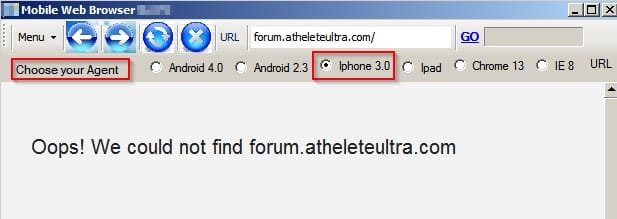
http://forum.atheleteultra.com

Server not found.

A few minutes ago I entered the above forum name on Hide My Ass, but got "The requested resource could not be loaded."

Today I installed Chrome on my laptop, but still couldn't access this site. So a bit lost here?
 

My Computer My Computer

At a glance

64 bit OS?Intel Core 13 8th Generation4GB DDR2, 2 Crucial memory upgrade sticks
Computer type
Laptop
Computer Manufacturer/Model Number
HP Windows 10
OS
64 bit OS?
CPU
Intel Core 13 8th Generation
Motherboard
Acer, Inc. Chapala [U2E1]
Memory
4GB DDR2, 2 Crucial memory upgrade sticks
Hard Drives
128GB SSD
Cooling
Ice
Mouse
Laptop finger pad and mouse
Internet Speed
Embarq
Antivirus
MalewareBytes
Browser
Firefox
I get server not found
 

My Computer My Computer

At a glance

win 8 32 bit
Computer type
PC/Desktop
OS
win 8 32 bit
What browser did you use?

After I posted my OP I tried getting the site on my phone which I could previously find and access, today I couldn't do that?

Got any ideas?
 

My Computer My Computer

At a glance

64 bit OS?Intel Core 13 8th Generation4GB DDR2, 2 Crucial memory upgrade sticks
Computer type
Laptop
Computer Manufacturer/Model Number
HP Windows 10
OS
64 bit OS?
CPU
Intel Core 13 8th Generation
Motherboard
Acer, Inc. Chapala [U2E1]
Memory
4GB DDR2, 2 Crucial memory upgrade sticks
Hard Drives
128GB SSD
Cooling
Ice
Mouse
Laptop finger pad and mouse
Internet Speed
Embarq
Antivirus
MalewareBytes
Browser
Firefox
TsFaMxyWyvd6O+HjASxxcicFko3OiHssr210o39JckIu2wfVN9W+KITMRQSXdhyQfHqCP0F+Dxh57qcmjkAAAAASUVORK5CYII=
Unable to resolve domain name

Please make sure:
- You are connected to the Internet.
- Your DNS server settings are correct.
Error code 105 (net::ERR_NAME_NOT_RESOLVED)


Using maxthon and firefox I am guessing its a dns problem I am using opendns change your dns see if it works then


My Computer My Computer

At a glance

win 8 32 bit
Computer type
PC/Desktop
OS
win 8 32 bit
Not familiar with DNS server settings, nor would I know what to change my DNS settings too?

Can you provide me with a tutorial link that shows how to do this? Or check to see if my DNS settings are okay?

Thanks.
 

My Computer My Computer

At a glance

64 bit OS?Intel Core 13 8th Generation4GB DDR2, 2 Crucial memory upgrade sticks
Computer type
Laptop
Computer Manufacturer/Model Number
HP Windows 10
OS
64 bit OS?
CPU
Intel Core 13 8th Generation
Motherboard
Acer, Inc. Chapala [U2E1]
Memory
4GB DDR2, 2 Crucial memory upgrade sticks
Hard Drives
128GB SSD
Cooling
Ice
Mouse
Laptop finger pad and mouse
Internet Speed
Embarq
Antivirus
MalewareBytes
Browser
Firefox
Not familiar with DNS server settings, nor would I know what to change my DNS settings too? Can you provide me with a tutorial link that shows how to do this? Or check to see if my DNS settings are okay? Thanks.


Use OpenDNS
 

My Computer My Computer

At a glance

Win7 pro x64stock i7 7700kCorsair Vengeance LPX 16GB (2x8GB) DDR4 @ 320...integrated Intel HD 630
Computer type
PC/Desktop
Computer Manufacturer/Model Number
diy
OS
Win7 pro x64
CPU
stock i7 7700k
Motherboard
Gigabyte Z270N-WIFI mini-ITX
Memory
Corsair Vengeance LPX 16GB (2x8GB) DDR4 @ 3200MHz
Graphics Card(s)
integrated Intel HD 630
Sound Card
onboard Realtek ALC1220
Monitor(s) Displays
two vertically mounted samsung 55" 4k un55mu8000
Screen Resolution
1920x1280
Hard Drives
256GB Samsung EVO 960 M.2 pci-e NVMe SSD
PSU
SilverStone Nightjar ST45NF 450Watt Fanless
Case
No case. Motherboard is mounted directly onto power supply
Cooling
Evercool low profile 815EP with Panaflow 12L fan at 7v
Keyboard
Ortek MCK-86 mini
Mouse
Belkin 5-button USB
Internet Speed
spectrum 400mbps

DNS Addressing - How to Change in Windows 7


How to change your DNS Address
Published by Zidane24
01 Jul 2009

I just used the above tutorial and got the same thing: "Server not found."

There where no DNS server addresses when I first opened the settings box. The tutorial said to use Preferred: 208.67.222.222 and Alternate: 208.67.220.220 server addresses.

Not sure if this matters, but do I need IPV 6 (TCP/IPv6)? Or is IPV 4 (TCP/IPv4) sufficient on its own?

I'll look into the Use Open DNS link you provided, thanks.
@johnhoh: The link you provided is basically the same as the one I used above. The only thing I didn't do was flush the DNS resolver cache to ensure that my new configuration settings take effect. Where do I find the DNS resolver cache?

Okay, so I found directions to flush the DNS resolver cache successfully. Then I typed the site I am trying to find/access in the search box and got "Server not found."

Any other options here?
 
Last edited:

My Computer My Computer

At a glance

64 bit OS?Intel Core 13 8th Generation4GB DDR2, 2 Crucial memory upgrade sticks
Computer type
Laptop
Computer Manufacturer/Model Number
HP Windows 10
OS
64 bit OS?
CPU
Intel Core 13 8th Generation
Motherboard
Acer, Inc. Chapala [U2E1]
Memory
4GB DDR2, 2 Crucial memory upgrade sticks
Hard Drives
128GB SSD
Cooling
Ice
Mouse
Laptop finger pad and mouse
Internet Speed
Embarq
Antivirus
MalewareBytes
Browser
Firefox

My Computer My Computer

At a glance

Win7 pro x64stock i7 7700kCorsair Vengeance LPX 16GB (2x8GB) DDR4 @ 320...integrated Intel HD 630
Computer type
PC/Desktop
Computer Manufacturer/Model Number
diy
OS
Win7 pro x64
CPU
stock i7 7700k
Motherboard
Gigabyte Z270N-WIFI mini-ITX
Memory
Corsair Vengeance LPX 16GB (2x8GB) DDR4 @ 3200MHz
Graphics Card(s)
integrated Intel HD 630
Sound Card
onboard Realtek ALC1220
Monitor(s) Displays
two vertically mounted samsung 55" 4k un55mu8000
Screen Resolution
1920x1280
Hard Drives
256GB Samsung EVO 960 M.2 pci-e NVMe SSD
PSU
SilverStone Nightjar ST45NF 450Watt Fanless
Case
No case. Motherboard is mounted directly onto power supply
Cooling
Evercool low profile 815EP with Panaflow 12L fan at 7v
Keyboard
Ortek MCK-86 mini
Mouse
Belkin 5-button USB
Internet Speed
spectrum 400mbps
Thanks appreciate your time and the provided links.

The only questions I have are:

1. Why is it that I am the only one having this issue on this forum?
2. If the site is not there or doesn't exist, then how do all the forum members post daily on that site, including myself previously? Doesn't make any sense?
3. I can't access the site on my phone anymore which I could previously, doesn't make sense?

The forum administrator told me that of all the forum members, I am the only one having this issue? If so, I can only conclude that maybe I have been hacked that prevents me from finding and accessing the site?

How would I know if I have been hacked? Don't mean to sound paranoid, but its not to hard to hack someones computer these days. Given a teenager recently hacked the head of the CIA's personal computer, go figure?

But the links you provided say the forum address doesn't exist? But it does exist, I've been there and posted on both my laptop and phone previously???
 

My Computer My Computer

At a glance

64 bit OS?Intel Core 13 8th Generation4GB DDR2, 2 Crucial memory upgrade sticks
Computer type
Laptop
Computer Manufacturer/Model Number
HP Windows 10
OS
64 bit OS?
CPU
Intel Core 13 8th Generation
Motherboard
Acer, Inc. Chapala [U2E1]
Memory
4GB DDR2, 2 Crucial memory upgrade sticks
Hard Drives
128GB SSD
Cooling
Ice
Mouse
Laptop finger pad and mouse
Internet Speed
Embarq
Antivirus
MalewareBytes
Browser
Firefox
Athlete is how you spell Athlete. Looking at the URL I don't know what Athelete is supposed to represent - looks like a typo to me.

atheleteultra - Opera.jpg

atheleteultra - Mobile.jpg

Domain search reveals atheleteultra dot com is not registered

Whatever you click on to access that site check the URL behind the text if bookmarked or hyperlinked.
 

My Computer My Computer

At a glance

Microsoft Windows 7 Home Premium 64-bit 7601 ...AMD C-60 APU with Radeon(tm) HD Graphics4.00 GBAMD Radeon HD 6290 Graphics
Computer type
Laptop
Computer Manufacturer/Model Number
ASUS
OS
Microsoft Windows 7 Home Premium 64-bit 7601 Multiprocessor Free Service Pack 1
CPU
AMD C-60 APU with Radeon(tm) HD Graphics
Motherboard
ASUSTeK COMPUTER INC. X501U
Memory
4.00 GB
Graphics Card(s)
AMD Radeon HD 6290 Graphics
Sound Card
(1) AMD High Definition Audio Device (2) Realtek High Defi
Screen Resolution
1366 x 768 x 32 bits (4294967296 colors) @ 60 Hz
Hard Drives
Hitachi HTS545050A7E380 SATA Disk Device
Antivirus
Comodo CIS & FW, SecureAplus App Whitelisting, Threatfire
Browser
Cyberfox 64bit, Opera 64bit, Airfox
Other Info
Spy-The-Spy, HitmanPro.Alert, Norton Connect Safe, MJRegWatcher, BitDefender TrafficLight, Voodoo Shield, Zemana AntiMalware
You are correct sir! I used to be a decent speller, I must be getting senile or something, so embarrassed? :o WTH? Have to start using spell check more often. Apologize for any inconvenience caused.

My next issue is that when I changed my DNS settings on my laptop figuring that's what I needed to do based on the replies I got previously. My laptop seems to be running okay, but my phone is now barely moving when I try to access a online site or watch any videos I try to watch just spin, go off and on and just don't play.

So do I have to do something with my phones DNS settings to match the DNS settings on my laptop?
 

My Computer My Computer

At a glance

64 bit OS?Intel Core 13 8th Generation4GB DDR2, 2 Crucial memory upgrade sticks
Computer type
Laptop
Computer Manufacturer/Model Number
HP Windows 10
OS
64 bit OS?
CPU
Intel Core 13 8th Generation
Motherboard
Acer, Inc. Chapala [U2E1]
Memory
4GB DDR2, 2 Crucial memory upgrade sticks
Hard Drives
128GB SSD
Cooling
Ice
Mouse
Laptop finger pad and mouse
Internet Speed
Embarq
Antivirus
MalewareBytes
Browser
Firefox
Don't know anything about phones and DNS. I guess you should have noted down your original DNS settings. If you never changed them in the past just choose the Detect DNS Server Automatically option and Apply. Then reboot. Then you are using default settings provided by your ISP.

FYI: That site looks like a complete scam.

Code:
Store Information

My Company, 42 Puffin street 12345 Puffinville France 

Call us now: 0123-456-789

I mean who has a phone number like that (sequential numbers)

Just Google "42 Puffin street 12345 Puffinville France" "Call us now: 0123-456-789"

Total scam.
 

My Computer My Computer

At a glance

Microsoft Windows 7 Home Premium 64-bit 7601 ...AMD C-60 APU with Radeon(tm) HD Graphics4.00 GBAMD Radeon HD 6290 Graphics
Computer type
Laptop
Computer Manufacturer/Model Number
ASUS
OS
Microsoft Windows 7 Home Premium 64-bit 7601 Multiprocessor Free Service Pack 1
CPU
AMD C-60 APU with Radeon(tm) HD Graphics
Motherboard
ASUSTeK COMPUTER INC. X501U
Memory
4.00 GB
Graphics Card(s)
AMD Radeon HD 6290 Graphics
Sound Card
(1) AMD High Definition Audio Device (2) Realtek High Defi
Screen Resolution
1366 x 768 x 32 bits (4294967296 colors) @ 60 Hz
Hard Drives
Hitachi HTS545050A7E380 SATA Disk Device
Antivirus
Comodo CIS & FW, SecureAplus App Whitelisting, Threatfire
Browser
Cyberfox 64bit, Opera 64bit, Airfox
Other Info
Spy-The-Spy, HitmanPro.Alert, Norton Connect Safe, MJRegWatcher, BitDefender TrafficLight, Voodoo Shield, Zemana AntiMalware
try a different browser with your phone..
 

My Computer My Computer

At a glance

Win7 pro x64stock i7 7700kCorsair Vengeance LPX 16GB (2x8GB) DDR4 @ 320...integrated Intel HD 630
Computer type
PC/Desktop
Computer Manufacturer/Model Number
diy
OS
Win7 pro x64
CPU
stock i7 7700k
Motherboard
Gigabyte Z270N-WIFI mini-ITX
Memory
Corsair Vengeance LPX 16GB (2x8GB) DDR4 @ 3200MHz
Graphics Card(s)
integrated Intel HD 630
Sound Card
onboard Realtek ALC1220
Monitor(s) Displays
two vertically mounted samsung 55" 4k un55mu8000
Screen Resolution
1920x1280
Hard Drives
256GB Samsung EVO 960 M.2 pci-e NVMe SSD
PSU
SilverStone Nightjar ST45NF 450Watt Fanless
Case
No case. Motherboard is mounted directly onto power supply
Cooling
Evercool low profile 815EP with Panaflow 12L fan at 7v
Keyboard
Ortek MCK-86 mini
Mouse
Belkin 5-button USB
Internet Speed
spectrum 400mbps
Athlete Ultra Forum works fine - was / is a typo as noted by @Callender ;)

As for DNS either set to Automatic in browser or try 8.8.8.8 and 8.8.4.4 for primary and secondary addresses
 

My Computers My Computers

  • At a glance

    Windows 11 Pro x64 [Latest Release and Releas...Ryzen 9 5950X, 3.8 - 5.2 MHz64GB [2 x 32GB] DDR4 3200MHz4GB NVIDIA GEFORCE GTX 1650 Ti
    Computer type
    PC/Desktop
    Computer Manufacturer/Model Number
    ChillBlast - Custom to my design
    OS
    Windows 11 Pro x64 [Latest Release and Release Preview]
    CPU
    Ryzen 9 5950X, 3.8 - 5.2 MHz
    Motherboard
    Asus Prime X570-Pro
    Memory
    64GB [2 x 32GB] DDR4 3200MHz
    Graphics Card(s)
    4GB NVIDIA GEFORCE GTX 1650 Ti
    Sound Card
    On-board SPDIF to 5.1 System + HDMI [5.1 system]
    Monitor(s) Displays
    32" UHD 32 Bit HDR Monitor + 43" UHD 4K 32Bit HDR TV
    Screen Resolution
    2 x 3840 x 2160 @60Hz
    Hard Drives
    1TB M2 SSD OS, 500GB Fast Access SSD, 2 x 8TB Data + Various Externals from 1TB to 4TB, 10TB NAS
    PSU
    NZXT C750 80 PLUS Gold 750W Modular PSU
    Case
    Workstation Case [Matt Black]
    Cooling
    NZXT Kraken X63 280mm CPU Cooler +2x Quiet Case fans
    Keyboard
    Logitech Wireless MX Keys & K400 + others
    Mouse
    Logitech Wireless MX Master 3S
    Internet Speed
    920 MB Down 50 MB Up
    Antivirus
    BitDefender Total Security Pro
    Browser
    Chrome (always run latest Non-Beta)
    Other Info
    Also run ...
    Laptop - Quad 8GB - Windows 10 Pro x64
    Nexus 7 Android tablet x2
    Samsung 10.2" tablet
    Blackview TAB 8 4G Android Tablet c/w Keyboard
    Wacom Intuos Pro Medium Pen Pad
    Wacom Intuos Pro Small Pen Pad
    Wacom Expresskeys Remote
    Loopdeck+ Graphics Controller
    Shuttle Pro v2 Control
  • At a glance

    Windows 11 Pro x64 Latest RPIntel I7 10750H 5.0GHz32GB [2x16GB] DDR4 2933 MHznVidia GTX1650Ti 4 GB GDDR6
    Computer type
    Laptop
    System Manufacturer/Model Number
    Dell XPS 17 10750H
    OS
    Windows 11 Pro x64 Latest RP
    CPU
    Intel I7 10750H 5.0GHz
    Motherboard
    Dell XPS
    Memory
    32GB [2x16GB] DDR4 2933 MHz
    Graphics Card(s)
    nVidia GTX1650Ti 4 GB GDDR6
    Sound Card
    Stock [Realtek] 4 Speaker
    Monitor(s) Displays
    17" IPS UHD+ Infinity Edge Touchscreen
    Screen Resolution
    3840 x 2400
    Hard Drives
    2TB M2 NVMe, 4TB External + various 500GB & 1TB External NVMe (also have access to spinner HDD from
    PSU
    Stock
    Case
    Stock XPS Aluminium & Carbon Fibre
    Cooling
    Stock - Active Fan Control
    Keyboard
    Backlit + Various Logitech
    Mouse
    Stock Track Pad + Logitech MX Trackball
    Internet Speed
    72 MB Down 18MB Up
    Browser
    Chrome
    Other Info
    Also run ...
    Laptop - Quad 8GB - Windows 10 Pro x64
    Nexus 7 Android tablet x2
    10.2" tablet
    Sony Z3 Android Smartphone
    Wacom Intuos Pro Medium Pen Pad
    Wacom Intuos Pro Small Pen Pad
    Wacom Expresskeys Remote
    Loopdeck+ Graphics Controller
    Shuttle Pro v2 Control Pad
    10TB NAS
I guess you should have noted down your original DNS settings.

@Callender:

R. My laptop had no DNS settings until I added the DNS settings yesterday, as stated above.

If you never changed them in the past just choose the Detect DNS Server Automatically option and Apply. Then reboot. Then you are using default settings provided by your ISP.

R. My Android phone was purchased a few months ago, still all new to me. I guess i will have to do a search for a DNS setting tutorial for Android phones.

FYI: That site looks like a complete scam.

R. Yea, the phone number does look suspicious. Sometimes when sites ask for a phone number even if its not necessary I put in (area code then 345-6789). They just want you to fill in the blank space in order to proceed with a purchase.

I have never had any site ever actually call me, even if I gave my correct number. Sites from my experience always use e-mail for contacting. Unless its a security thing like a bank or something similar. But then again I'm not a site (fake or real) selling stuff either.

Thanks Callender for correcting my spelling. :rolleyes:

@johnhoh: try a different browser with your phone..

R. The phone came with Chrome and has worked fine until yesterday when I set the DNS settings on my laptop.

Not sure if this has anything to do with my phone working so slowly, but my phone was connected to my laptop for charging when I set the DNS settings.

I just checked my settings on my phone, I couldn't find any DNS settings? But I did notice my phones Wi-Fi switch was off, so I turned it on. Strange as I never had any phone connectivity issues with the phone Wi-Fi off and videos ran super slow like they did yesterday and earlier today?

I just ran a few YouTube videos and they are running normal again. So I'm guessing that setting the DNS settings on my laptop must have effected my phones ability to receive a good enough signal from my router with my phones wi-fi off?

Where as before with no DNS settings set on my laptop, my phone was able to receive a signal and work okay? I'm just guesstimating here.

@Barman: As for DNS either set to Automatic in browser or try 8.8.8.8 and 8.8.4.4 for primary and secondary addresses.

R. Is this for my phone DNS settings? If so, any idea where to access the DNS settings page on the Android phone?

At any rate, my phone is working as it should now and I can find and access that site I was looking for. Thanks to my misspelling of the forum name, LOL! It wasn't anything technical, except for the DNS settings. So thanks to all that helped/contributed, I appreciate it.

vista32towin7
 

My Computer My Computer

At a glance

64 bit OS?Intel Core 13 8th Generation4GB DDR2, 2 Crucial memory upgrade sticks
Computer type
Laptop
Computer Manufacturer/Model Number
HP Windows 10
OS
64 bit OS?
CPU
Intel Core 13 8th Generation
Motherboard
Acer, Inc. Chapala [U2E1]
Memory
4GB DDR2, 2 Crucial memory upgrade sticks
Hard Drives
128GB SSD
Cooling
Ice
Mouse
Laptop finger pad and mouse
Internet Speed
Embarq
Antivirus
MalewareBytes
Browser
Firefox
Back
Top